Thursday, September 10, 2009

The Open Source Events Calendar


Open Source Events Calendar

Kudos to Lenz, who, acting on an idea launched by Ronald Bradford some time ago, has put together a comprehensive calendar of open source events. Most of them are somehow related to the MySQL ecosystem, but there is no limitation to what the calendar contains.
Here is the announcement, with the instructions to use and contribute to the calendar.
In addition to informing you about the events, this calendar does also tell you when a deadline is approaching. Using this tool, you won't miss a call for participation anymore.
You can simply subscribe to the iCal feed (it's a Google calendar) or see it online.
And of course, we want to improve the calendar. Feel free to submit new events using the event submission form.

We're looking into ways of improving the service. It would be nice to have a widget to show on your blog. Using Google APIs, it's easy to create such a widget, but the events are shown in insertion order, rather than chronological order. If anyone knows how to fix this issue, please contact me or Lenz.

Sponsoring OpenSQLCamp


OpenSQL Camp 2009 in Portland, OR

The next OpenSQLCamp will be held in Portland, Oregon, USA. It is being organized by Eric Day, well known to the open source community for his active and productive participation to several projects (especially Drizzle and Gearman).

The event is public and free. Therefore, it needs public sponsoring. I don't know yet if I can attend, but I have already donated something to the organizers, and I am officially a sponsor. You can be one too. Simply go to the sponsors page and donate a minimum of $100 as in individual or $250 as an organization.
And of course, if you plan to participate, register yourselfand eventually propose a session.
OpenSQLCamp is a fun, equal level event. If you have something to say, write a proposal, and the other participants will tell you if they want to hear it or not. Either way, you will learn something.

Tuesday, August 25, 2009

First Kosovo Free Software Conference


Kosovo Free Software Conference

The first Free Software Conference in Kosovo is being held on August 29-30 in Prishtina, Kosovo.
The newborn state, which declared independence in 2008, is growing in several ways. Besides economic and political growth, also technology is expanding. In this fresh environment, free and open source software can have an important role.
The conference schedule includes local and international speakers.

I have a strong professional and personal relationship with Kosovo. Before and after the war, from 1998 to 2002, I was part of the OSCE-UN mission that helped the country in its first steps towards independence. And there I found my wife. Thus, it's with great pleasure that I will do a keynote on the theme of Freedom beyond free of charge.
And although the talk won't be about MySQL, it will nonetheless have a role in the story. Some of the freedom that was achieved during the UN Mission in Kosovo days is also due a combination of Linux, FreeBSD, MySQL, and many more free software projects.

Thursday, August 20, 2009

MySQL Sandbox and Spider at FrOSCon and OpenSQLCamp


MySQL Spider

FrOSCon and the OpenSQLCamp are about to start.
I am packing for Sankt Augustin, where I will attend the fourth edition of FrOSCon and the second OpenSQLCamp. I will have two sessions, Sharding for the masses, about the Spider storage engine and MySQL Sandbox 3, about one of my favorite tools.

The program is very rich. There will be several tracks in the main event and in the associated conferences. If you have any involvement or simply some curiority in open source matters, You will find something interesting at FrOSCon.

Tuesday, August 18, 2009

Testing the InnoDB plugin with MySQL snapshots


MySQL plugins

The cat is out of the bag.
MySQL 5.1 will include the InnoDB plugin, and thanks to
labs.mysql.com
you can try the new version right away.
Here is a step-by-step guide to testing the InnoDB plugin with MySQL snapshot 5.1.39 and MySQL Sandbox.

1. Install MySQL::Sandbox
This is a straightforward part. Please refer to the manual for the details.

2. get the binaries
Check the list of available binaries and download the one that matches your architecture and operating system.

3. Install the sandbox
Since we want to use the InnoDB plugin, we need to start the Sandbox with the builtin innodb engine disabled.
make_sandbox \
/path/to/mysql-5.1.39-snapshot20090812-osx10.5-i386.tar.gz \
-c ignore-builtin-innodb
The option passed with "-c" will be written to the options file.
Make sure that the sandbox is installed and the server starts. If it doesn't, check the error log at $HOME/sandboxes/msb_5_1_39/data/msandbox.err and try to figure out what happened.

4. Check the available engines
~/sandboxes/msb_5_1_39/use
Welcome to the MySQL monitor. Commands end with ; or \g.
Your MySQL connection id is 2
Server version: 5.1.39-snapshot20090812 Source distribution

Type 'help;' or '\h' for help. Type '\c' to clear the current input statement.

select engine, support from information_schema.engines;
+------------+---------+
| engine | support |
+------------+---------+
| MyISAM | DEFAULT |
| MRG_MYISAM | YES |
| BLACKHOLE | YES |
| CSV | YES |
| MEMORY | YES |
| FEDERATED | NO |
| ARCHIVE | YES |
+------------+---------+
As you can see, InnoDB is not in the list.

5. Install the innodb plugin
install plugin innodb soname 'ha_innodb_plugin.so';
Query OK, 0 rows affected (0.85 sec)

select @@innodb_version;
+------------------+
| @@innodb_version |
+------------------+
| 1.0.4 |
+------------------+

6. Install the additional INFORMATION SCHEMA tables
INSTALL PLUGIN INNODB_TRX SONAME 'ha_innodb_plugin.so';
Query OK, 0 rows affected (0.00 sec)

INSTALL PLUGIN INNODB_LOCKS SONAME 'ha_innodb_plugin.so';
Query OK, 0 rows affected (0.00 sec)

INSTALL PLUGIN INNODB_LOCK_WAITS SONAME 'ha_innodb_plugin.so';
Query OK, 0 rows affected (0.00 sec)

INSTALL PLUGIN INNODB_CMP SONAME 'ha_innodb_plugin.so';
Query OK, 0 rows affected (0.00 sec)

INSTALL PLUGIN INNODB_CMP_RESET SONAME 'ha_innodb_plugin.so';
Query OK, 0 rows affected (0.00 sec)

INSTALL PLUGIN INNODB_CMPMEM SONAME 'ha_innodb_plugin.so';
Query OK, 0 rows affected (0.00 sec)

INSTALL PLUGIN INNODB_CMPMEM_RESET SONAME 'ha_innodb_plugin.so';
Query OK, 0 rows affected (0.00 sec)

7. Finally, check the results
select plugin_name, plugin_type, plugin_status from information_schema.plugins;
+---------------------+--------------------+---------------+
| plugin_name | plugin_type | plugin_status |
+---------------------+--------------------+---------------+
| binlog | STORAGE ENGINE | ACTIVE |
| partition | STORAGE ENGINE | ACTIVE |
| ARCHIVE | STORAGE ENGINE | ACTIVE |
| BLACKHOLE | STORAGE ENGINE | ACTIVE |
| CSV | STORAGE ENGINE | ACTIVE |
| FEDERATED | STORAGE ENGINE | DISABLED |
| MEMORY | STORAGE ENGINE | ACTIVE |
| MyISAM | STORAGE ENGINE | ACTIVE |
| MRG_MYISAM | STORAGE ENGINE | ACTIVE |
| InnoDB | STORAGE ENGINE | ACTIVE |
| INNODB_TRX | INFORMATION SCHEMA | ACTIVE |
| INNODB_LOCKS | INFORMATION SCHEMA | ACTIVE |
| INNODB_LOCK_WAITS | INFORMATION SCHEMA | ACTIVE |
| INNODB_CMP | INFORMATION SCHEMA | ACTIVE |
| INNODB_CMP_RESET | INFORMATION SCHEMA | ACTIVE |
| INNODB_CMPMEM | INFORMATION SCHEMA | ACTIVE |
| INNODB_CMPMEM_RESET | INFORMATION SCHEMA | ACTIVE |
+---------------------+--------------------+---------------+
Now you can read the InnoDB plugin manual and have as much fun as you can.

Sunday, August 09, 2009

Beefing up community feeds


Planet MySQL

If you weren't paying attention, you may have missed the latest news in Planet MySQL. A few months ago, the site has added the ability of voting for posts (in addition to searching and tagging, which make it much more useful than it was before).
However, if you, like many, read Planet MySQL using a feed reader, the recent benefits are not easily usable.
To allow everyone to vote on the posts they like, even from a feed reader, the feeds now include two links at the end of for each post, to vote on a deserving post even from a feed reader.

The feed may look like this one:

Since I liked this post, I can click on Vote UP, and the link opens in my default browser, showing the result of the voting.

The same happens for the MySQL Librarian feed. At the end of each post, you can click on vote UP or vote DOWN directly from your feed reader.
In both cases, the vote works only if you are already logged in. If you aren't, you will be taken to the login page.
This is not the end of the story. More goodies will come. Stay tuned.

Monday, July 27, 2009

Automating MySQL Librarian tasks


MySQL Librarian

The MySQL Librarian is a collection of community generated content, easy to search and to extend. If you have missed the announcement, you may look at Introducing the MySQL Librarian..
To add a new link, you have several ways. You can just use the Add A Link feature inside the Librarian. If the link to be added comes from Planet MySQL, every post has a link to facilitate the insertion to the Librarian. For everything else, adding a link is a manual task. Until today.

Adding easily to the Librarian


Diego Medina, who should be well known in the community as a very active promoter of MySQL Proxy, and one of the most creative bug finders, has made two additions that have already been incorporated into the Librarian.
If you go to the MySQL Librarian now, you will find a "bookmarklet" that you can drag and drop to your browser toolbar (if your browser is either FireFox or Safari, that is). After that, you have a button in your toolbar, which you can use to quickly add a new link.

For example, let's consider an article that we may want to add to the Librarian. Something like MockLoad on Launchpad - MySQL Proxy.

If you have already dragged and dropped the bookmarklet, you can click on your new button, and get to the Librarian page, with almost all the detailed already filled in for you.

Search engines


Diego didn't limit his contribution to adding links. He has also created a new search engine plugin for FireFox, which lets you use the MySQ Librarian as your search engine.
Adding the Librarian engineUsing the Librarian engine

If your default search engine is the Librarian, your search will be sent to MySQL Librarian, as easily as you search in Google or in any other engine.

Thanks, Diego!

Wednesday, July 22, 2009

OpenSQLCamp democracy


OpenSQLCAmp voting

We have seen this before. Actually, we got the idea from Drupal, where talk proposals are public, and the most voted ones get in the schedule. Nonetheless, it's a pleasure to see that a transparent voting system is accepted and used.

The OpenSQLCamp 2009 European edition, is under scrutiny. There are 27 session proposals, from which we will need to get 12 in the schedule.
The open voting is done via Twitter or the mailing list.
I have a good feeling about it. Since I am proposing a public talk, I must be prepared for public scrutiny. It's only fair that my proposal is evaluated by the same audience that will later decide to come see my presentation. It's an incentive to write a clear and compelling proposal. I can't get away with "I am well known. I will say something about replication."
If you are attending OpenSQLCamp at FrOSCon, let us know what you would like to see. Let the best proposals win.

Monday, July 06, 2009

Sharding for the masses: the spider storage engine


The Spider storage engine
In my previous article about the Spider storage engine, I made some tests and I saw that the engine has potential. I did also identify some problems, which were promptly addressed by the author. I have looked at the latest version (0.12), and the results are very much encouraging.

Installing the Spider storage engine is not trivial but not extremely difficult either. My previous article has a step-by-step explanation. Before installing, though, you need to apply one patch to the server, to enable condition pushdown to the partitions engine. What is it about? In short, when you issue a query from the Spider table, with a WHERE clause, the query is passed to a backend database without the WHERE clause. True, it's filtered by partition, but each partition may have a large data set, and this means a full table scan on the backend server. In a few cases, this is not a big deal, because the general performance of the Spider engine is better than a non-partitioned table, but it can be improved.
The lack of conditions pushdown is a problem already known in the Federated engine. With the above patch applied, the Spider engine pushes the condition down to the back end, and the query is executed with the WHERE clause intact.
Let's consider this simple query:
select * from salaries where from_date='1996-01-10' limit 10;
Before applying the patch, the backend database would execute this:
select `emp_no`,`salary`,`from_date`,`to_date`
from `employees`.`salaries` limit 0,9223372036854775807
After the patch, the backend receives and execute the more sensible
select `emp_no`,`salary`,`from_date`,`to_date`
from `employees`.`salaries`
where (`from_date` = '1996-01-10')
limit 0,9223372036854775807

A final observation. While I was testing the latest version, I noticed something that should have been clear from the beginning, i.e. that a spider engine set of backends can have multiple front-ends. Meaning that you can create a Spider table from a different host, and access the same backends that another host is already using. In theory, it means more flexibility when dealing with large amount of data. In practice, we'll have to test it more and see what happens.

Sunday, June 28, 2009

Remote replication setup with Gearman and MySQL Sandbox


replication via Gearman

A few months ago, Brian Aker invited me to have a look at Gearman, saying that I could find interesting combinations with MySQL Proxy. I did not forget, and I kept thinking about interesting ways of using it. The first idea that I managed to apply is not related to Proxy, but to a practical problem that I have been keeping in reserve for years, i.e. installing replication systems from remote, without effort.

After some fiddling around with the alternatives, I convinced myself that Gearman is the way to go. Before I proceed to show what I did, though, perhaps it's useful if I spend a few words about Gearman itself.

Gearman overview

It's a strange word. If you don't pay close attention, you read "German" and you may think "why should an administration tool be German? Doesn't Open Source apply across country boundaries?" And when you realize that there is an "a" after the "e", you are as baffled as before. What's this? Gearman is an anagram of manager. Because managers, so the explanation goes, don't do anything, but only direct workers towards their jobs. And this could be a good explanation of what Gearman is: it's a system to organize distributed jobs.
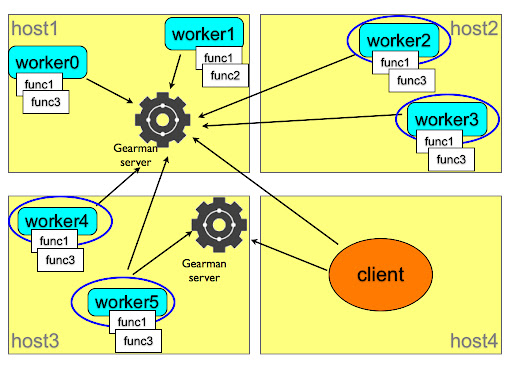
how gearman works
This picture explains the concept. You, as a client, need to have a job done. You ask the gearman server which somehow asks all the registered workers for their ability to perform such job. If any of the function names advertised by the workers matches the client request, the server assigns the job to the worker, together with the workload sent by the client, and then returns to the client the results that the worker has provided.
The system is flexible, because you can set as many servers and workers as needed, in several hosts. And it is fault tolerant, because the same worker can register its functions to several servers, and several workers can advertise the same functions to the same or a different server. Depending on the nature of the task, a client can ask several workers for a portion of the task, or it can just ask the first available one to perform the whole job. Since the workers can be located in several servers, you can distribute the load of a heavy job among many hosts. Your imagination is the limit.

Installing a replication system with Gearman

If you are familiar with MySQL Sandbox, you know that its main aim is to install servers quickly and efficiently, and to save valuable time by providing shortcut scripts for each sandbox. You can create a replication sandbox with one master and two slaves in the same server in a handful of seconds. However, they are all in the same server. This means that you can use this sandbox system to test the correctness of your application, but you can't test efficiency and scalability very well.
On one side, we have a flexible method to install single sandboxes. On the other side, we have a general purpose distributed system that can do jobs in remote servers. It is a logical choice to put these two frameworks together.

Requirements


Before you start, you need to install MySQL Sandbox and Gearman in all the servers that will host a database node.You also need to have downloaded the appropriate tarball in each host. If the boxes are compatible, you can download once and copy from box to box (I am playing with the idea of doing the copy through Gearman), but that is not always a safe assumption. If one of the boxes has a different operating system or architecture (as in my case: two Macs and one Tux), you need a different tarball.
Another task to perform before installing is opening the necessary ports. You will need to open the Gearman port (4730) and the port(s) used by MySQL master and slaves.

Gluing pieces together

Installing the Gearman framework is not trivial. For many users, it is not as difficult as setting up a MySQL replicated system, but it may have some pitfalls.
Unless you are comfortable programming in C, in addition to the Gearman server you may want to install the API for your favorite language. I used Gearman::XS, a Perl module wrapped around the C API. It installs easily on some operating systems, but it requires some manual help in some others.
Anyway, after one hour, I had it installed in six servers with five operating systems and I am confident that I can install it almost anywhere (if that anywhere looks like Unix).
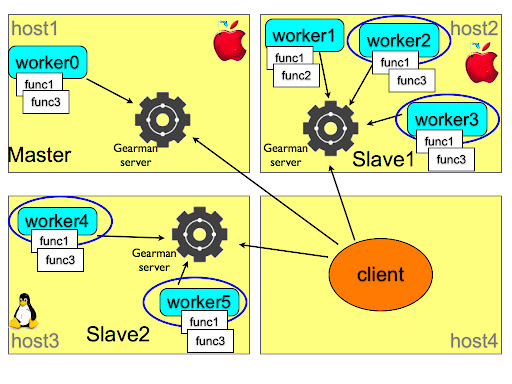
Sandbox replication with Gearman
Unlike the sample framework of the previous picture, I can't use a single Gearman server. Or, actually, I can, but it would require quite a lot of additional traffic and code complexity in the client, and therefore I used one server for each host where I had to install something.
Once that decision was taken, everything went smoothly. Each host has a server and one or two workers that registered the "make_sandbox" function with a remote installer script. The client knows which role is assigned to each host. Although it is not strictly necessary: the IPs could be shuffled around, and the final result would not change. Anyway, using the make_distributed_replication scripts, the client installs (or, rather, asks a worker to install) the master in the first host, and the slaves in the second and third host. At each step, there is a rudimentary error check, to make sure that the installation is being performed as expected. During the operation, the client produces a few scripts that make the administration easy.
At the end of the installation, you can connect to the master and the slaves using the familiar m, s1, and s2 scripts, and do mass operations with use_all and check_slaves.
To the user, the layout looks like the result of make_replication_sandbox in one machine, but you are dealing with a system spread among several hosts.

$ ./make_distributed_replication.pl
installing master
installing slave 0
initializing slave 0
installing slave 1
initializing slave 1

$ ./check_slaves
slave 1:
Slave_IO_Running: Yes
Slave_SQL_Running: Yes
slave 2:
Slave_IO_Running: Yes
Slave_SQL_Running: Yes

$ ./m
Welcome to the MySQL monitor. Commands end with ; or \g.
Your MySQL connection id is 4
Server version: 5.0.83-log MySQL Community Server (GPL)

Type 'help;' or '\h' for help. Type '\c' to clear the current input statement.

master> exit
Bye

My first test was to load some heavy data, using the employees test database, and I am happy to report that the execution is much faster than a replication in the same host.

TO DO list

This is just a proof of concept. It seems to work well, but there is still much work to do. The error checking must be improved a lot both in the client and in the worker. Before registering the function, the worker must check that the external applications are available. When receiving a request, the worker can check if the desired tarball exists and if there is no conflict with already installed servers.
The client should be able to accept IPs, ports, and tarball versions from the command line. Some functions to cleanup and diagnose the remote servers should be implemented as well.
But I am very pleased about this first step.
Comments are welcome. This is my first usage of Gearman, and any way of improving on the basic concepts of this framework will be welcome.

Sunday, June 21, 2009

Failing by choice. Another bug-vs-feature debate ends

A long standing bug

Among the many outstanding bugs for MySQL, there is one that has sparked a fierce discussion, not only in the bug report itself, but also in blogs, forums, mailing lists.
Bug #19027: MySQL 5.0 starts even with Fatal InnoDB errors was neglected for long time, until finally it got fixed, and it is available in MySQL 5.1.36.
First off, what is it about?
In short, if an engine doesn't initialize correctly, the MySQL server starts anyway, without the offending engine. Depending on how you use the failing engine, this could be either a minor annoyance or a complete disaster.
Annoyance: ARCHIVE fails to initialize, and you create tables with the default engine (usually MyISAM), and after a while you realize that the disk is filling up faster than you expected. You will find out eventually.
Disaster: ARCHIVE fails to initialize, and you copy 300 GB of data into a table that you believed was ARCHIVE and instead is MyISAM, filling the disk and halting your server completely.
Annoyance: InnoDB fails to initialize on your new slave, and you create MyISAM tables instead. After a while you realize that this slave is serving queries way more slowly than the others.
Disaster: InnoDB fails to initialize on your master, which was already using InnoDB tables. None of you application work anymore. You can't read or write from your tables. You are completely stuck.

The same old story: bug or feature?

While I admit that some cases could be classified as annoyances, I am convinced, by personal experience coupled with gut feeling, that disaster is a more frequent outcome of this situation. When the engine fails and the server happily starts without your valuable data you are in trouble. True, you can monitor the error log and have a cron job sending you an alert if this happens, but by then it may be already too late.
So, why did it take this long to fix it? The bug was filed in April 2006.
The reason is that this bug was labeled between low priority and feature request. The behavior was documented and consistent with other similar cases, and many developers felt that by satisfying the request of the bug reporter we were adding a new feature. If this were a philosophical discussion, yes, it would be so. But this is about real life usage of databases, and it's my strong opinion that it is a bug, because it can harm the user, and it feels wrong.
I wrote about this matter before. A bug is not justified by being documented. A documented wrong behavior is a bug nonetheless.

How it works

Let's have a look at the practicalities. In MySQL 5.1.35, you create a InnoDB table and then restart the server with a mistake in your my.cnf. You inadvertently changed the size of the InnoDB file. For example, you set innodb_data_file_path=ibdata1:2000M while the original size was 200 MB.

$ $HOME/sandboxes/msb_5_1_35/restart --innodb_data_file_path=ibdata1:2000M
. sandbox server started
# the server starts
$ $HOME/sandboxes/msb_5_1_35/use -e "show engines" | grep -i innodb
Your query for the InnoDB engine is met by Unix nothingness. InnoDB failed to initialize, but the server started, leaving your data crippled and the DBAs blissfully unaware, unless they were checking for this specific occurrence.
What happens with 5.1.36? By default, it does exactly the same. If you think that this kind of failure could be a minor annoyance, you leave things as they are, and the failure of an engine, from CSV to InnoDB, won't bother you more than usually.
However, if you want to force the server to abort when your engine fails, now you can say so. You need to specify the desired behavior in the options file.
commandmeaningexample
engine_name=OFFThe specified engine will not be included. The server will start without it.innodb=off
engine_name=ONThe specified engine will be included. If it fails, the server will start.innodb=on
engine_name=FORCEThe specified engine will be included. If it fails, the server will NOT start.innodb=force

Testing the above assumptions with the latest version shows a different result.
$ cd $HOME/sandboxes/msb_5_1_36
./restart --innodb=force --innodb_data_file_path=ibdata1:2000M
................... sandbox server not started yet
With the choice to fail now available, we can decide if an engine is so important that we can't live without, and instruct the server that it's better to fail than starting in crippled mode.
Another usability bug bites the dust.

Tuesday, June 16, 2009

Giving away one copy of MySQL Administration Bible in Madrid


Open Communities Forum

I will be in Madrid on June 18-19, to participate to the Sun Open Communities Forum. I will have two presentations on my own, and I will be a guest speaker during Victor Jimenez's session. There will be some ancillary activities, among which a lunch with the MySQL community and a MySQL workshop.

During one of these activities, I will give away one copy of the MySQL Administrator’s Bible. If you are a MySQL enthusiast and you are in Madrid, that's an extra reason to attend the forum. For the ones who still don't know how good this book is, you can have a look at this Review.
During the forum, there will be an announcement about the MySQL community in Spain.

Friday, June 12, 2009

A quick look at Google Fusion Tables

I was curious about Google Fusion Tables, and gave it a try.
I uploaded the employees table from the employees test database, 16 MB of data, about 300,000 rows. Since the maximum limit per table is 100 MB, I expected interesting results.
However, one of my first tests, with aggregation was quite disappointing.
A simple group by gender was executed in about 30 seconds.

InnoDB on my laptop did a much better job:

select gender , count(*) from employees group by gender;
+--------+----------+
| gender | count(*) |
+--------+----------+
| M | 179973 |
| F | 120051 |
+--------+----------+
2 rows in set (0.32 sec)

Here's the link to my test table, if you want to give it a try. You need to have a Google account to see it.

Thursday, June 11, 2009

MySQL Sandbox and laziness


MySQL Sandbox shortcut
Laziness strikes again.
MySQL Sandbox was created with the intent of avoiding repetitive work when creating and using several servers. Turns out that even the current framework, which many say that is really time saving and enhances productivity, was not enough. So my desire for laziness, which is, as everybody should know a chief virtue for a programmer has made me code a shortcut script, which can joggle sandboxes as never before.

Enter the sb script (available in version 3.0.03). Now I can shorten my typing experience with sandboxes quite a lot:

$ sb 5135
# same as calling
# $SANDBOX_HOME/msb_5_1_35/use

Nice, isn't it? It saves me quite a lot of keys. Not only that. If this sandbox is not active, the script will start it for me. That's yet a few keystrokes more that I am saving.
What if I want a replication sandbox? Easy:

$ sb r5135
# same as calling
# $SANDBOX_HOME/rsandbox_5_1_35/m

For a multiple sandbox instead of a replication one, use "m5135."
Now, for the really amazing stuff. Let's suppose that the sandbox doesn't exist yet.
No problem.

$ sb 5.1.35
# same as calling
# make_sandbox 5.1.35
# and
# $SANDBOX_HOME/msb_5_1_35/use

And if you don't have a pre-expanded directory for 5.1.35 under $SANDBOX_BINARY as I do? Also this is easily done:

$ sb mysql-5.1.35-YOUR_OS.tar.gz
# same as calling
# make_sandbox mysql-5.1.35-YOUR_OS.tar.gz
# and
# $SANDBOX_HOME/msb_5_1_35/use

Creating and using a replication sandbox is really easy as well:

$ sb r5.1.35
# same as calling
# make_replication_sandbox 5.1.35
# and
# $SANDBOX_HOME/rsandbox_5_1_35/m

The manual explains the above cases and some more (Yes: there is actually more).
Go on! get lazy!

Tuesday, June 09, 2009

Speaking at FrOSCon 2009 and getting ready to OpenSQLCamp-Europe

FrOSCon 2009
For the fourth time in a row, I will be speaking at FrOSCon, one of the most charming open source events in Europe.
Hosted in the bright environment of the Department of Computer Science of the University of Applied Sciences Bonn-Rhein-Sieg, this event will get you hooked from the beginning. The organization is done by volunteers, who have always done an amazing job, with even better results than more expensive and famous conferences.
This year, there will be some more action than ever before. In addition to the main event, the organizers have given away a few developers rooms, to let some projects build their own event within the main one. There will be a Java subconference, and, closer to my interests, the European edition of the OpenSQLCamp 2009, which applies to all open database related projects, such as MySQL, PostgreSQL, JavaDB, and many others that are listed in the announcements page. The principal organizer is Lenz Grimmer, who is looking for volunteers to share the burden.
The organizers have also launched a creative contest, which most geeks will find irresistible. Check it out!
FrOSCon started as one of the many LAMP events, and in its fourth year it has emerged as an example for others. I warmly recommend it to all people interested in open source.

Joining the PHP BBQ in Hamburg and Kiel


Australian barbecue and countryside

There must be something that gets coders and barbecue together. In Australia, I was invited to a hackers barbecue, while at FrOSCon, the Saturday evening meal is a grill fest.
It seems just right that the PHP coders in Germany are getting together with a BBQ Tour, starting on Monday, June 15, and touching seven German towns in one week.

I will join the happy campers on Saturday, June 20, in Hamburg, and finish off the tour in Kiel the next day.
The event is open. However, for logistic reasons, a registration is required in some of them. Check the schedule for more details.
Being informal events, we may or may not have presentations and demos, but being inter-geek meetings, there will be some fun and mutual learning for sure. I look forward for it. Most of my "aha" technical moments came during serendipitous social gatherings. Beer and food are great science conductors!
Follow FrOSCon on Twitter and OpenSQLCamp on Twitter for more updates.

Saturday, June 06, 2009

Unreliable androids

There is an article with a cute title that is gaining popularity:
Do Androids Count Electric Sheep with DB2 or MySQL?
Allegedly, DB2 is demonstrated as incredibly faster than MySQL, with a benchmark that repeats the same COUNT query 100 times.

This is a naive (at best) benchmark that doesn’t tell me nothing about the database potential. But anyway, if you enable the query cache in MySQL, the repetition of 100 queries is at least three times faster than DB2.

Try
set global query_cache_size=1024*1024;
and repeat that test.

Moreover: the table structure doesn’t correspond to the data from the freebase project.

CREATE TABLE `people` (
`id` int(11) DEFAULT NULL auto_increment PRIMARY KEY,
`name` varchar(255) NOT NULL,
`fbid` varchar(255) NOT NULL,
`gender` varchar(255),
`profession` varchar(255)
) ENGINE=InnoDB

Too bad there is no integer ID in that table, and there are 23 fields instead of 5.
These androids don’t strike me as extremely reliable.

A cross-system benchmark is reliable only if you either (a) know both systems very well or (b) you invite one expert of the systems involved to make sure you are using both of them in a fair way.
Oh, and if you can make a table that has smarter fields than VARCHAR(255), your benchmark may look more credible.

Wednesday, June 03, 2009

MySQL Sandbox has a dedicated home


MySQL Sandbox

MySQL Sandbox is a mature project (recently released version 3.0), and as such I thought that it deserved a dedicated home.
Thus, I went shopping, and I bought a few domains, all pointing to the same place:

Web design is not (to say it mildly) my strongest ability, and thus the result is nothing that would trouble Facebook or eBay's sleep. But I will work at it in my spare time to improve its features and possibly its looks.

This is my 300th post in this blog!

Open Communities in Madrid - June 18-19


I am going to Madrid, Spain, to participate in the Open Communities Forum on June 18-19.
As usual with Sun open events, the agenda includes several actors in the open source arena, such as MySQL, Java, Open Solaris, with topics ranging from web development to mobile integration.
It looks promising, and I look forward to this event, which is my first one in Spain.
On the first day, I will do an introductory talk about MySQL, and a more technical workshop for advanced users. The second day will be mainly dedicated to meeting users in the area, but I will also do a guest appearance in a talk about database testing.

Monday, June 01, 2009

MySQL University - Boosting performance with partitions


MySQL University

Mark your calendars: A MySQL University session about Boosting performance with MySQL 5.1 will take place on Thursday, June 4th at 13:00 UTC ( 8am CDT (Central) / 9am EDT (Eastern) / 14:00 BST / 15:00 CET / 17:00 MDT (Moscow) / 18:30 IST (India))
The session will be conducted through DimDim, a system that allows you to follow the audio and visuals of a presentation from your browser, without any additional settings.

Attendance is free. Please follow the instructions given in the MySQL University main page.