 | I am attending WordCamp 2009 in Milan. I presented MySQL 5.1 and 5.4, with stress on performance. People are interested. And many questions are flying around, some of which are answerable and some aren't. The questions about Oracle were swiftly avoided, and the ones about forks comparisons were answered with live examples. The attendees have appreciated it. |
Saturday, May 23, 2009
Wordcamp in Milan - slides on MySQL 5.x performance


Monday, May 18, 2009
Cleaning up Wordpress comment tables
 | In Montreal with Dups and Kaj, we were looking at a number of technical problems, and each one of you got something valuable from the meeting. One of Kaj's problems was a collection of Wordpress blogs infested by spam. Kaj has done something already but the situation was critical. Before applying Akismet to his comments, he needed to cleanup the majority of the spam in same easy way. |
It is not rocket science, really, but it needs some care in the implementation.
The comment tables in a wordpress installation are called wp_X_comments, where X is a progressive integer. This makes it a bit problematic to run a single query against all comments. Additionally, the same problem exists in two different servers, with a different number of blogs. Thus, I needed to come up with a portable remedy.
There's the starting point.
SELECT
  table_name, table_rows
from
  information_schema.tables
where
  table_schema=schema() and table_name like '%comments';
+----------------+------------+
| table_name     | table_rows |
+----------------+------------+
| wp_10_comments |        385 |
| wp_11_comments |          1 |
| wp_12_comments |          7 |
| wp_13_comments |          0 |
| wp_14_comments |         80 |
| wp_15_comments |          0 |
| wp_16_comments |         24 |
| wp_17_comments |          1 |
| wp_18_comments |          2 |
| wp_19_comments |          3 |
| wp_1_comments  |          6 |
| wp_2_comments  |      34457 |
| wp_3_comments  |        582 |
| wp_4_comments  |        103 |
| wp_5_comments  |          1 |
| wp_6_comments  |          0 |
| wp_7_comments  |          3 |
| wp_8_comments  |          1 |
| wp_9_comments  |         24 |
+----------------+------------+

DESC wp_1_comments;
+----------------------+---------------------+------+-----+
| Field                | Type                | Null | Key |
+----------------------+---------------------+------+-----+
| comment_ID           | bigint(20) unsigned | NO   | PRI |
| comment_post_ID      | int(11)             | NO   | MUL |
| comment_author       | tinytext            | NO   |     |
| comment_author_email | varchar(100)        | NO   |     |
| comment_author_url   | varchar(200)        | NO   |     |
| comment_author_IP    | varchar(100)        | NO   |     |
| comment_date         | datetime            | NO   |     |
| comment_date_gmt     | datetime            | NO   | MUL |
| comment_content      | text                | NO   |     | <--
| comment_karma        | int(11)             | NO   |     |
| comment_approved     | varchar(20)         | NO   | MUL | <--
| comment_agent        | varchar(255)        | NO   |     |
| comment_type         | varchar(20)         | NO   |     |
| comment_parent       | bigint(20)          | NO   |     |
| user_id              | bigint(20)          | NO   |     |
+----------------------+---------------------+------+-----+
To get rid of most of the probable spam, we can use a regular expression to search for unapproved comments that contain at least three links. There is a chance of legitimate comments like that, but this is the best shot.
First, let's see how big is the problem:
set group_concat_max_len = 65000;

set @sum=0;
set @q = (
    select group_concat(
        concat(
               'SELECT "',
                    table_name,
                '" as T, count(*), @sum := @sum + COUNT(*) C FROM ',
                table_name,
                ' where comment_approved=0'
              ) SEPARATOR ' UNION '
        )
    from information_schema.tables
    where table_schema = schema()
    and table_name like 'wp_%_comments');

prepare q from @q;
execute q;
deallocate prepare q;
select @sum;
This code will tell us how many unapproved comments there are in each comment table.
The way if works is by creating a query using the list of comment table, taken from the information schema.
+----------------+----------+-------+
| T              | count(*) | C     |
+----------------+----------+-------+
| wp_10_comments |      339 |   339 |
| wp_11_comments |        0 |   339 |
| wp_12_comments |        2 |   341 |
| wp_13_comments |        0 |   341 |
| wp_14_comments |       73 |   414 |
| wp_15_comments |        0 |   414 |
| wp_16_comments |        3 |   417 |
| wp_17_comments |        0 |   417 |
| wp_18_comments |        0 |   417 |
| wp_19_comments |        0 |   417 |
| wp_1_comments  |        0 |   417 |
| wp_2_comments  |    33784 | 34201 |
| wp_3_comments  |      579 | 34780 |
| wp_4_comments  |       90 | 34870 |
| wp_5_comments  |        0 | 34870 |
| wp_6_comments  |        0 | 34870 |
| wp_7_comments  |        1 | 34871 |
| wp_8_comments  |        0 | 34871 |
| wp_9_comments  |       24 | 34895 |
+----------------+----------+-------+
+-------+
| @sum  |
+-------+
| 34895 |
+-------+
Cleaning up the comments manually is thus ruled out.
The next step is to see how many comments contain at least three links. To create the search pattern, we use the
REPEAT function.
set @w = concat('%', repeat('http%',3));
set @sum1 =0;
set @q = (
    select group_concat(
        concat(
               'SELECT "',
                    table_name,
                '" as T, count(*), @sum1 := @sum1 + COUNT(*) C FROM ', table_name,
                ' where comment_content LIKE "', @w, '" and comment_approved = 0'
              ) SEPARATOR ' UNION '
        )
    from information_schema.tables
    where table_schema = schema()
    and table_name like 'wp_%_comments');

prepare q from @q;
execute q;
select @sum, @sum1, @sum1 / @sum * 100 ;
This second statement will show how many comments will be removed by simply looking at the links.
+----------------+----------+-------+
| T              | count(*) | C     |
+----------------+----------+-------+
| wp_10_comments |       51 |    51 |
| wp_11_comments |        0 |    51 |
| wp_12_comments |        0 |    51 |
| wp_13_comments |        0 |    51 |
| wp_14_comments |        0 |    51 |
| wp_15_comments |        0 |    51 |
| wp_16_comments |        0 |    51 |
| wp_17_comments |        0 |    51 |
| wp_18_comments |        0 |    51 |
| wp_19_comments |        0 |    51 |
| wp_1_comments  |        0 |    51 |
| wp_2_comments  |    26340 | 26391 |
| wp_3_comments  |      402 | 26793 |
| wp_4_comments  |       57 | 26850 |
| wp_5_comments  |        0 | 26850 |
| wp_6_comments  |        0 | 26850 |
| wp_7_comments  |        0 | 26850 |
| wp_8_comments  |        0 | 26850 |
| wp_9_comments  |        9 | 26859 |
+----------------+----------+-------+

+-------+-------+--------------------+
| @sum  | @sum1 | @sum1 / @sum * 100 |
+-------+-------+--------------------+
| 34895 | 26859 |            76.9709 |
+-------+-------+--------------------+
This filter will eliminate almost 77% of the comments.
The last step is now the production of the DELETE queries .
drop table if exists remove_queries;
create table remove_queries (q varchar(600));

 insert into remove_queries
    select
        concat(
               'DELETE FROM ', table_name,
                ' where comment_content LIKE "', @w, '" and comment_approved = 0;'
              )
    from information_schema.tables
    where table_schema = schema()
    and table_name like 'wp_%_comments';

select * from remove_queries;
This latest step creates the DELETE queries, the ones that will remnve the 77% of spam.
One they are created, you can either cut-and-paste them, or pipe them between client runs:
mysql wordpress -N -e 'select * from remove_queries' | mysql -v -v -v wordpress
The bigger bulk is gone. But we can do something more to clean up. The query to create is this one:
DELETE FROM wp_XXX_comments
where
  comment_approved="spam"
  or (
      ((comment_content regexp "casino|cialis|viagra|sex|loan")
       or length(comment_content) < 10 )
       and comment_approved = 0
     );
It will remove another 20% of spam, leaving the situation so light that a few loops of the akismet plugin will remove the remaining spam.
In the other server, these two scripts removed 90% of the spam, leaving a few hundred comments to consider manually.
Wednesday, May 13, 2009
I am sponsoring the Boston MySQL User Group
 | As many may probably know, Boston is one of my favorite towns. I have been in love with this town since my first visit in 1990, and in every subsequent trips I have always been enchanted by the town itself and by the kindness I was shown by its people. I am also very fond of the Boston MySQL User Group, and its organizer, Sheeri K. "Super Hero" Cabral. |
I want to show my personal appreciation for Boston by sponsoring the MySQL User Group for one year. I am doing that with my own money, without involving my company.
You can also donate for a MySQL user group, if you want, using the Technocation fund.
You can specify your funds go to a particular user group if you like, or any user group that needs your help.
Tuesday, May 12, 2009
MySQL 5.4 - performance at your fingertips
 | The session at the Boston MySQL User Group was very enjoyable. There was a full room, and the presentation was followed with attention and curiosity. The slides I used for this presentation include the deck used by Allan Packer and Mikael Ronström at the MySQL Conference 2009, followed by a testimony of my own experience with 5.4. Here is the final deck: MySQL 5.4 theory and practice |
While preparing the slides, I realized that, for the first time, we have a product that allows a painless performance gain. Unlike all the tuning and technological improvements that you can use to improve performance so far, upgrading to MySQL 5.4 is a simple and easy step to a performance gain. It deserves at least some testing, because of the huge difference that it can make.
On May 21, there will be an online presentation by Allan Packer on MySQL 5.4 Benchmarks In-Depth.
Saturday, May 09, 2009
MySQL Sandbox 3.0 is released - looking at the future
 | It's done. MySQL Sandbox 3.0 is now available. New features include:
|
If you get the source code through the Bazaar repository, you will see something new. There is now a directory script_templates, containing the re-engineered scripts that go inside the Sandbox. These scripts are not in version 3.0.0, but they are the first step to the changes that will go into version 3.1. The main new feature is modularity. These scripts are now easier to maintain and modify.
The new start script is also more powerful. You will be able to start a sandboxed server without the mysqld_safe container, sending the output to a user defined place, choosing between running it in background or foreground.
All in due time. The new features for now pass all the existing tests, but I didn't want to include them in the current release before designing some rigorous tests for them.
Looking forward to your comments!
Thursday, May 07, 2009
MySQL 5.4 at the MySQL Boston User group
 | The MySQL Boston User group will meet on May 11 at 7pm. I will speak about my experience using MySQL 5.4, with some general information on the release. BTW, you know that there has been some trouble about MySQL meetup groups. We are looking into the matter, and we will release information as soon as possible. For now, I can tell you that the current agreement between MySQL and Meetup is valid at least until June 10, 2009. |
Sunday, May 03, 2009
MySQL Sandbox 3.0 release candidate
 | MySQL Sandbox is now in release candidate status. If no bugs are reported on the latest version (2.0.99f), I will repackage it as 3.0. In addition to the list of features previously announced, I managed to implement another feature that has been in the wish list for long time, i.e. creating a sandbox from existing binaries, such as the ones installed by a .rpm or .deb package. |
The new script make_sandbox_from_installed meets the expectations by creating a fake BASEDIR with symbolic links.
Other important additions:
- the test suite has now 200 tests, making it much more comprehensive than before.
- The above feature was achieved also thanks to the improved test plugins, which allowed me to write tests much faster.
- There is now another module, which only contains documentation. MySQL::Sandbox::Recipes is a cookbook that tells most of the cool things you can do with MySQL Sandbox. It is not completed, but for the unfinished recipes the stubs are enough to give you a clue.
MySQL Sandbox is a non trivial project.
| part | files | lines | characters |
|---|---|---|---|
| scripts | 10 | 4,390 | 141,585 |
| libraries | 3 | 1,595 | 51,304 |
| documentation | 2 | 1,250 | 50,248 |
| tests | 19 | 686 | 19,951 |
| total | 34 | 6,671 | 239,048 |
If you have some recipes to contribute to the MySQL::Sandbox cookbook, please let me know.
Wednesday, April 29, 2009
Test driving the Spider storage engine - sharding for the masses
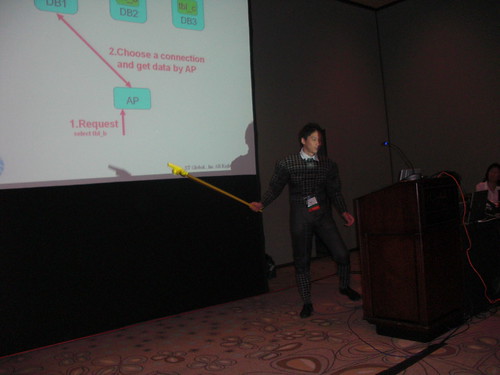 | At the MySQL Conference 2009 I attended a session about the Spider storage engine, an engine with built-in sharding features. The talk was notable for the speaker wearing a spiderman costume, and for some language barrier that made the talk less enjoyable than it should be. That's a pity, because the engine is very intriguing, and deserves some exploration. |
What is the Spider engine, then? In short, it's an extension to the partitioning engine with the ability of connecting to remote servers. Basically, partitions + federated, except that Federated is explicitly removed during the compilation. Additionally, the spider engine should remove current limitations, such as single thread for replication and single source replication, but due to lack of specific documentation, I will limit my current experiment to the sharding features.
The only documentation available is the slide deck from the presentation, and some very reference parameters that come with the source code. I show here what I found by practical inspection.
building the engine
To compile the engine, you need the source code for MySQL 5.1.31 (as required by the documentation, but it works fine with later versions as well).Download the source code from the launchpad repository and expand it. You will get a ./spider directory, which you need to move under the ./storage directory in the source. Then you compile, with these instructions:
autoconf
automake
./configure \
 --prefix=/usr/local/mysql \
 --localstatedir=/usr/local/mysql/data \
 --libexecdir=/usr/local/mysql/bin \
 --enable-thread-safe-client \
 --enable-local-infile --with-pic \
 --with-fast-mutexes \
 --with-client-ldflags=-static \
 --with-mysqld-ldflags=-static \
 --with-zlib-dir=bundled \
 --with-big-tables --with-ssl \
 --with-readline --with-embedded-server \
 --with-partition --without-innodb \
 --without-ndbcluster \
 --without-archive-storage-engine \
 --without-blackhole-storage-engine \
 --with-csv-storage-engine \
 --without-example-storage-engine \
 --without-federated-storage-engine \
 --with-extra-charsets=complex
make
./scripts/make_binary_distribution
Now we will use the MySQL Sandbox to create a testing environment. Let's start with a simple case: 1 main server and 4 remote ones.
make_sandbox $PWD/mysql-5.1.31-osx10.5-i386.tar.gzThis creates a sandbox under $HOME/sandboxes/msb_5_1_31, which is our main server. Before using it, we need to create some additional tables and load the plugin. (These queries are in the spider instructions, but they are hard to cut and paste. This is much easier for that purpose.)
create table if not exists mysql.spider_xa(
  format_id int not null default 0,
  gtrid_length int not null default 0,
  bqual_length int not null default 0,
  data char(128) not null default '',
  status char(8) not null default '',
  primary key (data, format_id, gtrid_length),
  key idx1 (status)
) engine=MyISAM default charset=utf8 collate=utf8_bin;
create table if not exists mysql.spider_xa_member(
  format_id int not null default 0,
  gtrid_length int not null default 0,
  bqual_length int not null default 0,
  data char(128) not null default '',
  scheme char(64) not null default '',
  host char(64) not null default '',
  port char(5) not null default '',
  socket char(64) not null default '',
  username char(64) not null default '',
  password char(64) not null default '',
  primary key (data, format_id, gtrid_length, host, port, socket)
) engine=MyISAM default charset=utf8 collate=utf8_bin;
create table if not exists mysql.spider_tables(
  db_name char(64) not null default '',
  table_name char(64) not null default '',
  priority bigint not null default 0,
  server char(64) default null,
  scheme char(64) default null,
  host char(64) default null,
  port char(5) default null,
  socket char(64) default null,
  username char(64) default null,
  password char(64) default null,
  tgt_db_name char(64) default null,
  tgt_table_name char(64) default null,
  primary key (db_name, table_name),
  key idx1 (priority)
) engine=MyISAM default charset=utf8 collate=utf8_bin;

install plugin spider soname 'ha_spider.so';
select engine,support,transactions,xa
from information_schema.engines;
+------------+---------+--------------+------+
| engine     | support | transactions | xa   |
+------------+---------+--------------+------+
| SPIDER     | YES     | YES          | YES  |
| MRG_MYISAM | YES     | NO           | NO   |
| CSV        | YES     | NO           | NO   |
| MyISAM     | DEFAULT | NO           | NO   |
| MEMORY     | YES     | NO           | NO   |
+------------+---------+--------------+------+
Spider is now enabled
preparing the remote servers
The servers used as remote shards can be conveniently replaced, for this experiment, by sandboxes. Let's create three of them, to illustrate the concept.
make_multiple_sandbox --group_directory=spider_dir \
  --sandbox_base_port=6000 --check_base_port  5.1.31
Now we have three sandboxes under $HOME/sandboxes/spider_dir, with ports ranging from 6001 to 6003.
What we need to do is to create, in each server, a table with the same structure as the one that is being sharded in the main server.
$ cd $HOME/sandboxes/spider_dir
$ cat tablea.sql
drop schema if exists   myspider;
create schema myspider;
use myspider;

Create table tbl_a(
        col_a int,
        col_b int,
        primary key(col_a)
);

$ ./use_all "source tablea.sql"
The main server
Finally, we have all the components in place, we can create the table for the main server.
drop schema if exists   myspider;
create schema myspider;
use myspider;

Create table tbl_a(
        col_a int,
        col_b int,
        primary key(col_a)
) engine = Spider
Connection ' table "tbl_a", user "msandbox", password "msandbox" '
partition by range( col_a )
(
        partition pt1 values less than (1000)
          comment 'host "127.0.0.1", port "6001"',
        partition pt2 values less than (2000)
          comment 'host "127.0.0.1", port "6002"',
        partition pt3 values less than (MAXVALUE)
          comment 'host "127.0.0.1", port "6003"'
);
Compared to classic partitions, there is some new ground to cover. The "CONNECTION" clause is used to define the table name in the remote server. The schema name is assumed to be the same as the one in the main server.
For each partition, we can add a "COMMENT" clause, with the connection parameters. Since we are using sandboxes in the same host, we connect to 127.0.0.1, and use the port corresponding to each sandbox.
From now on, we can use this table almost transparently.
Using the spider engine
# on the main server
./use myspider

insert into tbl_a values (1,1);
Query OK, 1 row affected (0.00 sec)

insert into tbl_a values (1001,2);
Query OK, 1 row affected (0.01 sec)

insert into tbl_a values (2001,3);
Query OK, 1 row affected (0.00 sec)

select * from tbl_a;
+-------+-------+
| col_a | col_b |
+-------+-------+
|     1 |     1 |
|  1001 |     2 |
|  2001 |     3 |
+-------+-------+
3 rows in set (0.01 sec)
So far, so good. No surprises, at least in the surface.
Now, where is the data? A close inspection to the files in the data directory shows that the data is not in the main server.
The data is stored in the "remote" servers, as we can check easily:
# in the spider_dir path
./use_all "select * from myspider.tbl_a"

# server: 1:
col_a col_b
1 1
# server: 2:
col_a col_b
1001 2
# server: 3:
col_a col_b
2001 3
Now, let's apply some curiosity. What happens in the remote server when I insert a row in the main server? Probably the general log can give me an answer.
# spider_dir
./use_all 'set global general_log=1'

# main server
insert into tbl_a values (2002,3);
Query OK, 1 row affected (0.00 sec)

# spider_dir
$ tail node3/data/mysql_sandbox6003.log
090429 17:27:28  299 Connect    msandbox@localhost on
090429 17:27:42  299 Query  set session sql_log_off = 1
Well. This can stop a common user, but not a determined one.
MySQL Proxy to the rescue! There is a Lua script that handles logs.
./node2/proxy_start --proxy-lua-script=$PDW/logs.lua --log-level=warning
Let's change the main table definition:
...
        partition pt3 values less than (MAXVALUE)
        comment 'host "127.0.0.1", port "4040"'
And now we can see what happens.
# main server
insert into tbl_a values (2004,3);
Query OK, 1 row affected (0.00 sec)

#tail /tmp/mysql/log
2009-04-29 18:03:04    305 -- set session sql_log_off = 1 >{0}
2009-04-29 18:03:04    305 -- set session autocommit = 1 >{0}
2009-04-29 18:03:04    305 -- start transaction >{0}
2009-04-29 18:03:04    305 -- set session transaction isolation level repeatable read >{0}
2009-04-29 18:03:04    305 -- insert into `myspider`.`tbl_a`(`col_a`,`col_b`)values(2004,3) >{0}
2009-04-29 18:03:04    305 -- commit >{0}
Hmmm. I don't like the sight of it. autocommit=1 and then start transaction, set session transaction and commit. At the very least, it's wasting three queries. This needs some explanation from the author, I guess. Let's try some data retrieval.
# main server
select * from tbl_a;
+-------+-------+
| col_a | col_b |
+-------+-------+
|     1 |     1 |
|  1001 |     2 |
|  2003 |     3 |
|  2004 |     3 |
|  1001 |     2 |
|  2003 |     3 |
|  2004 |     3 |
+-------+-------+
7 rows in set (0.01 sec)

$tail /tmp/mysql.log
2009-04-29 18:01:07    303 -- set session sql_log_off = 1 >{0}
2009-04-29 18:01:07    303 -- set session autocommit = 1 >{0}
2009-04-29 18:01:07    303 -- start transaction >{0}
2009-04-29 18:01:07    303 -- set session transaction isolation level repeatable read >{0}
2009-04-29 18:01:07    303 -- show table status from `myspider` like 'tbl_a' >{0}
2009-04-29 18:01:07    303 -- select `col_a`,`col_b` from `myspider`.`tbl_a` limit 0,9223372036854775807 >{0}
2009-04-29 18:01:07    303 -- commit >{0}
Scarier than the previous one. The LIMIT clause spells trouble.
And this latest experiment made me try something more ambitious.
I installed a group of 20 sandboxes and loaded the employees test database (4.2 million records), spreading two partitioned tables across the backend servers.
Performance is better than using a single table, but slower than a normal partitioned table on a single server. And I think I know why.
# main server
select count(*) from salaries where from_date between '1995-01-01' and '1995-12-31';
+----------+
| count(*) |
+----------+
|   201637 |
+----------+
1 row in set (0.76 sec)

$ tail /tmp/mysql.log
2009-04-29 18:09:51    307 -- set session sql_log_off = 1 >{0}
2009-04-29 18:09:51    307 -- set session autocommit = 1 >{0}
2009-04-29 18:09:51    307 -- start transaction >{0}
2009-04-29 18:09:51    307 -- set session transaction isolation level repeatable read >{0}
2009-04-29 18:09:51    307 -- show table status from `employees` like 'salaries' >{0}
2009-04-29 18:09:51    307 -- select `emp_no`,`from_date` from `employees`.`salaries` order by `emp_no`,`from_date` limit 0,9223372036854775807 >{0}
This is definitely a waste. It's a problem that is similar to what is happening when using the Federated engine. But here, we get a "ORDER BY" clause that is unnecessary to say the least.
Bugs
During the tests, I spot at least two serious bugs.
When you drop a partition, the data in the remote server is not removed. If you recreate the partition and insert something, you get a "duplicate key" error.
When you drop a database, the table mysql.spider_tables does not get updated, with the result that you can't recreate the table. with the same name, unless you remove the corresponding entries manually.
That was a lot of information for one session. Please try it and comment. Don't expect me to provide answers to the reasons of the spider engine. I hope the author chimes in and clarifies the muddy matter.
MySQL community and sushi
Now, relax. This is not haircut blogging. There is actually a true relationship between MySQL Community and sushi. Just bear with me for a while.
I went to meet Drew in front of a quiet sushi restaurant in Santa Clara, CA. In his latest email, he said "we will meet you there", implying that there was more than one person. He mentioned a wife in one of his email, and so I expected at least two people.
Curious thing, this meeting. It all started in 2006, when I published an article about replication techniques. In answer to that article, I received dozens of email messages, with comments, congratulations, requests for help, job offers. Drew's message started as a praise, than he asked some questions, and we exchanged some more emails in the last two years. In November, he told me that since I had been helpful, he would like to take me to a sushi restaurant, and there we are, meeting in person after years of mail exchange.
It turns out that he is with his wife, and three more geeks. What else you expect to find in Silicon Valley, anyway? There are two more guests, who are not in the IT industry, one of whom is a exuberant toddler.
We talk about geeky things, the Sun acquisition by Oracle (which makes a poor subject for conversation since nothing is known) and a less than successful attempt at explaining the risks of circular replication using the soy sauce jar, a glass, and chopsticks to form a diagram on the table.
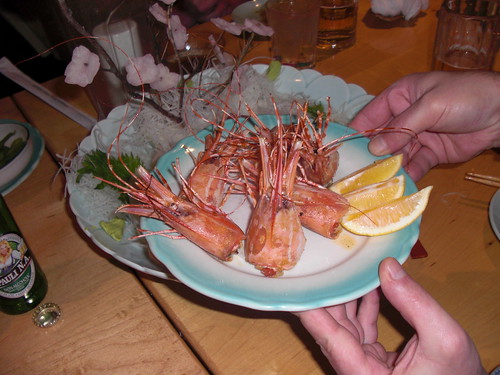
The food comes. I cast my vote for sashimi, with the semi-general agreement. There is raw tuna, salmon, and sea urchin on the side, with prawn heads in the middle. When I reach for the salmon with my chopsticks, one of the prawn heads moves, in what seems an attempt to bite me. The video shows some of the action.
The owner suggests that we eat the heads while they are still alive. After some looking around, we all agree that we won't do it, and thus we gladly accept the owner's offer to deep fry the prawn heads. When they come back, they are definitely not moving anymore, and thus we eat them without much remorse.
The dinner continues with sushi, which is deader than the prawns, and doesn't offer any particular challenges.
The discussion is mostly on geeky subjects, and we explore the world of social networks, wondering how can Twitter make money. We find several schemes that may make us rich in one month, but nobody seems particularly eager to invest on it at the moment. The final rush of discussion covers a social network that one of the guests is currently administering. It sounds very entertaining and fast spreading, but venture capitalists don't seem to buy the idea yet. It uses MySQL, though, which is an apt thought at the end of this dinner. The fascinating thing about this network is that it relies on the Mechanichal Turk service to check if the contents are decent. Apparently, it's absolutely forbidden to show nudity in a iPhone application. Therefore, the contents have to be checked before they go public. Despite the name, the Mechanical Turk service is real people (not a politically correct name, IMO) who do micro tasks, like checking that women in the social network pictures are wearing a bra. Apparently, there is no technological replacement for people judgment in this case.
So, my community work has earned me a free sushi dinner, and a few new contacts. Thanks, Drew, it was an enjoyable evening!
I went to meet Drew in front of a quiet sushi restaurant in Santa Clara, CA. In his latest email, he said "we will meet you there", implying that there was more than one person. He mentioned a wife in one of his email, and so I expected at least two people.
Curious thing, this meeting. It all started in 2006, when I published an article about replication techniques. In answer to that article, I received dozens of email messages, with comments, congratulations, requests for help, job offers. Drew's message started as a praise, than he asked some questions, and we exchanged some more emails in the last two years. In November, he told me that since I had been helpful, he would like to take me to a sushi restaurant, and there we are, meeting in person after years of mail exchange.
It turns out that he is with his wife, and three more geeks. What else you expect to find in Silicon Valley, anyway? There are two more guests, who are not in the IT industry, one of whom is a exuberant toddler.
We talk about geeky things, the Sun acquisition by Oracle (which makes a poor subject for conversation since nothing is known) and a less than successful attempt at explaining the risks of circular replication using the soy sauce jar, a glass, and chopsticks to form a diagram on the table.
The food comes. I cast my vote for sashimi, with the semi-general agreement. There is raw tuna, salmon, and sea urchin on the side, with prawn heads in the middle. When I reach for the salmon with my chopsticks, one of the prawn heads moves, in what seems an attempt to bite me. The video shows some of the action.
The owner suggests that we eat the heads while they are still alive. After some looking around, we all agree that we won't do it, and thus we gladly accept the owner's offer to deep fry the prawn heads. When they come back, they are definitely not moving anymore, and thus we eat them without much remorse.
The dinner continues with sushi, which is deader than the prawns, and doesn't offer any particular challenges.
The discussion is mostly on geeky subjects, and we explore the world of social networks, wondering how can Twitter make money. We find several schemes that may make us rich in one month, but nobody seems particularly eager to invest on it at the moment. The final rush of discussion covers a social network that one of the guests is currently administering. It sounds very entertaining and fast spreading, but venture capitalists don't seem to buy the idea yet. It uses MySQL, though, which is an apt thought at the end of this dinner. The fascinating thing about this network is that it relies on the Mechanichal Turk service to check if the contents are decent. Apparently, it's absolutely forbidden to show nudity in a iPhone application. Therefore, the contents have to be checked before they go public. Despite the name, the Mechanical Turk service is real people (not a politically correct name, IMO) who do micro tasks, like checking that women in the social network pictures are wearing a bra. Apparently, there is no technological replacement for people judgment in this case.
So, my community work has earned me a free sushi dinner, and a few new contacts. Thanks, Drew, it was an enjoyable evening!
Monday, April 27, 2009
MySQL 5.4 performance with logging
| About a month ago, I published the results of MySQL 5.x performance with logging. The results covered several versions, from 5.0.45 to 5.1.33. Among the conclusions of the post was the consideration that MySQL 5.0.x is faster than MySQL 5.1 in read only operations. I hinted that better results may come for MySQL 5.1. When I wrote that post I had, in fact, an ace up my sleeve, because I had already benchmarked the performance of MySQL 5.4, using the same criteria shown in my previous post. The results, as you can see from the charts below, tell that you don't need to downgrade to 5.0 to achieve the performance you want, but MySQL 5.4 may be the right choice. |
 |
| MySQL 5.1 + 5.4 read-only logging performance |
 |
| MySQL 5.1 + 5.4 read-only logging performance |
 |
| MySQL 5.0 read-only Logging performance |
 |
| MySQL 5.0 read-only Logging performance |
 |
| MySQL 5.1 + 5.4 binlog performance |
 |
| MySQL 5.1 + 5.4 binlog performance |
 |
| MySQL 5.0 binlog performance |
 |
| MySQL 5.0 binlog performance |
A piece of trivia. On April 9, users of MySQL Sandbox may have noticed that I left a clue of what was about to happen. Among the accepted versions, you could see "5.3, 5.4. 5.5" :-)
Friday, April 17, 2009
MySQL Campus tour at USC - Slow start, brilliant ending
 | The Southern California branch of the MySQL Campus Tour is almost over. At the USC, attendance was very good, and even better was the enthusiasm and the participation we met. The meeting didn't start well. Our hotel is 11 miles away from the USC campus, and we figured out that heading to the campus 1 hour before the planned time ought to be enough. After 65 minutes, we had done exactly 7 miles, in one of the worst traffic jams that I have ever seen, but the locals tell me that it's pretty standard stuff down here. Anyway, we started 20 minutes later than expected, and we were pleasantly surprised that nobody had left, and a faithful audience had been waiting for us patiently. |
I would like to thank the campus ambassadors Lynn Janh and Raed Shomali for the excellent organization and their patience with our forced delay.
Tomorrow we will talk at the L.A. MySQL meetup and then we will move North, to the MySQL Conference.
Thursday, April 16, 2009
Gurus show at the Los Angeles Meetup - April 17
 | If you are in the Los Angeles area, you have two more chances to meet the MySQL gurus on their way to the the MySQL Conference. Today at the USC, Sheeri and I will conclude the South California MySQL Campus Tour. Tomorrow, April 17, big gathering at the Los Angeles MySQL Meetup Group, where Andrew Aksyonoff, Sheeri, and myself will be the speakers. Come along! |
Quiet excitement at UCLA
 | The second leg of the Southern California MySQL Campus Tour was at UCLA. There was less attendance than Cal Poly. Only 22 brave souls who endured a lengthy session with a long tail of Q&A. The excitement came on my way back to my hotel, 25 miles from the campus. Distances have a different meaning here. A few dozen miles is just a tiny portion of the town, and so I found myself once more driving the endless highways of Los Angeles. |
Wednesday, April 15, 2009
Cal Poly - A success
 | The MySQL Campus Tour 2009 started very well at Cal Poly, San Luis Obispo, CA. Despite the warm day, which would have tempted many attendees to desert the conference and go to the nearby beaches, there was a full room, with 82 people, many of them standing. The presentation was appreciated (and so was the pizza that Sun had delivered to the classroom). I did the main part, while Sheeri was actively contributing with witty and informational remarks. |
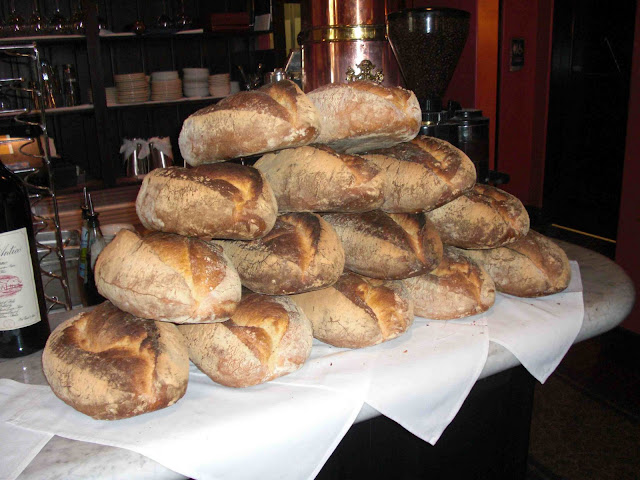
Most notable, after the session, we continued the cultural exchange to a local restaurant that bears my name (correctly spelled!), where this heap of bread caught my eye. Thanks to Stephanie and Wendy for organizing the event, and to all the students for their active participation!
Monday, April 13, 2009
MySQL Campus Tour - South California
 | The MySQL Campus Tour got reinforcements. Dups is not alone anymore. He is being joined by Colin and Farhan. Sheeri and yours truly are in Los Angeles, just about to travel to San Luis Obispo, where we will be guests of Cal Poly. The lecture is scheduled for tomorrow, April 14th, at 11am. The address is 1 Grand Avenue, San Luis Obispo, CA 93401. Pizza will be provided! Here's a reminder of the events to come. Again, if you are in the area, come along! Attendance is free, and if you want to participate actively, you will be very welcome! |
| North California | |
|---|---|
| 13-Apr-2009 | Univ. of San Francisco |
| 15-Apr-2009 | Univ. of California, Berkley |
| 16-Apr-2009 | San Jose State University |
| 16-Apr-2009 | Stanford University, Palo Alto |
| 17-Apr-2009 | Univ. of California, Davis |
| South California | |
| 14-Apr-2009 | Cal Poly, San Luis Obispo |
| 15-Apr-2009 | UCLA, Los Angeles |
| 15-Apr-2009 | Univ. of California, Irvine |
| 16-Apr-2009 | USC, Los Angeles |
| 17-Apr-2009 | MySQL Meetup Los Angeles |
Saturday, April 11, 2009
MySQL Sandbox 3 - Now feature complete
 | MySQL Sandbox 2.0.98i is now feature complete. The most notable additions are a robust test suite, with over 120 tests, and some features that have been in the wish list for long time. The first one that makes a lot of difference is the ability of installing a sandbox from a build directory. |
The second most important addition is the sbtool, which includes tasks to be performed on existing sandboxes, such as moving, copying, deleting, and preserving a sandbox.
The one feature that I like the most is the ability of checking for an used port, and instead of requesting a manual intervention, it can detect the first available port and use it. No more conflicts!
The documentation has been enhanced and included into MySQL::Sandbox.
$ perldoc MySQL::Sandbox provides the full manual.Now I await bug reports, and I plan to release the final 3.0 version within one month.
Thursday, April 02, 2009
MySQL Sandbox even more sandboxed
| In the late evening of March 31st I had a good coding session with MySQL Sandbox. I implemented a feature that has been in the wish list for long time. Checking the port before installing, and providing a non used port that positively avoids conflicts is a great step forward. |
Now you can do things like this:
$ make_sandbox 5.1.33 --check_port --no_confirm
$ make_sandbox 5.1.33 --check_port --no_confirm
$ make_sandbox 5.1.33 --check_port --no_confirm
$ make_sandbox 5.1.33 --check_port --no_confirm
$ make_sandbox 5.1.33 --check_port --no_confirm
The Sandbox will create msb_5_1_33_a, msb_5_1_33_b and so on, using ports 5133, 5134, 5.1.35, and so on, without manual intervention. Running the above commands 30 times, you would find these sandboxes:
ls -d msb_5_1_33*/
msb_5_1_33/    msb_5_1_33_a/  msb_5_1_33_b/  msb_5_1_33_c/
msb_5_1_33_d/  msb_5_1_33_e/  msb_5_1_33_f/  msb_5_1_33_g/
msb_5_1_33_h/  msb_5_1_33_i/  msb_5_1_33_j/  msb_5_1_33_k/
msb_5_1_33_l/  msb_5_1_33_m/  msb_5_1_33_n/  msb_5_1_33_o/
msb_5_1_33_p/  msb_5_1_33_q/  msb_5_1_33_r/  msb_5_1_33_s/
msb_5_1_33_t/  msb_5_1_33_u/  msb_5_1_33_v/  msb_5_1_33_w/
msb_5_1_33_x/  msb_5_1_33_y/  msb_5_1_33_z/  msb_5_1_33_aa/
msb_5_1_33_ab/ msb_5_1_33_ac/
I felt very pleased with myself and I thought "I should blog about it." But I looked at the time. Hmm. 20 minutes to midnight. If the blog post comes up as April 1st, then it would be taken as an April fool joke.
Wait a minute! A devilish thought crossed my mind, and refused to leave. Perhaps I could announce something, after all. So, in about 10 minutes, I implemented the Query Analyzer replica.
It took several man-year to the Enterprise Team to do the real Query Analyzer (great job, guys!) My implementation time was quite faster than theirs, although admittedly the screen shot looks poor in comparison.
 |  |
| The Query Analyzer | The Fish Analyzer |
In ten more minutes, I wrote the blog post, and I changed the published time to March 31st 11:55pm, to remove the telltale date, and off I went.
It was a great success. Some colleagues (1), who saw the post but didn't bother to try the code, sent me concerned messages, blaming me for jeopardizing the company business, weakening the global economy, melting the North Pole ice, and making Bambi cry. Unfortunately, we work in a networked environment, so I could not see their faces when I told them to look at the calendar ...
I also got a few bug reports, complaining that the --query_analyzer option didn't work as advertised. One of the reporters, who had actually seen the fish analyzer screenshot, still insisted on the lack of analysis in the application. Oh, well. Someone just don't get it!
Anyway, the ephemeral Sandbox Analyzer, a.k.a. The Fish Analyzer, has been deprecated and removed in version 2.0.98d. Not an April's fool anymore. The
--check_port option is the real thing! (1)Not from the Enterprise Team. No sane developer would think that a man alone could create the Query Analyzer in his (limited) spare time!
Tuesday, March 31, 2009
Query Analyzer features integrated in MySQL Sandbox
Community strikes.
It was about time that someone provided a match for MySQL Query Analyzer, the flagship feature of MySQL Enterprise.
Now MySQL Sandbox includes a --query_analyzer option, which will convert your sandboxed server into an analysis machine. No need to buy Enterprise. No need to waste tons of money on expensive consultants.
Just download the latest tarball and install a sandbox as usual, with the additional option.
And that's it! Your worries will be over. Enjoy!
Update As it should be clear by now, this was an April's fool joke. See the follow up post for more info.
It was about time that someone provided a match for MySQL Query Analyzer, the flagship feature of MySQL Enterprise.
Now MySQL Sandbox includes a --query_analyzer option, which will convert your sandboxed server into an analysis machine. No need to buy Enterprise. No need to waste tons of money on expensive consultants.
Just download the latest tarball and install a sandbox as usual, with the additional option.
$ make_sandbox 5.1.32 --query_analyzer
And that's it! Your worries will be over. Enjoy!
Update As it should be clear by now, this was an April's fool joke. See the follow up post for more info.
Monday, March 30, 2009
New version of employees test DB
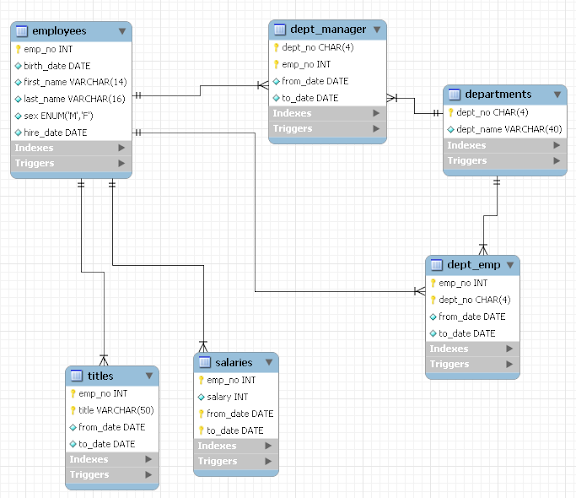 | The Employees Test database has been updated. There was a subtle bug in the data. One employee was assigned to two departments with the same start and end date. And one of the sample procedures fell into the trap of assuming that the data was clean, thus reporting incorrect statistics. Now the bug is fixed, the test suite is updated, and I can wait for the next bug report. |
Sunday, March 29, 2009
MySQL Sandbox approaching version 3
| MySQL Sandbox is approaching another milestone. Preparing for version 3.0, which will include some new features, version 2.0.98 (based on 2.0.18) can be installed like any other Perl module, and the scripts become available in the PATH. It means a few seconds more to install the scripts, but a faster and easier usage. |
This latest change also means that MySQL Sandbox will be available through the CPAN (Comprehensive Perl Archive Network, for the uninitiated).
The next step will be to include this package in Linux distros (Ubuntu, and eventually Debian, and then Fedora).
If you use the new package, the installation goes like this:
The hard way
Download and unpack MySQL Sandbox, then issue these commands:$ perl Makefile.PL
$ make
$ make test
$ sudo make install
$HOME/usr/local (a good idea, since MySQL Sandbox was designed for the purpose of installing servers in user space), then you can do the following:$ export PATH=$PATH:$HOME/usr/local
$ export PERL5LIB=$HOME/usr/local/lib/perl5/site_perl/5.8.8
# change the perl version accordingly
$ perl Makefile.PL PREFIX=$HOME/usr/local
$ make
$ make test
$ sudo make install
The easy way
$ sudo cpan
cpan > install MySQL::Sandbox
Usage
Either way, the Sandbox scripts will now be in your PATH, and you can invoke the scripts quite easily:$ make_sandbox /path/to/mysql-tarball-5.1.32-YOUR-OS.tar.gz
There is one (very small) incompatible change. Previously, you could get debugging output by setting the DEBUG environmental variable. Now you will have to set SBDEBUG instead.
Enjoy!
Subscribe to:
Posts (Atom)


