Thursday, July 30, 2015

MySQL replication monitoring 101


Replication is the process that transfers data from an active master to a slave server, which reproduces the data stream to achieve, as best as possible, a faithful copy of the data in the master.

To check replication health, you may start with sampling the service, i.e. committing some Sentinel value in the master and retrieving it from the slave.

Sentinel data: Tap tap… Is this thing on?


If you want to make sure that replication is working, the easiest test is using replication itself to see if data is being copied across from the master to the slaves. The method is easy:

  1. Make sure that the data you want to see is NOT in the master or in the slave. If you skip this step, you may think that replication is working, while in fact it may not.
  2. Either create a table in the master or use a table that you know exists both in the master and the slave.
  3. Insert several records in the master table.
  4. Check that they are replicated in the slave correctly.
  5. Update a record in the master.
  6. Watch it changing in the slave.
  7. Delete a record in the master.
  8. Watch it disappear in the slave.

Saturday, July 25, 2015

MySQL 5.7 : no more password column!

Maintaining a project like MySQL::Sandbox is sometimes tiring, but it has its advantages. One of them is that everything related to the server setup comes to my attention rather earlier than if I were an average DBA or developer.

I try to keep MySQL Sandbox up to date with every release of MySQL and (to a lesser extent) MariaDB [1]. For this reason, I am used to trying a new release with MySQL Sandbox, and … seeing it fail.

Of the latest changes in MySQL, probably the most disruptive was what happened in MySQL 5.7.6, where the mysql.user table lost the password column.

Yep. No ‘password’ column anymore. And just to make the setup procedure harder, the syntax of SET PASSWORD was changed, and deprecated.


Previously, I could run:


mysql [localhost] {msandbox} (mysql) > select version();  
+-----------+  
| version() |  
+-----------+  
| 5.6.25    |  
+-----------+  
1 row in set (0.00 sec)

mysql [localhost] {msandbox} (mysql) > select host,user,password from user;  
+-----------+-------------+-------------------------------------------+  
| host      | user        | password                                  |  
+-----------+-------------+-------------------------------------------+  
| localhost | root        | *6C387FC3893DBA1E3BA155E74754DA6682D04747 |  
| 127.%     | msandbox    | *6C387FC3893DBA1E3BA155E74754DA6682D04747 |  
| localhost | msandbox    | *6C387FC3893DBA1E3BA155E74754DA6682D04747 |  
| localhost | msandbox_rw | *6C387FC3893DBA1E3BA155E74754DA6682D04747 |  
| 127.%     | msandbox_rw | *6C387FC3893DBA1E3BA155E74754DA6682D04747 |  
| 127.%     | msandbox_ro | *6C387FC3893DBA1E3BA155E74754DA6682D04747 |  
| localhost | msandbox_ro | *6C387FC3893DBA1E3BA155E74754DA6682D04747 |  
| 127.%     | rsandbox    | *B07EB15A2E7BD9620DAE47B194D5B9DBA14377AD |  
+-----------+-------------+-------------------------------------------+  
8 rows in set (0.00 sec)

In the latest releases, though, this fails.


mysql [localhost] {msandbox} (mysql) > select version();  
+-----------+  
| version() |  
+-----------+  
| 5.7.8-rc  |  
+-----------+  
1 row in set (0.00 sec)

mysql [localhost] {msandbox} (mysql) > select host,user,password from user;  
ERROR 1054 (42S22): Unknown column 'password' in 'field list'

Instead of a password column (which was CHAR(41)), we have now an authentication_string column of type TEXT.


+-----------+-------------+-------------------------------------------+  
| host      | user        | authentication_string                     |  
+-----------+-------------+-------------------------------------------+  
| localhost | root        | *6C387FC3893DBA1E3BA155E74754DA6682D04747 |  
| 127.%     | msandbox    | *6C387FC3893DBA1E3BA155E74754DA6682D04747 |  
| localhost | msandbox    | *6C387FC3893DBA1E3BA155E74754DA6682D04747 |  
| localhost | msandbox_rw | *6C387FC3893DBA1E3BA155E74754DA6682D04747 |  
| 127.%     | msandbox_rw | *6C387FC3893DBA1E3BA155E74754DA6682D04747 |  
| 127.%     | msandbox_ro | *6C387FC3893DBA1E3BA155E74754DA6682D04747 |  
| localhost | msandbox_ro | *6C387FC3893DBA1E3BA155E74754DA6682D04747 |  
| 127.%     | rsandbox    | *B07EB15A2E7BD9620DAE47B194D5B9DBA14377AD |  
+-----------+-------------+-------------------------------------------+

Fixing MySQL Sandbox to handle this issue and to be at the same time compatible with previous releases was quite challenging, but in the end I did it. Recent versions of the sandbox can handle all the releases from Oracle, Percona, and MariaDB without showing hiccups.

So, for testing, the issue is solved. Now comes the hard part: when thousands of database administration procedures will break down for lack of the password column. To all the DBAs and database developers out there: good luck!


  1. It is my pleasure to disclose that MariaDB 10.1 runs in MySQL Sandbox 3.0.55+, with only minimal changes.  ↩


Sunday, July 19, 2015

MYSQL Sandbox 3.0.55 and new Github replication scripts


Both MySQL and MariaDB have been busy, each introducing new features, sometimes creating the same feature, often with different syntax.

This is sometimes good for users, who have a wide choice. And sometimes it is bad, as once you are used to the deployment and syntax of one flavor, it is hard to switch to a different one. This problem is enhanced if you are dealing with an application, MySQL Sandbox, that needs to work well with all flavors.

The latest releases of MySQL Sandbox (3.0.51 to 3.0.55) have been necessary to solve minor and major troublesome points with MySQL 5.7.8 and MariaDB 10.1.

The current version (3.0.55) can install all the newest releases, including replication with MySQL 5.7.8 which suffers from a compatibility bug (better explored in a separate article).

To make like easier for testers of newest versions, all replication deployments through MySQL Sandbox now include a test_replication script, which ensures that replication is working correctly. The new release also includes more tarball pattern tests, to check that known name patterns are recognized. In all, MySQL Sandbox has now about 100 tests more than before. Every time I release a new version, I run the suite with 10 or 12 versions of MySQL, Percona Server, MariaDB, for a grand total of about 5,000 tests.

And speaking of tests, there are features that require more attention than just installing a group of sandboxes, and are not easy to incorporate into MySQL Sandbox tools. For this reason, I have published on GitHub the sample scripts that I use to demonstrate multi-source replication for MySQL 5.7 and MariaDB 10. Since I was at it, I have also published the examples used for Pivot tables demos.

Tuesday, March 10, 2015

MySQL 5.7.6 is out. Be prepared for big changes


Today Oracle released MySQL 5.7.6 milestone 16. With this, MySQL 5.7 has been in development for over 2 years.
Compared to MySQL 5.6, the changes are quite extensive. The main effort of the team has been focused on speed, with performance reportedly improved from 2 to 3 times compared to previous releases.
A full list of what is new would take too much space here, but I would like to mention some key points:


  • Oracle has spent a considerable amount of energy in the improvement of MySQL security and safety. You will see many new features, but even more old features that were deprecated and more that were removed after deprecation in 5.6.
  • The installation process has been changing in every milestone release of MySQL 5.7, always towards the goal of making MySQL more robust. The effort, though, will break compatibility with installation practices used for previous versions.

In this article, I will cover the biggest changes during installation.
In MySQL 5.6, mysql_install_db has an option for the generation of a random password during database creation. The process is unfriendly to scripting but it is a step in the direction of ending the long time practice of creating a root user without a password.
In MySQL 5.7.4, there was a further change, with the random password generation becoming the default, with the possibility of skipping the creation with the option –skip-random-password.
In MySQL 5.7.5, the default was confirmed, but the option was changed to –insecure.


And now, in MySQL 5.7.6, the crackdown on old practices continues: mysql_install_db is deprecated, and replaced with mysqld –initialize (formerly known as “mysqld –bootstrap,” now deprecated.)
Here’s a test run:


$ ~/opt/mysql/5.7.6/bin/mysqld --no-defaults --basedir=~/opt/mysql/5.7.6/ --datadir=$PWD/data --initialize
2015-03-09T05:06:37.159659Z 0 [Warning] TIMESTAMP with implicit DEFAULT value is deprecated. Please use --explicit_defaults_for_timestamp server option (see documentation for more details).
2015-03-09T05:06:37.355155Z 0 [Warning] InnoDB: New log files created, LSN=45790
2015-03-09T05:06:37.410118Z 0 [Warning] InnoDB: Creating foreign key constraint system tables.
2015-03-09T05:06:37.467002Z 0 [Warning] Failed to setup SSL
2015-03-09T05:06:37.467029Z 0 [Warning] SSL error: SSL context is not usable without certificate and private key
2015-03-09T05:06:37.468142Z 1 [Warning] A temporary password is generated for root@localhost: f<jqhdJ(A5p#

Compared to the previous versions, the most notable difference is that there is no .mysql_secret file, but a simple line on the screen mentioning the temporary password.
But there is one, more important behavioral difference: this command works only once. When using mysql_install_db, you could run the same command even if the data directory existed, where the script would re-apply the data creation commands. Using mysqld –initialize, you can only run on a non-existing data directory.


$ ~/opt/mysql/5.7.6/bin/mysqld --no-defaults --basedir=~/opt/mysql/5.7.6/ --datadir=$PWD/data --initialize
2015-03-09T05:49:12.504413Z 0 [Warning] TIMESTAMP with implicit DEFAULT value is deprecated. Please use --explicit_defaults_for_timestamp server option (see documentation for more details).
2015-03-09T05:49:12.505398Z 0 [ERROR] --initialize specified but the data directory exists. Aborting.
2015-03-09T05:49:12.505422Z 0 [ERROR] Aborting

Using the newly created database is a bit more trickier than before:


$ ~/opt/mysql/5.7.6/bin/mysql --no-defaults   -u root -p
Enter password:
Welcome to the MySQL monitor.  Commands end with ; or \g.
Your MySQL connection id is 2
Server version: 5.7.6-m16

Copyright (c) 2000, 2015, Oracle and/or its affiliates. All rights reserved.

Oracle is a registered trademark of Oracle Corporation and/or its
affiliates. Other names may be trademarks of their respective
owners.

Type 'help;' or '\h' for help. Type '\c' to clear the current input statement.

mysql> use mysql
ERROR 1820 (HY000): You must SET PASSWORD before executing this statement
mysql> set password=password('test');
ERROR 1064 (42000): You have an error in your SQL syntax; check the manual that corresponds to your MySQL server version for the right syntax to use near 'password('test')' at line 1

Uh? What’s this? This command used to work until recently. The reason is a change in the syntax of SET PASSWORD, which now accepts a plain text argument:


mysql> set password='test';
Query OK, 0 rows affected (0.00 sec)

The old syntax was meant to be only deprecated, but it was accidentally completely removed. This will be hopefully fixed in MySQL 5.7.7.


More changes involve the use of GRANT, REVOKE, CREATE USER, and ALTER USER, which now are more strict. You get warnings if you try to create users with the GRANT command, or when mixing granting of privileges with authentication options.


mysql> grant all on test.* to testuser identified by 'test';
Query OK, 0 rows affected, 1 warning (0.00 sec)

Warning (Code 1287): Using GRANT for creating new user is deprecated and will be removed in future release. Create new user with CREATE USER statement.

mysql> grant all on *.* to testuser identified by 'test';

Query OK, 0 rows affected, 1 warning (0.00 sec)


Warning (Code 1287): Using GRANT statement to modify existing user's properties other than privileges is deprecated and will be removed in future release. Use ALTER USER statement for this operation.

In short, if you have automated scripts that deal with installing and administering MySQL, you should test them with warnings enabled, and be prepared for broken compatibility with your old practice.


One such ‘old practice’ scripts that is broken by the new syntax changes is MySQL-Sandbox. I have just released an updated version (MySQL Sandbox 3.0.48) with a workaround for MySQL 5.7.6 changed SET PASSWORD syntax.


BTW, did I mention that the password field in the mysql.user table was removed? That’s another surprise that may break quite a lot of existing tests:


mysql> use mysql
Database changed
mysql> select host,user,password from user;
ERROR 1054 (42S22): Unknown column 'password' in 'field list'

mysql> select host, user, authentication_string from user;
+-----------+-------------+-------------------------------------------+
| host      | user        | authentication_string                     |
+-----------+-------------+-------------------------------------------+
| localhost | root        | *6C387FC3893DBA1E3BA155E74754DA6682D04747 |
| 127.%     | msandbox    | *6C387FC3893DBA1E3BA155E74754DA6682D04747 |
| localhost | msandbox    | *6C387FC3893DBA1E3BA155E74754DA6682D04747 |
| localhost | msandbox_rw | *6C387FC3893DBA1E3BA155E74754DA6682D04747 |
| 127.%     | msandbox_rw | *6C387FC3893DBA1E3BA155E74754DA6682D04747 |
| 127.%     | msandbox_ro | *6C387FC3893DBA1E3BA155E74754DA6682D04747 |
| localhost | msandbox_ro | *6C387FC3893DBA1E3BA155E74754DA6682D04747 |
| 127.%     | rsandbox    | *B07EB15A2E7BD9620DAE47B194D5B9DBA14377AD |
| %         | testuser    | *94BDCEBE19083CE2A1F959FD02F964C7AF4CFC29 |
+-----------+-------------+-------------------------------------------+
9 rows in set (0.00 sec)

Wednesday, June 04, 2014

MariaDB 10 is a Sandbox killjoy?

Using MySQL Sandbox I can install multiple instances of MySQL. It is not uncommon for me to run 5 or 6 instances at once, and in some occasions, I get to have even 10 of them. It is usually not a problem. But today I had an issue while testing MariaDB, for which I needed 5 instances, and I the installation failed after the 4th one. To make sure that the host could run that many servers, I tried installing 10 instances of MySQL 5.6 and 5.7. All at once, for a grand total of 20 instances:

$ make_multiple_sandbox --how_many_nodes=10 5.6.14
installing node 1
installing node 2
installing node 3
installing node 4
installing node 5
installing node 6
installing node 7
installing node 8
installing node 9
installing node 10
group directory installed in $HOME/sandboxes/multi_msb_5_6_14
$ make_multiple_sandbox --how_many_nodes=10 5.7.4
installing node 1
installing node 2
installing node 3
installing node 4
installing node 5
installing node 6
installing node 7
installing node 8
installing node 9
installing node 10
group directory installed in $HOME/sandboxes/multi_msb_5_7_4

$ ~/sandboxes/use_all 'select @@port, @@version'
# server: 1:
@@port  @@version
14015   5.6.14-log
# server: 2:
@@port  @@version
14016   5.6.14-log
# server: 3:
@@port  @@version
14017   5.6.14-log
# server: 4:
@@port  @@version
14018   5.6.14-log
# server: 5:
@@port  @@version
14019   5.6.14-log
# server: 6:
@@port  @@version
14020   5.6.14-log
# server: 7:
@@port  @@version
14021   5.6.14-log
# server: 8:
@@port  @@version
14022   5.6.14-log
# server: 9:
@@port  @@version
14023   5.6.14-log
# server: 10:
@@port  @@version
14024   5.6.14-log
# server: 1:
@@port  @@version
7975    5.7.4-m14-log
# server: 2:
@@port  @@version
7976    5.7.4-m14-log
# server: 3:
@@port  @@version
7977    5.7.4-m14-log
# server: 4:
@@port  @@version
7978    5.7.4-m14-log
# server: 5:
@@port  @@version
7979    5.7.4-m14-log
# server: 6:
@@port  @@version
7980    5.7.4-m14-log
# server: 7:
@@port  @@version
7981    5.7.4-m14-log
# server: 8:
@@port  @@version
7982    5.7.4-m14-log
# server: 9:
@@port  @@version
7983    5.7.4-m14-log
# server: 10:
@@port  @@version
7984    5.7.4-m14-log

This worked fine. Then I removed all the instances, and tried again with MariaDB

 $ sbtool -o delete -s ~/sandboxes/multi_msb_5_6_14/ 
 ...
 $ sbtool -o delete -s ~/sandboxes/multi_msb_5_7_4/
 ...

With MariaDB 10, the installation failed after the 4th node.

$ make_multiple_sandbox --how_many_nodes=10 10.0.11
installing node 1
installing node 2
installing node 3
installing node 4
error while creating grant tables
Installing MariaDB/MySQL system tables in '/home/tungsten/sandboxes/multi_msb_10_0_11/node4/data' ...
140604  8:27:14 [Note] InnoDB: Using mutexes to ref count buffer pool pages
140604  8:27:14 [Note] InnoDB: The InnoDB memory heap is disabled
140604  8:27:14 [Note] InnoDB: Mutexes and rw_locks use GCC atomic builtins
140604  8:27:14 [Note] InnoDB: Compressed tables use zlib 1.2.3
140604  8:27:14 [Note] InnoDB: Using Linux native AIO
140604  8:27:14 [Note] InnoDB: Using CPU crc32 instructions
2014-06-04 08:27:14 7f207d353780 InnoDB: Warning: io_setup() failed with EAGAIN. Will make 5 attempts before giving up.
InnoDB: Warning: io_setup() attempt 1 failed.
InnoDB: Warning: io_setup() attempt 2 failed.
InnoDB: Warning: io_setup() attempt 3 failed.
InnoDB: Warning: io_setup() attempt 4 failed.
InnoDB: Warning: io_setup() attempt 5 failed.
2014-06-04 08:27:16 7f207d353780 InnoDB: Error: io_setup() failed with EAGAIN after 5 attempts.
InnoDB: You can disable Linux Native AIO by setting innodb_use_native_aio = 0 in my.cnf
InnoDB: Warning: Linux Native AIO disabled because os_aio_linux_create_io_ctx() failed. To get rid of this warning you can try increasing system fs.aio-max-nr to 1048576 or larger or setting innodb_use_native_aio = 0 in my.cnf
140604  8:27:16 [Note] InnoDB: Initializing buffer pool, size = 128.0M
140604  8:27:16 [Note] InnoDB: Completed initialization of buffer pool
140604  8:27:16 [Note] InnoDB: The first specified data file ./ibdata1 did not exist: a new database to be created!
140604  8:27:16 [Note] InnoDB: Setting file ./ibdata1 size to 12 MB
140604  8:27:16 [Note] InnoDB: Database physically writes the file full: wait...
140604  8:27:16 [Note] InnoDB: Setting log file ./ib_logfile101 size to 48 MB
140604  8:27:17 [Note] InnoDB: Setting log file ./ib_logfile1 size to 48 MB
140604  8:27:18 [Note] InnoDB: Renaming log file ./ib_logfile101 to ./ib_logfile0
140604  8:27:18 [Warning] InnoDB: New log files created, LSN=45781
140604  8:27:18 [Note] InnoDB: Doublewrite buffer not found: creating new
140604  8:27:18 [Note] InnoDB: Doublewrite buffer created
140604  8:27:18 [Note] InnoDB: 128 rollback segment(s) are active.
140604  8:27:19 [Warning] InnoDB: Creating foreign key constraint system tables.
140604  8:27:19 [Note] InnoDB: Foreign key constraint system tables created
140604  8:27:19 [Note] InnoDB: Creating tablespace and datafile system tables.
140604  8:27:19 [Note] InnoDB: Tablespace and datafile system tables created.
140604  8:27:19 [Note] InnoDB: Waiting for purge to start
140604  8:27:19 [Note] InnoDB:  Percona XtraDB (http://www.percona.com) 5.6.17-65.0 started; log sequence number 0
140604  8:27:24 [Note] InnoDB: FTS optimize thread exiting.
140604  8:27:24 [Note] InnoDB: Starting shutdown...
140604  8:27:25 [Note] InnoDB: Shutdown completed; log sequence number 1616697
OK
Filling help tables...
140604  8:27:25 [Note] InnoDB: Using mutexes to ref count buffer pool pages
140604  8:27:25 [Note] InnoDB: The InnoDB memory heap is disabled
140604  8:27:25 [Note] InnoDB: Mutexes and rw_locks use GCC atomic builtins
140604  8:27:25 [Note] InnoDB: Compressed tables use zlib 1.2.3
140604  8:27:25 [Note] InnoDB: Using Linux native AIO
140604  8:27:25 [Note] InnoDB: Using CPU crc32 instructions
2014-06-04 08:27:25 7f12bb0e9780 InnoDB: Warning: io_setup() failed with EAGAIN. Will make 5 attempts before giving up.
InnoDB: Warning: io_setup() attempt 1 failed.
InnoDB: Warning: io_setup() attempt 2 failed.
InnoDB: Warning: io_setup() attempt 3 failed.
InnoDB: Warning: io_setup() attempt 4 failed.
InnoDB: Warning: io_setup() attempt 5 failed.
2014-06-04 08:27:28 7f12bb0e9780 InnoDB: Error: io_setup() failed with EAGAIN after 5 attempts.
InnoDB: You can disable Linux Native AIO by setting innodb_use_native_aio = 0 in my.cnf
InnoDB: Warning: Linux Native AIO disabled because os_aio_linux_create_io_ctx() failed. To get rid of this warning you can try increasing system fs.aio-max-nr to 1048576 or larger or setting innodb_use_native_aio = 0 in my.cnf
140604  8:27:28 [Note] InnoDB: Initializing buffer pool, size = 128.0M
140604  8:27:28 [Note] InnoDB: Completed initialization of buffer pool
140604  8:27:28 [Note] InnoDB: Highest supported file format is Barracuda.
140604  8:27:28 [Note] InnoDB: 128 rollback segment(s) are active.
140604  8:27:28 [Note] InnoDB: Waiting for purge to start
140604  8:27:28 [Note] InnoDB:  Percona XtraDB (http://www.percona.com) 5.6.17-65.0 started; log sequence number 1616697
140604  8:27:28 [Note] InnoDB: FTS optimize thread exiting.
140604  8:27:28 [Note] InnoDB: Starting shutdown...
140604  8:27:30 [Note] InnoDB: Shutdown completed; log sequence number 1616707

This smells like a bug. BTW, the installation fails with both MariaDB 10.0.10 and 10.0.11, and only on Ubuntu Linux. I can install 10 instances just fine on Mac OSX. I haven’t tried with CentOS.

Friday, May 02, 2014

MySQL defaults evolution

MySQL, the original brand, the one developed by the MySQL team at Oracle, is steadily evolving. You can feel it if you try every new release that comes out of the milestone release cycle. Or even if you don’t try all of them, just testing a release once in a while gives you something to think about.

The engineers at Oracle are trying hard to improve the defaults. If you are the out-of-the-box type, and just install the new version on top of the previous one, leaving the same setup in place, you may be up for a for a few surprises. It’s the marketing, see? They tell you that just by replacing your old MySQL (5.1 or 5.5) with MySQL 5.6 you get 30% to 70% performance improvement. Which happens to be true, not only because the server is better, but also because they have changed the defaults. However, this change in defaults may come with some serious consequences for the ones who skip the release notes.

An annoying consequence of the MySQL team focusing on security is that in MySQL 5.6 you get a mandatory warning if you use a password in the command line. On one hand, it’s a good thing, because they force you to use better security practices. On the other hand, it’s a royal PITA, because many applications are broken because of this warning, just by replacing MySQL 5.1 or 5.5 with 5.6. There are solutions. For example, you can adopt the new mysql_config_editor to handle your password, but that would break compatibility with previous MySQL versions. Rewriting complex procedures to use configuration files instead of username and passwords is tricky, especially if you are testing exactly the behavior of using a password on the command line to override the contents of an options file.

INTERMISSION: this is a point of contention with the MySQL team. They have started a trend of introducing features that will prevent working smoothly with previous versions of MySQL. Up to MySQL 5.5, installing a server and staring using it was a set of steps that would work in the same way regardless of the version. With MySQL 5.6, all bets are over. When you install a new server, you get a long list of unwanted messages to the error output (which is fortunately fixed in MySQL 5.7), and then you get the warning if you use a password on the command line. For me, and for many developers who build software related to MySQL, the ability of writing a piece of software that works well with any version is paramount. The MySQL team seems to think that users will be happy to throw everything to the wind and start writing new code for MySQL 5.6 only instead of reusing what was working until the month before. And let’s be clear: I fully understand the need of moving forward, but I don’t understand the need of trapping users in the new behavior without remedy.

Back to the defaults. What else is new? One good improvement in MySQL 5.6 is a change in the default value for SQL_MODE. Up to MySQL 5.5, it was an empty string. In MySQL 5.6.6 and later it is ‘NO_ENGINE_SUBSTITUTION.’ Can this change have side effects? Yes. Code that worked before may break. IMO, it’s a good thing, because getting an error when trying to create a table of a non-existing engine is better than having the table created silently with the default engine. I can, however, think of at least one case where a silent substitution is desirable, as I have seen in action at a customer’s deployment. That aside, one wonders why they did not go the extra mile and add STRICT_TRANS_TABLES (or even STRICT_ALL_TABLES) to the default. It turned out that they did it… and didn’t. When you install a new data directory using mysql_install_db, the procedure creates a my.cnf file in the $BASEDIR (the place where your mysql tarball was expanded), containing the line

sql_mode=NO_ENGINE_SUBSTITUTION,STRICT_TRANS_TABLES 

However, if you have skipped the release notes, you will be left wondering where does this additional directive come from, since the manual mentions only one of them, and SHOW VARIABLES tells you that SQL_MODE contains two values.

MySQL 5.7 has also changed something. There is a lot of cleanup going on. Options and variables that were deprecated long ago suddenly disappear. Did you ever use ‘key-buffer’ as a short for ‘key-buffer-size’? If you did, that directive in the my.cnf won’t work anymore. (I could not find it in the release notes, but the test suite for MySQL Sandbox suddenly stopped working when I tried MySQL 5.7 and then I realized what was happening.) More to the point, though, is the installation procedure. In MySQL 5.6 there is a –random-passwords option that generates a random password for the server, and you can’t do anything with root until you use such random password to access the server and change the password to something else. This is an improvement over the old and despicable root without password, which has been the default since the very beginning of MySQL, and it’s been the source of many security nightmares and interesting bugs. In MySQL 5.7.4, this behavior, i.e. the generation of a random password during the installation, is now the default. It is good news, because the old behavior was a disaster, but if you have an automated way of dealing with installation, there will be more hard work in front of you to handle the changes. The implementation is not script friendly, and definitely nightmarish if you want to install several instances of the server in the same host. What happens when you install MySQL 5.7.4? The installation software generates a random password, and writes it to a file named .mysql_secret in your $HOME directory. A sample file that was created by the installer would be:

# The random password set for the root user at Mon Mar 31 10:16:54 2014 (local time):
2X7,S4PGkIg=H(lJ


EOF

If you wanted a script to read the password generated by this procedure, it would be a mistake to look for the second line. In fact, if you repeat the installation on the same host, you get something like this:

# The random password set for the root user at Mon Mar 31 10:16:54 2014 (local time):
2X7,S4PGkIg=H(lJ


# The random password set for the root user at Tue Apr 29 09:35:07 2014 (local time):
_S07zDt7dQ=,sxw9


# The random password set for the root user at Tue Apr 29 09:42:19 2014 (local time):
r[yn4ND$-5p,4q}5


EOF

Then the correct approach would be looking for the last non empty line in the file. However, if you were installing several instances in the same host (such as MySQL Sandbox does) you wouldn’t be able to find which password belongs to which server. Admittedly, multiple instances of the same server is not what most users do, but since it breaks MySQL Sandbox, which is used by many, I mention it here. BTW, MySQL Sandbox 3.0.44 has a temporary fix for this behavior. If you install MySQL 5.7.4 or later, it will include –skip-random-passwords, and defaults to the old password-less installation. There is a hackish workaround for the above uncompromising design and I will add it to MySQL Sandbox unless the next MySQL version introduces an optional path for the .mysql_secret file.

Summing up, there are mostly good improvements from the MySQL team, although the attention to usability is still low. They are whipping users into better security. A gentler approach would be appreciated. Sometimes I see a post from the community team asking for feedback on some feature being deprecated or modified. I would welcome such requests on matters that affect the default behavior of everyday tools.

Thursday, February 13, 2014

On the road again - FOSSAsia

On the road again - FOSSAsia

It has been a few busy months until now. I have moved from Italy to Thailand, and the move has been my first priority, keeping me from attending FOSDEM and interacting with social media. Now I start catching my breath, and looking around for new events to attend. But before I get into this, let’s make a few things clear:

  • I am still working for Continuent. Actually, it’s because of my company flexibility that I could move to a different country (a different continent, 6 time zones away) without much trouble. Thanks, Continuent! (BTW: Continuent is hiring! )
  • I am still involved with MySQL activities, events, and community matters. I just happen to be in a different time zone, where direct talk with people in Europe and US need to happen on a different schedule.

I am already committed to attend Percona Live MySQL Conference & Expo in Santa Clara, where I will present a tutorial on MySQL replication features and a regular session on multi-master topologies with Tungsten.

But in the meantime, Colin encouraged me to submit talk proposals at FOSSAsia, and both my submissions were accepted. So, at the end of February I will be talking about some of my favorite topics:

  • Easy MySQL multi master replication with Tungsten
  • Data in the cloud: mastering the ephemeral

The exact schedule will be announced shortly. I am eager to attend an open source event in Asia. It’s been a long time since I went to a similar event in Malaysia, which was much pleasant.

Thursday, January 16, 2014

PerconaLive 2014 program is published

PerconaLive 2014 program is published

Percona Live MySQL Conference and Expo, April 1-4, 2014

After a few months of submissions and reviews, the program for PerconaLive MySQL Conference and Expo 2014 is published. The conference will be held in Santa Clara, from April 1 to 4, 2014.

Registration with early bird discount is available until February 2nd. If you plan to attend, this is probably the best time to act.

I will be presenting twice at the conference:

Notice that the Call for Participation is still open for lightning talks and BoF. You can submit a talk until the end of January.

Tuesday, January 07, 2014

Multiple masters : attraction to the stars

In the last 10 years I have worked a lot with replication systems, and I have developed a keen interest in the topic of multiple masters in a single cluster. My interest has a two distinct origins:

  • On one hand, I have interacted countless times with users who want to use a replication system as a drop-in replacement for a single server. In many cases, especially when users are dealing with applications that are not much flexible or modular, this means that the replication system must have several points of data entry, and such points must work independently and in symbiosis with the rest of the nodes.
  • On the other hand, I am a technology lover (look it up in the dictionary: it is spelled geek), and as such I get my curiosity stirred whenever I discover a new possibility of implementing multi-master systems.

The double nature of this professional curiosity makes me sometimes forget that the ultimate goal of technology is to improve the users life. I may fall in love with a cute design or a clever implementation of an idea, but that cleverness must eventually meet with usability, or else it loses its appeal. There are areas where the distinction between usefulness and cleverness is clear cut. And there are others where we really don’t know where we stand because there are so many variables involved.

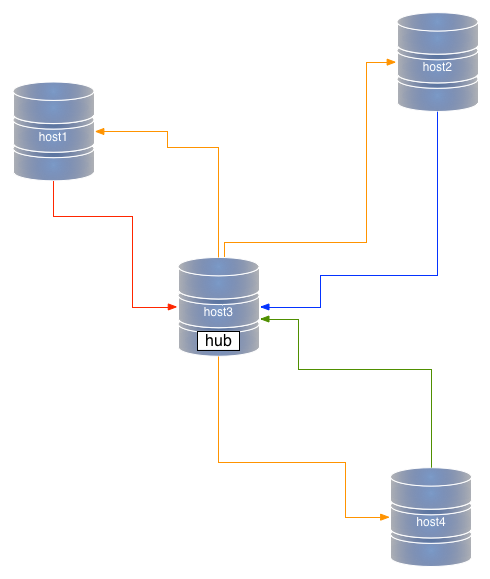
One of such cases is a star topology, where you have many master nodes, which are connected to each other through a hub. You can consider it a bi-directional master/slave. If you take a master/slave topology, and make every node able to replicate back to the master, then you have almost a star. To make it complete, you also need to add the ability of the master of broadcasting the changes received from the outside nodes, so that every node gets the changes from every other node. Compared to other popular topologies, say point-to-point all-masters, and circular replication, the star topology has the distinct advantage of requiring less connections, and of making it very easy to add a new node.

Star

Figure #1: Star topology

However, anyone can see immediately one disadvantage of the star topology: the hub is the cornerstone of the cluster. It’s a single point of failure (SPOF). If the hub fails, there is no replication anywhere. Period. Therefore, when you are considering a multi-master topology, you have to weigh in the advantages and disadvantages of the star, and usually you consider the SPOF as the most important element to consider.

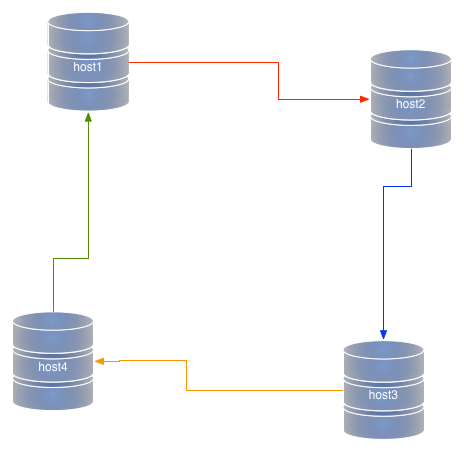
Depending on which technology you choose, though, there is also another important element to consider, i.e. that data must be replicated twice when you use a star topology. It’s mostly the same thing that happens in a circular replication. If you have nodes A, B, C, and D, and you write data in A, the data is replicated three times before it reaches D (A->B, B->C, and C->D). A star topology is similar. In a system where A, B, and D are terminal nodes, and C is the hub, data needs to travel twice before it reaches D (A->C, C->D). Circular replication

Figure #2: Circular replication

This double transfer is bad for two reasons: it affects performance, and it opens to the risk of unexpected transformations of data. Let’s explore this concept a bit. When we replicate data from a master to a slave, there is little risk of mischief. The data goes from the source to a reproducer. If we use row-based-replication, there is little risk of getting the wrong data in the slave. If we make the slave replicate to a further slave, we need to apply the data, generate a further binary log in the slave host, and replicate data from that second binary log. We can deal with that, but at the price of taking into account more details, like where the data came from, when to stop replicating in a loop, whether the data was created with a given configuration set, and so on. In short, if your slave server has been configured differently from the master, chances are that the data down the line may be different. In a star topology, this translates into the possibility of data in each spoke to be replicated correctly in the hub, but to be possibly different in the other spokes.

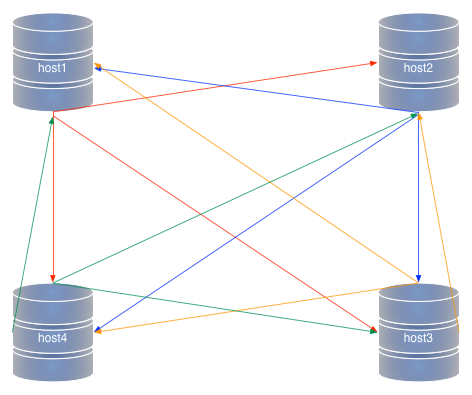
Compare this with a point-to-point all-masters. In this topology, there are no SPOFs. You pay for this privilege by having to set a higher number of connections between nodes (every node must connect to every other node), but there is no second hand replication. Before being applied to the slave service, the data is applied only once in the originating master.

Point to point all masters

Figure #2: Point-to-point all-masters topology

Where do I want to go from all the above points? I have reached the conclusion that, much as user like star topologies, because of their simplicity, I find myself often recommending the more complex but more solid point-t-point all-masters setup. Admittedly, the risk of data corruption is minimal. The real spoiler in most scenarios is performance. When users realize that the same load will flow effortlessly in a point-to-point scenario, but cause slave lags in a star topology, then the choice is easy to make. If you use row-based replication, and in a complex topology it is often a necessary requirement, the lag grows to a point where it becomes unbearable.

As I said in the beginning, all depends on the use case: if the data load is not too big, a star topology will run just as fine as point-to-point, and if the data flow is well designed, the risk of bad data transformation becomes negligible. Yet, the full extent of star topologies weaknesses must be taken into account when designing a new system. Sometimes, investing some effort into deploying a point-to-point all-masters topology pays off in the medium to long term. Of course, you can prove that only if you deploy a star and try it out with the same load. If you deploy it on a staging environment, no harm is done. If you deploy in production, then you may regret. In the end, it all boils down to my mantra: don’t trust the theory, but test, test, test.

Thursday, December 12, 2013

Quick and dirty concurrent operations from the shell

Let’s say that you want to measure something in your database, and for that you need several operations to happen in parallel. If you have a capable programming language at your disposal (Perl, Python, Ruby, PHP, or Java would fit the bill) you can code a test that sends several transactions in parallel.

But if all you have is the shell and the mysql client, things can be trickier. Today I needed such a parallel result, and I only had mysql and bash to accomplish the task.

In the shell, it’s easy to run a loop:

for N in $(seq 1 10)
do
    mysql -h host1 -e "insert into sometable values($N)" 
done

But this does run queries sequentially, and each session will open and close before the next one starts. Therefore there is no concurrency at all.
Then I thought that the method for parallel execution in the shell is to run things in the background, and then collect the results. I just needed to find a way of keeping the first session open while the others are being started.

Here’s what I did: I ran a loop with a countdown, using the seq command, and I included a sleep statement in each query, waiting for a decreasing amount of seconds. If I start with 10 seconds, the first query will sleep for 10 seconds, the second one for 9 seconds, and so on. I will run each command in the background, so they will eat up the time independently.

#!/bin/bash
mysql -h host1 test -e 'drop table if exists t1'
mysql -h host1 test -e 'create table t1 (i int not null primary key, ts timestamp)'

for N in $(seq 10 -1 1)
do
    query1="set autocommit=0"
    query2="insert into test.t1 (i) values($N)"
    query3="select sleep($N) into @a; commit"
    mysql -h host1 -e "$query1;$query2;$query3" &
done

wait

mysql -h host1 test -e 'select * from t1'

The effect of this small script is that the commit for these 10 commands come at the same time, as you can see from the resulting table:

+----+---------------------+
| i  | ts                  |
+----+---------------------+
|  1 | 2013-12-12 18:08:00 |
|  2 | 2013-12-12 18:08:00 |
|  3 | 2013-12-12 18:08:00 |
|  4 | 2013-12-12 18:08:00 |
|  5 | 2013-12-12 18:08:00 |
|  6 | 2013-12-12 18:08:00 |
|  7 | 2013-12-12 18:08:00 |
|  8 | 2013-12-12 18:08:00 |
|  9 | 2013-12-12 18:08:00 |
| 10 | 2013-12-12 18:08:00 |
+----+---------------------+

This is a very good result, but what happens if I need to run 500 queries simultaneously, instead of 10? I don’t want to wait 500 seconds (8+ minutes). So I made an improvement:

for N in $(seq 5000 -10 1)
do
    echo $N
    query1="set autocommit=0"
    query2="insert into test.t1 (i) values($N)"
    query3="select sleep(concat('0.', lpad($N,4,'0'))) into @a; commit"
    mysql -h host1 -e "$query1;$query2;$query3" &
done

Now each SLEEP command is called with a fractional argument, starting at “0.5000”, and continuing with “0.4999,” and so on. You can try it. All 500 rows are committed at the same time.

However, the same time is a bit fuzzy. When we use timestamps with second granularity, it’s quite easy to show the same time. But with microseconds it’s a different story. Here’s what happens if I use MySQL 5.6 with timestamp columns using microseconds (TIMESTAMP(3)):

+----+-------------------------+
| i  | ts                      |
+----+-------------------------+
|  1 | 2013-12-12 18:27:24.070 |
|  2 | 2013-12-12 18:27:24.070 |
|  3 | 2013-12-12 18:27:24.069 |
|  4 | 2013-12-12 18:27:24.068 |
|  5 | 2013-12-12 18:27:24.065 |
|  6 | 2013-12-12 18:27:24.066 |
|  7 | 2013-12-12 18:27:24.062 |
|  8 | 2013-12-12 18:27:24.064 |
|  9 | 2013-12-12 18:27:24.064 |
| 10 | 2013-12-12 18:27:24.064 |
+----+-------------------------+

For the purpose of my tests (the actual queries were different) this is not an issue. Your mileage may vary.

Monday, December 09, 2013

Old and new MySQL verbosity

I was pleased to see Morgan’s announcement about a fix to an old problem of mine. In March 2012 I complained about MySQL verbosity during installation.

In MySQL 5.7.3, this behavior was changed. While the default is still as loud as it can, you can now add an option (log_error_verbosity) to send only errors to STDERR, which allows you to hide the output of mysql_install_db, and still get the errors, if they occur.

Well done!

However, the same obnoxious verbosity is also in MariaDB 10.0.x. Since I discussed this specific bug with a few MariaDB developers early in 2012, I was disappointed to see this same output when running mysql_install_db with MariaDB. Here’s the same appeal: MariaDB developers, please fix this usability issue!

And now, for the laughing notes. All versions of MySQL available now, from Oracle, Percona, MariaDB, list this line when installing with mysql_install_db:

Please report any problems with the './scripts/mysqlbug' script!

There is Bug#29716 that was reported in 2008, about mysqlbug being unnecessary (by then, it had been obsolete for 2 or 3 years already), with a patch submitted but not committed. So, in 2013, we still see a reference to a tool that has ceased working for at least 8 years. It should not take much to remove this line and replace it with an appropriate link to the bugs system.

Sunday, December 08, 2013

Submissions at Percona Live Santa Clara 2014 and Lightning talks

The call for participation at Percona Live MySQL Conference and Expo 2014 is now closed. There have been more than 320 submissions, and this will keep the review committee busy for a while.

One important point for everyone who has submitted: if you have submitted a proposal but haven’t included a bio in your account, do it now. If you don’t, your chances of being taken seriously are greatly reduced. To add a bio, go to your account page and fill in the Biography field. Including a picture is not mandatory, but it will be definitely appreciated.

Although the CfP is closed for tutorials and regular sessions, your chances of becoming a celebrity are not over yet. The CfP is still open for Lightning talks and Bird of a Feather sessions.

If you want to submit a lightning talk, you still have time until the end of January. Don’t forget to read the instructions and remember that lightning talks don’t give you a free pass, but a healthy 20% discount.

So far, I have received 16 proposals. Of these, 6 have been rated highly enough to guarantee acceptance (including mine, for which I have not voted.) We still have 6 spots to fill (12 spots in total, 5 minutes each,) and I’d rather fill them with talks that appeal to everyone in the committee, than scrap the barrel of the mediocre ones. My unofficial goal is to have so many good submissions that I will have to withdraw my own talk. Thus, the potential number of available spots is 7. Please kick my talk off stage, by submitting outstanding proposals!

Friday, November 15, 2013

Parallel replication: off by one

One of the most common errors in development is where a loop or a retrieval by index falls short or long by one unit, usually because of an oversight or a logic in coding.

Of the following snippets, which one will run 10 times?

/* #1 */    for (N = 0 ; N < 10; N++) printf("%d\n", N);

/* #2 */    for (N = 0 ; N <= 10; N++) printf("%d\n", N); 

/* #3 */    for (N = 1 ; N <= 10; N++) printf("%d\n", N);

/* #4 */    for (N = 1 ; N < 10; N++) printf("%d\n", N);

The question is deceptive, as there are two snippets that will run 10 times (1 and 3). But they will print different numbers. If you ware aiming for numbers from 1 to 10, only #3 is good.

After many years of programming, off-by-one errors are rare in my code, and I have been able to spot them or prevent them at first sight. That’s why I feel uneasy when I look at the way parallel replication is enabled in MySQL 5.6,5.7 and MariaDB 10.0.5. In both cases, there is a variable that sets the number of replication threads:

set global slave_parallel_workers=5 in MySQL
set global slave_parallel_threads=5 in mariadb

Yet, for both implementations, you can set the number of threads to 1, and it is not the same as disabling parallel replication.

set global slave_parallel_workers=1 in MySQL
set global slave_parallel_threads=1 in mariadb

It will run parallel replication with one thread, meaning that you will have all the overhead of parallel replication with none of the benefits. Not only that, but replication actually slows down. The extra channel reduces performance by 7% in MariaDB and 10% in MySQL.

Now for the punch line. In Tungsten-Replicator, to disable parallel replication you set the number of channels to 1 (the intuitive value). If you set it to 0, the setup fails, as it should, since there would be no replication without channels. The reason for the fit is that in Tungsten, parallel replication was designed around the core functionality, while in MySQl and MariaDB it is an added feature that struggles to be integrated.

Wednesday, November 13, 2013

Call for papers (with lightning talks): Percona Live MySQL Conference 2014

The call for participation for Percona Live MySQL Conference 2014 is still open. As part of the review committee, I will be looking at the proposals, and I hope to see many interesting ones.

There is a novelty in the submission form. In addition to tutorials and regular sessions, now you can submit proposals for lightning talks, to which I am particularly interested, as I have organized the lightning talks in the past two editions, and I am in charge to continue the tradition for the next one.

If you want to be a speaker at the conference, here are some tips to get your proposal accepted:

  • Propose a topic that you know well;
  • Take some time to write a well thought and meaningful proposal: nothing gets me faster to the rejection button than statements like “I want to talk about X, I will think of something to say”;
  • Write your proposal with the attendees in mind, i.e. giving information that will make them want to see your presentation;
  • But also write with the committee in mind. There is a space for private messages to the reviewers. Use it wisely if there is something that we need to know.
  • Mind your buzzwords. I am not easily impressed by fashionable topics. Back your proposal with sound reasoning. Don’t assume that I, or anyone in the committee, see things your way, or the way they are reported in the press.
  • Check your spelling. Another way of getting rejected quickly is when you misspell the topic you claim to be an expert of.
  • And check your spelling again. If you miss the difference between “know its shit” and “know it’s shit,” I am less inclined to approve.
  • Write a sensible bio. We need to know who are you and what you do, to see if your story is compatible with your proposal.
  • Write enough to make your proposal clear. A proposal that is shorter than your bio will raise a red flag. But do not write too much. You are writing a proposal, not an article on the matter. If you have written an interesting article on the topic, give us an URL.

Regarding the lightning talks, I have some more recommendations.

  • A lightning talk last 5 minutes maximum. Don’t propose a topic that cannot be exhausted in that timeframe.
  • An accepted lightning talk does not give you a free pass (unless you are also accepted as speaker for a regular talk). You will be given a code to register at a 15% discount.
  • You should propose something that it is either highly interesting, or surprising, or entertaining, or all the above: the lightning talks are a show.
  • Be daring in your proposals. While a regular talk might be refused if you propose to sing the InnoDB settings, a LT on this topic could be seen as legitimate (but you must demonstrate that you can do it!)
  • Convince me (specifically, as I will be choosing the talks accepted by the committee) that you want to be on stage and have the abilities for the show.
  • Be prepared to show your slides earlier than usual. As the organizer, I need to make sure that you have something meaningful to show before sending you on stage.
  • Be aware of the rules:
    • All slides will be loaded into a single computer, to minimize delays between talks;
    • Someone (probably me) will nag the speakers until they either surrender their slides or escape to Mexico;
    • All speakers will meet 15 minutes before the start, and be given the presentation order. Missing speakers will be replaced by reserve speakers;
    • The speaker will have 5 minutes to deliver the talk.
    • When one minute is left, there will be a light sound to remind of the remaining time.
    • When 10 seconds are left, most likely the audience will start chanting the countdown.
    • When the time is finished, the speaker must leave the podium to the next one.

If you have reached this point, you are ready to submit a proposal!

See also:

Friday, October 11, 2013

Tungsten Replicator Filters: A trove of golden secrets unveiled

UPDATE: This post is obsolete, for most of the URLs referenced here have been removed by the contents owner.


Since I joined the company in late 2010, I have known that one of the strong points of Tungsten Replicator is its ability of setting filters. The amazing capabilities offered by Tungsten filters cannot be fully grasped unless we explain how stage replication works.

There are several default stages in the replication stream. Every stage has an extraction task and an apply task. The extraction task will get data from the previous step repository and the apply task will save the data to the next repository, which can be either a temporary storage (memory queue, THL file) or the final destination (slave database server). Consider that the architecture allows developers to add stages, and you will appreciate its full power. For every stage, we can insert one or more filter between the two tasks. This architecture gives us ample freedom to design our pipelines.


Tungsten Replication stages

What’s more interesting, filters in Tungsten can be of two types:

  • built-in filters, written in Java, which require users to compile and build the software before the filter is available;
  • Javascript filters, which can do almost everything the built-in scripts can do, but don’t require recompiling. All you need is deploy the filter in the appropriate folder, and run a tpm command to install or update the replicator.

The Tungsten team has developed a large number of filters, either to achieve general purpose pipeline control (such as renaming objects, excluding or including schemas and tables from replication) or filters providing very specific tasks that were needed to meet customer requirements or to help implementing heterogeneous pipelines (such as converting ENUM and SET columns to strings, dropping UPDATE and DELETE events, normalize DDL, etc). There are 23 built-in and 18 Javascript filters available. They were largely undocumented, or sparsely documented in the code. Now, thanks to my colleague MC Brown, Continuent director of documentation, the treasure is there for the taking.

Tungsten filters are a beautiful feature to explore, but also a powerful tool for users with special needs who want to create their own customized pipeline. A word of warning, though. Filters are powerful and sometimes fun to implement and use, but they don’t come free. There are two main things to keep in mind:

  • Using more than one filter for the same stage may result in performance loss. The amount of performance loss depends on the stage and on your systems resources. For example if your replication weakest point is data transfer across the network, adding two or three filters to this stage (remote-to-thl) will make things worse. If you can apply the filter to the previous or next stages, you may achieve your purpose without many side effects. As always, the advice is: “test, benchmark, repeat.”
  • Filters that alter data (such as exclude schemas or table, drop events) will make the slave unsuitable for promotion. You should always ask yourself if the filter may make the slave a lousy master, and if it does, make sure you have at least another slave that is replicating without filters.

As a final parting thought, be aware that yours truly and the above-mentioned MC Brown will be speaking at Percona Live London 2013, with a full, take-no-prisoners, 6 hours long complete Tungsten Replicator tutorial, where we will cover filters and give some explosive and sensational examples.

Wednesday, October 09, 2013

Speaking at the MySQL NoSQL & Cloud Conference & Expo in Buenos Aires

I am on my way to Argentina, where I will be speaking at the MySQL NoSQL & Cloud Conference & Expo.

I have two talks: one on my pet project MySQL Sandbox and one on replication between MySQL and MongoDB (using another project dear to me, Tungsten Replicator.

It’s my first visit to Argentina and I will try to look around a bit before the conference. And I look forward to see many ex colleagues and well known speakers at the conference. The lineup includes speakers from Percona, EffectiveMySQL, PalominoDB, MariaDB, SkySQL, Tokutek, and OpenStack.

I am looking forward to this trip. My presentation on MongoDB replication is a first for me, and I am always pleased when I can break new ground. I have the feeling that the networking is going to be more exciting than the sessions.

If you are in Buenos Aires, come to the conference and say hi!

Thursday, September 26, 2013

Forking MySQL/ for how long can forks keep up?

  • Fact: MySQL 5.6 was released as GA in February 2013
  • Fact: MySQL 5.6 has been available with its complete set of features since September 2012
  • Fact: On September 21st, Oracle has released MySQL 5.7.2, which is the de facto major release after MySQL 5.6 (5.7.1 was just a token “we’re-still-in-business” release).
  • Fact: As of today, there is no GA-ready fork of MySQL 5.6.

Percona Server is still in RC state, while MariaDB, with its runaway version 10, is still in alpha state. Of these releases, Percona Server seems the one in the better shape. Their problem was to adapt Percona Server to the enhanced codebase for 5.6, and the merging problems were bigger than the ones encountered in 5.1 and 5.5. Percona Server is a business oriented fork. It includes specific features for performance and manageability, things that users are asking for, and things that make Percona professional services easier to carry out.

Much different is the case of MariaDB. Their feature set is wider and hard to categorize globally. It includes some features that enhance performance (block commit, subquery optimization) but also plenty of features that are included only because nobody else wanted to touch them. In my experience, adding features to a project does not make it more stable, as the MySQL team knows well, with its disastrous experience with version 6.0, which was aborted after two years of alpha. MariaDB is in a state where they are adding lots of stuff to their code base, while merging selected pieces from MySQL 5.6. It could be a recipe for success or disaster. User experience will tell.

Up to MySQL 5.5, MariaDB has kept itself completely compatible with MySQL, with the goal of being a drop-in replacement. With the capriciously numbered version 10, that promise of compatibility has been broken. Most of the features introduced in MySQL 5.6 have not been included in MariaDB 10. Some of them have been rewritten with a completely different approach. As a result, MariaDb 10 lacks some of MySQL 5.6 features (parallel replication, for example) while showing some that are not in the upstream project (multi-source replication). The design of GTID has been started from scratch, and surely will make interoperability really hard (if not downright impossible) between the two projects.

Looking at the status of the projects, it seems that the MySQL team at Oracle has produced so many changes, that keeping up with it, even in terms of simple patch merging, is a heavy task. Where does it leave us, the community users? We have the choice between using the latest and greatest from Oracle, or waiting for the next latest and greatest from one of the forks. Percona Server seems to be on the final path of a less-than-easy catch-up, but MariaDB is farther away. And even if it releases a GA soon, it will find itself in a situation where merging changes from Oracle is going to be tougher and tougher. It may mean that performance enhancements from mainstream MySQL will take months (or years) to reach MariaDB. Users willing to benefit from the latest improvements will choose between Oracle MySQL and (with some delay) Percona Server. MariaDB will need to either do some sort of cherry-picking from Oracle releases or implement its own improvements. Can they compete with the 200 strong engineering team at Oracle? It’s going to be a tough proposition.

Given the above facts, how is it that we hear of big players like Red Hat and Google announcing that they will adopt MariaDB instead of Oracle’s MySQL? Since I could not find a sensible technical reason, I am forced to conclude that the choice has been political. Both Red Hat and Google have been entangled in commercial competition, and sometimes in court. Yet, choosing software for non-technical reason looks foolish to me.

Summing up: Oracle is releasing a steady stream of improvement for MySQL. This shows a high level of commitment that does not play well with what the doomsayers have been announcing for the past 4 years. So far, facts are contradicting that FUD. Forks are lagging behind. Some more than others.

Disclaimer: The above thoughts are my own, and don’t reflect the opinions of my employer or other companies.

Tuesday, September 24, 2013

MySQL 5.7.2 : Good job Oracle! (Well, almost)

On September 21st, during the opening keynote at MySQL Connect 2013, Tomas Ulin disclosed the release of MySQL 5.7.2. This is a milestone release that includes several new features. Unlike the Previous one, which was just a point of pride, where Oracle was stating its continuous commitment to releasing new versions of MySQL. In MySQL 5.7.2, we see several new features:

  • First and foremost, performance. The announcement slides say MySQL 5.7.2 is 95% faster than MySQL 5.6 and 172% faster than MySQL 5.5. I don’t know yet in which circumstances these numbers hold true, but I am sure someone at Percona will soon prove or disprove the claim.
  • Performance Schema tables for several aspects:
    • Memory usage
    • Stored programs and Events pre-filtering
    • Replication tables. You can have all the information that you get from SHOW SLAVE STATUS, and then some more, in nicely organized tables. Regrettably, there is no corresponding table or tables for SHOW MASTER STATUS. This is a feature that I did ask for long time ago (7 1/2 years, to be precise) and I had great expectations. Now the feature comes, sort of crippled. Without a table for the contents of SHOW MASTER STATUS, there is no good monitoring system that can be implemented.
  • There is now a different method for parallel replication. Instead of splitting the threads by schema, the parallelization can be defined by using a logical clock, which uses information stored by the master, telling the slaves when it is safe to run threads in parallel.
  • More flexibility with Semi-synchronous replication
  • You can now have more than one trigger per table per each action. The CREATE TRIGGER syntax now include a “trigger_order” clause that allows you to define in which sequence your triggers will run;
  • EXPLAIN FOR CONNECTION will let you run an explain statement for an already running query.

There are other news and improvements, and they are all listed in the Release notes, and What’s new in MySQL 5.7. Two minor changes that did not make the news, and yet, they mean a lot for end user experience:

  • The Verbosity of the bootstrap which filled the screen (and the error log) with useless trivia that made the users lose track of the real errors, has been greatly reduced. Now you only see warnings and errors. Thank you, MySQL team!
  • The test suite now uses InnoDB as default storage engine. This means that a lot of possible errors that could have been overlooked will now be caught by the test suite. Next step will be to use InnoDB for the grant tables, but there does not seem to be a set goal for this.

What else is there? The MySQL Labs now list several experimental features for MySQL 5.7.2. These are features that did not make the cut for the milestone, and are still in a less reliable state. Most notable among them is a build that offers multi source replication. I need to test it more before I can hazard some deeper judgment. For now, I am impressed by the amount of work produced.

Some disappointment comes from the realization that many of the shortcomings found in MySQL 5.6 are still there. SOme of them have been reduced of eliminated by the new performance schema tables, but the bulk of what I noticed in MySQL 5.6 is still there with the same limitations. I will come back to this topic with a deeper analysis of the new features.

Friday, August 30, 2013

Shi...pment happens - Tungsten Replicator 2.1.2

It was just a few days ago that we announced, with celebratory enthusiasm, Tungsten Replicator 2.1.1, and today we are at it again, with Tungsten Replicator 2.1.2.

What happened? In a surfeit of overconfidence, we released Tungsten 2.1.1, with faith on the test suite and its result. The faith was justified, as the test suite was able to catch any known problem and regression. The overconfidence was unjustified, because, due to a series of unfortunate events, some sections of the test suite were accidentally disabled, and the regression that was lurking in the dark was not caught.

Therefore, instead of having a quiet post-release week-end, the whole team has worked round the clock to plug the holes. There were two bugs that actually broke the tests (when we put the suite in good order, that is):

We came out of the exercise with the embarrassing bugs fixed, a few more found in the process, and a much improved test suite, which now checks itself to make sure that nothing is missing, and everything that should be tested was actually tested. While the bugs were fixed over the week-end, we spent three more days just testing the release with all the firepower we could muster.

The test suite has grown quite a while during the past years. The first version of the suite, 2+ years ago, ran in about 15 minutes. We have been adding steadily to the tests, and now the full set of tests (when none of it gets accidentally switched off, that is) requires about 12 hours. Now we feel much better about the release. All I wrote about Tungsten Replicator 2.1.1 is also good for Tungsten 2.1.2, so I encourage all to give it a try.

As a further lesson learned, from now on we’re going to publish a release candidate a few weeks before blessing a build as GA. The labels in the downloads page tell which stage of readiness each build is.

Wednesday, August 21, 2013

Tungsten-Replicator 2.1.1 with better installation and built-in security


UPDATE 2013-08-30: Tungsten 2.1.2 was released.

UPDATE 2013-08-23: We have found a few problems that happen when replicating with RBR and temporal columns. We will have to publish an updated bugfix release quite soon.

Tungsten Replicator 2.1.1 is out. Key features in this release are:

  • A better installer, of which we have already given a preview in tpm, the multi-master composer. The new installer allows faster and more powerful deployments of both single and multiple masters topologies. And it also allows the next feature:
  • Secured communication layer. Now the replicator data and administrative messages can be encrypted with SSL across nodes. The security layer, once installed, is transparent. All replication features will keep working as before, and the encryption is independent from the database. In fact, heterogeneous replication (e.g. MySQL to MongoDB, Oracle to MySQL, etc) can use it just as easily as MySQL to MySQL replication.
  • Full support for MySQL 5.6 binary log improvements. Now you can have the best of two worlds, running MySQL 5.6 enhanced performance, and Tungsten advanced replication features, without compromises. Due to this improvement, we also have the first change in our transport layer (the Transaction History Logs, or THL) since we released parallel replication. This means that a full cluster upgrade is needed (first slaves, and then masters) if you want to use the new release.

For more information on Tungsten Replicator 2.1.1, see the Release notes.

What does this mean for the common user? Let’s see what you can experience, when installing Tungsten Replicator 2.1.1

$ tar -xzf tungsten-replicator-2.1.1-230.tar.gz
$ cd tungsten-replicator-2.1.1-230
$ export VERBOSE=1
$ ./cookbook/install_master_slave
## -------------------------------------------------------------------------------------
## Installation with deprecated method will resume in 30 seconds - Hit CTRL+C now to abort
## -------------------------------------------------------------------------------------
## WARNING: INSTALLATION WITH tungsten-installer and configure-service IS DEPRECATED
## Future versions of Tungsten Cookbook will only support tpm-based installations
## To install with tpm, please set the variable 'USE_TPM' and start again
## -------------------------------------------------------------------------------------
....5....^C

Installation with tungsten-installer, which has been used until now, is still available, but it is deprecated. We want to encourage everyone to use tpm, as we will stop supporting tungsten-installer from the next release (2.1.2).

The main reason for using tpm instead of tungsten-installer, is that you can now install with security. The Tungsten manual has an extensive section on how to create security certificates. If you are not used to this kind of tasks, you may get discouraged from the very beginning, as you will need to create two key stores, one encrypted password store, and one file with JMX access rules. Tungsten Cookbook to the rescue! It will be enough to state our intention to install using tpm, with security enabled, and the cookbook script will generate the needed files for you.

$ export USE_TPM=1
$ export WITH_SECURITY=1
$ ./cookbook/install_master_slave
Certificate stored in file </home/tungsten/tinstall/tungsten-replicator-2.1.1-230/cookbook/client.cer>
Certificate was added to keystore
[Storing /home/tungsten/tinstall/tungsten-replicator-2.1.1-230/cookbook/truststore.ts]
Using parameters:
-----------------
password_file.location   = /home/tungsten/tinstall/tungsten-replicator-2.1.1-230/cookbook/passwords.store
encrypted.password   = true
truststore.location      = /home/tungsten/tinstall/tungsten-replicator-2.1.1-230/cookbook/truststore.ts
truststore.password      = cookbookpass
-----------------
Creating non existing file: /home/tungsten/tinstall/tungsten-replicator-2.1.1-230/cookbook/passwords.store
User created successfuly: cookbook
Using parameters:
-----------------
password_file.location   = /home/tungsten/tinstall/tungsten-replicator-2.1.1-230/cookbook/passwords.store
encrypted.password   = true
truststore.location      = /home/tungsten/tinstall/tungsten-replicator-2.1.1-230/cookbook/truststore.ts
truststore.password      = cookbookpass
-----------------
User created successfuly: cookbook
# ---------------------------------------------------------------------
# Options for tpm
\
--thl-ssl=true \
--rmi-ssl=true \
--rmi-authentication=true \
--rmi-user=cookbook \
--java-keystore-password=cookbookpass \
--java-truststore-password=cookbookpass \
--java-truststore-path=/home/tungsten/tinstall/tungsten-replicator-2.1.1-230/cookbook/truststore.ts \
--java-keystore-path=/home/tungsten/tinstall/tungsten-replicator-2.1.1-230/cookbook/keystore.jks \
--java-jmxremote-access-path=/home/tungsten/tinstall/tungsten-replicator-2.1.1-230/cookbook/jmxremote.access \
--java-passwordstore-path=/home/tungsten/tinstall/tungsten-replicator-2.1.1-230/cookbook/passwords.store
# ---------------------------------------------------------------------

Next, you will see the complete installation command using tpm, and the cluster will be built as smoothly as it would be without the security additions.

Notice that the paths that you see on the screen are created dynamically. Once installed, the security files will be deployed in a standard location, which will be easily picked up when you need to upgrade.

The difference that you will notice about the secure deployment is only in a few small differences. When using the cookbook tools, you will see a ssl label next to each secured node:

$ ./cookbook/show_cluster
--------------------------------------------------------------------------------------
Topology: 'MASTER_SLAVE'
--------------------------------------------------------------------------------------
# node host1 (ssl)
cookbook  [master]  seqno:          0  - latency:   0.681 - ONLINE
# node host2 (ssl)
cookbook  [slave]   seqno:          0  - latency:   1.397 - ONLINE
# node host3 (ssl)
cookbook  [slave]   seqno:          0  - latency:   1.683 - ONLINE
# node host4 (ssl)
cookbook  [slave]   seqno:          0  - latency:   1.684 - ONLINE

When using the traditional tools, you will notice one tiny difference in the master URI:

Processing status command...
NAME                     VALUE
----                     -----
appliedLastEventId     : mysql-bin.000008:0000000000000427;0
appliedLastSeqno       : 0
appliedLatency         : 0.681
channels               : 1
clusterName            : cookbook
currentEventId         : mysql-bin.000008:0000000000000427
currentTimeMillis      : 1377091602039
dataServerHost         : host1
extensions             :
latestEpochNumber      : 0
masterConnectUri       : thls://localhost:/    
masterListenUri        : thls://host1:2112/    
maximumStoredSeqNo     : 0
minimumStoredSeqNo     : 0
offlineRequests        : NONE
pendingError           : NONE
pendingErrorCode       : NONE
pendingErrorEventId    : NONE
pendingErrorSeqno      : -1
pendingExceptionMessage: NONE
pipelineSource         : /var/lib/mysql
relativeLatency        : 656.039
resourcePrecedence     : 99
rmiPort                : 10000
role                   : master
seqnoType              : java.lang.Long
serviceName            : cookbook
serviceType            : local
simpleServiceName      : cookbook
siteName               : default
sourceId               : host1
state                  : ONLINE
timeInStateSeconds     : 655.552
transitioningTo        :
uptimeSeconds          : 656.431
version                : Tungsten Replicator 2.1.1 build 230
Finished status command...

Instead of thl:// you see thls://. That’s the indication that the replicators are communicating using a SSL channel.

The same procedure works for multi-master and heterogeneous topologies. In fact, the very same mechanism is used in our commercial product, Continuent Tungsten, where it is installed using the same tools and the same tpm options.

For existing deployments we have a manual page dedicated to Upgrading from tungsten-installer to tpm-based installation. If you are a cookbook user, try

./cookbook/upgrade

There is a live webinar covering many Tungsten-Replicator 2.1.1 features. It is free, on Thursday, August 22nd, at 10am PT.

.