Showing posts with label multi-source. Show all posts

Tuesday, April 02, 2019

dbdeployer cookbook - Advanced techniques

In the previous post about the dbdeployer recipes we saw the basics of using the cookbook command and the simpler tutorials that the recipes offer.

Here we will see some more advanced techniques, and more demanding examples.


We saw that the recipe for a single deployment would get a NOTFOUND when no versions were available, or the highest MySQL version when one was found.

$ dbdeployer cookbook  show single | grep version=
version=$1
[ -z "$version" ] && version=8.0.16

But what if we want the latest Percona Server or MariaDB for this recipe? One solution would be to run the script with an argument, but we can ask dbdeployer to find the most recent version for a given flavor and use it in our recipe:

$ dbdeployer cookbook  show single --flavor=percona | grep version=
version=$1
[ -z "$version" ] && version=ps8.0.15

$ dbdeployer cookbook  show single --flavor=pxc | grep version=
version=$1
[ -z "$version" ] && version=pxc5.7.25

$ dbdeployer cookbook  show single --flavor=mariadb | grep version=
version=$1
[ -z "$version" ] && version=ma10.4.3

This works for all the recipes that don’t require a given flavor. When one is indicated (see dbdeployer cookbook list) you can override it using --flavor, but do that at your own risk. Running the ndb recipe using pxc flavor won’t produce anything usable.


Replication between sandboxes

When I proposed dbdeployer support for NDB, the immediate reaction was that this was good to test cluster-to-cluster replication. Although I did plenty of such topologies in one of my previous jobs, I had limited experience replicating between single or composite sandboxes. Thus, I started thinking about how to do it. In the old MySQL-Sandbox, I had an option --slaveof that allowed a single sandbox to replicate from an existing one. I did not implement the same thing in dbdeployer, because that solution looked limited, and only useful in a few scenarios.

I wanted something more dynamic, and initially I thought of creating a grandiose scheme, involving custom templates and user-defined fillers. While I may end up doing that some day, I quickly realized that it was overkill for this purpose, and that the sandboxes had already all the information needed to replicate from and to every other sandbox. I just had to expose the data in such a way that it can be used to plug one sandbox to the other.

Now every sandbox has a script named replicate_from, and a companion script called metadata. Using a combination of the two (in fact, replicate_from on the would-be replica calls metadata from the donor) we can quickly define the replication command needed for most situations.


Replication between single sandboxes

Before we tackle the most complex one, let’s demonstrate that the system works with a simple case.

There is a recipe named replication_between_single that creates a file named, aptly, ./recipes/replication-between-single.sh.

If you run it, you will see something similar to the following:

$ ./recipes/replication-between-single.sh  5.7.25
+ dbdeployer deploy single 5.7.25 --master --gtid --sandbox-directory=msb_5_7_25_1 --port-as-server-id
Database installed in $HOME/sandboxes/msb_5_7_25_1
run 'dbdeployer usage single' for basic instructions'
. sandbox server started
0
+ dbdeployer deploy single 5.7.25 --master --gtid --sandbox-directory=msb_5_7_25_2 --port-as-server-id
Database installed in $HOME/sandboxes/msb_5_7_25_2
run 'dbdeployer usage single' for basic instructions'
. sandbox server started
0
+ dbdeployer sandboxes --full-info
.--------------.--------.---------.---------------.--------.-------.--------.
|     name     |  type  | version |     ports     | flavor | nodes | locked |
+--------------+--------+---------+---------------+--------+-------+--------+
| msb_5_7_25_1 | single | 5.7.25  | [5725 ]       | mysql  |     0 |        |
| msb_5_7_25_2 | single | 5.7.25  | [5726 ]       | mysql  |     0 |        |
'--------------'--------'---------'---------------'--------'-------'--------'
0
+ $HOME/sandboxes/msb_5_7_25_1/replicate_from msb_5_7_25_2
Connecting to $HOME/sandboxes/msb_5_7_25_2
--------------
CHANGE MASTER TO master_host="127.0.0.1",
master_port=5726,
master_user="rsandbox",
master_password="rsandbox"
, master_log_file="mysql-bin.000001", master_log_pos=4089
--------------

--------------
start slave
--------------

              Master_Log_File: mysql-bin.000001
          Read_Master_Log_Pos: 4089
             Slave_IO_Running: Yes
            Slave_SQL_Running: Yes
          Exec_Master_Log_Pos: 4089
           Retrieved_Gtid_Set:
            Executed_Gtid_Set: 00005725-0000-0000-0000-000000005725:1-16
                Auto_Position: 0
0
# Inserting data in msb_5_7_25_2
+ $HOME/sandboxes/msb_5_7_25_2/use -e 'create table if not exists test.t1 (id int not null primary key, server_id int )'
+ $HOME/sandboxes/msb_5_7_25_2/use -e 'insert into test.t1 values (1, @@server_id)'
# Retrieving data from msb_5_7_25_1
+ $HOME/sandboxes/msb_5_7_25_1/use -e 'select *, @@port from test.t1'
+----+-----------+--------+
| id | server_id | @@port |
+----+-----------+--------+
|  1 |      5726 |   5725 |
+----+-----------+--------+

The script deploys two sandboxes of the chosen version, using different directory names (dbdeployer takes care of choosing a free port) and then starts replication between the two using $SANDBOX1/replicate_from $SANDBOX2. Then a quick test shows that the data created in a sandbox can be retrieved in the other.


Replication between group replication clusters

The method used to replicate between two group replications is similar to the one seen for single sandboxes. The script replicate_from on the group top directory delegates the replication task to its first node, which points to the second group.

$ ./recipes/replication-between-groups.sh  5.7.25
+ dbdeployer deploy replication 5.7.25 --topology=group --concurrent --port-as-server-id --sandbox-directory=group_5_7_25_1
[...]
+ dbdeployer deploy replication 5.7.25 --topology=group --concurrent --port-as-server-id --sandbox-directory=group_5_7_25_2
[...]
+ dbdeployer sandboxes --full-info
.----------------.---------------------.---------.----------------------------------------.--------.-------.--------.
|      name      |        type         | version |                 ports                  | flavor | nodes | locked |
+----------------+---------------------+---------+----------------------------------------+--------+-------+--------+
| group_5_7_25_1 | group-multi-primary | 5.7.25  | [20226 20351 20227 20352 20228 20353 ] | mysql  |     3 |        |
| group_5_7_25_2 | group-multi-primary | 5.7.25  | [20229 20354 20230 20355 20231 20356 ] | mysql  |     3 |        |
'----------------'---------------------'---------'----------------------------------------'--------'-------'--------'
0
+ $HOME/sandboxes/group_5_7_25_1/replicate_from group_5_7_25_2
Connecting to $HOME/sandboxes/group_5_7_25_2/node1
--------------
CHANGE MASTER TO master_host="127.0.0.1",
master_port=20229,
master_user="rsandbox",
master_password="rsandbox"
, master_log_file="mysql-bin.000001", master_log_pos=1082
--------------

--------------
start slave
--------------

              Master_Log_File: mysql-bin.000001
          Read_Master_Log_Pos: 1082
             Slave_IO_Running: Yes
            Slave_SQL_Running: Yes
          Exec_Master_Log_Pos: 1082
           Retrieved_Gtid_Set:
            Executed_Gtid_Set: 00020225-bbbb-cccc-dddd-eeeeeeeeeeee:1-3
                Auto_Position: 0
0
# Inserting data in group_5_7_25_2 node1
+ $HOME/sandboxes/group_5_7_25_2/n1 -e 'create table if not exists test.t1 (id int not null primary key, server_id int )'
+ $HOME/sandboxes/group_5_7_25_2/n1 -e 'insert into test.t1 values (1, @@server_id)'
# Retrieving data from one of group_5_7_25_1 nodes
# At this point, the data was replicated twice
+ $HOME/sandboxes/group_5_7_25_1/n2 -e 'select *, @@port from test.t1'
+----+-----------+--------+
| id | server_id | @@port |
+----+-----------+--------+
|  1 |     20229 |  20227 |
+----+-----------+--------+

The interesting thing about this recipe is that the sandboxes are created using the option --port-as-server-id. While it was used also in the replication between single sandboxes as an excess of caution, in this recipe, and in all the recipes involving compound sandboxes, it is a necessity, as the replication would fail if primary and replica servers have the same server_id.

All the work is done by the replicate_from script, which knows how to check whether the target is a single sandbox or a composite one, and where to find the primary server.

Using a similar method, we can run more recipes on the same tune.


Replication between different things

I won’t reproduce the output of all recipes here. I will just mention what every recipe needs to prepare to ensure a positive outcome.

  • Replication between NDB clusters. Nothing special here, except making sure to use a MySQL Cluster tarball. If you don’t dbdeployer will detect it and refuse the installation. For the rest, it’s like replication between groups.
  • Replication between master/slave. This is a bit trickier, because the replication data comes to a master, and if we want to propagate to its slaves we need to activate log-slave-update. The recipe shows how to do it.
  • Replication between group and master/slave. In addition to the trick mentioned in the previous recipe, we need to make sure that the master/slave deployment is using GTID.
  • Replication between master/slave and group. See the previous one.
  • Replication between group and single (and vice versa). We just need to make sure the single sandbox has GTID enabled.

Replication between different versions

This is a simple recipe that comes from a feature request. All you need to do is make sure that the version on the master is lower than the one on the slaves. The recipe script replication-multi-versions.sh, looks for tarballs of 5.6, 5.7, and 8.0, but you can start it using three versions that you’d like. For example:

./recipes/replication-multi-versions.sh 5.7.23 5.7.24 5.7.25

The first version will be used as the master.


Circular replication

I didn’t want to do this, as I consider ring replication to be weak and difficult to handle. I stated that much in the feature request and in the list of dbdeployer features. But then I saw that with the latest enhancements it was so easy, that I had to at least make a recipe for it. And then you have it. recipes/circular-replication.sh does what it promises, but the burden of maintenance is still on the user’s shoulders. I suggest looking at it, and then forgetting it.


Upgrade from MySQL 5.5 to 8.0 (through 5.6 and 5.7)

This is one of the most advanced recipes. To enjoy it, you need to have expanded tarballs from 5.5, 5.6, 5.7, and 8.0.

Provided that you do, running this script will do the following:

  1. deploy MySQL 5.5
  2. Create a table upgrade_log and insert some data.
  3. deploy MySQL 5.6
  4. run mysql_upgrade (through dbdeployer)
  5. Add data to the log table
  6. deploy MySQL 5.7
  7. run mysql_upgrade again
  8. add data to the log table
  9. deploy MySQL 8.0
  10. run mysql_upgrade for the last time
  11. Show the data from the table

Here’s a full transcript of the operation. It’s interesting to see how the upgrade procedure has changed from older versions to current ones.


$ ./recipes/upgrade.sh

# ****************************************************************************
# Upgrading from 5.5.53 to 5.6.41
# ****************************************************************************
+ dbdeployer deploy single 5.5.53 --master
Database installed in $HOME/sandboxes/msb_5_5_53
run 'dbdeployer usage single' for basic instructions'
.. sandbox server started
0
+ dbdeployer deploy single 5.6.41 --master
Database installed in $HOME/sandboxes/msb_5_6_41
run 'dbdeployer usage single' for basic instructions'
. sandbox server started
0
+ $HOME/sandboxes/msb_5_5_53/use -e 'CREATE TABLE IF NOT EXISTS test.upgrade_log(id int not null auto_increment primary key, server_id int, vers varchar(50), urole varchar(20), ts timestamp)'
+ $HOME/sandboxes/msb_5_5_53/use -e 'INSERT INTO test.upgrade_log (server_id, vers, urole) VALUES (@@server_id, @@version, '\''original'\'')'
+ dbdeployer admin upgrade msb_5_5_53 msb_5_6_41
stop $HOME/sandboxes/msb_5_5_53
stop $HOME/sandboxes/msb_5_6_41
Data directory msb_5_5_53/data moved to msb_5_6_41/data
. sandbox server started
Looking for 'mysql' as: $HOME/opt/mysql/5.6.41/bin/mysql
Looking for 'mysqlcheck' as: $HOME/opt/mysql/5.6.41/bin/mysqlcheck
Running 'mysqlcheck' with connection arguments: '--port=5641' '--socket=/var/folders/rz/cn7hvgzd1dl5y23l378dsf_c0000gn/T/mysql_sandbox5641.sock'
mysql.columns_priv                                 OK
mysql.db                                           OK
mysql.event                                        OK
mysql.func                                         OK
mysql.general_log                                  OK
mysql.help_category                                OK
mysql.help_keyword                                 OK
mysql.help_relation                                OK
mysql.help_topic                                   OK
mysql.host                                         OK
mysql.ndb_binlog_index                             OK
mysql.plugin                                       OK
mysql.proc                                         OK
mysql.procs_priv                                   OK
mysql.proxies_priv                                 OK
mysql.servers                                      OK
mysql.slow_log                                     OK
mysql.tables_priv                                  OK
mysql.time_zone                                    OK
mysql.time_zone_leap_second                        OK
mysql.time_zone_name                               OK
mysql.time_zone_transition                         OK
mysql.time_zone_transition_type                    OK
mysql.user                                         OK
Running 'mysql_fix_privilege_tables'...
Running 'mysqlcheck' with connection arguments: '--port=5641' '--socket=/var/folders/rz/cn7hvgzd1dl5y23l378dsf_c0000gn/T/mysql_sandbox5641.sock'
test.upgrade_log                                   OK
OK

The data directory from msb_5_6_41/data is preserved in msb_5_6_41/data-msb_5_6_41
The data directory from msb_5_5_53/data is now used in msb_5_6_41/data
msb_5_5_53 is not operational and can be deleted
+ dbdeployer delete msb_5_5_53
List of deployed sandboxes:
$HOME/sandboxes/msb_5_5_53
Running $HOME/sandboxes/msb_5_5_53/stop
Running rm -rf $HOME/sandboxes/msb_5_5_53
Directory $HOME/sandboxes/msb_5_5_53 deleted
+ $HOME/sandboxes/msb_5_6_41/use -e 'INSERT INTO test.upgrade_log (server_id, vers, urole) VALUES (@@server_id, @@version, '\''upgraded'\'')'
+ $HOME/sandboxes/msb_5_6_41/use -e 'SELECT * FROM test.upgrade_log'
+----+-----------+------------+----------+---------------------+
| id | server_id | vers       | urole    | ts                  |
+----+-----------+------------+----------+---------------------+
|  1 |      5553 | 5.5.53-log | original | 2019-04-01 20:27:38 |
|  2 |      5641 | 5.6.41-log | upgraded | 2019-04-01 20:27:46 |
+----+-----------+------------+----------+---------------------+

# ****************************************************************************
# The upgraded database is now upgrading from 5.6.41 to 5.7.25
# ****************************************************************************
+ dbdeployer deploy single 5.7.25 --master
Database installed in $HOME/sandboxes/msb_5_7_25
run 'dbdeployer usage single' for basic instructions'
. sandbox server started
0
+ $HOME/sandboxes/msb_5_6_41/use -e 'CREATE TABLE IF NOT EXISTS test.upgrade_log(id int not null auto_increment primary key, server_id int, vers varchar(50), urole varchar(20), ts timestamp)'
+ $HOME/sandboxes/msb_5_6_41/use -e 'INSERT INTO test.upgrade_log (server_id, vers, urole) VALUES (@@server_id, @@version, '\''original'\'')'
+ dbdeployer admin upgrade msb_5_6_41 msb_5_7_25
stop $HOME/sandboxes/msb_5_6_41
stop $HOME/sandboxes/msb_5_7_25
Data directory msb_5_6_41/data moved to msb_5_7_25/data
.. sandbox server started
Checking if update is needed.
Checking server version.
Running queries to upgrade MySQL server.
Checking system database.
mysql.columns_priv                                 OK
mysql.db                                           OK
mysql.engine_cost                                  OK
mysql.event                                        OK
mysql.func                                         OK
mysql.general_log                                  OK
mysql.gtid_executed                                OK
mysql.help_category                                OK
mysql.help_keyword                                 OK
mysql.help_relation                                OK
mysql.help_topic                                   OK
mysql.host                                         OK
mysql.innodb_index_stats                           OK
mysql.innodb_table_stats                           OK
mysql.ndb_binlog_index                             OK
mysql.plugin                                       OK
mysql.proc                                         OK
mysql.procs_priv                                   OK
mysql.proxies_priv                                 OK
mysql.server_cost                                  OK
mysql.servers                                      OK
mysql.slave_master_info                            OK
mysql.slave_relay_log_info                         OK
mysql.slave_worker_info                            OK
mysql.slow_log                                     OK
mysql.tables_priv                                  OK
mysql.time_zone                                    OK
mysql.time_zone_leap_second                        OK
mysql.time_zone_name                               OK
mysql.time_zone_transition                         OK
mysql.time_zone_transition_type                    OK
mysql.user                                         OK
Upgrading the sys schema.
Checking databases.
sys.sys_config                                     OK
test.upgrade_log
error    : Table rebuild required. Please do "ALTER TABLE `upgrade_log` FORCE" or dump/reload to fix it!

Repairing tables
`test`.`upgrade_log`
Running  : ALTER TABLE `test`.`upgrade_log` FORCE
status   : OK
Upgrade process completed successfully.
Checking if update is needed.

The data directory from msb_5_7_25/data is preserved in msb_5_7_25/data-msb_5_7_25
The data directory from msb_5_6_41/data is now used in msb_5_7_25/data
msb_5_6_41 is not operational and can be deleted
+ dbdeployer delete msb_5_6_41
List of deployed sandboxes:
$HOME/sandboxes/msb_5_6_41
Running $HOME/sandboxes/msb_5_6_41/stop
Running rm -rf $HOME/sandboxes/msb_5_6_41
Directory $HOME/sandboxes/msb_5_6_41 deleted
+ $HOME/sandboxes/msb_5_7_25/use -e 'INSERT INTO test.upgrade_log (server_id, vers, urole) VALUES (@@server_id, @@version, '\''upgraded'\'')'
+ $HOME/sandboxes/msb_5_7_25/use -e 'SELECT * FROM test.upgrade_log'
+----+-----------+------------+----------+---------------------+
| id | server_id | vers       | urole    | ts                  |
+----+-----------+------------+----------+---------------------+
|  1 |      5553 | 5.5.53-log | original | 2019-04-01 20:27:38 |
|  2 |      5641 | 5.6.41-log | upgraded | 2019-04-01 20:27:46 |
|  3 |      5641 | 5.6.41-log | original | 2019-04-01 20:27:51 |
|  4 |      5725 | 5.7.25-log | upgraded | 2019-04-01 20:28:01 |
+----+-----------+------------+----------+---------------------+

# ****************************************************************************
# The further upgraded database is now upgrading from 5.7.25 to 8.0.15
# ****************************************************************************
+ dbdeployer deploy single 8.0.15 --master
Database installed in $HOME/sandboxes/msb_8_0_15
run 'dbdeployer usage single' for basic instructions'
.. sandbox server started
0
+ $HOME/sandboxes/msb_5_7_25/use -e 'CREATE TABLE IF NOT EXISTS test.upgrade_log(id int not null auto_increment primary key, server_id int, vers varchar(50), urole varchar(20), ts timestamp)'
+ $HOME/sandboxes/msb_5_7_25/use -e 'INSERT INTO test.upgrade_log (server_id, vers, urole) VALUES (@@server_id, @@version, '\''original'\'')'
+ dbdeployer admin upgrade msb_5_7_25 msb_8_0_15
stop $HOME/sandboxes/msb_5_7_25
Attempting normal termination --- kill -15 10357
stop $HOME/sandboxes/msb_8_0_15
Data directory msb_5_7_25/data moved to msb_8_0_15/data
... sandbox server started
Checking if update is needed.
Checking server version.
Running queries to upgrade MySQL server.
Upgrading system table data.
Checking system database.
mysql.columns_priv                                 OK
mysql.component                                    OK
mysql.db                                           OK
mysql.default_roles                                OK
mysql.engine_cost                                  OK
mysql.func                                         OK
mysql.general_log                                  OK
mysql.global_grants                                OK
mysql.gtid_executed                                OK
mysql.help_category                                OK
mysql.help_keyword                                 OK
mysql.help_relation                                OK
mysql.help_topic                                   OK
mysql.host                                         OK
mysql.innodb_index_stats                           OK
mysql.innodb_table_stats                           OK
mysql.ndb_binlog_index                             OK
mysql.password_history                             OK
mysql.plugin                                       OK
mysql.procs_priv                                   OK
mysql.proxies_priv                                 OK
mysql.role_edges                                   OK
mysql.server_cost                                  OK
mysql.servers                                      OK
mysql.slave_master_info                            OK
mysql.slave_relay_log_info                         OK
mysql.slave_worker_info                            OK
mysql.slow_log                                     OK
mysql.tables_priv                                  OK
mysql.time_zone                                    OK
mysql.time_zone_leap_second                        OK
mysql.time_zone_name                               OK
mysql.time_zone_transition                         OK
mysql.time_zone_transition_type                    OK
mysql.user                                         OK
Found outdated sys schema version 1.5.1.
Upgrading the sys schema.
Checking databases.
sys.sys_config                                     OK
test.upgrade_log                                   OK
Upgrade process completed successfully.
Checking if update is needed.

The data directory from msb_8_0_15/data is preserved in msb_8_0_15/data-msb_8_0_15
The data directory from msb_5_7_25/data is now used in msb_8_0_15/data
msb_5_7_25 is not operational and can be deleted
+ dbdeployer delete msb_5_7_25
List of deployed sandboxes:
$HOME/sandboxes/msb_5_7_25
Running $HOME/sandboxes/msb_5_7_25/stop
Running rm -rf $HOME/sandboxes/msb_5_7_25
Directory $HOME/sandboxes/msb_5_7_25 deleted
+ $HOME/sandboxes/msb_8_0_15/use -e 'INSERT INTO test.upgrade_log (server_id, vers, urole) VALUES (@@server_id, @@version, '\''upgraded'\'')'
+ $HOME/sandboxes/msb_8_0_15/use -e 'SELECT * FROM test.upgrade_log'
+----+-----------+------------+----------+---------------------+
| id | server_id | vers       | urole    | ts                  |
+----+-----------+------------+----------+---------------------+
|  1 |      5553 | 5.5.53-log | original | 2019-04-01 20:27:38 |
|  2 |      5641 | 5.6.41-log | upgraded | 2019-04-01 20:27:46 |
|  3 |      5641 | 5.6.41-log | original | 2019-04-01 20:27:51 |
|  4 |      5725 | 5.7.25-log | upgraded | 2019-04-01 20:28:01 |
|  5 |      5725 | 5.7.25-log | original | 2019-04-01 20:28:07 |
|  6 |      8015 | 8.0.15     | upgraded | 2019-04-01 20:28:20 |
+----+-----------+------------+----------+---------------------+

What else can we do?

The replication recipes seen so far use the same principles. The method used in these recipes doesn’t work for all-masters and fan-in replication, because mixing named channels and nameless ones is not allowed. Also, there are things that don’t respond to replication commands at all, like TiDB. But it should be easy to enhance the current scripts (or to add some more specialized ones) that will include also these exceptions. Given the recent wave of collaboration, I expect it will happen relatively soon.

Monday, March 12, 2018

dbdeployer release candidate


The latest release of dbdeployer is possibly the last one with a leading 0. If no serious bugs are found in the next two weeks, the next release will bear a glorious 1.0.

Latest news

The decision to get out of the stream of pre-releases that were published until now comes because I have implemented all the features that I wanted to add: mainly, all the ones that I wished to add to MySQL-Sandbox but it would have been too hard:

The latest addition is the ability of running multi-source topologies. Now we can run four topologies:

  • master-slave is the default topology. It will install one master and two slaves. More slaves can be added with the option --nodes.
  • group will deploy three peer nodes in group replication. If you want to use a single primary deployment, add the option --single-primary. Available for MySQL 5.7 and later.
  • fan-in is the opposite of master-slave. Here we have one slave and several masters. This topology requires MySQL 5.7 or higher.
    all-masters is a special case of fan-in, where all nodes are masters and are also slaves of all nodes.

It is possible to tune the flow of data in multi-source topologies. The default for fan-in is three nodes, where 1 and 2 are masters, and 2 are slaves. You can change the predefined settings by providing the list of components:

$ dbdeployer deploy replication \
    --topology=fan-in \
    --nodes=5 \
    --master-list="1 2 3" \
    --slave-list="4 5" \
    8.0.4 \
    --concurrent

In the above example, we get 5 nodes instead of 3. The first three are master (--master-list="1 2 3") and the last two are slaves (--slave-list="4 5") which will receive data from all the masters. There is a test automatically generated to test replication flow. In our case it shows the following:

$ ~/sandboxes/fan_in_msb_8_0_4/test_replication
# master 1
# master 2
# master 3
# slave 4
ok - '3' == '3' - Slaves received tables from all masters
# slave 5
ok - '3' == '3' - Slaves received tables from all masters
# pass: 2
# fail: 0

The first three lines show that each master has done something. In our case, each master has created a different table. Slaves in nodes 5 and 6 then count how many tables they found, and if they got the tables from all masters, the test succeeds.
Note that for all-masters topology there is no need to specify master-list or slave-list. In fact, those lists will be auto-generated, and they will both include all deployed nodes.

What now?

Once I make sure that the current features are reasonably safe (I will only write more tests for the next 10~15 days) I will publish the first (non-pre) release of dbdeployer. From that moment, I'd like to follow the recommendations of the Semantic Versioning:

  • The initial version will be 1.0.0 (major, minor, revision);
  • The spects for 1.0 will be the API that needs to be maintained.
  • Bug fixes will increment the revision counter.
  • New features that don't break compatibility with the API will increment the minor counter;
  • New features or changes that break compatibility will trigger a major counter increment.

Using this method will give users a better idea of what to expect. If we get a revision number increase, it is only bug fixes. An increase in the minor counter means that there are new features, but all previous features work as before. An increase in the major counter means that something will break, either because of changed interface or because of changed behavior.
In practice, the tests released with 1.0.0 should run with any 1.x subsequent version. When those tests need changes to run correctly, we will need to bump up the major version.

Let's see if this method is sustainable. So far, I haven't had need to do behavioural changes, which are usually provoked by new versions of MySQL that introduce incompatible behavior (definitely MySQL does not follow the Semantic Versioning principles.) When the next version becomes available, I will see if this RC of dbdeployer can stand its ground.


Sunday, January 22, 2017

MySQL Group Replication vs. Multi Source

In my previous post, we saw the usage of MySQL Group Replication (MGR) in single-primary mode. We know that Oracle does not recommends using MGR in multi-primary mode, but there is so much in the documentation and in presentations about MGR behavior in multi-primary, that I feel I should really give it a try, and especially compare this technology with the already existing multiple master solution introduced in 5.7: multi-source replication.

Installation

To this extent, I will set up two clusters using MySQL-Sandbox. The instructions for MGR in the manual use three nodes in the same host without using MySQL Sandbox. Here we can see that using MySQL-Sandbox simplifies operations considerably (the scripts are available in GitHub):

Group replication

# ----------------------------------------------------------------------------
#!/bin/bash
# mm_gr.sh : installs MySQL Group Replication
MYSQL_VERSION=$1
[ -z "$MYSQL_VERSION" ] && MYSQL_VERSION=5.7.17

make_multiple_sandbox --gtid --group_directory=GR $MYSQL_VERSION

if [ "$?" != "0" ] ; then exit 1 ; fi
multi_sb=$HOME/sandboxes/GR
baseport=$($multi_sb/n1 -BN -e 'select @@port')
baseport=$(($baseport+99))

port1=$(($baseport+1))
port2=$(($baseport+2))
port3=$(($baseport+3))
for N in 1 2 3
do
    myport=$(($baseport+N))
    options=(
        binlog_checksum=NONE
        log_slave_updates=ON
        plugin-load=group_replication.so
        group_replication=FORCE_PLUS_PERMANENT
        group_replication_start_on_boot=OFF
        group_replication_bootstrap_group=OFF
        transaction_write_set_extraction=XXHASH64
        report-host=127.0.0.1
        loose-group_replication_group_name="aaaaaaaa-bbbb-cccc-dddd-eeeeeeeeeeee"
        loose-group_replication_local_address="127.0.0.1:$myport"
        loose-group_replication_group_seeds="127.0.0.1:$port1,127.0.0.1:$port2,127.0.0.1:$port3"
        loose-group-replication-single-primary-mode=off
    )
    $multi_sb/node$N/add_option ${options[*]}

    user_cmd='reset master;'
    user_cmd="$user_cmd CHANGE MASTER TO MASTER_USER='rsandbox', MASTER_PASSWORD='rsandbox' FOR CHANNEL 'group_replication_recovery';"
    $multi_sb/node$N/use -v -u root -e "$user_cmd"
done

START_CMD="SET GLOBAL group_replication_bootstrap_group=ON;"
START_CMD="$START_CMD START GROUP_REPLICATION;"
START_CMD="$START_CMD SET GLOBAL group_replication_bootstrap_group=OFF;"
$multi_sb/n1 -v -e "$START_CMD"
sleep 1
$multi_sb/n2 -v -e 'START GROUP_REPLICATION;'
sleep 1
$multi_sb/n3 -v -e 'START GROUP_REPLICATION;'
sleep 1
$multi_sb/use_all 'select * from performance_schema.replication_group_members'
# ----------------------------------------------------------------------------

Using this script, we get a cluster with MGR up and running. Here's a trimmed-out sample of its output:

$ ./mm_gr.sh
installing node 1
installing node 2
installing node 3
group directory installed in $HOME/sandboxes/GR
# option 'binlog_checksum=NONE' added to configuration file
# option 'log_slave_updates=ON' added to configuration file
# option 'plugin-load=group_replication.so' added to configuration file
# option 'group_replication=FORCE_PLUS_PERMANENT' added to configuration file
# option 'group_replication_start_on_boot=OFF' added to configuration file
# option 'group_replication_bootstrap_group=OFF' added to configuration file
# option 'transaction_write_set_extraction=XXHASH64' added to configuration file
# option 'loose-group_replication_group_name=aaaaaaaa-bbbb-cccc-dddd-eeeeeeeeeeee' added to configuration file
# option 'loose-group_replication_local_address=127.0.0.1:14518' added to configuration file
# option 'loose-group_replication_group_seeds=127.0.0.1:14518,127.0.0.1:14519,127.0.0.1:14520' added to configuration file
# option 'loose-group-replication-single-primary-mode=off' added to configuration file
.. sandbox server started
reset master
CHANGE MASTER TO MASTER_USER='rsandbox', MASTER_PASSWORD='rsandbox' FOR CHANNEL 'group_replication_recovery'

# [ ...]
.. sandbox server started
reset master
CHANGE MASTER TO MASTER_USER='rsandbox', MASTER_PASSWORD='rsandbox' FOR CHANNEL 'group_replication_recovery'

# [...]
.. sandbox server started
reset master
CHANGE MASTER TO MASTER_USER='rsandbox', MASTER_PASSWORD='rsandbox' FOR CHANNEL 'group_replication_recovery'

SET GLOBAL group_replication_bootstrap_group=ON
START GROUP_REPLICATION
SET GLOBAL group_replication_bootstrap_group=OFF
--------------

--------------
START GROUP_REPLICATION
--------------
START GROUP_REPLICATION
--------------

Multi-source replication

We have a similar (but much shorter) script to run multi-source replication in sandboxes.

# ----------------------------------------------------------------------------
#!/bin/bash
# mm_ms.sh : installs MySQL multi-source replication
MYSQL_VERSION=$1
[ -z "$MYSQL_VERSION" ] && MYSQL_VERSION=5.7.16

make_multiple_sandbox --gtid --group_directory=MS $MYSQL_VERSION

if [ "$?" != "0" ] ; then exit 1 ; fi
multi_sb=$HOME/sandboxes/MS

$multi_sb/use_all 'reset master'

for N in 1 2 3
do
    user_cmd=''
    for node in 1 2 3
    do
        if [ "$node" != "$N" ]
        then
            master_port=$($multi_sb/n$node -BN -e 'select @@port')
            user_cmd="$user_cmd CHANGE MASTER TO MASTER_USER='rsandbox', "
            user_cmd="$user_cmd MASTER_PASSWORD='rsandbox', master_host='127.0.0.1', "
            user_cmd="$user_cmd master_port=$master_port FOR CHANNEL 'node$node';"
            user_cmd="$user_cmd START SLAVE FOR CHANNEL 'node$node';"
        fi
    done
    $multi_sb/node$N/use -v -u root -e "$user_cmd"
done
# ----------------------------------------------------------------------------

Sample run:

$ ./mm_ms.sh
installing node 1
installing node 2
installing node 3
group directory installed in $HOME/sandboxes/MS
# server: 1:
# server: 2:
# server: 3:
--------------
CHANGE MASTER TO MASTER_USER='rsandbox',  MASTER_PASSWORD='rsandbox', master_host='127.0.0.1',  master_port=14318 FOR CHANNEL 'node2'
START SLAVE FOR CHANNEL 'node2'
CHANGE MASTER TO MASTER_USER='rsandbox',  MASTER_PASSWORD='rsandbox', master_host='127.0.0.1',  master_port=14319 FOR CHANNEL 'node3'
START SLAVE FOR CHANNEL 'node3'

--------------
CHANGE MASTER TO MASTER_USER='rsandbox',  MASTER_PASSWORD='rsandbox', master_host='127.0.0.1',  master_port=14317 FOR CHANNEL 'node1'
START SLAVE FOR CHANNEL 'node1'
CHANGE MASTER TO MASTER_USER='rsandbox',  MASTER_PASSWORD='rsandbox', master_host='127.0.0.1',  master_port=14319 FOR CHANNEL 'node3'
START SLAVE FOR CHANNEL 'node3'

--------------
CHANGE MASTER TO MASTER_USER='rsandbox',  MASTER_PASSWORD='rsandbox', master_host='127.0.0.1',  master_port=14317 FOR CHANNEL 'node1'
START SLAVE FOR CHANNEL 'node1'
CHANGE MASTER TO MASTER_USER='rsandbox',  MASTER_PASSWORD='rsandbox', master_host='127.0.0.1',  master_port=14318 FOR CHANNEL 'node2'
START SLAVE FOR CHANNEL 'node2'
--------------

Simple test data

Finally, we have a script that will create one table for each node and insert one record.


# ----------------------------------------------------------------------------     
#!/bin/bash
multi_sb=$1
if [ -z "$multi_sb" ]
then
    echo multiple sandbox path needed
    exit 1
fi
if [ ! -d $multi_sb ]
then
    echo directory $multi_sb not found
    exit 1
fi
if [ ! -d "$multi_sb/node3" ]
then
    echo directory $multi_sb/node3 not found
    exit 1
fi
cd $multi_sb

for N in  1 2 3 ; do
    ./n$N -e "create schema if not exists test"
    ./n$N -e "drop table if exists test.t$N"
    ./n$N -e "create table test.t$N(id int not null primary key, sid int)"
    ./n$N -e "insert into  test.t$N values ($N, @@server_id)"
done

./use_all 'select * from test.t1 union select * from test.t2 union select * from test.t3'
# ----------------------------------------------------------------------------

We run the script in both clusters, and at the end we'll have the test database with three tables, each one created and filled by a different node.

Checking replication status

The old topology: multi-source

Let's start with the the old technology, so we can easily compare it with the new one.

node1 [localhost] {msandbox} (performance_schema) > select * from replication_connection_status\G
*************************** 1. row ***************************
             CHANNEL_NAME: node2
               GROUP_NAME:
              SOURCE_UUID: 00014318-2222-2222-2222-222222222222   # ----
                THREAD_ID: 32
            SERVICE_STATE: ON
COUNT_RECEIVED_HEARTBEATS: 244
 LAST_HEARTBEAT_TIMESTAMP: 2017-01-22 13:31:54
 RECEIVED_TRANSACTION_SET: 00014318-2222-2222-2222-222222222222:1-4
        LAST_ERROR_NUMBER: 0
       LAST_ERROR_MESSAGE:
     LAST_ERROR_TIMESTAMP: 0000-00-00 00:00:00
*************************** 2. row ***************************
             CHANNEL_NAME: node3
               GROUP_NAME:
              SOURCE_UUID: 00014319-3333-3333-3333-333333333333   # ----
                THREAD_ID: 34
            SERVICE_STATE: ON
COUNT_RECEIVED_HEARTBEATS: 244
 LAST_HEARTBEAT_TIMESTAMP: 2017-01-22 13:31:55
 RECEIVED_TRANSACTION_SET: 00014319-3333-3333-3333-333333333333:1-4
        LAST_ERROR_NUMBER: 0
       LAST_ERROR_MESSAGE:
     LAST_ERROR_TIMESTAMP: 0000-00-00 00:00:00
2 rows in set (0.00 sec)

Notice that we are benefitting from a feature of MySQL-Sandbox that creates a more readable version of the server UUID. This way we can easily identify the nodes. Here we see that each transaction set has a clearly defined origin. We can see similar information in the replication tables from the mysql database:

node1 [localhost] {msandbox} (mysql) > select * from slave_master_info\G
*************************** 1. row ***************************
       Number_of_lines: 25
       Master_log_name: mysql-bin.000001
        Master_log_pos: 154
                  Host: 127.0.0.1       # ----
             User_name: rsandbox
         User_password: rsandbox
                  Port: 14318           # ----
         Connect_retry: 60
           Enabled_ssl: 0
Ssl_verify_server_cert: 0
             Heartbeat: 30
                  Bind:
    Ignored_server_ids: 0
                  Uuid: 00014318-2222-2222-2222-222222222222  # ----
           Retry_count: 86400
           Ssl_crlpath:
 Enabled_auto_position: 0
          Channel_name: node2
           Tls_version:
*************************** 2. row ***************************
       Number_of_lines: 25
       Master_log_name: mysql-bin.000001
        Master_log_pos: 154
                  Host: 127.0.0.1    # ----
             User_name: rsandbox
         User_password: rsandbox
                  Port: 14319        # ----
         Connect_retry: 60
           Enabled_ssl: 0
Ssl_verify_server_cert: 0
             Heartbeat: 30
                  Bind:
    Ignored_server_ids: 0
                  Uuid: 00014319-3333-3333-3333-333333333333  # ----
           Retry_count: 86400
           Ssl_crlpath:
 Enabled_auto_position: 0
          Channel_name: node3
           Tls_version:
2 rows in set (0.00 sec)

Additionally, we have SHOW SLAVE STATUS, which, although not the ideal monitoring tool, is still the only place where we can see at once both the received and executed transactions, and the corresponding binary log and relay log records.

Here's an abridged version:

node1 [localhost] {msandbox} (performance_schema) > SHOW SLAVE STATUS\G
*************************** 1. row ***************************
               Slave_IO_State: Waiting for master to send event
                  Master_Host: 127.0.0.1
                  Master_User: rsandbox
                  Master_Port: 14318
                Connect_Retry: 60
              Master_Log_File: mysql-bin.000001
          Read_Master_Log_Pos: 965
               Relay_Log_File: mysql-relay-node2.000002
                Relay_Log_Pos: 1178
        Relay_Master_Log_File: mysql-bin.000001
             Slave_IO_Running: Yes
            Slave_SQL_Running: Yes
          Exec_Master_Log_Pos: 965
              Relay_Log_Space: 1387
             Master_Server_Id: 102
                  Master_UUID: 00014318-2222-2222-2222-222222222222
             Master_Info_File: mysql.slave_master_info
      Slave_SQL_Running_State: Slave has read all relay log; waiting for more updates
           Master_Retry_Count: 86400
           Retrieved_Gtid_Set: 00014318-2222-2222-2222-222222222222:1-4
            Executed_Gtid_Set: 00014317-1111-1111-1111-111111111111:1-4,
00014318-2222-2222-2222-222222222222:1-4,
00014319-3333-3333-3333-333333333333:1-4
                 Channel_Name: node2
*************************** 2. row ***************************
               Slave_IO_State: Waiting for master to send event
                  Master_Host: 127.0.0.1
                  Master_User: rsandbox
                  Master_Port: 14319
                Connect_Retry: 60
              Master_Log_File: mysql-bin.000001
          Read_Master_Log_Pos: 965
               Relay_Log_File: mysql-relay-node3.000002
                Relay_Log_Pos: 1178
        Relay_Master_Log_File: mysql-bin.000001
             Slave_IO_Running: Yes
            Slave_SQL_Running: Yes
          Exec_Master_Log_Pos: 965
              Relay_Log_Space: 1387
              Until_Condition: None
             Master_Server_Id: 103
                  Master_UUID: 00014319-3333-3333-3333-333333333333
             Master_Info_File: mysql.slave_master_info
      Slave_SQL_Running_State: Slave has read all relay log; waiting for more updates
           Master_Retry_Count: 86400
           Retrieved_Gtid_Set: 00014319-3333-3333-3333-333333333333:1-4
            Executed_Gtid_Set: 00014317-1111-1111-1111-111111111111:1-4,
00014318-2222-2222-2222-222222222222:1-4,
00014319-3333-3333-3333-333333333333:1-4
                 Channel_Name: node3
2 rows in set (0.00 sec)

Finally, we'll have a look at the data itself:

node1 [localhost] {msandbox} (mysql) > show binlog events;
+------------------+-----+----------------+-----------+-------------+-------------------------------------------------------------------+
| Log_name         | Pos | Event_type     | Server_id | End_log_pos | Info                                                              |
+------------------+-----+----------------+-----------+-------------+-------------------------------------------------------------------+
| mysql-bin.000001 |   4 | Format_desc    |       101 |         123 | Server ver: 5.7.16-log, Binlog ver: 4                             |
| mysql-bin.000001 | 123 | Previous_gtids |       101 |         154 |                                                                   |
| mysql-bin.000001 | 154 | Gtid           |       101 |         219 | SET @@SESSION.GTID_NEXT= '00014317-1111-1111-1111-111111111111:1' |
| mysql-bin.000001 | 219 | Query          |       101 |         325 | create schema if not exists test                                  |
| mysql-bin.000001 | 325 | Gtid           |       101 |         390 | SET @@SESSION.GTID_NEXT= '00014317-1111-1111-1111-111111111111:2' |
| mysql-bin.000001 | 390 | Query          |       101 |         518 | DROP TABLE IF EXISTS `test`.`t1` /* generated by server */        |
| mysql-bin.000001 | 518 | Gtid           |       101 |         583 | SET @@SESSION.GTID_NEXT= '00014317-1111-1111-1111-111111111111:3' |
| mysql-bin.000001 | 583 | Query          |       101 |         711 | create table test.t1(id int not null primary key, sid int)        |
| mysql-bin.000001 | 711 | Gtid           |       101 |         776 | SET @@SESSION.GTID_NEXT= '00014317-1111-1111-1111-111111111111:4' |
| mysql-bin.000001 | 776 | Query          |       101 |         844 | BEGIN                                                             |
| mysql-bin.000001 | 844 | Table_map      |       101 |         890 | table_id: 108 (test.t1)                                           |
| mysql-bin.000001 | 890 | Write_rows     |       101 |         934 | table_id: 108 flags: STMT_END_F                                   |
| mysql-bin.000001 | 934 | Xid            |       101 |         965 | COMMIT /* xid=72 */                                               |
+------------------+-----+----------------+-----------+-------------+-------------------------------------------------------------------+
13 rows in set (0.00 sec)

The binary log contains only the data produced in this node.

The new topology: MGR

Turning to the new software, let's first check whether replication is working. An important note here: SHOW SLAVE STATUS is not available in MGR. That's not entirely true. The channel architecture used for multi-master has been hijacked to convey information about group problems. If something goes wrong during the setup, you will find the information in the groupreplicationrecovery channel.

node1 [localhost] {msandbox} (performance_schema) > SHOW SLAVE STATUS for channel 'group_replication_recovery';
Empty set (0.00 sec)

When things are fine, the tables in performance_schema report a satisfactory status:

node1 [localhost] {msandbox} (performance_schema) > select * from replication_group_members;
+---------------------------+--------------------------------------+-------------+-------------+--------------+
| CHANNEL_NAME              | MEMBER_ID                            | MEMBER_HOST | MEMBER_PORT | MEMBER_STATE |
+---------------------------+--------------------------------------+-------------+-------------+--------------+
| group_replication_applier | 00014418-1111-1111-1111-111111111111 | gmini       |       14418 | ONLINE       |
| group_replication_applier | 00014419-2222-2222-2222-222222222222 | gmini       |       14419 | ONLINE       |
| group_replication_applier | 00014420-3333-3333-3333-333333333333 | gmini       |       14420 | ONLINE       |
+---------------------------+--------------------------------------+-------------+-------------+--------------+

The above command tells us that all nodes are online.

Next, we ask what are the stats of the current member.

node1 [localhost] {msandbox} (performance_schema) > select * from replication_group_member_stats\G
*************************** 1. row ***************************
                      CHANNEL_NAME: group_replication_applier
                           VIEW_ID: 14850806532423012:3
                         MEMBER_ID: 00014418-1111-1111-1111-111111111111
       COUNT_TRANSACTIONS_IN_QUEUE: 0
        COUNT_TRANSACTIONS_CHECKED: 12
          COUNT_CONFLICTS_DETECTED: 0
COUNT_TRANSACTIONS_ROWS_VALIDATING: 0
TRANSACTIONS_COMMITTED_ALL_MEMBERS: aaaaaaaa-bbbb-cccc-dddd-eeeeeeeeeeee:1-7:1000003-1000006:2000003-2000006
    LAST_CONFLICT_FREE_TRANSACTION: aaaaaaaa-bbbb-cccc-dddd-eeeeeeeeeeee:2000006
1 row in set (0.00 sec)

The same operation from a different member will give a very similar result.

node2 [localhost] {msandbox} (performance_schema) > select * from replication_group_member_stats\G
*************************** 1. row ***************************
                      CHANNEL_NAME: group_replication_applier
                           VIEW_ID: 14850806532423012:3
                         MEMBER_ID: 00014419-2222-2222-2222-222222222222
       COUNT_TRANSACTIONS_IN_QUEUE: 0
        COUNT_TRANSACTIONS_CHECKED: 12
          COUNT_CONFLICTS_DETECTED: 0
COUNT_TRANSACTIONS_ROWS_VALIDATING: 0
TRANSACTIONS_COMMITTED_ALL_MEMBERS: aaaaaaaa-bbbb-cccc-dddd-eeeeeeeeeeee:1-7:1000003-1000006:2000003-2000006
    LAST_CONFLICT_FREE_TRANSACTION: aaaaaaaa-bbbb-cccc-dddd-eeeeeeeeeeee:2000006
1 row in set (0.00 sec)

Then, we check the more classical replication status:

node1 [localhost] {msandbox} (performance_schema) > select * from replication_connection_status\G
*************************** 1. row ***************************
             CHANNEL_NAME: group_replication_applier
               GROUP_NAME: aaaaaaaa-bbbb-cccc-dddd-eeeeeeeeeeee
              SOURCE_UUID: aaaaaaaa-bbbb-cccc-dddd-eeeeeeeeeeee    # ----
                THREAD_ID: NULL
            SERVICE_STATE: ON
COUNT_RECEIVED_HEARTBEATS: 0
 LAST_HEARTBEAT_TIMESTAMP: 0000-00-00 00:00:00
 RECEIVED_TRANSACTION_SET: aaaaaaaa-bbbb-cccc-dddd-eeeeeeeeeeee:1-7:1000003-1000006:2000003-2000006
        LAST_ERROR_NUMBER: 0
       LAST_ERROR_MESSAGE:
     LAST_ERROR_TIMESTAMP: 0000-00-00 00:00:00
1 row in set (0.00 sec)

There are a few things that strike the observer immediately:

  • As we saw in the single-primary topology, all transactions bear the UUID of the group, not of the server that generated them. While in single-primary mode this could be considered an asset, as it simplifies a failover procedure, in multi-primary mode I consider it to be a loss. We lose the knowledge of the transaction provenience. As you can see, the SOURCE_UUID field shows the group ID instead of the node.
  • The GTID numbers look odd. There is a set that stars at 1, another set that starts at 1 million, and a third one that starts at 2 million. What's going on? The answer is in the value of group_replication_gtid_assignment_block_size, which determines the block of values for each node. When the values in the block are exhausted, the node allocates another block. Someone could naively think that we could use this block to identify which node the data comes from, but this would be ultimately wrong for two reasons:
    • The blocks are assigned on a first-come-first-served basis. If we start operations in node 2, its transactions will bear the lowest numbers.
    • When the blocks are exhausted, the node starts a new block, meaning that with a busy cluster we will have hard time identifying which nodes uses which block.

If someone thought that we could get some more information from the replication tables in mysql, they are in for a disappointment:

node2 [localhost] {msandbox} (mysql) > select * from slave_master_info\G
*************************** 1. row ***************************
       Number_of_lines: 25
       Master_log_name:
        Master_log_pos: 4
                  Host: <NULL>            # ----
             User_name:
         User_password:
                  Port: 0                 # ----
         Connect_retry: 60
           Enabled_ssl: 0
Ssl_verify_server_cert: 0
             Heartbeat: 30
                  Bind:
    Ignored_server_ids: 0
                  Uuid:                   # ----
           Retry_count: 86400
 Enabled_auto_position: 1
          Channel_name: group_replication_applier
           Tls_version:
*************************** 2. row ***************************
       Number_of_lines: 25
       Master_log_name:
        Master_log_pos: 4
                  Host: <NULL>
             User_name: rsandbox
         User_password: rsandbox
                  Port: 0
         Connect_retry: 60
           Enabled_ssl: 0
Ssl_verify_server_cert: 0
             Heartbeat: 30
                  Bind:
    Ignored_server_ids: 0
                  Uuid:
           Retry_count: 1
 Enabled_auto_position: 1
          Channel_name: group_replication_recovery
           Tls_version:
2 rows in set (0.00 sec)

The table shows group operations rather than individual hosts connections. There is no origin information here.

Looking at the events, we will notice immediately some more differences.

node2 [localhost] {msandbox} (mysql) > show binlog events;
+------------------+------+----------------+-----------+-------------+-------------------------------------------------------------------------+
| Log_name         | Pos  | Event_type     | Server_id | End_log_pos | Info                                                                    |
+------------------+------+----------------+-----------+-------------+-------------------------------------------------------------------------+
| mysql-bin.000001 |    4 | Format_desc    |       102 |         123 | Server ver: 5.7.17-log, Binlog ver: 4                                   |
| mysql-bin.000001 |  123 | Previous_gtids |       102 |         150 |                                                                         |
| mysql-bin.000001 |  150 | Gtid           |       101 |         211 | SET @@SESSION.GTID_NEXT= 'aaaaaaaa-bbbb-cccc-dddd-eeeeeeeeeeee:1'       |
| mysql-bin.000001 |  211 | Query          |       101 |         270 | BEGIN                                                                   |
| mysql-bin.000001 |  270 | View_change    |       101 |         369 | view_id=14850806532423012:1                                             |
| mysql-bin.000001 |  369 | Query          |       101 |         434 | COMMIT                                                                  |
| mysql-bin.000001 |  434 | Gtid           |       101 |         495 | SET @@SESSION.GTID_NEXT= 'aaaaaaaa-bbbb-cccc-dddd-eeeeeeeeeeee:2'       |
| mysql-bin.000001 |  495 | Query          |       101 |         554 | BEGIN                                                                   |
| mysql-bin.000001 |  554 | View_change    |       101 |         693 | view_id=14850806532423012:2                                             |
| mysql-bin.000001 |  693 | Query          |       101 |         758 | COMMIT                                                                  |
| mysql-bin.000001 |  758 | Gtid           |       102 |         819 | SET @@SESSION.GTID_NEXT= 'aaaaaaaa-bbbb-cccc-dddd-eeeeeeeeeeee:3'       |
| mysql-bin.000001 |  819 | Query          |       102 |         878 | BEGIN                                                                   |
| mysql-bin.000001 |  878 | View_change    |       102 |        1017 | view_id=14850806532423012:3                                             |
| mysql-bin.000001 | 1017 | Query          |       102 |        1082 | COMMIT                                                                  |
| mysql-bin.000001 | 1082 | Gtid           |       101 |        1143 | SET @@SESSION.GTID_NEXT= 'aaaaaaaa-bbbb-cccc-dddd-eeeeeeeeeeee:4'       |
| mysql-bin.000001 | 1143 | Query          |       101 |        1250 | create schema if not exists test                                        |
| mysql-bin.000001 | 1250 | Gtid           |       101 |        1311 | SET @@SESSION.GTID_NEXT= 'aaaaaaaa-bbbb-cccc-dddd-eeeeeeeeeeee:5'       |
| mysql-bin.000001 | 1311 | Query          |       101 |        1440 | DROP TABLE IF EXISTS `test`.`t1` /* generated by server */              |
| mysql-bin.000001 | 1440 | Gtid           |       101 |        1501 | SET @@SESSION.GTID_NEXT= 'aaaaaaaa-bbbb-cccc-dddd-eeeeeeeeeeee:6'       |
| mysql-bin.000001 | 1501 | Query          |       101 |        1630 | create table test.t1(id int not null primary key, sid int)              |
| mysql-bin.000001 | 1630 | Gtid           |       101 |        1691 | SET @@SESSION.GTID_NEXT= 'aaaaaaaa-bbbb-cccc-dddd-eeeeeeeeeeee:7'       |
| mysql-bin.000001 | 1691 | Query          |       101 |        1755 | BEGIN                                                                   |
| mysql-bin.000001 | 1755 | Table_map      |       101 |        1797 | table_id: 219 (test.t1)                                                 |
| mysql-bin.000001 | 1797 | Write_rows     |       101 |        1837 | table_id: 219 flags: STMT_END_F                                         |
| mysql-bin.000001 | 1837 | Xid            |       101 |        1864 | COMMIT /* xid=51 */                                                     |
| mysql-bin.000001 | 1864 | Gtid           |       102 |        1925 | SET @@SESSION.GTID_NEXT= 'aaaaaaaa-bbbb-cccc-dddd-eeeeeeeeeeee:1000003' |
| mysql-bin.000001 | 1925 | Query          |       102 |        2032 | create schema if not exists test                                        |
| mysql-bin.000001 | 2032 | Gtid           |       102 |        2093 | SET @@SESSION.GTID_NEXT= 'aaaaaaaa-bbbb-cccc-dddd-eeeeeeeeeeee:1000004' |
| mysql-bin.000001 | 2093 | Query          |       102 |        2222 | DROP TABLE IF EXISTS `test`.`t2` /* generated by server */              |
| mysql-bin.000001 | 2222 | Gtid           |       102 |        2283 | SET @@SESSION.GTID_NEXT= 'aaaaaaaa-bbbb-cccc-dddd-eeeeeeeeeeee:1000005' |
| mysql-bin.000001 | 2283 | Query          |       102 |        2412 | create table test.t2(id int not null primary key, sid int)              |
| mysql-bin.000001 | 2412 | Gtid           |       102 |        2473 | SET @@SESSION.GTID_NEXT= 'aaaaaaaa-bbbb-cccc-dddd-eeeeeeeeeeee:1000006' |
| mysql-bin.000001 | 2473 | Query          |       102 |        2542 | BEGIN                                                                   |
| mysql-bin.000001 | 2542 | Table_map      |       102 |        2584 | table_id: 220 (test.t2)                                                 |
| mysql-bin.000001 | 2584 | Write_rows     |       102 |        2624 | table_id: 220 flags: STMT_END_F                                         |
| mysql-bin.000001 | 2624 | Xid            |       102 |        2651 | COMMIT /* xid=62 */                                                     |
| mysql-bin.000001 | 2651 | Gtid           |       103 |        2712 | SET @@SESSION.GTID_NEXT= 'aaaaaaaa-bbbb-cccc-dddd-eeeeeeeeeeee:2000003' |
| mysql-bin.000001 | 2712 | Query          |       103 |        2819 | create schema if not exists test                                        |
| mysql-bin.000001 | 2819 | Gtid           |       103 |        2880 | SET @@SESSION.GTID_NEXT= 'aaaaaaaa-bbbb-cccc-dddd-eeeeeeeeeeee:2000004' |
| mysql-bin.000001 | 2880 | Query          |       103 |        3009 | DROP TABLE IF EXISTS `test`.`t3` /* generated by server */              |
| mysql-bin.000001 | 3009 | Gtid           |       103 |        3070 | SET @@SESSION.GTID_NEXT= 'aaaaaaaa-bbbb-cccc-dddd-eeeeeeeeeeee:2000005' |
| mysql-bin.000001 | 3070 | Query          |       103 |        3199 | create table test.t3(id int not null primary key, sid int)              |
| mysql-bin.000001 | 3199 | Gtid           |       103 |        3260 | SET @@SESSION.GTID_NEXT= 'aaaaaaaa-bbbb-cccc-dddd-eeeeeeeeeeee:2000006' |
| mysql-bin.000001 | 3260 | Query          |       103 |        3324 | BEGIN                                                                   |
| mysql-bin.000001 | 3324 | Table_map      |       103 |        3366 | table_id: 221 (test.t3)                                                 |
| mysql-bin.000001 | 3366 | Write_rows     |       103 |        3406 | table_id: 221 flags: STMT_END_F                                         |
| mysql-bin.000001 | 3406 | Xid            |       103 |        3433 | COMMIT /* xid=68 */                                                     |
+------------------+------+----------------+-----------+-------------+-------------------------------------------------------------------------+
47 rows in set (0.00 sec)

Two important points:

  • All transaction IDs are assigned to the group, not to the node. The only way to see where the data is coming from is to look at the binary log itself and check the good old server-id. One wonders why we have come all this way with the ugly UUIDs in the global transaction identifier only to maim their usefulness by removing one of the most important feature, which is tracking the data origin.

For example:

# at 434
#170122 11:24:11 server id 101  end_log_pos 495         GTID    last_committed=1        sequence_number=2
SET @@SESSION.GTID_NEXT= 'aaaaaaaa-bbbb-cccc-dddd-eeeeeeeeeeee:2'/*!*/;
# at 495
#170122 11:24:11 server id 101  end_log_pos 554         Query   thread_id=7     exec_time=6     error_code=0
SET TIMESTAMP=1485080651/*!*/;
BEGIN
/*!*/;
  • Because log-slave-updates is mandatory, the binary log in every node will have all the transactions of every other node. This can have disagreeable side effects when dealing with large data. Here is an example when we load the sample employee database from node #1:

With Group Replication, the load takes 2 minutes and 16 seconds, and the binary logs have the same size in every node.

[GR]$ ls -lh node?/data/*bin*
-rw-r-----  1 gmax  staff   8.2K Jan 22 10:22 node1/data/mysql-bin.000001
-rw-r-----  1 gmax  staff    63M Jan 22 10:24 node1/data/mysql-bin.000002
-rw-r-----  1 gmax  staff    38B Jan 22 10:22 node1/data/mysql-bin.index

-rw-r-----  1 gmax  staff    63M Jan 22 10:24 node2/data/mysql-bin.000001
-rw-r-----  1 gmax  staff    19B Jan 22 10:12 node2/data/mysql-bin.index

-rw-r-----  1 gmax  staff    63M Jan 22 10:24 node3/data/mysql-bin.000001
-rw-r-----  1 gmax  staff    19B Jan 22 10:12 node3/data/mysql-bin.index

The same operation in multi-source replication takes 1 minute and 30 seconds. The binary logs are kept only in the origin.

[MS]$ ls -lh node?/data/*bin*
-rw-r-----  1 gmax  staff   4.9K Jan 22 10:26 node1/data/mysql-bin.000001
-rw-r-----  1 gmax  staff    63M Jan 22 10:27 node1/data/mysql-bin.000002
-rw-r-----  1 gmax  staff    38B Jan 22 10:26 node1/data/mysql-bin.index

-rw-r-----  1 gmax  staff   1.4K Jan 22 10:14 node2/data/mysql-bin.000001
-rw-r-----  1 gmax  staff    19B Jan 22 10:14 node2/data/mysql-bin.index

-rw-r-----  1 gmax  staff   1.4K Jan 22 10:14 node3/data/mysql-bin.000001
-rw-r-----  1 gmax  staff    19B Jan 22 10:14 node3/data/mysql-bin.index

Conflict resolution

One of the strong points of MGR is conflict resolution.

We can try a conflicting operations in two nodes, inserting the same data at the same time:

use test;
set autocommit=0;
insert into t2 values (3, @@server_id);
commit;

In multi source, we get a replication error, on both nodes. It's an ugly result, but it tells the user immediately that something went wrong in a given node, and doesn't let the error propagate to other nodes.

In MGR, the situation varies. This is a possible outcome:

node1 [localhost] {msandbox} (test) > set autocommit=0;                        |   node2 [localhost] {msandbox} (test) > set autocommit=0;
Query OK, 0 rows affected (0.00 sec)                                           |   Query OK, 0 rows affected (0.00 sec)
                                                                               |
node1 [localhost] {msandbox} (test) > insert into t2 values (3, @@server_id);  |   node2 [localhost] {msandbox} (test) > insert into t2 values (3, @@server_id);
Query OK, 1 row affected (0.00 sec)                                            |   Query OK, 1 row affected (0.00 sec)
                                                                               |
node1 [localhost] {msandbox} (test) > select * from t2;                        |   node2 [localhost] {msandbox} (test) > select * from t2;
+----+------+                                                                  |   +----+------+
| id | sid  |                                                                  |   | id | sid  |
+----+------+                                                                  |   +----+------+
|  2 |  102 |                                                                  |   |  2 |  102 |
|  3 |  101 |                                                                  |   |  3 |  102 |
+----+------+                                                                  |   +----+------+
2 rows in set (0.00 sec)                                                       |   2 rows in set (0.00 sec)
                                                                               |
node1 [localhost] {msandbox} (test) > commit;                                  |   node2 [localhost] {msandbox} (test) > commit;
Query OK, 0 rows affected (0.01 sec)                                           |   ERROR 3101 (HY000): Plugin instructed the server to rollback the current transaction.
                                                                               |   node2 [localhost] {msandbox} (test) > select * from t2;
 node1 [localhost] {msandbox} (test) > select * from t2;                       |   +----+------+
 +----+------+                                                                 |   | id | sid  |
 | id | sid  |                                                                 |   +----+------+
 +----+------+                                                                 |   |  2 |  102 |
 |  2 |  102 |                                                                 |   |  3 |  101 |
 |  3 |  101 |                                                                 |   +----+------+
 +----+------+                                                                 |   2 rows in set (0.00 sec)
 2 rows in set (0.00 sec)                                                      |

Here node # 2 got the transaction a fraction of second later, and its transaction was rolled back. Thus the transaction that was ultimately kept in the database was the one from node1 (server-id 101.) However, this behavior is not predictable. If we try the same operation again, we get a different outcome:

node1 [localhost] {msandbox} (test) > insert into t2 values (4, @@server_id);  |   node2 [localhost] {msandbox} (test) > insert into t2 values (4, @@server_id);
Query OK, 1 row affected (0.00 sec)                                            |   Query OK, 1 row affected (0.00 sec)
                                                                               |
node1 [localhost] {msandbox} (test) > select * from t2;                        |   node2 [localhost] {msandbox} (test) > select * from t2;
+----+------+                                                                  |   +----+------+
| id | sid  |                                                                  |   | id | sid  |
+----+------+                                                                  |   +----+------+
|  2 |  102 |                                                                  |   |  2 |  102 |
|  3 |  101 |                                                                  |   |  3 |  101 |
|  4 |  101 |                                                                  |   |  4 |  102 |
+----+------+                                                                  |   +----+------+
3 rows in set (0.00 sec)                                                       |   3 rows in set (0.00 sec)
                                                                               |
node1 [localhost] {msandbox} (test) > commit;                                  |   node2 [localhost] {msandbox} (test) > commit;
Query OK, 0 rows affected (0.01 sec)                                           |
ERROR 3101 (HY000): Plugin instructed the server to rollback                   |
the current transaction.                                                       |
node1 [localhost] {msandbox} (test) > select * from t2;                        |   node2 [localhost] {msandbox} (test) > select * from t2;
+----+------+                                                                  |   +----+------+
| id | sid  |                                                                  |   | id | sid  |
+----+------+                                                                  |   +----+------+
|  2 |  102 |                                                                  |   |  2 |  102 |
|  3 |  101 |                                                                  |   |  3 |  101 |
|  4 |  102 |                                                                  |   |  4 |  102 |
+----+------+                                                                  |   +----+------+
4 rows in set (0.00 sec)                                                       |   3 rows in set (0.00 sec)

In the second attempt, the transaction was rolled back by node 1, and the surviving one is the one that was inserted from node 2. This means that conflict resolution works, but it may not be what the user wants, as the resolved conflict if aleatory.

Summing up

On the plus side, MGR keeps what it promises. We can set up a cluster of peer nodes and replicate data between nodes with some advantages compared to older multi-source topologies.

On the minus side, the documentation could be vastly improved, especially for multi-primary setup. Moreover, users need to be aware of the limitations, such as serializable isolation level and foreign keys with constraints not being supported.

Most important from my standpoint is the reduction of monitoring information for this technology, namely the loss of information about the data origin.

Thursday, October 08, 2015

Sound advice for GTID, with caveats

During the PerconaLive conference in Amsterdam, I attended a session where I heard a good piece of advice about using GTID. It amounts to: look at SHOW SLAVE STATUS output, and if you see more than one line in the Executed_Gtid_Set field, this tells you immediately if someone has written on a slave database.
This is good advice. Let's dissect it. Here is what a regular slave looks like, when nobody has messed up with it:
SHOW SLAVE STATUS\G
*************************** 1. row ***************************
 [...]
             Master_Server_Id: 1
                  Master_UUID: 00013454-1111-1111-1111-111111111111
             Master_Info_File: mysql.slave_master_info
                    SQL_Delay: 0
          SQL_Remaining_Delay: NULL
      Slave_SQL_Running_State: Slave has read all relay log; waiting for more updates
           Master_Retry_Count: 86400
                  Master_Bind:
      Last_IO_Error_Timestamp:
     Last_SQL_Error_Timestamp:
               Master_SSL_Crl:
           Master_SSL_Crlpath:
           Retrieved_Gtid_Set: 00013454-1111-1111-1111-111111111111:1-12
            Executed_Gtid_Set: 00013454-1111-1111-1111-111111111111:1-12
                Auto_Position: 1
         Replicate_Rewrite_DB:
                 Channel_Name:
1 row in set (0.00 sec)
What you see here is a slave that has received transactions from a single source (Retrieved_Gtid_Set lists only one GTID set) and has applied data from a single source (also Executed_Gtid_Set shows a single item.)
Notice that this advice holds true even when the slave being considered is an intermediate one, i.e. a relay slave which is master of one or more slaves. Due to the nature of GTIDs, even though the intermediate slave is recording the transactions to its own binary log, the transaction identifier does not change. Thus you should see a clean set of transactions throughout the chain. For example, if you have another slave that is replicating from slave #2, you would see something like this:
SHOW SLAVE STATUS\G
*************************** 1. row ***************************
 [...]
             Master_Server_Id: 102
                  Master_UUID: 00013456-3333-3333-3333-333333333333
             Master_Info_File: mysql.slave_master_info
                    SQL_Delay: 0
          SQL_Remaining_Delay: NULL
      Slave_SQL_Running_State: Slave has read all relay log; waiting for more updates
           Master_Retry_Count: 86400
                  Master_Bind:
      Last_IO_Error_Timestamp:
     Last_SQL_Error_Timestamp:
               Master_SSL_Crl:
           Master_SSL_Crlpath:
           Retrieved_Gtid_Set: 00013454-1111-1111-1111-111111111111:1-12
            Executed_Gtid_Set: 00013454-1111-1111-1111-111111111111:1-12
                Auto_Position: 0
         Replicate_Rewrite_DB:
                 Channel_Name:

Monday, August 24, 2015

MySQL usability issues for replication

In my latest series of advanced replication features, I came across several usability issues, which I would like to recap here. For each section of this list of requests, I make a wish list, with some general comments.

INSTALLATION

As the maintainer of MySQL Sandbox, a tool that wants to facilitate the installation of MySQL for testing, I am particularly sensitive to the annoyances during installation. I have covered the matter extensively in recent weeks and many times before. My point is that the logging of the installation must be useful for the DBA, not to the MySQL developers.
  • Make a big distinction between [Info] and [Warning] messages. Warnings should only appear when there is some risk. Using a warning to tell the user that the InnoDB log file was created is a nonsense.
  • … and then make [Info] messages suppressible. Currently, I can suppress warnings, but then I would suppress also the real warnings, in addition to the fake ones.
  • Make mysqld –initialize use the correct syntax for timestamps, instead of issuing a warning about the obsolete syntax that was used. (See In search of cleanliness : the elusive quiet installation for a full explanation)

MULTI-SOURCE

Here we have two main problems. The first one is that the introduction of multi source channels has left some new ways of shooting yourself in the foot. By mixing the new explicitly named channels with the hidden one (but still used in regular replication!) which is named "" (= the empty string), we may start to see a new series of blunders in replication.
The second set of problems comes from weak integration between existing features and the new one. There are operation modes, such as semi-synchronous, delayed, and parallel replication that were designed with a single data stream in mind, and that lack the capability of being tuned for different channels.
  • Make it impossible to use the unnamed channel and the named ones at the same time. Currently only a very weak protection exists against mixing named and unnamed channels. Also the syntax for channel ’’ should result in an error when named channels are defined.
  • Integrate features that were designed for single sources to work better with multi source: semi-sync replication, parallel applier, delayed replication.

Wednesday, August 19, 2015

MySQL replication in action - Part 4 - star and hybrid topologies

Previous episodes:

Introducing star topology.

In all-masters P2P topologies, we have seen that we have a way of deploying a topology where all nodes are masters, and achieve better efficiency and stability than ring topologies. That method comes at the price of a complex setup, which requires, for a N-node cluster, N*(N-1) connections.
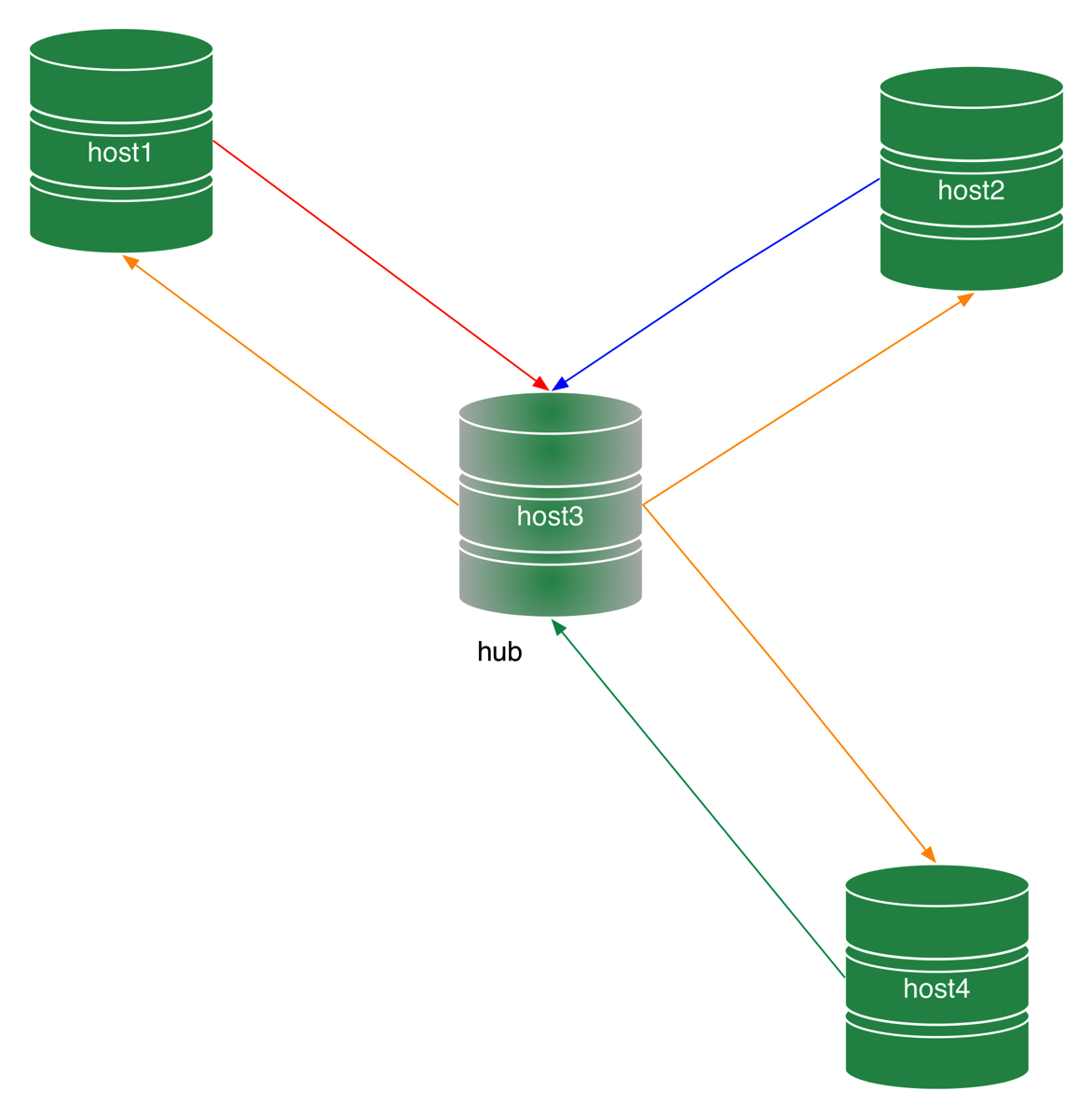
We can achieve the same result as in a P2P all-masters topology by trading connections for stability. In a star topology (Figure 1) all nodes are masters, but they do not connect to each other directly. There is a special node, named hub, which receives the changes produced by each endpoint and spreads them to the others.
Topologies star
Figure 1 - A star topology

Monday, August 17, 2015

MySQL replication in action - Part 3: all-masters P2P topology

Previous episodes:


In the previous article, we saw the basics of establishing replication from multiple origins to the same destination. By extending that concept, we can deploy more complex topologies, such as the point-to-point (P2P) all-masters topology, a robust and fast way of moving data.

Introduction to P2P all-masters topology

A P2P (Point-to-point) topology is a kind of deployment where replication happens in a single step from the producer to the consumers. For example, in a master/slave topology, replication from the master (producer) reaches every slave (consumer) in one step. This is simple P2P replication. If we use a hierarchical deployment, where every slave that is connected to the master is also replicating to one or more slaves, we will have a 2-step replication (Figure 1). Similarly, in circular replication, we have as many steps as the number of nodes minus one (Figure 2.)
Hierarchical master slave processing Figure 1 - Hierarchical replication depth of processing

Friday, August 14, 2015

MySQL replication in action - Part 2 - Fan-in topology


Introduction: where we stand

Previous episodes:

In the latest releases of MySQL and MariaDB we have seen several replication improvements. One of the most exciting additions is the ability to enhance basic replication with multiple sources. Those who have used replication for a while should remember that one of the tenets of the “old” replication was that a slave couldn’t have more than one master. This was The Law and there was no escape ... until now. The only way to work around that prohibition was to use circular replication, also known as ring replication, where each node is slave of the previous node and master of the next one.
Circular replication