Showing posts with label conflict. Show all posts

Sunday, January 15, 2017

MySQL group replication: installation with Docker

Overview

MySQL Group Replication was released as GA with MySQL 5.7.17. It is essentially a plugin that, when enabled, allows users to set replication with this new way.

There has been some confusion about the stability and usability of this release. Until recently, MySQL Group Replication (MGR) was only available in the Labs, which traditionally denotes a preview or an use-at-your-own-risk feature. Several months ago we saw the release of Group Replication as a Docker image, which allowed users to deploy a peer-to-peer cluster (every node is a master.) However, about one month after such release, word came from Oracle discouraging this setup, and inviting users to use Group Replicator in Single Primary mode which is functionally equivalent to traditional replication, with just some synchronous component more. There hasn't been an update of MGR for Docker since.

BTW, some more confusion came from the use of "synchronous replication" to refer to Group Replication operations. In reality, what in many presentations was called synchronous replication is only a synchronous transfer of binary logs data. The replication itself, i.e. the operation that makes a node able to retrieve the data inserted in the master, is completed asynchronously. Therefore, if you looked at MGR as a way of using multiple masters without conflicts, this is not the solution.

What we have is a way of replicating from a node that is the Primary in the group, with some features designed to facilitate high availability solutions. And all eyes are on the next product, which is based on MGR, named MySQL InnoDB Cluster which is MGR + an hormone pumped MySQL Shell (released with the same version number 1.0.5 in two different packages,) and MySQL-Router.

MGR has several limitations, mostly related to multi-primary mode.

Another thing that users should know is that the performance of MGR is inferior to that of asynchronous replication, even in Single-Primary mode. As an example, loading the test employees database takes 92 seconds in MGR, against 49 seconds in asynchronous replication (same O.S., same MySQL version, same server setup.)

Installing MySQL Group Replication

One of the biggest issue with MGR has been the quality of its documentation, which for a while was just lack of documentation altogether. What we have now has a set of instructions that refers to installing group replication in three nodes on the same host. You know, sandboxes, although without the benefit of using a tool to simplify operations. It's just three servers on the same host, and you drive with stick shift.

What we'll see in this post is how to set group replication using three servers in Docker. The advantage of using this approach is that the servers look and feel like real ones. Since the instructions assume that you are only playing with sandboxes (an odd assumption for a GA product) we lack the instructions for a real world setup. The closest thing to a useful manual is the tutorial given by Frédéric Descamps and Kenny Gryp at PerconaLive Amsterdam in October. The instructions, however, are muddled up by the fact that they were using the still unreliable InnoDB Cluster instead of a bare bones Group Replicator. What follows is my own expansion of the sandboxed rules as applied to distinct servers.

The environment:

I am using Docker 1.12.6 on Linux, and the image for mysql/mysql-server:5.7.17. I deploy three containers, with a customized my.cnf containing the bare minimum options to run Group Replication. Here's the template for the configuration files:

$ cat my-template.cnf
[mysqld]
user=mysql
server_id=_SERVER_ID_
gtid_mode=ON
enforce_gtid_consistency=ON
master_info_repository=TABLE
relay_log_info_repository=TABLE
binlog_checksum=NONE
log_slave_updates=ON
log_bin=mysql-bin
relay-log=relay
binlog_format=ROW
log-error=mysqld.err

transaction_write_set_extraction=XXHASH64
loose-group_replication_group_name="aaaaaaaa-bbbb-cccc-dddd-eeeeeeeeeeee"
loose-group_replication_start_on_boot=off
loose-group_replication_local_address= "172.19.0._IP_END_:6606"
loose-group_replication_group_seeds= "172.19.0.2:6606,172.19.0.3:6606,172.19.0.4:6606"
loose-group_replication_ip_whitelist="172.19.0.2,172.19.0.3,172.19.0.4,127.0.0.1"
loose-group_replication_bootstrap_group= off

Here I take a shortcut. Recent versions of Docker assign a predictable IP address to new containers. To make sure I get the right IPs, I use a private network to deploy the containers. In a perfect world, I should use the container names for this purpose, but the manual lacks the instructions to set up the cluster progressively. For now, this method requires full knowledge about the IPs of the nodes, and I play along with what I have.

This is the deployment script:

#!/bin/bash
exists_net=$(docker network ls | grep -w group1 )
if [ -z "$exists_net" ]
then
    docker network create group1
fi
docker network ls

for node in 1 2 3
do
    export SERVERID=$node
    export IPEND=$(($SERVERID+1))
    perl -pe 's/_SERVER_ID_/$ENV{SERVERID}/;s/_IP_END_/$ENV{IPEND}/' my-template.cnf > my${node}.cnf
    datadir=ddnode${node}
    if [ ! -d $datadir ]
    then
        mkdir $datadir
    fi
    unset SERVERID
    docker run -d --name=node$node --net=group1 --hostname=node$node \
        -v $PWD/my${node}.cnf:/etc/my.cnf \
        -v $PWD/data:/data \
        -v $PWD/$datadir:/var/lib/mysql \
        -e MYSQL_ROOT_PASSWORD=secret \
        mysql/mysql-server:5.7.17

    ip=$(docker inspect --format '{{ .NetworkSettings.Networks.group1.IPAddress}}' node${node})
    echo "${node} $ip"
done

This script deploys three nodes, called node1, node2, and node3. For each one, the template is modified to use a different server ID. They use an external data directory created on the current directory (see Customizing MYSQL in Docker for more details on this technique.) Moreover, each node can access the folder /data, which contains this set of SQL commands:

reset master;
SET SQL_LOG_BIN=0;
CREATE USER rpl_user@'%';
GRANT REPLICATION SLAVE ON *.* TO rpl_user@'%' IDENTIFIED BY 'rpl_pass';
SET SQL_LOG_BIN=1;
CHANGE MASTER TO MASTER_USER='rpl_user', MASTER_PASSWORD='rpl_pass' FOR CHANNEL 'group_replication_recovery';
INSTALL PLUGIN group_replication SONAME 'group_replication.so';

Operations

After deploying the containers using the above script, I wait a few seconds to give time to the servers to be ready. I can peek at the error logs, which are in the directories ddnode1, ddnode2, and ddnode3, as defined in the installation command. Then I run the SQL code:

$ for N in 1 2 3; do docker exec -ti node$N bash -c 'mysql -psecret < /data/user.sql' ; done

At this stage, the plugin is installed in all three nodes. I can start the cluster:

$ docker exec -ti node1 mysql -psecret
Welcome to the MySQL monitor.  Commands end with ; or \g.
Your MySQL connection id is 5
Server version: 5.7.17-log MySQL Community Server (GPL)

Copyright (c) 2000, 2016, Oracle and/or its affiliates. All rights reserved.

Oracle is a registered trademark of Oracle Corporation and/or its
affiliates. Other names may be trademarks of their respective
owners.

Type 'help;' or '\h' for help. Type '\c' to clear the current input statement.

mysql> SET GLOBAL group_replication_bootstrap_group=ON;
Query OK, 0 rows affected (0.00 sec)

mysql> START GROUP_REPLICATION;
Query OK, 0 rows affected (1.14 sec)

mysql>SET GLOBAL group_replication_bootstrap_group=OFF;
Query OK, 0 rows affected (0.00 sec)

mysql> select * from performance_schema.replication_group_members;
+---------------------------+--------------------------------------+-------------+-------------+--------------+
| CHANNEL_NAME              | MEMBER_ID                            | MEMBER_HOST | MEMBER_PORT | MEMBER_STATE |
+---------------------------+--------------------------------------+-------------+-------------+--------------+
| group_replication_applier | ecba1582-db68-11e6-a492-0242ac130002 | node1       |        3306 | ONLINE       |
+---------------------------+--------------------------------------+-------------+-------------+--------------+
1 row in set (0.00 sec)

The above operations have started the replication with the bootstrap, an operation that must be executed only once, and that defines the primary node.

After setting the replication, I can enter some data, and then see what happens in the other nodes:

mysql> create schema test;
Query OK, 1 row affected (0.01 sec)

mysql> use test
Database changed
mysql> create table t1 (id int not null primary key, msg varchar(20));
Query OK, 0 rows affected (0.06 sec)

mysql> insert into t1 values (1, 'hello from node1');
Query OK, 1 row affected (0.01 sec)

mysql> show binlog events;
+------------------+------+----------------+-----------+-------------+----------------------------------------------------------------------------+
| Log_name         | Pos  | Event_type     | Server_id | End_log_pos | Info                                                                       |
+------------------+------+----------------+-----------+-------------+----------------------------------------------------------------------------+
| mysql-bin.000001 |    4 | Format_desc    |         1 |         123 | Server ver: 5.7.17-log, Binlog ver: 4                                      |
| mysql-bin.000001 |  123 | Previous_gtids |         1 |         150 |                                                                            |
| mysql-bin.000001 |  150 | Gtid           |         1 |         211 | SET @@SESSION.GTID_NEXT= 'aaaaaaaa-bbbb-cccc-dddd-eeeeeeeeeeee:1'          |
| mysql-bin.000001 |  211 | Query          |         1 |         270 | BEGIN                                                                      |
| mysql-bin.000001 |  270 | View_change    |         1 |         369 | view_id=14845163185775300:1                                                |
| mysql-bin.000001 |  369 | Query          |         1 |         434 | COMMIT                                                                     |
| mysql-bin.000001 |  434 | Gtid           |         1 |         495 | SET @@SESSION.GTID_NEXT= 'aaaaaaaa-bbbb-cccc-dddd-eeeeeeeeeeee:2'          |
| mysql-bin.000001 |  495 | Query          |         1 |         554 | BEGIN                                                                      |
| mysql-bin.000001 |  554 | View_change    |         1 |         693 | view_id=14845163185775300:2                                                |
| mysql-bin.000001 |  693 | Query          |         1 |         758 | COMMIT                                                                     |
| mysql-bin.000001 |  758 | Gtid           |         1 |         819 | SET @@SESSION.GTID_NEXT= 'aaaaaaaa-bbbb-cccc-dddd-eeeeeeeeeeee:3'          |
| mysql-bin.000001 |  819 | Query          |         1 |         912 | create schema test                                                         |
| mysql-bin.000001 |  912 | Gtid           |         1 |         973 | SET @@SESSION.GTID_NEXT= 'aaaaaaaa-bbbb-cccc-dddd-eeeeeeeeeeee:4'          |
| mysql-bin.000001 |  973 | Query          |         1 |        1110 | use `test`; create table t1 (id int not null primary key, msg varchar(20)) |
| mysql-bin.000001 | 1110 | Gtid           |         1 |        1171 | SET @@SESSION.GTID_NEXT= 'aaaaaaaa-bbbb-cccc-dddd-eeeeeeeeeeee:5'          |
| mysql-bin.000001 | 1171 | Query          |         1 |        1244 | BEGIN                                                                      |
| mysql-bin.000001 | 1244 | Table_map      |         1 |        1288 | table_id: 219 (test.t1)                                                    |
| mysql-bin.000001 | 1288 | Write_rows     |         1 |        1341 | table_id: 219 flags: STMT_END_F                                            |
| mysql-bin.000001 | 1341 | Xid            |         1 |        1368 | COMMIT /* xid=144 */                                                       |
+------------------+------+----------------+-----------+-------------+----------------------------------------------------------------------------+
19 rows in set (0.00 sec)

The binary log events show that we are replicating using the ID of the group, instead of the ID of the single server.

In the other two nodes I run the operation a bit differently:

$ docker exec -ti node2 mysql -psecret
mysql> select * from performance_schema.global_variables where variable_name in ('read_only', 'super_read_only');
+-----------------+----------------+
| VARIABLE_NAME   | VARIABLE_VALUE |
+-----------------+----------------+
| read_only       | OFF            |
| super_read_only | OFF            |
+-----------------+----------------+
2 rows in set (0.01 sec)

mysql>  START GROUP_REPLICATION;
Query OK, 0 rows affected (5.62 sec)

mysql> select * from performance_schema.global_variables where variable_name in ('read_only', 'super_read_only');
+-----------------+----------------+
| VARIABLE_NAME   | VARIABLE_VALUE |
+-----------------+----------------+
| read_only       | ON             |
| super_read_only | ON             |
+-----------------+----------------+
2 rows in set (0.01 sec)

mysql> select * from performance_schema.replication_group_members;
+---------------------------+--------------------------------------+-------------+-------------+--------------+
| CHANNEL_NAME              | MEMBER_ID                            | MEMBER_HOST | MEMBER_PORT | MEMBER_STATE |
+---------------------------+--------------------------------------+-------------+-------------+--------------+
| group_replication_applier | ecba1582-db68-11e6-a492-0242ac130002 | node1       |        3306 | ONLINE       |
| group_replication_applier | ecf2eae5-db68-11e6-a492-0242ac130003 | node2       |        3306 | ONLINE       |
+---------------------------+--------------------------------------+-------------+-------------+--------------+
2 rows in set (0.01 sec)

Now the cluster has two nodes, and I've seen that the nodes are automatically defined as read-only. I can repeat the same operation in the third one.

$ docker exec -ti node2 mysql -psecret
mysql> START GROUP_REPLICATION;
Query OK, 0 rows affected (2.35 sec)

mysql> select * from performance_schema.replication_group_members;
+---------------------------+--------------------------------------+-------------+-------------+--------------+
| CHANNEL_NAME              | MEMBER_ID                            | MEMBER_HOST | MEMBER_PORT | MEMBER_STATE |
+---------------------------+--------------------------------------+-------------+-------------+--------------+
| group_replication_applier | ecba1582-db68-11e6-a492-0242ac130002 | node1       |        3306 | ONLINE       |
| group_replication_applier | ecf2eae5-db68-11e6-a492-0242ac130003 | node2       |        3306 | ONLINE       |
| group_replication_applier | ed259dfc-db68-11e6-a4a6-0242ac130004 | node3       |        3306 | ONLINE       |
+---------------------------+--------------------------------------+-------------+-------------+--------------+
3 rows in set (0.00 sec)

What about the data? It's been replicated:

mysql> show schemas;
+--------------------+
| Database           |
+--------------------+
| information_schema |
| mysql              |
| performance_schema |
| sys                |
| test               |
+--------------------+
5 rows in set (0.00 sec)

mysql> show tables from test;
+----------------+
| Tables_in_test |
+----------------+
| t1             |
+----------------+
1 row in set (0.01 sec)

Monitoring

In this flavor of replication there is no SHOW SLAVE STATUS. Everything I've got is in performanceschema tables and in mysql.slavemasterinfo and mysql.slaverelayloginfo, and sadly it is not a lot.

mysql> select * from replication_group_member_stats\G
*************************** 1. row ***************************
                      CHANNEL_NAME: group_replication_applier
                           VIEW_ID: 14845163185775300:3
                         MEMBER_ID: ecba1582-db68-11e6-a492-0242ac130002
       COUNT_TRANSACTIONS_IN_QUEUE: 0
        COUNT_TRANSACTIONS_CHECKED: 3
          COUNT_CONFLICTS_DETECTED: 0
COUNT_TRANSACTIONS_ROWS_VALIDATING: 0
TRANSACTIONS_COMMITTED_ALL_MEMBERS: aaaaaaaa-bbbb-cccc-dddd-eeeeeeeeeeee:1-6
    LAST_CONFLICT_FREE_TRANSACTION: aaaaaaaa-bbbb-cccc-dddd-eeeeeeeeeeee:5
1 row in set (0.00 sec)


mysql> select * from replication_connection_status\G
*************************** 1. row ***************************
             CHANNEL_NAME: group_replication_recovery
               GROUP_NAME:
              SOURCE_UUID:
                THREAD_ID: NULL
            SERVICE_STATE: OFF
COUNT_RECEIVED_HEARTBEATS: 0
 LAST_HEARTBEAT_TIMESTAMP: 0000-00-00 00:00:00
 RECEIVED_TRANSACTION_SET:
        LAST_ERROR_NUMBER: 0
       LAST_ERROR_MESSAGE:
     LAST_ERROR_TIMESTAMP: 0000-00-00 00:00:00
*************************** 2. row ***************************
             CHANNEL_NAME: group_replication_applier
               GROUP_NAME: aaaaaaaa-bbbb-cccc-dddd-eeeeeeeeeeee
              SOURCE_UUID: aaaaaaaa-bbbb-cccc-dddd-eeeeeeeeeeee
                THREAD_ID: NULL
            SERVICE_STATE: ON
COUNT_RECEIVED_HEARTBEATS: 0
 LAST_HEARTBEAT_TIMESTAMP: 0000-00-00 00:00:00
 RECEIVED_TRANSACTION_SET: aaaaaaaa-bbbb-cccc-dddd-eeeeeeeeeeee:1-6
        LAST_ERROR_NUMBER: 0
       LAST_ERROR_MESSAGE:
     LAST_ERROR_TIMESTAMP: 0000-00-00 00:00:00
2 rows in set (0.00 sec)

Compared to regular replication, we lose the ID of the node where the data was originated. Instead, we get the ID of the group replication (which we set in the configuration file.) This is useful for a smoother operation of replacing the primary node (a.k.a. the master) with another node, but we have lost some valuable information that could have been added to the output rather than simply being replaced. Another valuable piece of information that is missing is the transactions that were executed (we only see RECEIVED_TRANSACTION_SET.) As in regular replication, we can get this information with "SHOW MASTER STATUS" or "SELECT @@global.gtid_executed", but as mentioned in improving the design of MySQL replication there are several flaws in this paradigm. What we see in MGR is a reduction of replication monitoring data, while we would have expected some improvement, given the complexity of the operations for this new technology.

Summing up

MySQL Group Replication is an interesting technology. If we consider it in the framework of a component for high availability (which will be completed when the InnoDB Cluster is released) it might improve the workflow of many database users.

As it is now, however, it gives the feeling of being a rushed up piece of software that does not offer any noticeable advantage to users, especially considering that the documentation released with it is far below the standards of other MySQL products.

Wednesday, March 27, 2013

Multi-master data conflicts - Part 2: dealing with conflicts

In the first part of this article we examined the types of conflicts and their causes. In this part, we will analyse some of the methods available to deal with conflicts.

Pessimistic locking (or: conflicts won't happen)

Applicability: synchronous clusters with 2pc

We've covered this topic in the previous article, but it's worth repeating. If you use a synchronous cluster, you don't have conflicts. For example, MySQL Cluster ensures consistent data with updates coming from different nodes. However, MySQL Cluster is not a replacement for a MySQL server, and it has severe limitations.


Optimistic locking

Applicability: synchronous clusters without 2pc (Galera)

Conflicting transactions proceed on different nodes with local locking. The last one then rolls back when it discovers a prior transaction got in first on the same data. For a more detailed analysis of this handling method, see this article by Jay Janssen


Conflict resolution after-the fact

Applicability: EnterpriseDB (none so far for MySQL)

Asynchronous replication is hard for conflicts. A conflict in this state means that the data has been applied to the wrong node or to the wrong object, and something must be done to solve the issue.

Typical remedies offered for conflict resolution are:

  • Earliest or Latest Timestamp: This method says that the oldest or the latest record prevails when a conflict happens. This is hardly a reliable resolution. It's the easiest method to implement, and thus it is offered. But it often results in a hidden data inconsistency problem, where we may find data that we don't expect. The current data was applied simply because it was updated later than the correct record. Also, timestamp calculation requires time synchronization across servers, and possibly across timezones, which calls for extra effort to keep the system functioning.
  • Node Priority: There is a hierarchy of nodes, with different ranks. When a conflict occurs, the node with the highest rank prevails. This method requires the data origin to be stored alongside the contents, and to be easily searchable when conflicts occur. It must also take into account offline nodes, and therefore it should keep the conflict resolution metadata until the offline nodes are back in synch.

Methods that could be implemented in a more advanced technology may include:

  • Origin enforcement: data coming from authorized nodes will be preserved. Data from wrong origin will be dropped, and a consolidation event will be generated and sent to the other nodes. This method would be possible in systems (like Tungsten) that keep track of the event origin.
  • Data merge: If possible and desirable, data from two different sources can be preserved, and merged in the destination table. This rule should also originate a new event to fix the data in the other nodes.

Schema renaming

Applicability: fan-in topologies

Fan in with likely conflicts

Image #1 - Fan-in topology with likely conflicts.

A fan-in topology is easy to implement with Tungsten Replicator, but not easy to maintain. By its nature, fan-in is a conflict waiting to happen. Assuming that all the masters have the same structure, they will replicate multiple changes into the same schema, and it is quite likely that some changes will clash. For this reason, the simple solution often adopted is renaming the schema before the data reaches the slave.

Fan in with schema renaming

Image #2 - Fan-in topology with schema renaming.

I know of at least one user who has successfully applied this technique for a cluster made of 70 masters and one slave.

Conflict prevention: Discipline

Applicability: all topologies

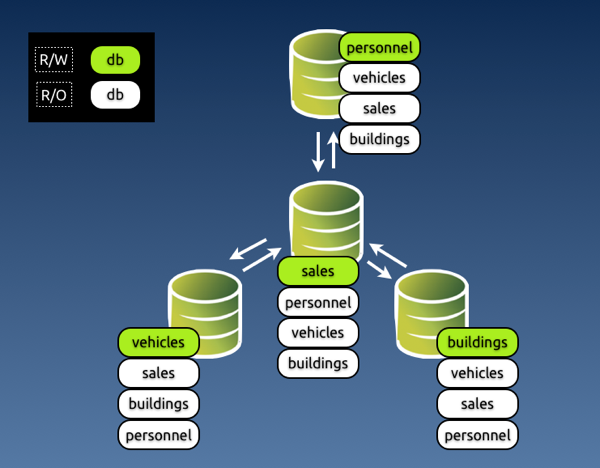
A simple way of preventing conflicts, and one that would make life easier for all is discipline. The organization decides which entry points can update which data, and conflicts are not possible, because the data is inserted or modified only in the places where it is supposed to be.

Multi master r w split

Image #3 - Preventing conflicts with discipline in a star topology.

Conflict prevention: Enforced discipline

Applicability: all topologies

If you have worked in any large organization, either public or private, you know that discipline alone is the worst method you can rely on for something so delicate and valuable as your data. The reasons why this paradigm could fail are many: it could be because some people dislike discipline, or because someone makes a mistake, or because there are too many rules and they don't remember, or because of an application bug that lets you update what you shouldn't.

Either way, you end up with a system that has conflicts and nobody knows what happened and how to fix them. However, there is a way of enforcing this system based on discipline.

This is the "poor-man's" conflict avoidance system. It is based on simple technology, available in most database servers. If you can install a multi-master topology, using either native MySQL (circular) replication or Tungsten Replicator topologies, you can also apply this method.

The key to the system is to grant different privileges for every master. Looking at image #3, you can enforce discipline by granting different privileges to the application user in every master.

In master #1, where we can update personnel, app_user will have SELECT privileges on all databases, and all privileges on personnel.

In master #2, where we can update sales, app_user will have all privileges on sales and read only access to the other databases, and so on.

The key to make this system work well is that you should assign the privileges and not let the GRANT statement being replicated. It should work like this:

# master 1
GRANT SELECT on *.* to app_user identified by 'my password';
# This is good for all masters. Let it replicate

# master 1
SET SQL_LOG_BIN=OFF;
GRANT ALL on personnel.* to app_user;   # This won't replicate


# master 2
SET SQL_LOG_BIN=OFF;
GRANT ALL on sales.* to app_user;

# master 3
SET SQL_LOG_BIN=OFF;
GRANT ALL on vehicles.* to app_user;

# master 4
SET SQL_LOG_BIN=OFF;
GRANT ALL on buildings.* to app_user;

This method works quite well. Since updates for a given schema can be applied only in one master, there is little chance of any mischief happening. Conflicts are not completely removed, though. There are super users and maintenance users who can, consciously or not, introduce errors. For these cases, you may want to look at the next section.

Enforced discipline with certified origin

Applicability: all Tungsten topologies

Discipline based on granted privileges is often robust enough for your needs. However, if you want to keep track of where the data comes from, you should look at a System Of Records technology, where the origin of each piece of data can be traced to its origin.

Tungsten Replicator implements this technology with several topologies. The theory of this matter is beautifully explained by Robert Hodges in an article written some time ago. Here I would like to look at the practical stuff.

To implement a System of Records in Tungsten, you decide where you want to update each schema (which is defined as a shard in our lingo,) assign that schema to a service, and the replicator will enforce your rules.

Once you have defined the shards, you can set the rules. When an event comes to a slave from an UNKNOWN shard, i.e. a shard that was not among the defined rules, you can:

  • Accept the event; (not recommended, really)
  • Drop the event silently
  • Drop the event with a warning in the logs;
  • Generate an error that will break replication (recommended)

You can choose among the above actions when setting a rule for events that come from UNWANTED shards, i.e. a shard that is not the one designated to update that schema.

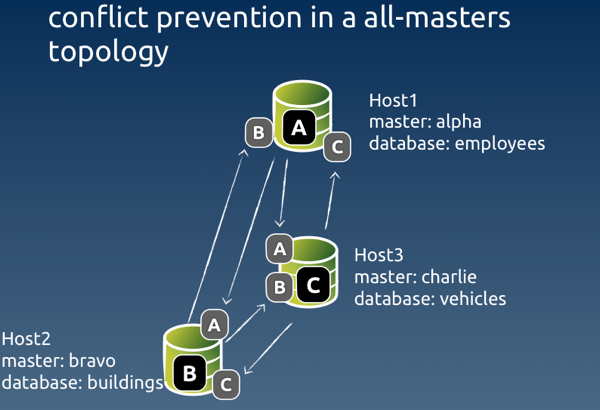
Here's an example of a shard definition based on an all-masters schema with three nodes:

Conflict prevention 0

Image #4 - Sample conflict prevention in an all-masters topology

# Options to add during installation
--svc-extractor-filters=shardfilter

# policy for unknown shards
--property=replicator.filter.shardfilter.unknownShardPolicy=error

# policy for unwanted shards
--property=replicator.filter.shardfilter.unwantedShardPolicy=error

# Whether the policy for unwanted shards is activated or not
--property=replicator.filter.shardfilter.enforceHomes=false

# whether we allow whitelists to be created
--property=replicator.filter.shardfilter.allowWhitelisted=false


# Loading the rules set

$ trepctl -host host1 -service charlie shard -insert < shards.map

$ cat shards.map
shard_id          master      critical
employees         alpha       false
buildings         bravo       false
vehicles          charlie     false
test              whitelisted false

The rules are set by service, rather than host name. The schema 'employees' can be updated by the service named 'alpha', which has its master in host #1. Similarly, 'buildings' can be updated by 'bravo', with a master in host #2, and 'vehicles' is updated by 'charlie' master service in host #3. Remember that in Tungsten each replication stream from one master to many slaves is a separate service. This way we can keep track of the events origin. Even if the event is routed through a hub in a star topology, it retains its origin in the metadata.

The last line of the rules says that the schema 'test' is whitelisted, i.e. it can be freely updated by any master. And this means that conflicts can happen there, so be careful if you use this feature!

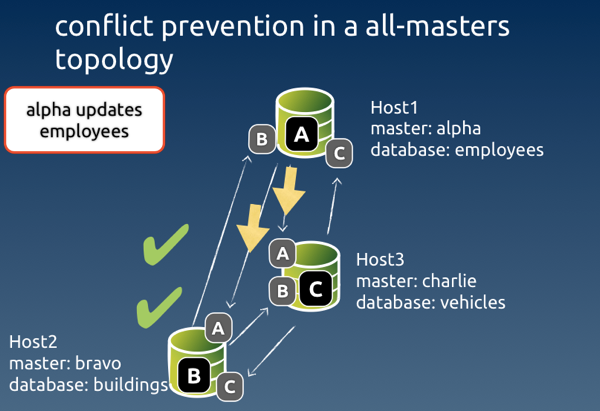
Conflict prevention right event1

Image #5 - Example of a legitimate event coming through

When an expected event comes through, all is well. Each node checks that the event was originated by the authorised master, and the event is applied to the slave service.

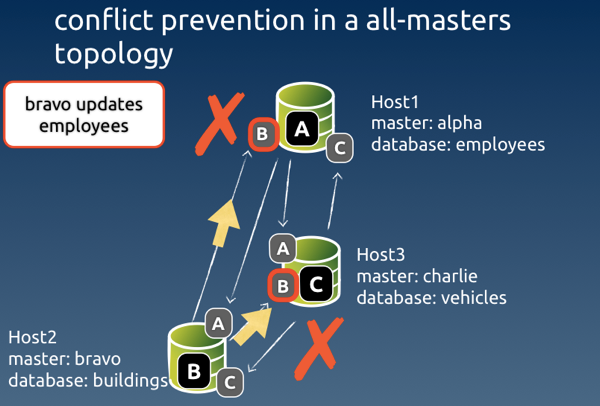
Conflict prevention wrong event0

Image #6 - Example of an event originated from an unauthorised node

When the event comes from a node that was not authorised, Tungsten looks at the rules for such case. In our setup, the rule says 'error', and therefore replication will break at the receiving end of the service 'bravo' in host #1 and host #3.

mysql #2> create table employees.nicknames( ... )


# Only server #2 creates the table
# slave service 'bravo' in host1 and host3 get an error
# No table is created in hosts #1 and #3

To detect the error, we can ask for the list of services in host #1 and host #3. What we will see is something like this.

#3 $ trepctl services | simple_services 
alpha    [slave]
seqno:          7  - latency:   0.136 - ONLINE

bravo    [slave]
seqno:         -1  - latency:  -1.000 - OFFLINE:ERROR

charlie  [master]
seqno:         66  - latency:   0.440 - ONLINE

This Listing says that replication was stopped with an error in slave service 'bravo'. To determine what happened exactly, we ask for the status of that service:

#3 $  trepctl -service bravo status
NAME                     VALUE
----                     -----
appliedLastEventId     : NONE
appliedLastSeqno       : -1
appliedLatency         : -1.0
(...)
offlineRequests        : NONE
pendingError           : Stage task failed: q-to-dbms
pendingErrorCode       : NONE
pendingErrorEventId    : mysql-bin.000002:0000000000001241;0
pendingErrorSeqno      : 7
pendingExceptionMessage: Rejected event from wrong shard: 
seqno=7 shard ID=employees shard master=alpha service=bravo
(...)

This status gives us quite a lot of useful information:

  • The event with Global transaction ID (GTID) # 7 was rejected;
  • The reason for rejection was because it came from the wrong shard;
  • The expected shard master (i.e. the authorized service) was alpha;
  • The event was instead originated from service bravo.

With the above information, we can take action to fix the event. We know that GTID 7 is wrong, so we can skip it in both servers where the error occurred. To clean up the error, we can simply generate the correct event in the authorized master

#host #1 
$ trepctl -service bravo online -skip-seqno 7

mysql #1> drop table if exists employees.nicknames;
mysql #1> create table if exists employees.nicknames ( ... ) ;

#3 $ trepctl -service bravo online -skip-seqno 7

Statement-based vs row-based replication

As a general note about conflict solving, I need to mention that, in most cases, using row-based replication vs. statement based will help identifying conflicts, making them easier to clean up.

Even when the conflict involves a deleted row, row-based events will contain enough information that will allow us to identifying the critical data needed to recover information.

Be aware that, if you use binlog-row-image=minimal in MySQL 5.6, the binary log entry for a DELETE event will only include the primary key.


More about filters

We have seen at least in two examples (server renaming and conflict prevention) that you can help avoid conflicts with filters. This is a powerful feature that should be taken into account when planning a multi-master topology.

MySQL native replication offers very little in matter of data transformation through filtering. Tungsten Replicator, instead, allows you to define filters at several stages of the replication process: when extracting the data, after transporting it to the slaves, before applying it. You can write your own filters in JavaScript, and do with the data pretty much everything you want. If you have creative ideas about solving conflicts by manipulating data in transit, there is a good chance that you can implement them using filters. This topic deserves more than a paragraph, and probably I will come back to it soon with a full fledged article.


Parting thoughts

Multi master topologies are much coveted features. However, they often introduce the risk of conflicts.

Dealing with conflicts becomes somewhat easier if you understand how they happen and what kind of problems they generate.

There is no silver bullet solution for conflicts, but recent technology and good organization can help you ease the pain.

Monday, March 25, 2013

Multi-master data conflicts - Part 1: understanding the problem

What is a conflict?

Readers of this blog know that one of my favorite tools, Tungsten Replicator, can easily create multi-master replication topologies, such as all-masters, star, fan-in. While this is good news for system designers and ambitious DBAs, it also brings some inconvenience. When you allow updates to happen in more than one master, you risk having conflicts. You may have heard this term before. For the sake of clarity, let's define what conflicts are, before analyzing each case in detail.

You have a conflict when several sources (masters) update concurrently the same data in asynchronous replication.

It's important to stress that this happens with asynchronous replication. In a truly synchronous cluster, where all data is kept consistent through 2-phase commit, there is no risk of conflicts.

The above definition is not always correct. You may update data from several sources and end up with something completely legitimate. A better definition should be: a conflict happens after an unexpected concurrent modification of existing data coming from a remote source.

For example:

  • Both servers A and B insert a record with the same primary key;
  • Master A updates record 10 with value 3 while master B updates record 10 with value 4;
  • Master A deletes record 10 while master B updates record 10.

In each of these cases, there is data in one server, which could have been just inserted by a legitimate source, or could have been there for long time. Regardless of the record age, the conflict happen when the data clashes with the latest update. We usually think of conflicts as concurrent events from different sources, because this is the most frequent case of evident conflicts, i.e. conflicts that are detected (and hopefully fixed). But there are hidden conflict that happen (or are discovered) long time after the update.

When we consider the consequences of a conflict, we observe that a conflict creates one or more of the following:

  • Duplicate data (unwanted insert)
  • Data inconsistency (unwanted update)
  • Data loss (unwanted delete)
  • Replication break

Duplicate data

This is the most widely known conflict, because it's often caught immediately after the fact, allowing the DBA to take action. However, it's also one of the less understood cases, as we will see in the next section.

Multi master conflicts 003

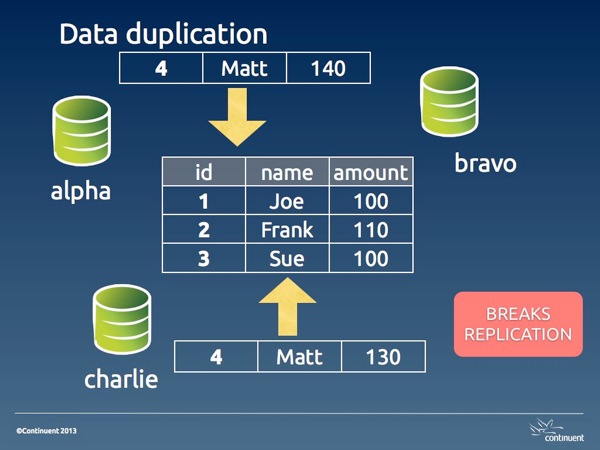
Image #1. Data duplication

In its basic shape, data duplication happens when two masters insert the same data. One of the two transactions will be committed before the other, and the second one will fail with a rightful duplicate key error. The reason for this occurrence is often an application bug, or a design flaw, or sometimes an human error that the application fails to detect properly (a different application bug).

We will see the possible solution in part 2 of this article. For now, it's enough to know that this kind of error is the best kind of conflicts that can happen to you. Since it breaks replication, it has the positive effect of alerting the DBA about an error.

Depending on which event is applied first, you have different situations. If the remote event is applied first, you have a real conflict, where the legitimate event can't get to the database. This state requires a longer set of actions: you need to clean up both the origin and the destination servers. If the legitimate action is applied first, then you don't have a real conflict, as the wrong event was applied only in one server, and you need to clean up only the origin. If you have more than two masters in your topology, you may find that the damage could be a mix of both cases, as the wrong event may arrive to distant servers before or after the right one.

auto_increment_offsets and hidden data duplication

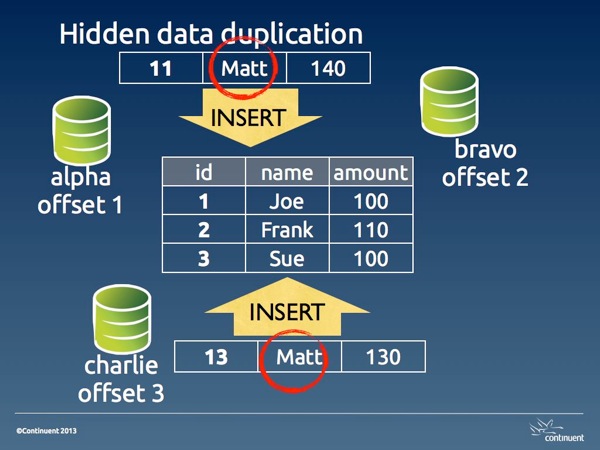
There is a popular belief that conflicts with multi-master topologies can be avoided using auto_increment_increment and auto_increment_offset. The combination of these two variables makes sure that auto_increment values are generated with different intervals for each master. For example, if I have three masters and I am using increment 3, the first master will generate 1,4,7,10, the second one will have 2,5,8,11, and the third one 3,6,9,12.

Where does this paradigm work? When the primary key is the auto generated column, then the conflict is prevented. For example, in a table that records bug reports, the incrementing value for the bug number is a legitimate primary key. If two masters enter a bug simultaneously, the bug numbers will have different values. (there will most likely be gaps in the bug numbers, and this could be a non desirable side effect, bt then, I am not advocating this system, although I made this mistake many years ago.)

However, if the table has a natural primary key that is not an auto-incremented value, conflicts are possible, and likely. In that case, you will have a duplicated key error, as in the case seen before.

Disaster strikes when the table has a poorly chosen auto_increment primary key.

For example, let's consider a departments table with this structure:

CREATE TABLE departments (
    dept_id int not null auto_increment primary key,
    dept_name varchar(30) not null
);

If two masters need to insert a new department named 'special ops', we may end up with this situation:

select * from departments;
+---------+-------------+
| dept_id | dept_name   |
+---------+-------------+
|       2 | special ops |
|       4 | special ops |
+---------+-------------+

Multi master conflicts 005

Image #2. Hidden data duplication

This is what I define hidden data duplication, because you have duplicated data, and no errors that may warn you of the problem. Here the issue is aggravated by the fact that 'department' is likely a lookup table. Thus, there will be a table where 'special ops' is referenced using dept_id 2, and another table where it is used with dept_id 4.

The reason for hidden data duplication is poor choice of primary key, and failure to enforce unique values in columns that should be such.

Data inconsistency

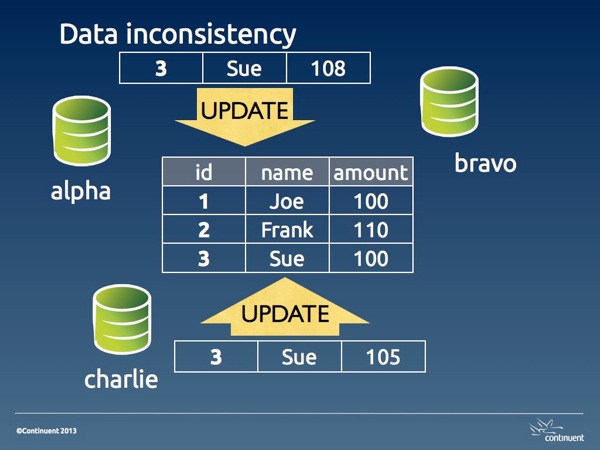
When two UPDATE statements are executed on the same record from different sources, there is the possibility of spoiling the data accuracy in several ways. The amount of damage depend on the type of update (with absolute values or calculated ones) and on whether we are using statement-based or row-based replication.

With absolute values, the last value inserted overwrites the previous one.

Multi master conflicts 006

Image #3. Data inconsistency

With calculated values, the data inconsistency may change with surprising consequences. For example, if we have a table accounts:

select * from accounts;
+----+--------+
| id | amount |
+----+--------+
|  1 |   1000 |
|  2 |   1000 |
|  3 |   1000 |
+----+--------+

If a statement that doubles the account for ID 2 is executed in two masters, then we will have an amount of 4,000 instead of 2,000. Using row-base replication can protect you against this kind of disaster.

Data loss

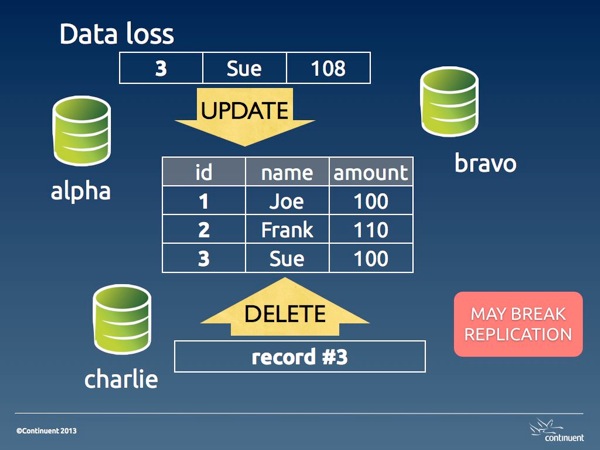
When a DELETE statement is entered for a record that later we want to read, we have lost data. This kind of DELETEs may happen because of bad operations, or more likely because of data inconsistencies that alter the conditions used for deleting.

Multi master conflicts 007

Image #4. Data loss

Unwanted DELETE operations may also break replication when the DELETE happens before an UPDATE on the same record. Either way, a data loss conflict is hard to resolve because the data has gone away. Depending on the amount of the loss, we may need to restore the table completely or partially from a backup.

Why conflicts happen

To understand why conflicts happen, let's first see why they don't happen when we try a conflicting operation in the same server.


SESSION_1 > create table people (id int not null primary key, name varchar(40) not null, amount int);
Query OK, 0 rows affected (0.01 sec)

SESSION_1 > insert into people values (1, 'Joe', 100), (2, 'Frank', 110), (3, 'Sue', 100);
Query OK, 3 rows affected (0.00 sec)
Records: 3  Duplicates: 0  Warnings: 0

SESSION_1 > set autocommit=0;
Query OK, 0 rows affected (0.00 sec)

SESSION_1 > begin;
Query OK, 0 rows affected (0.00 sec)

SESSION_2 > set autocommit=0;
Query OK, 0 rows affected (0.00 sec)

SESSION_2 > select * from people;
+----+-------+--------+
| id | name  | amount |
+----+-------+--------+
|  1 | Joe   |    100 |
|  2 | Frank |    110 |
|  3 | Sue   |    100 |
+----+-------+--------+
3 rows in set (0.00 sec)

SESSION_2 > begin;
Query OK, 0 rows affected (0.00 sec)


SESSION_1 > insert into people values (4,'Matt', 140);
Query OK, 1 row affected (0.00 sec)


SESSION_2 > insert into people values (4,'Matt', 130);
# ... hanging


SESSION_1 > commit;
Query OK, 0 rows affected (0.01 sec)


SESSION_2 > insert into people values (4,'Matt', 130);
# ...
ERROR 1062 (23000): Duplicate entry '4' for key 'PRIMARY'

What happens here is that user in session 1 inserts a record at the same time when user in session 2 inserts the same record. When the record is inserted in session 1, InnoDB creates a lock. If you look at the InnoDB locks before SESSION_1 issues a commit, you will see it:

SESSION_3 > select * from information_schema.innodb_locks\G
*************************** 1. row ***************************
    lock_id: 30B:0:307:5
lock_trx_id: 30B
  lock_mode: S
  lock_type: RECORD
 lock_table: `test`.`people`
 lock_index: `PRIMARY`
 lock_space: 0
  lock_page: 307
   lock_rec: 5
  lock_data: 4
*************************** 2. row ***************************
    lock_id: 30C:0:307:5
lock_trx_id: 30C
  lock_mode: X
  lock_type: RECORD
 lock_table: `test`.`people`
 lock_index: `PRIMARY`
 lock_space: 0
  lock_page: 307
   lock_rec: 5
  lock_data: 4
2 rows in set (0.00 sec)

You can see that there is an exclusive lock on the record.

This lock effectively prevents a duplicate.

Now, if you imagine the two sessions happening on different servers, the two users are in a similar situation, i.e. they don't know that a concurrent update on the same record is being attempted. But the difference is that, in asynchronous replication, there is no lock applied on a remote server. If the two transactions are committed at the same instant, both of them will be stored in their local server, and both of them will fail and break replication on the remote server. If the record in session 1 is applied a few seconds before the other, the user in session 2 will not be able to commit, same as it happened with the concurrent insertion in the single server example above. In this case, the conflict looks exactly as it happened in a single server.

However, if both commits happen at the same time, both users will have a positive feedback, since their transaction will return success, and both are happy, at least temporarily. Unbeknown to both, though, their transaction has failed on the remote server, and replication is broken on both servers, leaving each with a bit of mess to clean up.

These examples show that conflicts are often a matter of chance. Depending on the timing of the operations, we might catch them as they happen and take action before the conflict spreads its side effects, or we only notice later on, when replication fails, and the conflict has already spoiled our data.

Summing up

Conflicts in multi-master topologies are the consequence of unwanted or unexpected operations. The effects of a conflict range from data inconsistency to data loss, and may also cause replication to break.

The most desirable outcome for a conflict is a replication error, because it prevents further spreading of the error and alerts the DBA about a possible issue.

In the second part of this article, we will look at some of the methods to deal with conflicts in various scenarios.

Friday, November 04, 2011

Replication stars

Working with replication, you come across many topologies, some of them sound and established, some of them less so, and some of them still in the realm of the hopeless wishes. I have been working with replication for almost 10 years now, and my wish list grew quite big during this time. In the last 12 months, though, while working at Continuent, some of the topologies that I wanted to work with have moved from the cloud of wishful thinking to the firm land of things that happen. My quest for star replication starts with the most common topology. One master, many slaves.
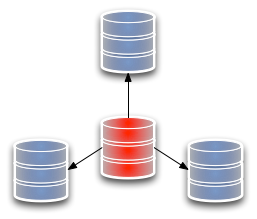
Replication 1 master slave

Fig 1. Master/Slave topology

Replication legend

Legend

It looks like a star, with the rays extending from the master to the slaves. This is the basis of most of the replication going on mostly everywhere nowadays, and it has few surprises. Setting aside the problems related to failing over and switching between nodes, which I will examine in another post, let's move to another star.
Replication 2 fan in slave

Fig 2. Fan-in slave, or multiple sources

The multiple source replication, also known as fan-in topology, has several masters that replicate to the same slave. For years, this has been forbidden territory for me. But Tungsten Replicator allows you to create multiple source topologies easily. This is kind of uni-directional, though. I am also interested in topologies where I have more than one master, and I can retrieve data from multiple points.
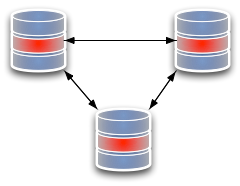
Replication 3 all to all three nodes

Fig 3. all-to-all three nodes

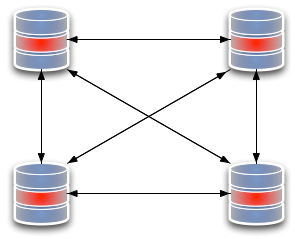
Replication 4 all to all four nodes

Fig 4. All-to-all four nodes

Tungsten Multi-Master Installation solves this problem. It allows me to create topologies where every node replicates to every other node. Looking at the three-node scheme, it appears a straightforward solution. When we add one node, though, we see that the amount of network traffic grows quite a lot. The double sided arrows mean that there is a replication service at each end of the line, and two open data channels. When we move from three nodes to four, we double the replication services and the channels needed to sustain the scheme. For several months, I was content with this. I thought: it is heavy, but it works, and it's way more than what you can do with native replication, especially if you consider that you can have a practical way of preventing conflicts using Shard Filters. But that was not enough. Something kept gnawing at me, and from time to time I experimented with Tungsten Replicator huge flexibility to create new topologies. But the star kept eluding me. Until … Until, guess what? a customer asked for it. The problem suddenly ceased to be a personal whim, and it became a business opportunity. Instead of looking at the issue in the idle way I often think about technology, I went at it with practical determination. What failed when I was experimenting in my free time was that either the pieces did not glue together the way I wanted, or I got an endless loop. Tungsten Replicator has a set of components that are conceptually simple. You deploy a pipeline between two points, open the tap, and data starts flowing in one direction. Even with multiple masters replication, the principle is the same. You deploy many pipes, and each one has one purpose only.
Replication 5 star topology 3 rays

Fig 5. All-masters star topology

In the star topology, however, you need to open more taps, but not too many, as you need to avoid the data looping around. The recipe, as it turned out, is to create a set of bi-directional replication systems, where you enable the central node slave services to get changes only from a specific master, and the slave services on the peripheral nodes to accept changes from any master. It was as simple as that. There are, of course, benefits and drawbacks with a star topology, compared to a all-replicate-to-all design. In the star topology, we create a single point of failure. If the central node fails, replication stops, and the central node needs to be replaced. Instead, the all-to-all design has no weaknesses. Its abundance of connections makes sure that, if a node fails, the system continues working without any intervention. There is no need for fail-over.
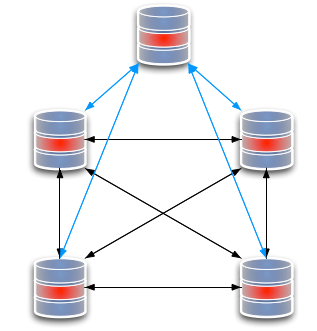
Replication 6 all to all extending png

Fig 6. extending an all-to-all topology

Replication 7 star extending

Fig 7. Extending a star topology

However, there is a huge benefit in the node management. If you need to add a new node, it costs two services and two connections, while the same operation in the all-to-all replication costs 8 services and 8 connections. With the implementation of this topology, a new challenge has arisen. While conflict prevention by sharding is still possible, this is not the kind of scenario where you want to apply it. We have another conflict prevention mechanism in mind, and this new topology is a good occasion make it happen. YMMV. I like the additional choice. There are cases where a all-replicate-to-all topology is still the best option, and there are cases where a star topology is more advisable.