Wednesday, April 29, 2009

Test driving the Spider storage engine - sharding for the masses


MySQL Conference and Expo 2009
At the MySQL Conference 2009 I attended a session about the Spider storage engine, an engine with built-in sharding features.
The talk was notable for the speaker wearing a spiderman costume, and for some language barrier that made the talk less enjoyable than it should be. That's a pity, because the engine is very intriguing, and deserves some exploration.

What is the Spider engine, then? In short, it's an extension to the partitioning engine with the ability of connecting to remote servers. Basically, partitions + federated, except that Federated is explicitly removed during the compilation. Additionally, the spider engine should remove current limitations, such as single thread for replication and single source replication, but due to lack of specific documentation, I will limit my current experiment to the sharding features.
The only documentation available is the slide deck from the presentation, and some very reference parameters that come with the source code. I show here what I found by practical inspection.

building the engine

To compile the engine, you need the source code for MySQL 5.1.31 (as required by the documentation, but it works fine with later versions as well).
Download the source code from the launchpad repository and expand it. You will get a ./spider directory, which you need to move under the ./storage directory in the source. Then you compile, with these instructions:
autoconf
automake
./configure \
--prefix=/usr/local/mysql \
--localstatedir=/usr/local/mysql/data \
--libexecdir=/usr/local/mysql/bin \
--enable-thread-safe-client \
--enable-local-infile --with-pic \
--with-fast-mutexes \
--with-client-ldflags=-static \
--with-mysqld-ldflags=-static \
--with-zlib-dir=bundled \
--with-big-tables --with-ssl \
--with-readline --with-embedded-server \
--with-partition --without-innodb \
--without-ndbcluster \
--without-archive-storage-engine \
--without-blackhole-storage-engine \
--with-csv-storage-engine \
--without-example-storage-engine \
--without-federated-storage-engine \
--with-extra-charsets=complex
make
./scripts/make_binary_distribution

Now we will use the MySQL Sandbox to create a testing environment. Let's start with a simple case: 1 main server and 4 remote ones.
make_sandbox $PWD/mysql-5.1.31-osx10.5-i386.tar.gz

This creates a sandbox under $HOME/sandboxes/msb_5_1_31, which is our main server. Before using it, we need to create some additional tables and load the plugin. (These queries are in the spider instructions, but they are hard to cut and paste. This is much easier for that purpose.)

create table if not exists mysql.spider_xa(
format_id int not null default 0,
gtrid_length int not null default 0,
bqual_length int not null default 0,
data char(128) not null default '',
status char(8) not null default '',
primary key (data, format_id, gtrid_length),
key idx1 (status)
) engine=MyISAM default charset=utf8 collate=utf8_bin;
create table if not exists mysql.spider_xa_member(
format_id int not null default 0,
gtrid_length int not null default 0,
bqual_length int not null default 0,
data char(128) not null default '',
scheme char(64) not null default '',
host char(64) not null default '',
port char(5) not null default '',
socket char(64) not null default '',
username char(64) not null default '',
password char(64) not null default '',
primary key (data, format_id, gtrid_length, host, port, socket)
) engine=MyISAM default charset=utf8 collate=utf8_bin;
create table if not exists mysql.spider_tables(
db_name char(64) not null default '',
table_name char(64) not null default '',
priority bigint not null default 0,
server char(64) default null,
scheme char(64) default null,
host char(64) default null,
port char(5) default null,
socket char(64) default null,
username char(64) default null,
password char(64) default null,
tgt_db_name char(64) default null,
tgt_table_name char(64) default null,
primary key (db_name, table_name),
key idx1 (priority)
) engine=MyISAM default charset=utf8 collate=utf8_bin;

install plugin spider soname 'ha_spider.so';
select engine,support,transactions,xa
from information_schema.engines;
+------------+---------+--------------+------+
| engine | support | transactions | xa |
+------------+---------+--------------+------+
| SPIDER | YES | YES | YES |
| MRG_MYISAM | YES | NO | NO |
| CSV | YES | NO | NO |
| MyISAM | DEFAULT | NO | NO |
| MEMORY | YES | NO | NO |
+------------+---------+--------------+------+

Spider is now enabled

preparing the remote servers


The servers used as remote shards can be conveniently replaced, for this experiment, by sandboxes. Let's create three of them, to illustrate the concept.
make_multiple_sandbox --group_directory=spider_dir \
--sandbox_base_port=6000 --check_base_port 5.1.31

Now we have three sandboxes under $HOME/sandboxes/spider_dir, with ports ranging from 6001 to 6003.
What we need to do is to create, in each server, a table with the same structure as the one that is being sharded in the main server.
$ cd $HOME/sandboxes/spider_dir
$ cat tablea.sql
drop schema if exists myspider;
create schema myspider;
use myspider;

Create table tbl_a(
col_a int,
col_b int,
primary key(col_a)
);

$ ./use_all "source tablea.sql"

The main server


Finally, we have all the components in place, we can create the table for the main server.
drop schema if exists   myspider;
create schema myspider;
use myspider;

Create table tbl_a(
col_a int,
col_b int,
primary key(col_a)
) engine = Spider
Connection ' table "tbl_a", user "msandbox", password "msandbox" '
partition by range( col_a )
(
partition pt1 values less than (1000)
comment 'host "127.0.0.1", port "6001"',
partition pt2 values less than (2000)
comment 'host "127.0.0.1", port "6002"',
partition pt3 values less than (MAXVALUE)
comment 'host "127.0.0.1", port "6003"'
);

Compared to classic partitions, there is some new ground to cover. The "CONNECTION" clause is used to define the table name in the remote server. The schema name is assumed to be the same as the one in the main server.
For each partition, we can add a "COMMENT" clause, with the connection parameters. Since we are using sandboxes in the same host, we connect to 127.0.0.1, and use the port corresponding to each sandbox.
From now on, we can use this table almost transparently.

Using the spider engine


# on the main server
./use myspider

insert into tbl_a values (1,1);
Query OK, 1 row affected (0.00 sec)

insert into tbl_a values (1001,2);
Query OK, 1 row affected (0.01 sec)

insert into tbl_a values (2001,3);
Query OK, 1 row affected (0.00 sec)

select * from tbl_a;
+-------+-------+
| col_a | col_b |
+-------+-------+
| 1 | 1 |
| 1001 | 2 |
| 2001 | 3 |
+-------+-------+
3 rows in set (0.01 sec)

So far, so good. No surprises, at least in the surface.
Now, where is the data? A close inspection to the files in the data directory shows that the data is not in the main server.
The data is stored in the "remote" servers, as we can check easily:

# in the spider_dir path
./use_all "select * from myspider.tbl_a"

# server: 1:
col_a col_b
1 1
# server: 2:
col_a col_b
1001 2
# server: 3:
col_a col_b
2001 3

Now, let's apply some curiosity. What happens in the remote server when I insert a row in the main server? Probably the general log can give me an answer.
# spider_dir
./use_all 'set global general_log=1'

# main server
insert into tbl_a values (2002,3);
Query OK, 1 row affected (0.00 sec)

# spider_dir
$ tail node3/data/mysql_sandbox6003.log
090429 17:27:28 299 Connect msandbox@localhost on
090429 17:27:42 299 Query set session sql_log_off = 1
Ah! No curious people allowed.
Well. This can stop a common user, but not a determined one.
MySQL Proxy to the rescue! There is a Lua script that handles logs.
./node2/proxy_start --proxy-lua-script=$PDW/logs.lua --log-level=warning

Let's change the main table definition:
...
partition pt3 values less than (MAXVALUE)
comment 'host "127.0.0.1", port "4040"'

And now we can see what happens.
# main server
insert into tbl_a values (2004,3);
Query OK, 1 row affected (0.00 sec)

#tail /tmp/mysql/log
2009-04-29 18:03:04 305 -- set session sql_log_off = 1 >{0}
2009-04-29 18:03:04 305 -- set session autocommit = 1 >{0}
2009-04-29 18:03:04 305 -- start transaction >{0}
2009-04-29 18:03:04 305 -- set session transaction isolation level repeatable read >{0}
2009-04-29 18:03:04 305 -- insert into `myspider`.`tbl_a`(`col_a`,`col_b`)values(2004,3) >{0}
2009-04-29 18:03:04 305 -- commit >{0}

Hmmm. I don't like the sight of it. autocommit=1 and then start transaction, set session transaction and commit. At the very least, it's wasting three queries. This needs some explanation from the author, I guess. Let's try some data retrieval.

# main server
select * from tbl_a;
+-------+-------+
| col_a | col_b |
+-------+-------+
| 1 | 1 |
| 1001 | 2 |
| 2003 | 3 |
| 2004 | 3 |
| 1001 | 2 |
| 2003 | 3 |
| 2004 | 3 |
+-------+-------+
7 rows in set (0.01 sec)

$tail /tmp/mysql.log
2009-04-29 18:01:07 303 -- set session sql_log_off = 1 >{0}
2009-04-29 18:01:07 303 -- set session autocommit = 1 >{0}
2009-04-29 18:01:07 303 -- start transaction >{0}
2009-04-29 18:01:07 303 -- set session transaction isolation level repeatable read >{0}
2009-04-29 18:01:07 303 -- show table status from `myspider` like 'tbl_a' >{0}
2009-04-29 18:01:07 303 -- select `col_a`,`col_b` from `myspider`.`tbl_a` limit 0,9223372036854775807 >{0}
2009-04-29 18:01:07 303 -- commit >{0}

Scarier than the previous one. The LIMIT clause spells trouble.
And this latest experiment made me try something more ambitious.
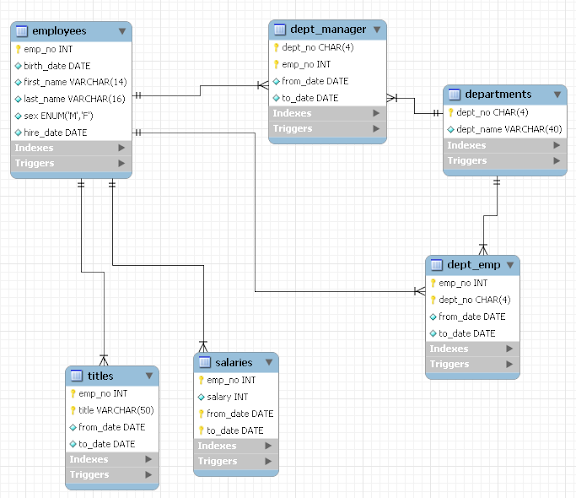
I installed a group of 20 sandboxes and loaded the employees test database (4.2 million records), spreading two partitioned tables across the backend servers.
Performance is better than using a single table, but slower than a normal partitioned table on a single server. And I think I know why.
# main server
select count(*) from salaries where from_date between '1995-01-01' and '1995-12-31';
+----------+
| count(*) |
+----------+
| 201637 |
+----------+
1 row in set (0.76 sec)

$ tail /tmp/mysql.log
2009-04-29 18:09:51 307 -- set session sql_log_off = 1 >{0}
2009-04-29 18:09:51 307 -- set session autocommit = 1 >{0}
2009-04-29 18:09:51 307 -- start transaction >{0}
2009-04-29 18:09:51 307 -- set session transaction isolation level repeatable read >{0}
2009-04-29 18:09:51 307 -- show table status from `employees` like 'salaries' >{0}
2009-04-29 18:09:51 307 -- select `emp_no`,`from_date` from `employees`.`salaries` order by `emp_no`,`from_date` limit 0,9223372036854775807 >{0}

This is definitely a waste. It's a problem that is similar to what is happening when using the Federated engine. But here, we get a "ORDER BY" clause that is unnecessary to say the least.

Bugs


During the tests, I spot at least two serious bugs.
When you drop a partition, the data in the remote server is not removed. If you recreate the partition and insert something, you get a "duplicate key" error.

When you drop a database, the table mysql.spider_tables does not get updated, with the result that you can't recreate the table. with the same name, unless you remove the corresponding entries manually.

That was a lot of information for one session. Please try it and comment. Don't expect me to provide answers to the reasons of the spider engine. I hope the author chimes in and clarifies the muddy matter.

MySQL community and sushi

Now, relax. This is not haircut blogging. There is actually a true relationship between MySQL Community and sushi. Just bear with me for a while.
I went to meet Drew in front of a quiet sushi restaurant in Santa Clara, CA. In his latest email, he said "we will meet you there", implying that there was more than one person. He mentioned a wife in one of his email, and so I expected at least two people.
Curious thing, this meeting. It all started in 2006, when I published an article about replication techniques. In answer to that article, I received dozens of email messages, with comments, congratulations, requests for help, job offers. Drew's message started as a praise, than he asked some questions, and we exchanged some more emails in the last two years. In November, he told me that since I had been helpful, he would like to take me to a sushi restaurant, and there we are, meeting in person after years of mail exchange.
It turns out that he is with his wife, and three more geeks. What else you expect to find in Silicon Valley, anyway? There are two more guests, who are not in the IT industry, one of whom is a exuberant toddler.
We talk about geeky things, the Sun acquisition by Oracle (which makes a poor subject for conversation since nothing is known) and a less than successful attempt at explaining the risks of circular replication using the soy sauce jar, a glass, and chopsticks to form a diagram on the table.
The food comes. I cast my vote for sashimi, with the semi-general agreement. There is raw tuna, salmon, and sea urchin on the side, with prawn heads in the middle. When I reach for the salmon with my chopsticks, one of the prawn heads moves, in what seems an attempt to bite me. The video shows some of the action.

The owner suggests that we eat the heads while they are still alive. After some looking around, we all agree that we won't do it, and thus we gladly accept the owner's offer to deep fry the prawn heads. When they come back, they are definitely not moving anymore, and thus we eat them without much remorse.
after ...
The dinner continues with sushi, which is deader than the prawns, and doesn't offer any particular challenges.
The discussion is mostly on geeky subjects, and we explore the world of social networks, wondering how can Twitter make money. We find several schemes that may make us rich in one month, but nobody seems particularly eager to invest on it at the moment. The final rush of discussion covers a social network that one of the guests is currently administering. It sounds very entertaining and fast spreading, but venture capitalists don't seem to buy the idea yet. It uses MySQL, though, which is an apt thought at the end of this dinner. The fascinating thing about this network is that it relies on the Mechanichal Turk service to check if the contents are decent. Apparently, it's absolutely forbidden to show nudity in a iPhone application. Therefore, the contents have to be checked before they go public. Despite the name, the Mechanical Turk service is real people (not a politically correct name, IMO) who do micro tasks, like checking that women in the social network pictures are wearing a bra. Apparently, there is no technological replacement for people judgment in this case.
So, my community work has earned me a free sushi dinner, and a few new contacts. Thanks, Drew, it was an enjoyable evening!

Monday, April 27, 2009

MySQL 5.4 performance with logging


MySQL 5.4
About a month ago, I published the results of MySQL 5.x performance with logging. The results covered several versions, from 5.0.45 to 5.1.33. Among the conclusions of the post was the consideration that MySQL 5.0.x is faster than MySQL 5.1 in read only operations. I hinted that better results may come for MySQL 5.1. When I wrote that post I had, in fact, an ace up my sleeve, because I had already benchmarked the performance of MySQL 5.4, using the same criteria shown in my previous post. The results, as you can see from the charts below, tell that you don't need to downgrade to 5.0 to achieve the performance you want, but MySQL 5.4 may be the right choice.

MySQL 5.1 + 5.4 read-only logging performance

MySQL 5.1 + 5.4 read-only logging performance

MySQL 5.0 read-only Logging performance

MySQL 5.0 read-only Logging performance

MySQL 5.1 + 5.4 binlog performance

MySQL 5.1 + 5.4 binlog performance

MySQL 5.0 binlog performance

MySQL 5.0 binlog performance

A piece of trivia. On April 9, users of MySQL Sandbox may have noticed that I left a clue of what was about to happen. Among the accepted versions, you could see "5.3, 5.4. 5.5" :-)

Friday, April 17, 2009

MySQL Campus tour at USC - Slow start, brilliant ending


Sakila in L.A.

The Southern California branch of the MySQL Campus Tour is almost over.
At the USC, attendance was very good, and even better was the enthusiasm and the participation we met. The meeting didn't start well. Our hotel is 11 miles away from the USC campus, and we figured out that heading to the campus 1 hour before the planned time ought to be enough. After 65 minutes, we had done exactly 7 miles, in one of the worst traffic jams that I have ever seen, but the locals tell me that it's pretty standard stuff down here. Anyway, we started 20 minutes later than expected, and we were pleasantly surprised that nobody had left, and a faithful audience had been waiting for us patiently.
The event went very well after that, and the participation was intense and passionate. Four students asked me how to become MySQL developers, and many had questions on Sun business model. After a while, the delay and the traffic jam were forgotten, and the event turned out to be very pleasant. There were 52 attendees. Like in a deck of cards. So Sheeri noted that probably we were the jokers!
I would like to thank the campus ambassadors Lynn Janh and Raed Shomali for the excellent organization and their patience with our forced delay.
Tomorrow we will talk at the L.A. MySQL meetup and then we will move North, to the MySQL Conference.

Thursday, April 16, 2009

Gurus show at the Los Angeles Meetup - April 17


L.A. MySQL meetup

If you are in the Los Angeles area, you have two more chances to meet the MySQL gurus on their way to the the MySQL Conference.
Today at the USC, Sheeri and I will conclude the South California MySQL Campus Tour.
Tomorrow, April 17, big gathering at the Los Angeles MySQL Meetup Group, where Andrew Aksyonoff, Sheeri, and myself will be the speakers. Come along!
During the event, I will do a quick live demonstration of the new features included in MySQL Sandbox 3.

Quiet excitement at UCLA


fire

The second leg of the Southern California MySQL Campus Tour was at UCLA.
There was less attendance than Cal Poly. Only 22 brave souls who endured a lengthy session with a long tail of Q&A.
The excitement came on my way back to my hotel, 25 miles from the campus. Distances have a different meaning here. A few dozen miles is just a tiny portion of the town, and so I found myself once more driving the endless highways of Los Angeles.
When I was almost home, I saw all the cars in front of me stopping, for what I believed was a traffic jam. Instead, it was a truck that was burning fiercely. When I realized that almost everyone was escaping to a side road, I took a rapid picture and then I followed suit in a prudent retreat.

Wednesday, April 15, 2009

Cal Poly - A success


Bread after speech
The MySQL Campus Tour 2009 started very well at Cal Poly, San Luis Obispo, CA.
Despite the warm day, which would have tempted many attendees to desert the conference and go to the nearby beaches, there was a full room, with 82 people, many of them standing.
The presentation was appreciated (and so was the pizza that Sun had delivered to the classroom). I did the main part, while Sheeri was actively contributing with witty and informational remarks.

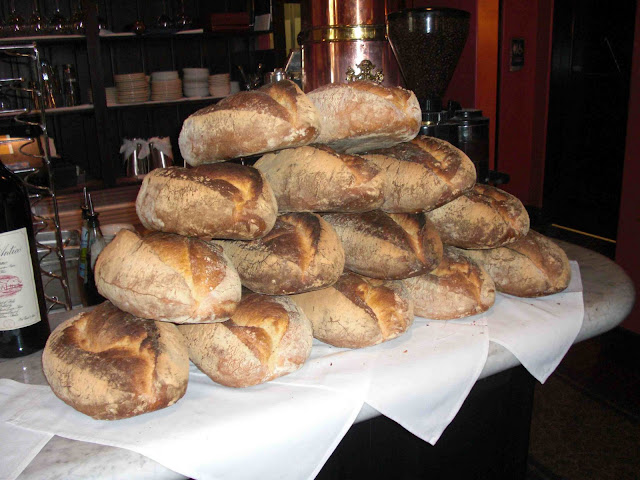
Most notable, after the session, we continued the cultural exchange to a local restaurant that bears my name (correctly spelled!), where this heap of bread caught my eye. Thanks to Stephanie and Wendy for organizing the event, and to all the students for their active participation!

Monday, April 13, 2009

MySQL Campus Tour - South California


MySQL Campus Tour 2009

The MySQL Campus Tour got reinforcements.
Dups is not alone anymore. He is being joined by Colin and Farhan.
Sheeri and yours truly are in Los Angeles, just about to travel to San Luis Obispo, where we will be guests of Cal Poly. The lecture is scheduled for tomorrow, April 14th, at 11am.
The address is 1 Grand Avenue, San Luis Obispo, CA 93401.
Pizza will be provided!
Here's a reminder of the events to come.
Again, if you are in the area, come along! Attendance is free, and if you want to participate actively, you will be very welcome!

North California
13-Apr-2009 Univ. of San Francisco
15-Apr-2009 Univ. of California, Berkley
16-Apr-2009 San Jose State University
16-Apr-2009 Stanford University, Palo Alto
17-Apr-2009 Univ. of California, Davis
South California
14-Apr-2009 Cal Poly, San Luis Obispo
15-Apr-2009 UCLA, Los Angeles
15-Apr-2009 Univ. of California, Irvine
16-Apr-2009 USC, Los Angeles
17-Apr-2009 MySQL Meetup Los Angeles

Saturday, April 11, 2009

MySQL Sandbox 3 - Now feature complete


MySQL Sandbox

MySQL Sandbox 2.0.98i is now feature complete. The most notable additions are a robust test suite, with over 120 tests, and some features that have been in the wish list for long time.
The first one that makes a lot of difference is the ability of installing a sandbox from a build directory.
This feature has requested many times, and I have been reluctant to implement it, because it involved fiddling with the internals of low_level_make_sandbox, which should behave differently depending on the base directory. An installed BASEDIR has a different structure than a source BASEDIR. In the end, I solved the problem by creating a script that builds a tarball and calls the appropriate script to make a sandbox.
The second most important addition is the sbtool, which includes tasks to be performed on existing sandboxes, such as moving, copying, deleting, and preserving a sandbox.
The one feature that I like the most is the ability of checking for an used port, and instead of requesting a manual intervention, it can detect the first available port and use it. No more conflicts!
The documentation has been enhanced and included into MySQL::Sandbox.
$ perldoc MySQL::Sandbox provides the full manual.
Now I await bug reports, and I plan to release the final 3.0 version within one month.

Thursday, April 02, 2009

MySQL Sandbox even more sandboxed


MySQL Sandbox 3

In the late evening of March 31st I had a good coding session with MySQL Sandbox. I implemented a feature that has been in the wish list for long time. Checking the port before installing, and providing a non used port that positively avoids conflicts is a great step forward.

Now you can do things like this:
$ make_sandbox 5.1.33 --check_port --no_confirm
And you will get no errors!
The Sandbox will create msb_5_1_33_a, msb_5_1_33_b and so on, using ports 5133, 5134, 5.1.35, and so on, without manual intervention. Running the above commands 30 times, you would find these sandboxes:
ls -d msb_5_1_33*/
msb_5_1_33/ msb_5_1_33_a/ msb_5_1_33_b/ msb_5_1_33_c/
msb_5_1_33_d/ msb_5_1_33_e/ msb_5_1_33_f/ msb_5_1_33_g/
msb_5_1_33_h/ msb_5_1_33_i/ msb_5_1_33_j/ msb_5_1_33_k/
msb_5_1_33_l/ msb_5_1_33_m/ msb_5_1_33_n/ msb_5_1_33_o/
msb_5_1_33_p/ msb_5_1_33_q/ msb_5_1_33_r/ msb_5_1_33_s/
msb_5_1_33_t/ msb_5_1_33_u/ msb_5_1_33_v/ msb_5_1_33_w/
msb_5_1_33_x/ msb_5_1_33_y/ msb_5_1_33_z/ msb_5_1_33_aa/
msb_5_1_33_ab/ msb_5_1_33_ac/
And they would be using ports from 5133 to 5162.
I felt very pleased with myself and I thought "I should blog about it." But I looked at the time. Hmm. 20 minutes to midnight. If the blog post comes up as April 1st, then it would be taken as an April fool joke.
Wait a minute! A devilish thought crossed my mind, and refused to leave. Perhaps I could announce something, after all. So, in about 10 minutes, I implemented the Query Analyzer replica.
It took several man-year to the Enterprise Team to do the real Query Analyzer (great job, guys!) My implementation time was quite faster than theirs, although admittedly the screen shot looks poor in comparison.
The Query AnalyzerThe Fish Analyzer

In ten more minutes, I wrote the blog post, and I changed the published time to March 31st 11:55pm, to remove the telltale date, and off I went.
It was a great success. Some colleagues (1), who saw the post but didn't bother to try the code, sent me concerned messages, blaming me for jeopardizing the company business, weakening the global economy, melting the North Pole ice, and making Bambi cry. Unfortunately, we work in a networked environment, so I could not see their faces when I told them to look at the calendar ...
I also got a few bug reports, complaining that the --query_analyzer option didn't work as advertised. One of the reporters, who had actually seen the fish analyzer screenshot, still insisted on the lack of analysis in the application. Oh, well. Someone just don't get it!
Anyway, the ephemeral Sandbox Analyzer, a.k.a. The Fish Analyzer, has been deprecated and removed in version 2.0.98d. Not an April's fool anymore. The --check_port option is the real thing!

(1)Not from the Enterprise Team. No sane developer would think that a man alone could create the Query Analyzer in his (limited) spare time!

Tuesday, March 31, 2009

Query Analyzer features integrated in MySQL Sandbox

Community strikes.
It was about time that someone provided a match for MySQL Query Analyzer, the flagship feature of MySQL Enterprise.
Now MySQL Sandbox includes a --query_analyzer option, which will convert your sandboxed server into an analysis machine. No need to buy Enterprise. No need to waste tons of money on expensive consultants.
Just download the latest tarball and install a sandbox as usual, with the additional option.

$ make_sandbox 5.1.32 --query_analyzer

And that's it! Your worries will be over. Enjoy!

Update As it should be clear by now, this was an April's fool joke. See the follow up post for more info.

Monday, March 30, 2009

New version of employees test DB


employees test db

The Employees Test database has been updated. There was a subtle bug in the data. One employee was assigned to two departments with the same start and end date. And one of the sample procedures fell into the trap of assuming that the data was clean, thus reporting incorrect statistics.
Now the bug is fixed, the test suite is updated, and I can wait for the next bug report.

Sunday, March 29, 2009

MySQL Sandbox approaching version 3


MySQL Sandbox 3.0

MySQL Sandbox is approaching another milestone. Preparing for version 3.0, which will include some new features, version 2.0.98 (based on 2.0.18) can be installed like any other Perl module, and the scripts become available in the PATH.
It means a few seconds more to install the scripts, but a faster and easier usage.

This latest change also means that MySQL Sandbox will be available through the CPAN (Comprehensive Perl Archive Network, for the uninitiated).
The next step will be to include this package in Linux distros (Ubuntu, and eventually Debian, and then Fedora).
If you use the new package, the installation goes like this:

The hard way

Download and unpack MySQL Sandbox, then issue these commands:
$ perl Makefile.PL
$ make
$ make test
$ sudo make install
If you want to install the module in your home directory, say under $HOME/usr/local (a good idea, since MySQL Sandbox was designed for the purpose of installing servers in user space), then you can do the following:
$ export PATH=$PATH:$HOME/usr/local
$ export PERL5LIB=$HOME/usr/local/lib/perl5/site_perl/5.8.8
# change the perl version accordingly
$ perl Makefile.PL PREFIX=$HOME/usr/local
$ make
$ make test
$ sudo make install

The easy way

$ sudo cpan
cpan > install MySQL::Sandbox

Usage

Either way, the Sandbox scripts will now be in your PATH, and you can invoke the scripts quite easily:
$ make_sandbox /path/to/mysql-tarball-5.1.32-YOUR-OS.tar.gz

There is one (very small) incompatible change. Previously, you could get debugging output by setting the DEBUG environmental variable. Now you will have to set SBDEBUG instead.
Enjoy!

Thursday, March 26, 2009

Forums are for sissies. The next thing is Twitter


Twitter

Once upon a time, if you had a problem with, say, Perl, you went to a forum, checked the forum rules, signed up, and asked a question, which eventually would get you an answer. Then you had a problem with MySQl, and you went to another forum, and asked a different question.

A forum for each topic is tiresome. Someone made an improvement, and then you have forums where you can ask pretty much anything.
But also that is not as general purpose as the concept of LazyWeb. When you need help, you just want to stand up and ask.
Here comes Twitter.
No additional subscriptions needed. Just the Swiss Army knife of the web questions. And you are not limited to geeky questions, you can ask anything.
Naive Twitter users may think that when you ask a question, only your followers can hear you. So if you have 50 followers, you don't stand a chance of getting an answer. Not so. Try this. Using Twirl (but also the simple twitter search would do), you create a new search, "activate it", and add it to your "home". Presto! you will be now receiving twitters that match your search, no matter if they are followers or not. The whole world is at your disposal.

You may be the one asking, and be surprised when you get back an answer in minutes from a complete stranger, or you may know the answer for one of the "lazyweb" questions, and feel compelled to respond.
Well, maybe the forums aren't dead yet, but surely they have a fierce rival.

Another command line tip

Encouraged by Baron Schwartz tip on result set comparison, here are a few more, on the same vein.
First, you can send a result set to a file. Probably you will say "yeah, I know, using SELECT INTO OUTFILE". Correct. Except that you can't rewrite to an existing file, if you want to, and you will get a raw output, not the well formatted one that you usually see on the command line. For example:

mysql > select 1 into outfile '/tmp/f1.txt';
mysql > \! cat /tmp/f1.txt
1

mysql > select 1 into outfile '/tmp/f1.txt';
ERROR 1086 (HY000): File '/tmp/f1.txt' already exists

BTW, \! command is a handy shortcut for executing a shell command.
Let's see what happens with the alternative method:

mysql > pager cat > /tmp/f1.txt
mysql > select 1;
\! cat /tmp/f1.txt
+---+
| 1 |
+---+
| 1 |
+---+

Now, Using the above trick, you can check the differences between two result sets visually:

mysql > pager cat > /tmp/f1.txt
mysql > select "one" union select "two" union select "three";
3 rows in set (0.00 sec)

mysql > pager cat > /tmp/f2.txt

mysql > select "one" union select "two" union select "Three";
3 rows in set (0.00 sec)

mysql > nopager

mysql > \! vimdiff -o /tmp/f[12].txt

And here is what you get:

Not only you'll know that there is something different, but you will also know exactly what.
This trick is part of a collection of command line advice that I have meant to write for long time. I will publish it all before the Users Conference. I just couldn't resist with this one!

Wednesday, March 25, 2009

MySQL 5.x performance with logging

There has been much talking about MySQL performance related to logging. Since MySQL 5.1.21, when Bug #30414 was reported (Slowdown (related to logging) in 5.1.21 vs. 5.1.20) I have been monitoring the performance of the server, both on 5.0 and 5.1.
Recently, I got a very powerful server, which makes these measurements meaningful.
Thus, I measured the performance of the server, using all publicly available sources, because I want this benchmark to be repeatable by everyone.
I will first describe the method used for the benchmarks, and then I report the results.

The server

The server is a Linux Red Hat Enterprise 5.2, running on a 8core processor, with 32 GB RAM and 1.5 TB storage.

$ cat /etc/redhat-release
Red Hat Enterprise Linux Server release 5.2 (Tikanga)

$ cat /proc/cpuinfo |grep "processor\|model name" | sort |uniq
model name : Intel(R) Xeon(R) CPU E5450 @ 3.00GHz
processor : 0
processor : 1
processor : 2
processor : 3
processor : 4
processor : 5
processor : 6
processor : 7

cat /proc/meminfo
MemTotal: 32967056 kB
MemFree: 22790272 kB

Method

I downloaded the source code tarball, as released for every version of MySQL, from 5.0.45 to 5.0.77 and from 5.1.20 to 5.1.33. I also took the code for 5.0.79 from the Bazaar tree on Launchpad.
For each version, I did the following:
* expanded the tarball to a directory;
* compiled the code using ./BUILD/compile-pentium64-max;
* built a binary using ./source/make_binary_distribution;
* installed the binary using MySQL Sandbox, assigning 5GB of RAM to innodb_buffer_pool_size;
* Tun the sysbench OLTP transactional test, 8 threads, 1,000,000 records, 1 minute run;

After installing, all database instances where shut down, and only one database server was active at any given time during the tests, to have clean results.
The servers were cleaned up, with all databases and log files removed between tests.
Additionally, all operating system memory cache was erased between tests.

The sysbench commands used for the tests were the following:
sysbench --test=oltp --oltp-table-size=1000000 \
--mysql-db=test --mysql-user=msandbox \
--mysql-password=msandbox --mysql-host=127.0.0.1 \
--mysql-port=$PORT --num-threads=8 prepare

sysbench --test=oltp --oltp-table-size=1000000 \
--mysql-db=test --mysql-user=msandbox \
--mysql-password=msandbox --mysql-host=127.0.0.1 \
--mysql-port=$PORT --max-time=60 --oltp-read-only=on \
--max-requests=0 --num-threads=8 run

sysbench --test=oltp --oltp-table-size=1000000 \
--mysql-db=test --mysql-user=msandbox \
--mysql-password=msandbox --mysql-host=127.0.0.1 \
--mysql-port=$PORT --max-time=60 --oltp-read-only=off \
--max-requests=0 --num-threads=8 run

The not so exciting results first


Using Sysbench with --oltp-read-only=on, MySQL 5.0 outperforms MySQL 5.1 constantly. In a read-only situation, it looks like 5.0 is much better than 5.1.

read only 5.0

read-only 5.1
Additional bad news is that Bug #30414 is still unfixed. Table logging takes away 50% of performance and thus is not recommended. General logs on file, instead, with the ability of logging on demand, is an affordable diagnostic tool.
Partial good news can be deducted by the ability of MySQL 5.1 to perform better with file logging, compared to MySQL 5.0.

The good news


Normal operations in a MySQL server are not read only, and include a binary log. For my second batch of testing, then, I compared performance with --oltp-read-only=off with and without binary logs. In this situation, MySQL 5.1 outperforms MySQL 5.0 in all cases. It's also nice to observe that the performance is improving gradually from earlier versions to recent ones. Kudos to MySQL engineers for their constant dedication to the server improvement.

Read-write 5.0

read-write TPS 5.1
The even better news is that, in MySQL 5.1, performance gain on 5.0.x has been increasing steadily.

What does this tell you? That MySQL 5.1 is much, much better than 5.0 for online transaction processing, while MySQL 5.0 seems to be better at concurrent read-only operations. My immediate reaction is that I should use MySQL 5.1 for a master and 5.0 for slaves. However, there are two considerations that stop me. First, using a master of a higher version than the slaves is not recommended, although some tests that I made after this discovery show that you can actually do it, provided that you don't use any specific MySQL 5.1 features. And second, the improvement path is such, that I believe MySQL 5.1 is going to catch up on 5.0 for read-only operations. As soon as this happens, I will let you know immediately! Probably, we will know more at the Users Conference 2009.

Summing up

I think that MySQL 5.1 has much to offer in comparison to 5.0.
The tests that I have performed are not definite. Sysbench is just one of the possible tests, and it doesn't mean that your production server will follow the same pattern or have the same performance. It's just an independent way of measuring the server performance, and especially is a repeatable way, which everyone can reproduce.
I warmly invite you to repeat these tests on different machines and let me know your results.

Tuesday, March 24, 2009

Another usability bug bites the dust

In MySQL 5.1.33 there is a fix for an apparently innocuous bug.
Bug #36540 CREATE EVENT and ALTER EVENT statements fail with large server_id.
This is a usability bug, that makes the DBA life unnecessarily hard. The reason for having a large server_id is because a DBA might want to use the IP address as server ID, to make sure that there are unique IDs, and to have an easy way of identifying the server through the IP.
All is well until you mix the server_id assignment with event creation:

select version();
+-----------+
| version() |
+-----------+
| 5.1.32 |
+-----------+
1 row in set (0.00 sec)

set global server_id =inet_aton('192.168.2.55');
Query OK, 0 rows affected (0.00 sec)

select @@server_id;
+-------------+
| @@server_id |
+-------------+
| 3232236087 |
+-------------+
1 row in set (0.00 sec)

create event e1 on schedule at now() + interval 60 second do set @a = 1;
ERROR 1538 (HY000): Failed to store event body. Error code 1 from storage engine.
Oops! the event table has a problem. The "originator" column is designed as a signed INT (2^31 -1), while the server_ID can take values up to 2^32 - 1.
In the latest version, soon to hit the market, the problem is solved.

select version();
+-----------+
| version() |
+-----------+
| 5.1.33 |
+-----------+
1 row in set (0.01 sec)

set global server_id =inet_aton('192.168.2.55');
Query OK, 0 rows affected (0.00 sec)

select @@server_id;
+-------------+
| @@server_id |
+-------------+
| 3232236087 |
+-------------+
1 row in set (0.00 sec)

create event e1 on schedule at now() + interval 60 second do set @a = 1;
Query OK, 0 rows affected (0.00 sec)

Something to know about the event scheduler and replication


Event scheduler

MySQL 5.1 has been GA for 4 months now, and I am sure that many people have been using the event scheduler.
There is something that you must know if you are using the event scheduler in a replicated environment.
The important thing to know is that, when you use the events in replication, by default the event is active on the master only. The event creation is replicated, but the event on the slaves is not active
The reference manual explains it in detail.
There are two things that you must remember, if you are going to promote a slave to master:
  • The event_scheduler variable is not replicated. If you set it on the master, the slaves don't know anything about that.
  • The event creation is replicated, but disabled. Even if you set the event_scheduler variable on the slave, the events won't start.
An example will clarify it. Let's create an event on the master:
$ ./m -e "create event e1 on schedule at now() + interval 1 minute do create table et1 (i int);"
$ ./m -e "set global event_scheduler=1";
And then request the status of the event scheduler.
$ ./m -e 'select @@event_scheduler';
+-------------------+
| @@event_scheduler |
+-------------------+
| ON |
+-------------------+
./m -e 'show events from test\G'
*************************** 1. row ***************************
Db: test
Name: e1
Definer: msandbox@%
Time zone: SYSTEM
Type: ONE TIME
Execute at: 2009-03-24 00:25:41
Interval value: NULL
Interval field: NULL
Starts: NULL
Ends: NULL
Status: ENABLED
Originator: 1
character_set_client: latin1
collation_connection: latin1_swedish_ci
Database Collation: latin1_swedish_ci
Everything seems to be in order on the master. Let's see the situation on the slave.
./s1 -e 'select @@event_scheduler';
+-------------------+
| @@event_scheduler |
+-------------------+
| OFF |
+-------------------+
That was to be expected. We know that SET commands are not replicated. What about the event creation? This should be replicated, and indeed it is:
./s1 -e 'show events from test\G'
*************************** 1. row ***************************
Db: test
Name: e1
Definer: @
Time zone: SYSTEM
Type: ONE TIME
Execute at: 2009-03-24 00:25:41
Interval value: NULL
Interval field: NULL
Starts: NULL
Ends: NULL
Status: SLAVESIDE_DISABLED
Originator: 1
character_set_client: latin1
collation_connection: latin1_swedish_ci
Database Collation: latin1_swedish_ci

It's easy to check that the event effects are replicated. After one minute, we list the tables on both master and slaves, and table "et1" was created.
./m -e 'show tables from test'
+----------------+
| Tables_in_test |
+----------------+
| et1 |
+----------------+

./s1 -e 'show tables from test'
+----------------+
| Tables_in_test |
+----------------+
| et1 |
+----------------+
But here's the tricky part. The event is created, but disabled. This is the desired behavior, because the effects of the events are replicated and we don't want the same operation executed twice on the slaves.
The only drawback of this situation is that you need to change "SLAVESIDE_DISABLED" into ENABLED when you promote a slave to master. You need to act with administrator powers, because a ALTER EVENT won't achieve the desired result. You need, instead, to update the mysql.event table, as explained in the manual.
It is not a big deal, but you must remember the above two issues when promoting a slave.

Monday, March 23, 2009

My favorite tutorial at the UC2009 : Build and release management


MySQl UC2009

I am looking forward to the MySQL Users Conference and Expo 2009. Since I am a tutorial speaker, my choice of tutorials to attend is limited. Upon completion of my duties, I will attend Greg Haase's tutorial on Build and Release Management for Database Engineers.
There are many reasons for that. For starting, Greg is the winner of the MySQl 5.1 Use Case competition where he has shown his DBA skills, and then, he is using the MySQL Sandbox among the tools of the trade recommended in hist tutorial. So you know that I haven't much choice but to attend it!

Easy server testing with MySQL Sandbox


MySQL Sandbox

MySQL Sandbox 2.0.18 introduces a new feature, changing port. You can now change the listening port for a sandboxed server, either as a standalone operation, or while moving it, using the sbtool.
There is a feature in the Sandbox, introduced in 2.0.13, that makes really easy to test servers in special conditions. If you need to start or restart a server using an option that you know you will need only for the next test, you can add the option to the command line invocation of the start or restart scripts.
SoC

$ ./start --key-buffer=2G
$ ./use -e "show variables like 'key_buffer_size'"
+-----------------+------------+
| Variable_name | Value |
+-----------------+------------+
| key_buffer_size | 2147483648 |
+-----------------+------------+
./use -e "show variables like 'innodb_buffer_pool_size'"
+-------------------------+---------+
| Variable_name | Value |
+-------------------------+---------+
| innodb_buffer_pool_size | 8388608 |
+-------------------------+---------+

$ ./restart --innodb-buffer-pool_size=2G
./use -e "show variables like 'innodb_buffer_pool_size'"
+-------------------------+------------+
| Variable_name | Value |
+-------------------------+------------+
| innodb_buffer_pool_size | 2147483648 |
+-------------------------+------------+

Some more news. There is a mailing list to discuss the Sandbox development, and new members are welcome. The Sandbox is also awaiting volunteer students for Google Summer of Code.