Wednesday, December 19, 2007

Pop quiz (with prize): generate 4 billion records

My latest quiz was quite popular, and some interesting ideas were submitted.
There was an interesting development. A colleague called and asked me for advice on how to insert 4 billion rows in a table with a simple structure.
create table t1 (
id tinyint not null
);
Very simple. No primary key, no indexes. It is needed to perform some specific tests.
Actually, not 4 billion, but 2^32 records are needed, i.e. 4,294,967,296.
The classical method used in these cases is doubling the table contents:

insert into t1 values (1),(1),(1),(1),(1),(1),(1),(1);
insert into t1 select * from t1;
insert into t1 select * from t1; # and so on
My solution was similar to the one from my quiz.
CREATE VIEW `v4` AS
select NULL
union all select NULL
union all select NULL;

CREATE VIEW v1024 AS
select null from v4 a, v4 b, v4 c, v4 d, v4 e;

INSERT INTO t1 select 1 from v1024 a, v1024 b, v1024 c, v4 ;
This one is faster than the doubling method, but it still requires from 40 to 65 minutes, depending on how fast is your server.
So, the challenge, for which we will give away 1 MySQL T-shirt to the winner, is as following:
  • Generate 2^32 records for table t1;
  • no limits to the length of code to use;
  • you can use stored routines, temporary tables, views, events, whatever makes the insertion fast;
  • the method must be portable across operating systems. If it is not portable, a Unix-only method may be accepted if it is exceptionally faster than SQL-only solutions;
  • methods relying on external applications cannot be accepted;
  • If an programming language is needed, for compatibility with the test suite we can only accept Bash shell or Perl scripts;
  • If you devise a fast method to insert data using MySQL Proxy, a Lua script can be accepted.
  • what matters is the final insertion speed and ease of use.
  • If a method uses an external script, its speed must be more than 20% faster than the fastest method using only SQL.
  • The speed will be calculated on my server, using MySQL 5.1.23.

Solutions so far

  • Dpin. 20 minutes for a portable solution is very good.
  • Jedy. Very nice, but not that fast. 32 minutes.
  • Todd. Brilliant solution (10 minutes for 4 billion rows!), but really impractical. We need something that works for any engine. This one is a dirty trick that is fun to use once, but in the long run it won't stand.

Data from nothing - solution to pop quiz

My latest post on generating one million records received many comments, with interesting solutions.
The challenge required the insertion of 1 million records in a simple table, with a few constraints.
create table t1 (
dt datetime not null,
primary key (dt)
);

The solution

The official solution is straightforward:
create view v3 as select null union all select null union all select null;
create view v10 as select null from v3 a, v3 b union all select null;
create view v1000 as select null from v10 a, v10 b, v10 c;
set @n = 0;
insert into t1 select now()-interval @n:=@n+1 second from v1000 a,v1000 b;
You can appreciate the title here. Data from nothing. Generate 1 million valid records from a view made of NULLs!
The principle is easy.
  1. First create a few values in a view, by means of UNION ALL queries.
  2. Then, using Cartesian products, generate a larger view.
  3. And a larger one, containing 1,000 self generating rows.
  4. The final step is a simple Cartesian product in a self join.
This is something that they told you not to do in Database 101 classes, but it can be handy sometimes!

It can be reduced to 4 lines:
create view v3 as select 1 n union all select 1 union all select 1;
create view v as select 1 n from v3 a, v3 b union all select 1;
set @n = 0;
insert t1 select now()-interval @n:=@n+1 second from v a,v b,v c,v d,v e,v;

The other solutions

The solution that comes closer to the intended one comes from Shane Bester.
set @a:=1167602400,@b:=1168602400;
create view v as select 1 union select 2 union select 3 union select 4;
create view x as select 1 from v,v a,v b,v c,v d;
insert t1 select(from_unixtime(@a:=@a+1))from x,x a where @a<@b;
Shane also produced the fastest solution.
create view v as select a.dt from t1,t1 a,t1 b,t1 c,t1 d,t1 e,t1 f,t1 g;
replace t1 values('990101'),('980101'),('970101'),(@a:=1);
replace t1 select (adddate(a.dt,@a:=@a+1)) from v,v a limit 999996;

B.Steinbrink produced the shortest one.
  INSERT t1 VALUES(@a:=72620211),(101),(102),(103),(104),(105),(106),(107);
replace t1 select@a:=adddate(@a,1)from t1,t1 a,t1 b,t1 c,t1 d,t1 e,t1 f;

Roland Bouman produced the most wicked one. And a method that caught me by surprise.
# WARNING! DON'T RUN IF YOUR SERVER DOES NOT HAVE AT LEAST 4 GB RAM !!!
set max_allowed_packet := 1073741824;
set @s=concat('insert into t1 values(@d:=10000101+@i:=1)');
set @s=concat(@s,repeat(',(date_add(@d,interval @i:=@i+1 day))',999999));
prepare s from @s;
execute s;
In 5 lines, he is generating a 37 MB query containing 1 million records!
Not very efficient, but it works, if you have a huge amount of RAM. Otherwise, it can crash your server!
Kai Voigt came up with the same idea, with a faster execution.
set @a=concat(repeat(concat(@s:="select 1 ","union all "),99),@s),@x:=0;
set @c=concat(@s,"from (",@a,")a join(",@a,")b join(",@a,")c"),@i="inser";
set @d=concat(@i,"t into t1 select from_unixtime(@x:=@x+1) from(",@c,")c");
prepare s from @d;
execute s;
Jedy solution was the fastest until Shane's arrived.
insert into t1 values (now()-2),(now()-1),(now()),(now()+(@a:=1));
insert into t1 select adddate(now(),@a:=@a+1) from t1 a,t1 b,t1 c,t1 d,t1;
insert into t1 select adddate(now(),@a:=@a+1) from t1,t1 b limit 998972;
You can see all the other solutions as comments to the previous post.
This post comes earlier than promised, because of an unexpected development. A new quiz is coming. Stay tuned!

Monday, December 17, 2007

Pop quiz: generate 1 million records

This is a quiz that has a aha! solution. Not so trivial, though. It requires some thinking.

Given this table:
create table t1 (
dt datetime not null,
primary key (dt)
);
Task: insert exactly 1 million records in table t1, with the following constraints:
  • Use a maximum of 5 (five) SQL statements;
  • Use only the MySQL interactive command line client;
  • No shell commands;
  • No loading of scripts;
  • No inserts from existing tables in your system. You must assume that t1 is the only table in your entire database;
  • No MySQL Proxy;
  • No stored routines, triggers or events;
  • Each statement must be not longer than 75 characters;
  • UPDATE. No modification of table t1;
  • No LOAD DATA.
Prize: fame and fortune (i.e. your name quoted in these columns).
I will publish the solution at the end of the week.

To make sure that I am not cheating, here is the MD5 signature of the solution file that I will publish this week.
fc6d32faf19b5ac1064093a6d7969f7c  solution.txt
If you are paranoid and believe that I can create an arbitrary file and make its contents match with the above MD5 signature, you have until Friday to get the solution from that. :)

Update: To keep the challenge interesting, I won't publish the comments with the right solutions for a few days. If you have sent a comment, don't worry if it does not show up immediately. I will publish it soon before the final solution.

Solutions so far

  • Shane. Three lines. Less than 6 seconds. And close to the original solution! (Your third solution is almost the same as the intended one)
  • Jedy. Three lines! and less than 6 seconds to execute! on top.
  • Dipin. Your latest solution (3 lines) tops the list.
  • Kai Voigt. one solution with the crowd, and a wicked one like Roland's, but much faster!
  • Roland Bouman. This is the wickedest solution so far. Not the shortest, but it's the one that is totally different from the intended one (and the other solutions). It will crash most weak servers, though.
  • Carsten. In the same league as Kai and Roland for the wicked solution.
  • Dirk1231. The challenge requires not to use other tables. (Also your second solution does). The third attempt put you finally in the list! Your fourth solution is nice, but not enough to climb to the top.
  • Sergey Zhuravlev. Excellent! Can you do it without creating a table? (your second solution is very nice and imaginative)
  • WSchwach. Your solution qualifies as cheating. Altering the given table to insert duplicate records is not a valid solution. Good shot, nonetheless!
  • Morgan Tocker. Very creative! That's very good.
  • Matthias. Good use of the allotted characters.
  • Ephes. Not bad. But you are not assuming that t1 is the only table in your system. Will you try without creating tables?
  • Hubert. Nice try. One of the elements you mentioned will lead you to the right track. Keep trying.
  • Bill Karwin. I did not specify that the numbers should be contiguous, and you took advantage of it! Well done!
  • Domas. Good solution. I expected more from you.
  • Tobias. Your first solution runs forever. The second one is cheating (using a information_schema table)
  • Erik. Nope. No other tables allowed. Not even information_schema tables.
  • William: Nope. No stored routines allowed. And the instruction to create the routine is longer than 75 characters. Your second solution has a command longer than 75 chars, and it's using other tables, and it does not work either!

Some hints

Keep trying, and consider that my intended solution does the following:
  • Inserts contiguous records;
  • Uses all dates in this century;
  • Does not insert from ANY table, not even t1;
  • Does not use LIMIT;
  • The total execution time is below 7 seconds.
UPDATE: Solution online!

Sunday, December 02, 2007

MySQL University - Introducing Lua for Proxy scripting

MySQL University
Mark your calendars!
On Thursday, December 13th at 15:00 CET (14:00 UTC, 09:00 EDT, 06:00 PST) I will host a session of MySQL University, on the topic of Introducing Lua for MySQL Proxy scripting.

For those who missed the previous announcements, MySQL University is a series of online expert lessons that you can join for free and attend from the comfort of your home or office. The slides are provided in either PDF of wiki pages, the audio is an ogg stream, and you can interact with the lecturer via IRC.
If you have heard of MySQL Proxy but haven't got the time of getting involved with it yet, this session is for you. If you were interested but you thought that another scripting language would be too difficult, give this session a chance. Enroll now!

Monday, November 19, 2007

Multiple scripts in MySQL Proxy

MySQL Proxy is being beefed up, to make it ready for prime time. New features are being added, and old ones are improved and tested.
Testing the Proxy is an adventure in its own right. It's a tool that was designed to get in the middle of the scene and change things. Testing its features is more challenging than testing a straightforward application, even more complex like a database server. So the test suite for MySQL Proxy is much more complex and feature rich than the corresponding suite for the database server.
While researching to create the next edition of the test suite, able to cope with more features and corresponding testing requests, I developed a Lua script that enhances the current Proxy features and allows you to load several scripts, and use them all at once.
The script (load-multi.lua) is available in the latest Subversion tree. The usage is not difficult.
From any client, you need to send a query
PLOAD script_name;
The script you indicate will then be available to all the clients.
If your script contains functions that are used at session start (connect_server, read_handshake, read_auth, read_auth_result), they will be available when the next client connects. If your script uses read_query and read_query_result, they will be available immediately.
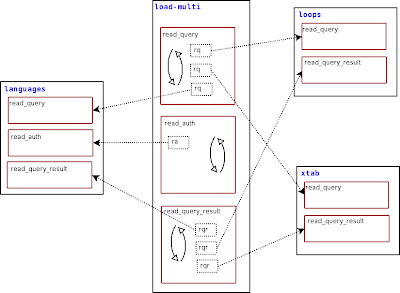
The mechanics of how this works is simple. You load one or more script containing one or more of the above mentioned functions that hook to the Proxy, and the load-multi module will stack each function in a list. For each hook, the load-multi module loops through the loaded functions, executes each one and tests the result. If the function returns a non null value, then that value is passed back to the Proxy.
load-multi
This means that if you have two scripts that can handle a particular query, only the first one that has been loaded will get a chance to evaluate the query.
When loading modules, you must check the order in which you are loading them. If you load first a script that handles every query, such as a logging application, subsequent scripts would be just filling memory.
There are more goodies.
Your scripts can use some global functions that load-multi prepares for you. Each of these routines is in the proxy.global namespace, so they are available to all clients and their loaded scripts.
One first useful application that can be plugged to this module is a script that lists the status of loaded functions:
-- show_handlers.lua
function read_query (packet)
if packet:byte() ~= proxy.COM_QUERY then
return
end
local query = packet:sub(2)
if query:match('select pload status') then
local header = { 'module', 'handler' }
local rows = {}
for id, lmodule in pairs(proxy.global.handler_status) do
for i,h in pairs(lmodule) do
table.insert(rows, { id, h.func } )
end
end
return proxy.global.make_dataset(header,rows)
end
end
Load this script with PLOAD show_handlers, and any client will be able to get a list of modules, with the function that each one introduced.
pload show_handlers;
+-------------------------------+
| info |
+-------------------------------+
| module "show_handlers" loaded |
+-------------------------------+
1 row in set (0.01 sec)

pload auth1;
+-----------------------+
| info |
+-----------------------+
| module "auth1" loaded |
+-----------------------+
1 row in set (0.03 sec)

select pload status;
+---------------+-------------------+
| module | handler |
+---------------+-------------------+
| show_handlers | read_query |
| auth1 | read_auth |
| auth1 | disconnect_client |
| auth1 | read_handshake |
| auth1 | connect_server |
| auth1 | read_auth_result |
+---------------+-------------------+
6 rows in set (0.01 sec)

This new module has the ability of extending its own behavior. If you like playing with new features, you should try this one!

Blocking specific queries

Imagine having a database with 100 tables and you want to allow a user to read from all of it, except one.
But of the table of the knowledge of good and evil, thou shalt not select of it

That's an old problem, with an ugly solution. You must either move the forbidden table to another database or to explicitly authorize the user to read each one of the other 99 tables.

A friend of mine had a similar problem. She has a huge database with thousand of tables, and she wants to prevent the users from issuing a "SHOW TABLES" command. Why? Because, with thousands of tables, the response time of MySQL can easily become very slow. It is a design problem, not easily solvable, and the best course of action here is to deny access to this command.

The bad news is that MySQL has no provision for this kind of restrictions.
The good news is that you can solve this problem with an easy MySQL Proxy script.
And you don't even need to write it. Just download the appropriate script from MySQL Forge and use it.
It's quite easy to customize. The interesting part is in the following lines:

local SHOW_REGEXP = make_regexp_from_command('show')

queries_to_filter = {
{
prefix = SHOW_REGEXP,
keywords = { 'SHOW', 'TABLES'} ,
},
}

SHOW_REGEXP is a variable containing a regular expression built from the command you want to consider. For performance reasons, before tokenizing every query, a quick search is pergormed, and only if that search is positive the query is analyzed further. In this case, the script will first check if there is a 'SHOW' at the start of the query. Then it will tokenize the query, and check if all the elements (SHOW and TABLES) are present. The tokenizer can separate literal values from strings. Therefore, if your query contains something like SELECT "SHOW TABLES" as X, it won't block the query.
To make the restriction more robust, there are also rules for 'SHOW TABLE STATUS', 'SELECT FROM INFORMATION_SCHEMA.TABLES", and "EXECUTE" (to prevent smart users from using prepared statements as a workaround).
mysql> show tables;
ERROR 7777 (X7777): command <SHOW TABLES> is not allowed
mysql> show table status;
ERROR 7777 (X7777): command <SHOW TABLE STATUS> is not allowed
mysql> select * from information_schema.tables;
ERROR 7777 (X7777): command <SELECT FROM INFORMATION_SCHEMA TABLES> is not allowed

mysql> select schema_name from information_schema.schemata;
+--------------------+
| schema_name |
+--------------------+
| information_schema |
| test |
+--------------------+
2 rows in set (0.00 sec)

Now, if you want to prevent someone from accessing the good_and_evil table, you can do the following:

local SELECT_REGEXP = make_regexp_from_command('select')

queries_to_filter = {
{
prefix = SELECT_REGEXP,
keywords = { 'SELECT', 'FROM', 'GOOD_AND_EVIL'} ,
},
}

And your beloved table becomes taboo.
Try it!

Sunday, October 28, 2007

MySQL Users Conference 2008 - CFP is closing soon!


Hurry up!
The call for papers for the Users Conference 2008 is closing on Tuesday, October 30th.
If you haven't submitted a proposal, now it's the time to do it.
Read the unofficial but very effective guidelines offered Baron Schwartz and Colin Charles and write down your well thought abstract
NOW!

OpenFest 2007

The OpenFest 2007 is under way in Sofia, Bulgaria. The event is hosted in an elegant building in Sofia center and it's packed with enthusiastic open source lovers.
The star of the show was Georg Greve president of the EFF Europe. A passionate speaker, he gathered a huge audience just at the start of the event.
Then, during break, the organizers called for an impromptu press conference, where Georg, Jonas Öberg, Erik Josefsson, Domas Mituzas, snd yours truly enjoyed the spotlight for a hour, while asked about recipes to win the ongoing battle between good and evil in the software industry.
I had a session about getting started with MySQL Proxy, which got me a full hall and a great degree of interest. (slides)
After that, Domas had a packed room with standing audience when he presented his talk about Wikipedia.
The evening was closed at a local restaurant where we were treated with free beer, of which everyone took advantage during the ongoing discussion on good and evil.

A very enjoyable experience.

Friday, October 26, 2007

Speaking at the OpenFest - Sofia

openfest
I was invited to talk at the OpenFest in Sofia, Bulgaria, and I gladly accepted.
Despite having worked four years in Balkan states, I have never been to Sofia before, and I welcome the chance.
I will present a session about Getting started with MySQL Proxy. The Proxy has advanced a lot since I wrote the getting started article, not only in terms of development (it has!) but also in terms of acceptance and experimentation.
I will show some consolidated usage, and some magic, which is good for advertising.
Since this is my first visit to Bulgaria, I got to learn some words of the local language. And since I was at it, I taught some to the Proxy as well.
How?
I won't anticipate anything, but the Proxy interacts politely in half a dozen languages now. If you are near Sofia, come and see!

Wednesday, October 17, 2007

Introducing the 15 seconds rule

How fast do you want your installation? Check this.
$ time ./express_install.pl ~/downloads/mysql-5.0.45-osx10.4-i686.tar.gz --no_confirm
unpacking /Users/gmax/downloads/mysql-5.0.45-osx10.4-i686.tar.gz
Executing ./install.pl --basedir=/Users/gmax/downloads/5.0.45 \
[...]
Installing MySQL system tables...
OK
Filling help tables...
OK
[...]
loading grants
sandbox server started
installation options saved to current_options.conf.
To repeat this installation with the same options,
use ./install.pl --conf_file=current_options.conf
----------------------------------------
Your sandbox server was installed in /Users/gmax/msb_5_0_45

real 0m6.773s
user 0m0.245s
sys 0m0.235s

Old times


MySQL has a long established rule of going from downloading to up and running in less than 15 minutes, as stated in various sources, like this interview with David Axmark
So we worked hard to make the installation and first use as easy as possible. We came up with the 15 minutes rule: we wanted a user to be able to have MySQL up and running 15 minutes after he finished downloading it.
With advanced installers like apt and rpm, the installation time can go down to seconds.
All goes well when you want to install or replace the main (or the only) server in your host, but things may get hairy when you want to install a second server. Reasons for having a second server:
  • You can't upgrade to a new version, but you need a feature available in a newer release, and you install it as a side server;
  • You want to test a problem without affecting the production database;
  • You want to test a new version.
For QA and Support engineers, consultants, developers, installing a side server is a common task, and usually a painful one.
To install cleanly a second server on a host, you need to:
  1. unpack a binary tarball;
  2. create a data directory (in a different location)
  3. start the server with a different port and socket, to avoid conflicts with the main server.
If you have tried the above steps, you know that it is not a difficult task, but it is error prone, the commands to issue are long and full of options to remember. And even if you don't make mistakes, starting and stopping the server requires a great deal of attention, and using the right server is a challenge in itself.
Enters MySQL Sandbox a program that creates a side install of a MySQL server in seconds.

MySQL Sandbox

The latest version of MySQL Sandbox is designed for the maximum speed with the minimum preparation from the user. To go from nothing to a fully functional server, you need 3 steps:
  1. download the binary tarball from MySQL site, and save it to a directory, say $HOME/downloads.
  2. download and expand the Sandbox
  3. run this command:
    ./express_install.pl $HOME/downloads/tarball_filename.tar.gz
You will get an output similar to the one seen at the beginning of this post, and within seconds, you will have a side server up and running.

Using the Sandbox

The Sandbox installation comes provided with essential goodies to start, stop, and use the server. By default, it installs in $HOME/msb_x_x_xx, where x_x_xx is the version numeral of the server you have just installed. If you were installing mysql 5.0.45, then you can run
$ ~/msb_5_0_45/use.sh
Welcome to the MySQL monitor. Commands end with ; or \g.
Your MySQL connection id is 1
Server version: 5.0.45 MySQL Community Server (GPL)

Type 'help;' or '\h' for help. Type '\c' to clear the buffer.

mysql [localhost] {msandbox} ((none)) > show schemas;
+--------------------+
| Database |
+--------------------+
| information_schema |
| mysql |
| test |
+--------------------+
3 rows in set (0.02 sec)

mysql [localhost] {msandbox} ((none)) >

When you are done, you can stop the server just as easily.
$ ~/msb_5_0_45/stop.sh
/Users/gmax/downloads/5.0.45/bin/mysqladmin --defaults-file=/Users/gmax/msb_5_0_45/my.sandbox.cnf shutdown

Replication

You have seen so far that installing a server took less than 7 seconds. Why I am talking about the 15 seconds rule?
That's what it takes to install a replication system of 1 master + 2 slaves, without any additional setup, no fiddling with configuration files. here goes.
$ time ./set_replication.pl ~/downloads/mysql-5.0.45-osx10.4-i686.tar.gz
installing and starting master
installing slave 1
installing slave 2
starting slave 1
sandbox server started
initializing slave 1
starting slave 2
sandbox server started
initializing slave 2
replication directory installed on /Users/gmax/rsandbox

real 0m14.820s
user 0m0.789s
sys 0m0.745s
That's slightly less than fifteen seconds. And you must consider that each "start" step contains a sleep 3 instruction, to let the server boot properly.

The replication sandbox has a few convenience scripts that let you manage the nodes without thinking of the details. m.sh is the master, s1.sh is the first slave, s2.sh is the second slave, start_all.sh starts all the nodes, and so on. Look. The replication is working!

$ ~/rsandbox/m.sh -e 'create table test.t1(i int)'
$ ~/rsandbox/s1.sh -e 'show tables from test'
+----------------+
| Tables_in_test |
+----------------+
| t1 |
+----------------+
$ ~/rsandbox/s1.sh -e 'show slave status \G' |grep Running
Slave_IO_Running: Yes
Slave_SQL_Running: Yes
Now it's up to you. Try it!

Saturday, September 22, 2007

Team exhibition - Baby talking MySQL


At the MySQL Developers Meeting in Heidelberg there were show off sessions where each team had a chance of showing their best to others.
As part of this shut out presentation, I demonstrated some MySQL Proxy magic.

This is a sample session from that presentation.
mysql> select 1 + 1;
+-------------------------------+
| ERROR |
+-------------------------------+
| Don't understand these digits |
+-------------------------------+
1 row in set (0.00 sec)

# Hmmm!
# Let's try to make it understand ...

mysql> set sql_mode='english_digits'; # You did not know we could do that. Did you?
Query OK, 42 rows affected (0.01 sec)

mysql> select 1 + 1;
+--------+
| result |
+--------+
| two |
+--------+
1 row in set (0.00 sec)

# Clever!
# perhaps it understands something more

mysql> select 1 + two;
+--------+
| result |
+--------+
| three |
+--------+
1 row in set (0.00 sec)

# Ok. What about two numbers?

mysql> select seven + two;
+--------+
| result |
+--------+
| nine |
+--------+
1 row in set (0.00 sec)

# Very good. Now how about something other than adding numbers?

mysql> select seven * two;
+----------+
| result |
+----------+
| fourteen |
+----------+
1 row in set (0.00 sec)

# Pushing it a bit ?

mysql> select seven * three;
+-----------------------------------------------+
| result |
+-----------------------------------------------+
| Can't count beyond my fingers and toes. (21?) |
+-----------------------------------------------+
1 row in set (0.00 sec)

# Well, it has some limitations!
As an exercise for the reader, you can figure out the Lua script that made the above exchange possible.

Monday, September 17, 2007

MySQL Test Creator - wrapping up a Summer of Code experience

Summer of Code image
I talked about this matter already, but now it's time to wrap up.
The Summer of code is over, and the project I have mentored is finished, with a new tool as its outcome, the MySQL test creator.

The student who developed this tool, Charlie Cahoon, did a decent job. All in all, considering that it was his first serious developing experience, he got an excellent result. The maturity stage is still alpha, but he did the breakthrough work to get the development of this tool in the right track.

What do we have in hour hands? A tool that will speed up and make easy the writing of test scripts, during a normal session with the MySQL client. It means that you will fiddle with the database in your usual way, and the test creator will work in the background, writing a test script with its corresponding result file.
Its features include
  • starting, stopping and resetting the background script creation;
  • using loops;
  • removing errors from the script;
  • undoing the last command;
  • showing the test script.
Let's see an example.

mysql> start;
+------------------------+
| TEST CREATOR |
+------------------------+
| Testing has started... |
+------------------------+
1 row in set (0.00 sec)

mysql> create table t1 (id int);
Query OK, 0 rows affected (0.01 sec)

mysql> set @counter = 0;
Query OK, 0 rows affected (0.00 sec)

mysql> start_loop myvar 100;
+-------------------------+
| TEST CREATOR |
+-------------------------+
| Beginning loop creation |
+-------------------------+
1 row in set (0.00 sec)

mysql> set @counter = @counter + 1;
Query OK, 0 rows affected (0.00 sec)

mysql> insert into t1 values (@counter);
Query OK, 1 row affected (0.00 sec)

mysql> stop_loop;
+--------------------------------+
| TEST CREATOR |
+--------------------------------+
| Executed 2 queries X 100 times |
+--------------------------------+
1 row in set (0.02 sec)

mysql> select count(*) from t1;
+----------+
| count(*) |
+----------+
| 100 |
+----------+
1 row in set (0.00 sec)

mysql> stop;
+---------------------+
| TEST CREATOR |
+---------------------+
| Testing has stopped |
+---------------------+
1 row in set (0.00 sec)

mysql> view test;
+-----------------------------------+
| Test File |
+-----------------------------------+
| --disable_warnings |
| DROP TABLE if exists t1; |
| --enable_warnings |
| create table t1 (id int); |
| set @counter = 0; |
| let $myvar = 100; |
| while ($myvar) |
| { |
| set @counter = @counter + 1; |
| insert into t1 values (@counter); |
| dec $myvar; |
| } |
| select count(*) from t1; |
+-----------------------------------+
13 rows in set (0.00 sec)

If you have ever tried to create a loop in mysqltest language, you know what a time saver this tool will be.
Another example. Getting rid of errors:

mysql> start;
+------------------------+
| TEST CREATOR |
+------------------------+
| Testing has started... |
+------------------------+
1 row in set (0.00 sec)

mysql> select 1 as info;
+------+
| info |
+------+
| 1 |
+------+
1 row in set (0.00 sec)

mysql> select 2 as info;
+------+
| info |
+------+
| 2 |
+------+
1 row in set (0.00 sec)

mysql> select this is wrong;
ERROR 1064 (42000): You have an error in your SQL syntax; check the manual that corresponds to your MySQL server version for the right syntax to use near 'wrong' at line 1
mysql> view test;
+-----------------------+
| Test File |
+-----------------------+
| connection con55; |
| select 1 as info; |
| select 2 as info; |
| --error 1064 |
| select this is wrong; |
+-----------------------+
5 rows in set (0.00 sec)

mysql> discard_last;
+-------------------------------+
| TEST CREATOR |
+-------------------------------+
| Last query has been discarded |
+-------------------------------+
1 row in set (0.00 sec)

mysql> view test;
+-------------------+
| Test File |
+-------------------+
| connection con55; |
| select 1 as info; |
| select 2 as info; |
+-------------------+
3 rows in set (0.00 sec)

mysql> select 3 as info;
+------+
| info |
+------+
| 3 |
+------+
1 row in set (0.00 sec)

mysql> wrong;
ERROR 1064 (42000): You have an error in your SQL syntax; check the manual that corresponds to your MySQL server version for the right syntax to use near 'wrong' at line 1
mysql> discard_last;
+-------------------------------+
| TEST CREATOR |
+-------------------------------+
| Last query has been discarded |
+-------------------------------+
1 row in set (0.00 sec)

mysql> view test;
+-------------------+
| Test File |
+-------------------+
| connection con55; |
| select 1 as info; |
| select 2 as info; |
| select 3 as info; |
+-------------------+
4 rows in set (0.00 sec)

mysql> stop;
+---------------------+
| TEST CREATOR |
+---------------------+
| Testing has stopped |
+---------------------+
1 row in set (0.00 sec)
There are still a few glitches to take care of, but the results so far are really great!

Saturday, September 15, 2007

How to hijack a Linux + MySQL server

I hope I got your attention with the title. The politically correct term should be "how to redirect MySQL traffic on Linux", but you probably wouldn't have noticed.
The scenario is this. You want to switch servers without need for the clients to change connection parameters.
Why would you want to do this? Some reasons:
  • You want to test a new server version, which you installed to listen to port 13306, and you want to do it without modifying the applications parameters;
  • You ant to use MySQL Proxy on port 4040 to log the traffic for a while without restarting the server, in order to debug an inexplicable problem;
Whatever the reason, you can do it.

Here is how you can proceed on Linux.

Set a iptables rule to redirect port 3306 to port 13306 or to port 4040:
sudo iptables -t nat -I PREROUTING \
-s ! 127.0.0.1 -p tcp \
--dport 3306 -j \
REDIRECT --to-ports 13306
Caveat: This will only work if your clients are connecting from a separate machine. On the same server, this rule spares the local IP address 127.0.0.1.

To undo the redirection, repeat the above command with -D instead of -I.

Saturday, September 01, 2007

Working for MySQL is COOL!


A new style for MySQL jobs page.
Haven't you heard? MySQL is hiring!


If the adventurous type doesn't appeal to you, you can opt for the quiet home sweet home version, with the beach sweet beach variation. That's what happened during the recent Summer of Code. I know it's a different story, but when I saw the picture of the career climber in the desert I couldn't resist associating it with Sakila typing away in the beach.

Thursday, August 23, 2007

Heading to FrOSCon

I mentioned this event a few weeks ago, but it's worth a reminder.

The Free and Open Source Software Conference is held in Sankt Augustin, a cheerful place near Bonn.
FrOSCon header

Some reasons to attend:
  • the organizers are friendly and efficient
  • the program is exciting
  • the food is good,
  • it's full of open source enthusiasts
  • I am meeting with a bunch of friends and colleagues
Do you need more? Ah, yes, my session :)
I will present a topic for database administrators, Monitoring and logging a database server.
But there is also Lenz Grimmer with a talk about Opening the doors and windows of the Cathedral, and Susanne Ebrecht, who will bravely cover the PostgreSQL vs. MySQL, or Venus vs. Mars debate.

See you there!

Tuesday, August 21, 2007

Another step forward for MySQL Proxy


After a few months of documentation uncertainty, MySQL Proxy has finally hit
the official manual.
The delay between the release and the manual is not a sign of neglect. The documentation engineer had to catch up while the author kept releasing revision after revision (we are now at revision 156. When the Proxy was announced, it was at revision 9).
The Proxy is growing, and so is the interest about this feature. A few days ago, an Oracle user was asking for a Proxy-like feature!

And the surprises are not over. More is coming. Stay tuned.

Go Proxy! Go Jan!

Monday, August 13, 2007

How MySQL 5.1 is going to change your life

Are you getting ready for MySQL 5.1? You should. I know that it's taken a long way from alpha to beta, but now it is really close to GA. Really. There is no way it's going to stay beta forever. Very soon someone in the high management will realize that all the outstanding bugs were fixed, and MySQL 5.1 is ready for prime time.
And then, you will have to get used to it. Meaning that there a lot of stuff that is so attractive, that you will want to explore the manual in search of guidance.
Let me give you a preview of what's there for you.
Partitioning

Better start reading some theory on this stuff. If you have performance problems with huge loads of data, this is really what you should be doing. Partitioning is a chunk of pure performance hooked to a database. It's not in any way related to relational theory, and you don't need to redesign your database, but surely you need to rethink it in terms of partitioning.
Rush to read the manual and Robin Schumacher introductory article. If you really want to get the most about partitioning, though, you should check The Art of SQL (Note: I am not affiliated with the author or the publisher. This advice is out of my goodness only)

Row based replication

This is heavy stuff. For demanding application. If you have been dreaming of a more robust replication mechanism for MySQL, here it is.
Row based replication will send to the slave the data, rather than the statement to reproduce it. All edge cases where normal replication leave you in doubt are now handled efficiently by row-based replication. And if you want to get the best of the two worlds, you can still choose the mixed format. Check it out.

Log tables on demand

Get ready for a new experience. Logs whenever you need them, without scheduling a server reboot.
The new logs can materialize in your server in several shapes. You can have them as files, the same as you have seen them in previous versions, or you can have them as CVS tables (which you can convert to MyISAM or to something else), or you can have both at once, tables and files.
And your logs are dynamic. You can tell the server to start and stop logging, to change the log file name, to log on tables and files or only on one of them, you'll have more options than some video games.
And your life will change when you realize that you will need to plan for backups that include the logs. Yes. This is the downside. Get used to it.

Event scheduler

Someone said that the event scheduler is the coolest new feature in MySQL 5.1. Perhaps it was my reaction as well when I saw it for the first time. I can't tell you if it's the best one, but surely it will change your way of working. Say goodbye to OS dependent schedulers. Your database will take care of its own jobs. Setting up events is ridiculously easy. Once you try, you will be hooked forever.

XML functions
To tell you the truth, this is my least favorite feature in 5.1, because for theoretical reasons I am not fond of XML, but I have to admit that it's going to be damn useful, and I will have to get acquainted to it. It will save time and allow for flexible integration schemes with applications that only talk XML.
What else? MySQL 5.1 will change your life, sure. To see the other reasons for my prediction, check the list of wonders for the upcoming version.

Sunday, August 12, 2007

Boost your SQL with Proxy loops

By now, everybody knows that I am quite fond of MySQL Proxy and with reason. Using a Proxy you can add features without need of delving into the intricacies of MySQL server code.
One of the features that you can create with the Proxy, once you are familiar with its basic architecture (if you still aren't, you may check Getting started with MySQL Proxy) is a loop.
So many times I catch myself doing things like
$ for N in `seq 1 10` ; do mysql -e "CREATE TABLE t$N (id int)"; done
or something like that. Why, oh why there is no FOR command in MySQL syntax?

Some time ago, I created a working solution using stored routines, but it is less than perfect. It requires installation, and the routines are limited to one database, thus requiring an unnecessary amount of detail to make it work.

Proxy loops with a counter.

Enter the Proxy, and the solution is surprisingly slim.
What you need to do is start the proxy with the loop module from MySQL Forge. Then, from your client you can do loops:
mysql> set @x =0;
Query OK, 0 rows affected (0.02 sec)

mysql> for 1 10 select @x := @x + 1 as x;
+------+
| x |
+------+
| 1 |
| 2 |
| 3 |
| 4 |
| 5 |
| 6 |
| 7 |
| 8 |
| 9 |
| 10 |
+------+
10 rows in set (0.42 sec)
This is the simplest syntax. It requires a command (FOR) a start counter (1) a stop counter (10) and a query (select @x := @x + 1 as x).
The Proxy does the rest, sending the query as many times you required, and collecting the results in practical tabular form. You can actually refer to a counter in the query itself.
mysql> for 1 5 create table t$N (id int);
+--------+--------+---------------+
| inj_id | result | affected rows |
+--------+--------+---------------+
| 1 | 0 | 0 |
| 2 | 0 | 0 |
| 3 | 0 | 0 |
| 4 | 0 | 0 |
| 5 | 0 | 0 |
+--------+--------+---------------+
5 rows in set (0.02 sec)

mysql> show tables;
+----------------+
| Tables_in_test |
+----------------+
| t1 |
| t2 |
| t3 |
| t4 |
| t5 |
+----------------+
5 rows in set (0.00 sec)
The $N variables refers to the current counter. The Proxy script will do the change before sending the query to the server. The result is shown in a dataset. A '0' (zero) means no error. When an actual error occurs, the loop is stopped, and the results up to that point are reported.
mysql> drop table t1;
Query OK, 0 rows affected (0.00 sec)

mysql> for 1 5 create table t$N (id int);
+--------+--------+---------------+
| inj_id | result | affected rows |
+--------+--------+---------------+
| 1 | 0 | 0 |
| 2 | -1 | 0 |
+--------+--------+---------------+
2 rows in set (0.01 sec)

mysql> show errors;
+-------+------+---------------------------+
| Level | Code | Message |
+-------+------+---------------------------+
| Error | 1050 | Table 't2' already exists |
+-------+------+---------------------------+
1 row in set (0.00 sec)
I removed one table (so the first command in the loop succeds) and when the second query is executed, an error is reported. The loop is immediately interrupted and the result is relayed to the client.

Proxy loops with a list.

Counters are useful, but they are not always what you need. Sometimes, you need to loop though a list. The above mentioned module supports a second syntax, using a list of comma separated items instead of a counter.
FOR user_var (items, in, a, list) your query
Easy to use. Really. Want to create three tables with the same structure but different names? Presto!
mysql> FOR mytable (the_first, the_second, the_third, something_else) CREATE TABLE $mytable (id int);
+--------+--------+---------------+
| inj_id | result | affected rows |
+--------+--------+---------------+
| 1 | 0 | 0 |
| 2 | 0 | 0 |
| 3 | 0 | 0 |
| 4 | 0 | 0 |
+--------+--------+---------------+
4 rows in set (0.05 sec)

mysql> show tables;
+----------------+
| Tables_in_test |
+----------------+
| something_else |
| the_first |
| the_second |
| the_third |
+----------------+
4 rows in set (0.00 sec)
Even if you don't declare a counter, nonetheless you can use one in your query, if needed. Suppose you want to create the tables in such a way that the first one has a CHAR(1) column, the second one a CHAR(2), and so on.
It's a lame example, but you can do it, using the now familiar $N variable.
mysql> FOR mytable (the_first, the_second, the_third, something_else) CREATE TABLE $mytable (name char($N ) );
+--------+--------+---------------+
| inj_id | result | affected rows |
+--------+--------+---------------+
| 1 | 0 | 0 |
| 2 | 0 | 0 |
| 3 | 0 | 0 |
| 4 | 0 | 0 |
+--------+--------+---------------+
4 rows in set (0.05 sec)

mysql> desc the_first;
+-------+---------+------+-----+---------+-------+
| Field | Type | Null | Key | Default | Extra |
+-------+---------+------+-----+---------+-------+
| name | char(1) | YES | | NULL | |
+-------+---------+------+-----+---------+-------+
1 row in set (0.01 sec)

mysql> desc the_second;
+-------+---------+------+-----+---------+-------+
| Field | Type | Null | Key | Default | Extra |
+-------+---------+------+-----+---------+-------+
| name | char(2) | YES | | NULL | |
+-------+---------+------+-----+---------+-------+
1 row in set (0.01 sec)
As usual, enjoy, and give it a try!

mysqldump unusual error

A friend of mine called me today, asking for advice on a baffling error.
He has just finished upgrading a database server from 4.1.20 to 5.0.45but, when attempting a backup to all databases with mysqldump, he gets a discomforting message:
mysqldump: Got error: 1044:
Access denied for user 'root'@'localhost' to database 'information_schema'
when using LOCK TABLES
Of course, the error is doubly strange.
  • First, because mysqldump is not supposed to attempt dumping the information schema. I know for sure, since I had to write a special script to dump the I_S when I really needed to export its data.
  • Second, because there was actually a bug affecting this behavior, but it was fixed over one year ago.
Looking at the bug report, though, I saw that someone was complaining about this bug again recently.
I don't believe without action, so I rapidly installed a 5.0.45 and I tried to repeat the offending behavior. No luck. Everything worked as expected.
Then it dawned on me that perhaps he was not using the right mysqldump. I asked my friend to report the version of the dump, and indeed, it was a version that comes with MySQL 4.1.
Apparently, an old version of the client tools were still stuck in the OS execution path, before the directory where the new ones were installed.
A couple of minutes later, having cleaned the installation, all went well.
Lesson learned: before crying "bug", try "--version"!

Monday, August 06, 2007

Summer of Code pleasures

Summer of Code image

As a professional tester, I have a dream about a tool that will let me use my favorite SQL manager, and at the same time create tests ready to be plugged to the regression test suite.
I have been dreaming and planning about it, and finally the magic tool is shaping up.
I am mentoring a Summer of Code project, assigned to Charlie Cahoon. After a long preparatory work and much planning, the MySQL test creator is finally out!
Initially, it was planned as a separated tool, a replacement for the MySQL command line. The idea is that you write queries and eye the results, while the tool in background is writing a polished test script. That would have been a good tool, multi platform, easy to use, but limited to the command line.
Then the MySQL Proxy came along, and we decided to use it as a backend. Thus the tool, instead of being written in C++, it ended up in Lua. Kudos to Charlie for learning the language very quickly and for coding it.
The tool is not ready yet. It has just the basic features, but it has now reached the stage when it can actually produce a simple test script+result pair.
For example, This is what I would type to check that the CREATE, INSERT, and SELECT statements are supported (not exhaustive test, of course!)
mysql> start;  # This is a macro from the magic tool
Query OK, 0 rows affected (0.00 sec)

mysql> drop table if exists t1;
Query OK, 0 rows affected, 1 warning (0.00 sec)

mysql> create table t1 (id int, c char(10));
Query OK, 0 rows affected (0.02 sec)

mysql> insert into t1 values (1,'a'), (2,'b');
Query OK, 2 rows affected (0.00 sec)
Records: 2 Duplicates: 0 Warnings: 0

mysql> select * from t1;
+------+------+
| id | c |
+------+------+
| 1 | a |
| 2 | b |
+------+------+
2 rows in set (0.01 sec)

mysql> stop; # another macro. The tool stops recording now
Query OK, 0 rows affected (0.01 sec)

mysql> exit
What I see on the screen is not what I need to get in a test script. If I had found a bug here and I wanted to submit it, I would have to do some cut-and-pasting and clean-up. Instead, the mysql-test-creator is doing that for me.
$ cat creator.test
--disable_warnings
DROP TABLES if exists t1;
--enable_warnings
create table t1 (id int, c char(10));
insert into t1 values (1), (2);
insert into t1 values (1,'a'), (2,'b');
select * from t1;

$ cat creator.result
DROP TABLES if exists t1;
create table t1 (id int, c char(10));
insert into t1 values (1,'a'), (2,'b');
select * from t1;
id c
1 a
2 b
Isn't it sweet?
Bravo Charlie!

More is coming. The tool will support multiple sessions at once, with the creation of a unified test script from several sessions. Stay tuned!