Tuesday, June 20, 2006
Talking at FrOSCon 2006
I will be at FrOSCon 2006 on June 24, with a talk about Pivot tables in MySQL 5.
I will arrive in Sankt Augustin on June 23, flying from Alghero Fertilia, Italy to Frankfurt Hahn, Germany and then driving to the conference site (travel plan).
The funny thing is that, when I booked my flight, I had no idea that I was about to get in the middle of the Soccer World Cup. Being no soccer fan, I realized this fact only when the media circus started and I could not avoid being informed. Oh, well, now I understand why it wasn't easy to find a hotel, even booking two months in advance!
The slides and the source code for this talk are available from my site.


Friday, June 02, 2006
Filling test tables quickly
Let's say that you are building a new application, and you need to test it against a large set of data. You would need either to borrow the data from some known source or to create it yourself.
Even without a stored procedure, you could just insert a line manually and then execute 20 times this query:
And it should not take you more than 30 seconds.
Since we need unique words, we can ask the database to produce the missing half by reversing the existing ones.
Then, if we want records with one minute interval, we can proceed like this:
There are other techniques as well, but these three are techniques that you can use to get the job done even without dedicated tools.
If you have such collection at your disposal, good for you. But more often than not you need some sort of data that is not ready in your repositories, and then you need to have a quick method to create it.
I will tell you three quick tricks to create large datasets of simple data types, namely numbers, words, and dates.Le's assume that we need at least one million records. Here's how to go for it.
numbers
Creating a large table with just a numeric field is quite simple.You may be tempted to run a loop in your favorite language, or even in a SQL stored procedure, but this approach would run for quite a long time.
There is a better solution, that will fill your large table in a few seconds
drop table if exists numbers;
create table numbers ( id int not null primary key);

delimiter $$

drop procedure if exists fill_numbers $$
create procedure fill_numbers()
deterministic
begin
  declare counter int default 1;
  insert into numbers values (1);
  while counter < 1000000
  do
      insert into numbers (id)
          select id + counter
          from numbers;
      select count(*) into counter from numbers;
      select counter;
  end while;
end $$
delimiter ;

call fill_numbers();
Even without a stored procedure, you could just insert a line manually and then execute 20 times this query:
insert into numbers (id) select id + (select count(*) from numbers) from numbers; select count(*) from numbers;
And it should not take you more than 30 seconds.
words
If your case calls for a large list of unique words, you could of course build it with a program, but then again the insertion process would be quite slow to complete. A faster method is to load an existing list from as file.All Unix system include a word list, whose size ranges from a few thousand to half a million. If you don't have such a list available in your box, you can get one (or build it from several ones) from several places. Good places to start looking for words are this and this.
At the end of the exercise, let's say that you've got a list of about half a million distinct words in /usr/share/dict/words. Thus, you can proceed to build your table.
drop table if exists words;
create table words (
  id int not null auto_increment primary key,
  t varchar(50) not null
);

load data local infile '/usr/share/dict/words'
  into table words (t);

Query OK, 518584 rows affected (4.94 sec)
Records: 518584  Deleted: 0  Skipped: 0  Warnings: 0

select count(*) from words;
+----------+
| count(*) |
+----------+
|   518584 |
+----------+
1 row in set (0.04 sec)
Since we need unique words, we can ask the database to produce the missing half by reversing the existing ones.
insert into words (t) select reverse(t) from words;
Query OK, 518584 rows affected (3.98 sec)
Records: 518584  Duplicates: 0  Warnings: 0

select count(*) from words;
+----------+
| count(*) |
+----------+
|  1037168 |
+----------+
alter ignore table words add unique key (t);
Query OK, 1037168 rows affected (46.69 sec)
Records: 1037168  Duplicates: 5791  Warnings: 0

select count(*) from words;
+----------+
| count(*) |
+----------+
|  1031377 |
+----------+
dates
Finally, let's see how to create a large list of dates. Actually, you would seldom need a million dates, since a million days cover more than 2,700 years. A table of just dates, thus, will usually range from 1,000 to 10,000 records. When you need a million records, you are more likely talking about DATETIME values, with intervals of hours, minutes, or seconds. Nothing will prevent you from using this technique to create one thousand DATE values, but let's keep to our original goal of filling a large table.Then, if we want records with one minute interval, we can proceed like this:
drop table if exists dates;
create table dates (
  id int(11) not null auto_increment primary key,
  dt datetime not NULL
) engine=myisam;

delimiter $$

drop procedure if exists make_dates $$
CREATE PROCEDURE make_dates( max_recs int)
begin
  declare start_dt datetime;
  declare numrecs int default 1;
  set start_dt = date_format( now() - interval max_recs minute, '%Y-%m-%d %H:%i:00');

  insert into dates (dt) values (start_dt );

  while numrecs < max_recs
  do
      insert into dates (dt)
          select dt + interval ( numrecs ) minute
          from dates;
      select count(*) into numrecs from dates;
      select numrecs;
  end while;
end $$

delimiter ;
Only this time we use the record count to calculate the interval in minutes between the existing records and the ones being inserted.
Also in this case, we double the table 20 times, to pass the one million records mark.
call make_dates( 1000000 );
+---------+
| numrecs |
+---------+
|       2 |
+---------+
1 row in set (0.02 sec)

+---------+
| numrecs |
+---------+
|       4 |
+---------+
1 row in set (0.02 sec)

# ... 16 more counts

+---------+
| numrecs |
+---------+
|  524288 |
+---------+
1 row in set (5.99 sec)

+---------+
| numrecs |
+---------+
| 1048576 |
+---------+
1 row in set (10.18 sec)

select count(*), min(dt), max(dt) from dates;
+----------+---------------------+---------------------+
| count(*) | min(dt)             | max(dt)             |
+----------+---------------------+---------------------+
|  1048576 | 2004-07-07 13:57:00 | 2006-07-05 18:12:00 |
+----------+---------------------+---------------------+
There are other techniques as well, but these three are techniques that you can use to get the job done even without dedicated tools.
Wednesday, May 24, 2006
Tutorial for a more powerful MySQL Sandbox
The MySQL Sandbox has been enhanced, with a new express installer, capable of setting up a sandbox in just a few seconds, and an interactive wizard, for fine tuning complex installations.
A lengthty tutorial is accompanying the new release.
This tool could be the basis for a long overdue interactive installation tool for Unix systems. What do you think?
A lengthty tutorial is accompanying the new release.
This tool could be the basis for a long overdue interactive installation tool for Unix systems. What do you think?
Sunday, May 14, 2006
New homes

I have a new web site. I registered the datacharmer.org and datacharmer.com domains, which are now jointly my main page. (Both addresses point to the same page)

Another change involves the MySQL General Purpose Stored Routines Library, which has evolved to version 1.0 (not alpha anymore). Its home is now at SourceForge.
Wednesday, April 26, 2006
MySQL Community Awards
Second day of the MySQL USers Conference 2006.
At breakfast, Arjen approached me, asking if I could hang nearby the podium during the keynote. "You may end up on stage", he said. I thought that they were going to hand me the iPod that was announced some time ago. So I went there and secured a seat as close as I could, together with Markus, Beat, Roland, and Sheeri.
However, instead of the iPod (I got it after lunch, BTW) I was called on stage to get a Community Award, and the same was granted to Roland, Markus, and Rasmus (!!)
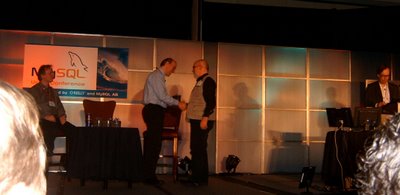

Looks quite useful. Now when somebody asks difficult questions, I can always consult the crystal ball. :)
Thanks to the MySQL Community for this wonderful surprise, and congratulations to Roland, Markus, and Rasmus!
(Pictures courtesy of Roland. Thanks)
At breakfast, Arjen approached me, asking if I could hang nearby the podium during the keynote. "You may end up on stage", he said. I thought that they were going to hand me the iPod that was announced some time ago. So I went there and secured a seat as close as I could, together with Markus, Beat, Roland, and Sheeri.
However, instead of the iPod (I got it after lunch, BTW) I was called on stage to get a Community Award, and the same was granted to Roland, Markus, and Rasmus (!!)
Looks quite useful. Now when somebody asks difficult questions, I can always consult the crystal ball. :)
Thanks to the MySQL Community for this wonderful surprise, and congratulations to Roland, Markus, and Rasmus!
(Pictures courtesy of Roland. Thanks)
Tuesday, April 25, 2006
Talk at the MySQL UC: Higher Order MySQL
From the highly unorthodox department, a speech about stored routines that create other routines in MySQL.

Friday, April 21, 2006
Advanced replication techniques in MySQL 5.x

OnLamp has just published an article I wrote about some interesting things you can do with MySQL 5.x and replication.
- You can create an array of peer-to-peer nodes that are at the same time master and slave, without much worry about insertion conflicts, thanks to some server variables introduced in MySQL 5.0;
- You can achieve automatic failover using a combination of federated tables (MySQL 5.0) and events (5.1)
If you want to get your hands dirty, using the companion package MySQL Replication Playground you can try out the goodies described in the article without risking your valuable servers.
Comments welcome.
Introducing MySQL 5 Replication Playground
As promised when I talked about the MySQL Sandbox and as mentioned in this (very) recent article on replication, I have released a testing environment for replication, called the MySQL 5 Replication Playground.
It's a package that creates in one single server an array of four replicating nodes using MySQL 5.0 or 5.1. The purpose of this package is to help developers and administrators when they need to test applications involving replication. You don't need to use several boxes. One machine is enough. With just one instance of MySQL installed, the Replication Playground will install four data directories and it will create the necessary scripts to start, stop, and using the nodes.
The installation comes in two flavors: standard (i.e. one master and three slaves, as usual) and circular (where each node is at once master and slave, as explained in the above mentioned article).
Once you install it, you can play with it and test your failover procedures, without worrying about your valuable production data. The playground works with separated ports and sockets, and it's completely independent from any other MySQL installation.
The docs in the distribution package contain also some sample sessions with both the standard and the circular installation.
The package requires:
It's a package that creates in one single server an array of four replicating nodes using MySQL 5.0 or 5.1. The purpose of this package is to help developers and administrators when they need to test applications involving replication. You don't need to use several boxes. One machine is enough. With just one instance of MySQL installed, the Replication Playground will install four data directories and it will create the necessary scripts to start, stop, and using the nodes.
The installation comes in two flavors: standard (i.e. one master and three slaves, as usual) and circular (where each node is at once master and slave, as explained in the above mentioned article).
Once you install it, you can play with it and test your failover procedures, without worrying about your valuable production data. The playground works with separated ports and sockets, and it's completely independent from any other MySQL installation.
The docs in the distribution package contain also some sample sessions with both the standard and the circular installation.
The package requires:
- Linux, or FreeBSD (theoretically, it should work with any Unix flavor, but it has been tested only with Linux and FreeBSD)
- MySQL 5.0 or 5.1
- bash
- tar
- gzip
- Perl (for the installation)
- Optionally, you need the Perl DBI and DBD::mysql to run some test tools
Wednesday, April 19, 2006
Introducing MySQL Sandbox
Normal MySQL users are going through a flurry of announcements about new versions that make them salivate ath the thought of what can be done with these new goodies. In November, version 5.0 became generally available, thur ready for production, then version 5.1 entered beta.
Ah! It would be nice if I could just install the new versions and test them. Sometimes, though, you can't do that, because you don't have root access, or you have already an older MySQL server running.
For years, due to my consulting duties, I have maintained several non-conflicting, different versions of MySQL. I did that manually, using some scripts that I have developed and tuned over time. For me it is not a big hassle. I am used to the command line, I wrote the tools, I know what to take care of, it's easy. Not so for some of my co-workers, who need to use the same facilities but lack the same degree of confidence that I got with trial-and-error.
So finally I put together all I did for myself and transferred most of my own knowledge into a Perl script that can create a seamless installation of MySQl 5.0 or 5.1 without need of root access, and without disturbing (or being disturbed by) existing MySQL installations.
I called this tool the MySQL Sandbox and I put it on SourceForge.
With this package, achieving your goal of a separated testing installation is quite simple (provided that you are running Linux or some other Unix, that is):
The destination directory will also contain some shell scripts to start, stop, and use the test server.
Optionally, you can also change the default configuration file by specifying --my_file={small|large|huge} . The sandbox installer will try to locate the sample files from the basedir you indicated, and will merge the basic parameters into your destination file (my.sandbox.cnf)
Once the installation is over, you go to the newly created directory, and start the server:
It has been tested in several Linux boxes. Ideally, it should work on every Unix box. Read the docs, or try
Happy testing!
However, that is not the end of it. More goodies are coming in the next days. Stay tuned.
Ah! It would be nice if I could just install the new versions and test them. Sometimes, though, you can't do that, because you don't have root access, or you have already an older MySQL server running.
For years, due to my consulting duties, I have maintained several non-conflicting, different versions of MySQL. I did that manually, using some scripts that I have developed and tuned over time. For me it is not a big hassle. I am used to the command line, I wrote the tools, I know what to take care of, it's easy. Not so for some of my co-workers, who need to use the same facilities but lack the same degree of confidence that I got with trial-and-error.
So finally I put together all I did for myself and transferred most of my own knowledge into a Perl script that can create a seamless installation of MySQl 5.0 or 5.1 without need of root access, and without disturbing (or being disturbed by) existing MySQL installations.
I called this tool the MySQL Sandbox and I put it on SourceForge.
With this package, achieving your goal of a separated testing installation is quite simple (provided that you are running Linux or some other Unix, that is):
- Download the binaries for the version of MySQL you want to try, or follow Markus Popp's instructions and compile your own.
- Unpack MySQL binaries in a convenient place (for the sake of this example, let's say you put it under $HOME/binaries/5.1.10)
- Download the latest MySQL Sandbox package and unpack it.
- Run the install program, saying where are the binaries
$ ./install.pl --basedir=$HOME/binaries/5.1.10If you answer "Y", or just press ENTER, the sandbox will create a $HOME/mysql_sandbox directory, and a data directory under it, containing the minimum for your MySQL installation to work.
The MySQL 5 Sandbox, version 1.1 19-Apr-2006
(C) 2006 Giuseppe Maxia, Stardata s.r.l.
installing with the following parameters:
basedir : /home/gmax/binaries/5.1.10
binbash : /bin/bash
conf_file :
datadir_from : archive
db_password : datacharmer
db_user : datacharmer
force : 0
home_directory : /home/gmax
install_version : 5.1
my_file :
operating_system_user : gmax
sandbox_directory : mysql_sandbox
sandbox_port : 3310
verbose : 0
do you agree? ([Y],n)
The destination directory will also contain some shell scripts to start, stop, and use the test server.
Optionally, you can also change the default configuration file by specifying --my_file={small|large|huge} . The sandbox installer will try to locate the sample files from the basedir you indicated, and will merge the basic parameters into your destination file (my.sandbox.cnf)
Once the installation is over, you go to the newly created directory, and start the server:
$ ./start.shAfter that, using the new server is easy.
~/binaries/5.1.10 ~/mysql_sandbox
~/mysql_sandbox
sandbox server started
$ ./use.shAs you see, there is also a dedicated prompt that may remind you what you are using.
Welcome to the MySQL monitor. Commands end with ; or \g.
Your MySQL connection id is 1 to server version: 5.1.10-beta-max
Type 'help;' or '\h' for help. Type '\c' to clear the buffer.
mysql [localhost] {datacharmer} ((none)) > exit
It has been tested in several Linux boxes. Ideally, it should work on every Unix box. Read the docs, or try
$ ./install --help
Happy testing!
However, that is not the end of it. More goodies are coming in the next days. Stay tuned.
Sunday, April 16, 2006
SQL Easter egg
There is a tentative Obfuscated SQL contest with one entry by Kai Voigt.
Here's my take (requires MySQL 4.1 or later):
Enjoy!
SELECT CONCAT(CONV(536,8,20), LPAD(EXPORT_SET(1,'Y','N','',1), 3, "P"), CHAR(32), HEX(234), UNHEX(594939469*POW(3,2)))Not bad, but ... SQL without data ? Doesn't sound right.
Here's my take (requires MySQL 4.1 or later):
drop table if exists complex;
drop table if exists simple;
CREATE TABLE complex ( simple char(2), complex char(1)) ;
CREATE TABLE simple ( complex char(2), simple char(1));

INSERT INTO complex VALUES ('0','7'),('1','6'),('2','6'),('3','6'),('4','2'),
('5','7'),('6','7'),('7','7'),('8','6'),('10','7'),('11','7'),('12','2'),
('13','7'),('14','6'),('15','6'),('24','2'),('25','6'),('26','6'),('27','6'),
('28','6'),('29','6'),('30','7'),('31','6');
INSERT INTO simple VALUES ('0','4'),('1','F'),('2','5'),('3','8'),('4','0'),
('5','2'),('6','1'),('7','3'),('8','A'),('10','3'),('11','5'),('12','0'),
('13','4'),('14','E'),('15','1'),('24','0'),('25','c'),('26','1'),('27','8'),
('28','b'),('29','3'),('30','2'),('31','5');
set @complex = sqrt(sqrt(0x19a1));
set @simple  = sqrt(sqrt(sqrt(0x290D741)));
select group_concat(unhex(concat(simple,complex))
order by complex.non_simple separator '' )
from (select simple ^ @complex non_simple, complex simple from complex) simple natural join
(select complex ^ @simple non_simple, simple complex from simple) complex ;
Enjoy!
Sunday, April 09, 2006
Sorting data by set of keys
This seems to be a popular problem, since I saw it twice in the past few weeks in two different newsgroups. Somebody complains that, having query with a set of keys like this
When I see such requests, I usually explain that there are two misconceptions. The first being that MySQL sorts results without asking. That it does not do, because a DBMS engine is basically lazy by design, and it won't do anything unless explicitly asked for. The second is that you are asking for a sort order in your set of keys. Such list is just an indication of which keys to consider for filtering the results, and it has no influence at all on ordering. If you want ordering, you need to say so explicitly, using the ORDER BY clause.
Once I clarified what the problem is, let's see the solutions.
You can sort it on-the-fly, if your values are reasonably few
SELECT * from mytable where id IN (200, 2 ,100)they get the results in a order that ius different from the one they specified. For example, they may get something like
selectOne of the posters complained that the result should come in the specified order [200,2,100], and that MySQL was arbitrarily sorting its resultset.
*
from
main_table
where
id in (200,2,100);
+-----+----------+
| id | contents |
+-----+----------+
| 2 | b |
| 100 | aa |
| 200 | bb |
+-----+----------+
When I see such requests, I usually explain that there are two misconceptions. The first being that MySQL sorts results without asking. That it does not do, because a DBMS engine is basically lazy by design, and it won't do anything unless explicitly asked for. The second is that you are asking for a sort order in your set of keys. Such list is just an indication of which keys to consider for filtering the results, and it has no influence at all on ordering. If you want ordering, you need to say so explicitly, using the ORDER BY clause.
Once I clarified what the problem is, let's see the solutions.
You can sort it on-the-fly, if your values are reasonably few
selectThis solution looks like a hack, and in fact it can negatively affect performance, and it is difficult to handle when you need to change the sort order. The best way is to use a support table providing the required sort order.
*
from
main_table
where
id in (200, 2, 100)
order by
case id
when 200 then 1
when 2 then 2
when 100 then 3
end ;
+-----+----------+
| id | contents |
+-----+----------+
| 200 | bb |
| 2 | b |
| 100 | aa |
+-----+----------+
create table sorting_table (Now to get the wanted order we use a join between the main table and the secondary one.
sort_order int not null auto_increment primary key,
fk_id int,
key (fk_id)
);
# here we insert the values in the order we want.
# the auto incremented key will insure that this is the correct one
insert into sorting_table (fk_id) values (200), (2), (100);
select * from sorting_table;
+------------+-------+
| sort_order | fk_id |
+------------+-------+
| 1 | 200 |
| 2 | 2 |
| 3 | 100 |
+------------+-------+
selectThis is a much better solution, which offers flexibility and efficiency at the same time.
main_table.*
from
main_table
inner join sorting_table on (id=fk_id)
where
id in (200,2, 100)
order by
sort_order ;
+-----+----------+
| id | contents |
+-----+----------+
| 200 | bb |
| 2 | b |
| 100 | aa |
+-----+----------+
Dumping MySQL information schema
I have been invited to join the O'Reilly weblogs on databases.
Today I gave my first contribution, with a piece on dumping MySQL information schema contents.
Today I gave my first contribution, with a piece on dumping MySQL information schema contents.
Sunday, April 02, 2006
Measuring replication speed
I am writing an article about some advanced replication features (coming soon), and I wanted to measure the speed of each specific architecture I am working with.
There seem to be no builtin MySQL solution for this particular problem, and thus I am using a hand made metrics tool, inspired by something that Jeremy Zawodny suggested in his High Performance MySQL a few years ago (see the relevant chapter on replication with code).
The naive method would be to set a timestamp in a master table, and to measure the same record when it shows up in the slave. Unfortunately, (but correctly, I have to say!) this does not work, because the binary log includes information on the current timestamp, so that master and slave in the end have exactly the same contents.
Using a trigger in MySQL 5.0 seems promising, because you can set the timestamp tothe value of SYSDATE(), thus showing the different insertion times in master and slave. However, MySQL imestamps precision is limited to seconds. Therefore, if I insert a record at 12:00:00.9999 and the slave receives it at 12:00:01.0001, MySQL will record a difference of 1 second, even though in this case the difference would be just a couple of milliseconds.
With this in mind, I worked on Zawodny suggestion, which was still dealing with seconds, to imrove the method and measure the performance of a replication system with a much better accuracy (possibly microseconds).
The schema works as follows (see the flow chart):
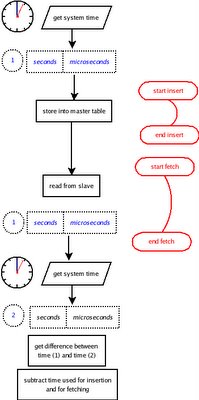
Get the system time in terms of seconds and microseconds (I am using Perl with the Time::HiRes module, but any major language has a corresponding feature). Insert that time in a table on the master, measuring also the time spent for the insertion operation.
Immediately after, start looping on the slave to get that same record. When you do it, get again the system time (with microseconds precision) and subtract the time you got from the table.
For better precision subtract the time you used for inserting and for fetching, and you get the bare replication time.
Here is an example, using a record of 1000 bytes, in a loop that increases the size of the record by 1000 bytes at each step.
This is the raw output used for debugging. The first colum is the step. The second is the ID retrieved from the record, the third one is the sequence number (I inserted 5 records for each steps, and asked to fetch the record with sequence no. 5).
The fourth and fifth columns are the system time that was stored in the table. The remaining two columns are the system time as recorded at fetch time.
With the above data, we can produce a listing of the actual raplication times, in human-readable format.
So the average replication time is, in this case, 0.001040 seconds.
For this test, I was using a sandbox environment, where both master and slave are in the same server. Thus there is some slight overhead due to the fact that one CPU is handling two instances of MySQL, and the same disk is hosting two logs (binary on the master, relay-log on the slave) in addition to the actual tables.
Using a real production replication, these times go down to an average of about 0.000500 seconds. It depends on several factors, from the speed of your networking equipment to the sheer power of your boxes.
Comments welcome.
There seem to be no builtin MySQL solution for this particular problem, and thus I am using a hand made metrics tool, inspired by something that Jeremy Zawodny suggested in his High Performance MySQL a few years ago (see the relevant chapter on replication with code).
The naive method would be to set a timestamp in a master table, and to measure the same record when it shows up in the slave. Unfortunately, (but correctly, I have to say!) this does not work, because the binary log includes information on the current timestamp, so that master and slave in the end have exactly the same contents.
Using a trigger in MySQL 5.0 seems promising, because you can set the timestamp tothe value of SYSDATE(), thus showing the different insertion times in master and slave. However, MySQL imestamps precision is limited to seconds. Therefore, if I insert a record at 12:00:00.9999 and the slave receives it at 12:00:01.0001, MySQL will record a difference of 1 second, even though in this case the difference would be just a couple of milliseconds.
With this in mind, I worked on Zawodny suggestion, which was still dealing with seconds, to imrove the method and measure the performance of a replication system with a much better accuracy (possibly microseconds).
The schema works as follows (see the flow chart):
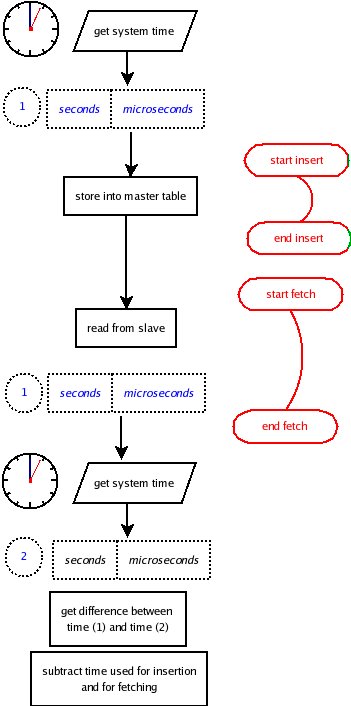
Get the system time in terms of seconds and microseconds (I am using Perl with the Time::HiRes module, but any major language has a corresponding feature). Insert that time in a table on the master, measuring also the time spent for the insertion operation.
Immediately after, start looping on the slave to get that same record. When you do it, get again the system time (with microseconds precision) and subtract the time you got from the table.
For better precision subtract the time you used for inserting and for fetching, and you get the bare replication time.
Here is an example, using a record of 1000 bytes, in a loop that increases the size of the record by 1000 bytes at each step.
0    41     5   1143983120       992916   1143983120       997036
1    41     5   1143983121       207218   1143983121       211084
2    41     5   1143983121       420654   1143983121       424630
3    41     5   1143983121       634802   1143983121       638909
4    41     5   1143983121       849051   1143983121       853521
5    41     5   1143983122        65003   1143983122        67892
6    41     5   1143983122       279944   1143983122       282933
7    41     5   1143983122       493895   1143983122       498320
8    41     5   1143983122       710443   1143983122       715032
9    41     5   1143983122       927867   1143983122       932013
10    41     5   1143983123       145376   1143983123       149648
This is the raw output used for debugging. The first colum is the step. The second is the ID retrieved from the record, the third one is the sequence number (I inserted 5 records for each steps, and asked to fetch the record with sequence no. 5).
The fourth and fifth columns are the system time that was stored in the table. The remaining two columns are the system time as recorded at fetch time.
With the above data, we can produce a listing of the actual raplication times, in human-readable format.
loop data size master insert slave retrieval total repl. time bare time
---- --------- ------------- --------------- ---------------- ---------
1      1000      0.001655        0.000859         0.004120  0.001606
2      1000      0.001643        0.001268         0.003866  0.000955
3      2000      0.001505        0.000850         0.003976  0.001621
4      3000      0.001604        0.000849         0.004107  0.001654
5      4000      0.001943        0.000851         0.004470  0.001676
6      5000      0.001853        0.000981         0.002889  0.000055
7      6000      0.001964        0.000968         0.002989  0.000057
8      7000      0.003285        0.001081         0.004425  0.000059
9      8000      0.001431        0.000851         0.004589  0.002307
10      9000      0.003076        0.001012         0.004146  0.000058
11     10000      0.001282        0.001600         0.004272  0.001390
So the average replication time is, in this case, 0.001040 seconds.
For this test, I was using a sandbox environment, where both master and slave are in the same server. Thus there is some slight overhead due to the fact that one CPU is handling two instances of MySQL, and the same disk is hosting two logs (binary on the master, relay-log on the slave) in addition to the actual tables.
Using a real production replication, these times go down to an average of about 0.000500 seconds. It depends on several factors, from the speed of your networking equipment to the sheer power of your boxes.
Anyway, this is a tool that can be useful sometimes. You can get the source code from MySQL Forge snippets.
Update Since the Forge is being decomissioned, I add the source code here.
#!/usr/bin/perl
use strict;
use warnings;
use Data::Dumper;
use DBI;
use Time::HiRes qw/ usleep gettimeofday tv_interval/;
use English qw( -no_match_vars );

my $username1 = 'user1';
my $password1 = 'user2';
my $username2 = 'pass1';
my $password2 = 'pass2';
my $host1     = 'host_IP1';
my $host2     = 'host_IP2';
my $port1     = '3306';
my $port2     = '3306';

my $dbh1=DBI->connect("dbi:mysql:test;host=$host1;port=$port1",
                $username1, $password1,
                {RaiseError => 1})
         or die "Can't connect: $DBI::errstr\n";

my $dbh2=DBI->connect("dbi:mysql:test;host=$host2;port=$port2",
                $username2, $password2,
                {RaiseError => 1})
         or die "Can't connect: $DBI::errstr\n";

my $loops                =     10; # how many times we loop (with size increase)
my $num_of_inserts       =      5; # how many records we insert for each loop
my $initial_blob_size    =  1_000; # how big is the record we start with
my $replica_db           = 'test'; # which database we use for testing

my $master_dbh = $dbh1;
my $slave_dbh = $dbh2;

my ( $exists_db ) = $master_dbh->selectrow_array(qq{SHOW DATABASES LIKE '$replica_db'});
unless ($exists_db) {
    eval {$master_dbh->do(qq{CREATE DATABASE $replica_db}) };
    if ( $EVAL_ERROR ) {
        die "execution error $DBI::errstr\n";
    }
}

#
# creating the measurement table
#
eval {
    $master_dbh->do( qq{
        CREATE DATABASE IF NOT EXISTS $replica_db});
    $master_dbh->do( qq{
        USE $replica_db } );
    $master_dbh->do( qq{
        DROP TABLE IF EXISTS replica_speed });
    $master_dbh->do( qq{
       CREATE TABLE replica_speed (
        id int(11) NOT NULL auto_increment,
        insert_sequence int not null,
        seconds bigint(20) default NULL,
        microseconds bigint(20) default NULL,
        ts timestamp(14) NOT NULL,
        big_one longtext,
        PRIMARY KEY  (`id`),
        KEY insert_sequence (insert_sequence)
       )
    } );
};
if ($EVAL_ERROR) {
    die "table creation error $DBI::errstr\n";
}

#
# give some time to the table creation to get replicated
#
usleep(200_000);
my $insert_query = qq{
    INSERT INTO $replica_db.replica_speed
        (insert_sequence, seconds, microseconds, big_one)
       VALUES ( ?, ?, ?, ?) };
my $retrieve_query = qq{
    SELECT seconds, microseconds, id, insert_sequence
    FROM $replica_db.replica_speed
    WHERE insert_sequence = ?
};
my $slave_sth = $slave_dbh->prepare($retrieve_query);

#
# checking max_allowed_packet to make sure that we are not
# exceeding the limits
#
my ( undef, $master_max_allowed_packet) = $master_dbh->selectrow_array(
        qq{ SHOW VARIABLES LIKE "max_allowed_packet" } );

my ( undef, $slave_max_allowed_packet) = $slave_dbh->selectrow_array(
        qq{ SHOW VARIABLES LIKE "max_allowed_packet" } );

my $max_allowed_packet = $master_max_allowed_packet;
if ( $slave_max_allowed_packet < $master_max_allowed_packet) {
    $max_allowed_packet = $slave_max_allowed_packet;
}
my @results     = ();

LOOP:
for my $loopcount (0 .. $loops )
{
    usleep(200_000);

    #
    # let's start with an empty table
    #
    $master_dbh->do( qq{ TRUNCATE $replica_db.replica_speed } );

    my $size   = $initial_blob_size * ($loopcount || 1);
    if ($size > $max_allowed_packet) {
        $size  = $max_allowed_packet - 1000;
    }
    my $master_insert_time  = 0.0;
    my $big_blob            = 'a' x $size;

    #
    # inserting several records in the master
    #
    for my $sequence (1 .. $num_of_inserts ) {
        my ( $secs, $msecs ) = gettimeofday();
        $master_dbh->do($insert_query, undef, $sequence, $secs, $msecs, $big_blob);
        $master_insert_time = tv_interval( [$secs, $msecs],  [gettimeofday()]);
    }
    my $replication_delay     = 0;
    my $total_retrieval_time  = 0;
    my $baredelay             = undef;

    #
    # fetching data from the slave
    #
    RETRIEVAL:
    while ( ! $replication_delay ) # waiting for data to arrive from master to slave
    {
        my $retrieval_start_time = [gettimeofday()];
        $slave_sth->execute( $num_of_inserts);
        my $info                = $slave_sth->fetchrow_arrayref();
        my $retrieval_stop_time = [gettimeofday()];
        my $retrieval_time      = 0.0;
        $retrieval_time         = tv_interval(
                $retrieval_start_time,
                $retrieval_stop_time);
        next RETRIEVAL unless $info->[0];

        #
        # retrieval time is counted only after a successful fetch
        #
        $total_retrieval_time   += $retrieval_time;
        $replication_delay      = tv_interval( [$info->[0], $info->[1]], $retrieval_stop_time);
        $baredelay              = $replication_delay - $total_retrieval_time - $master_insert_time;
        printf "%4d %5d %5d %12d %12d %12d %12d\n",
            $loopcount, $info->[2], $info->[3] , $info->[0] , $info->[1] ,
            $retrieval_stop_time->[0], $retrieval_stop_time->[1];
    }

    push @results,
        {
            data_size             => $size,
            master_insert_time    => $master_insert_time,
            slave_retrieval_time  => $total_retrieval_time,
            replication_time      => $replication_delay,
            bare_replication_time => $baredelay,
        }
}

#
# displaying results
#
my @header_sizes = qw(4 9 13 15 16 9);
my @headers = ('loop', 'data size', 'master insert', 'slave retrieval', 'total repl. time', 'bare time');
printf "%s %s %s %s %s %s\n" , @headers;
printf "%s %s %s %s %s %s\n" , map { '-' x $_ } @header_sizes;
my $count = 0;
for my $res (@results)
{
    printf "%4d %9d %13.6f %15.6f %16.6f %9.6f\n" , ++$count,
        map { $res->{$_} }
            qw/data_size master_insert_time slave_retrieval_time replication_time bare_replication_time/;
}
Comments welcome.
Thursday, March 09, 2006
Seeking alternatives to cursors
As users of stored procedures know, cursors can only work with explicit SQL statements, while they don't work with dynamic queries (there was an article by Beat Vontobel and a consequent feature request).
Trying to overcome this limitation, I came up with a somewhat useable alternative and a performance surprise. Let's go see them in due order.
The example is built against the World database provided in MySQL web site.
The method used for this test is an algorithm to compute a global checksum for a table. You may know that such a global CRC exists already, but it is only available for MyISAM tables, and as a procedure only (feature request #17009).
To calculate such a checksum we can do two things:
Here comes the preparation code.
Now we have a function to calculate the checksum of table new_city, which is a copy of City, inflated with copies of its records until it gets about half a million (to be able to compare timings with whole seconds rather than milliseconds), and we also create a BLACKHOLE table as preparation for the alternative method.
The CRC business goes like this: for each row, we calculate the SHA1 value of the whole record, by taking a CONCAT_WS of all the columns. You can see why I would need dynamic SQL to make this function a generic one. For each row, we get the SHA1 of the general checksum, concatenated to the row checksum. At the end, the general checksum thus calculated is returned.
In the case of the cursor method, the syntax is clear. In the alternative method, we use a user variable, previously initialized, and set it using the ":=" operator, thus preserving its value from row to row. Since we are sending the recordset to a BLACKHOLE table, we are not burdened by an unwanted recordset.
Executing both methods, we get the same results, but the timing are quite different. The testing code follows.
And here is the result.
The cursor method takes 18.51 seconds, while the SELECT+BLACKHOLE method takes only 11. Can anyone comment on this performance difference?
I know that this is not a general replacement to a cursor, but keep it in mind when you would like to use dynamic SQL with a cursor.
Trying to overcome this limitation, I came up with a somewhat useable alternative and a performance surprise. Let's go see them in due order.
The example is built against the World database provided in MySQL web site.
The method used for this test is an algorithm to compute a global checksum for a table. You may know that such a global CRC exists already, but it is only available for MyISAM tables, and as a procedure only (feature request #17009).
To calculate such a checksum we can do two things:
- Using a cursor, we start with an empty string, representing the global checksum, then calculate the checksum for each row, and we merge such checksum to the global checksum.
- Using a SELECT statement getting the checksum of each row, we start with a empty user variable, and we merge that result to the user variable.
Here comes the preparation code.
use world;

drop table if exists new_city;
create table new_city like City;
insert into new_city select * from City;

delimiter //

drop procedure if exists double_recs//
create procedure double_recs ()
deterministic
begin
   declare counter int default 0;
   while counter < 7 do
       insert into new_city select NULL,Name,CountryCode,District,Population from new_city;
       set counter = counter + 1;
   end while;
end//

delimiter ;

select 'inserting a bunch of records in new_city ' as 'wait a moment' ;
call double_recs() ;
select count(*) as 'rows in new_city' from new_city;
drop procedure if exists double_recs ;

drop table if exists crc_res;
CREATE TABLE `crc_res` (
 `crc` varchar(100) default NULL,
 `cnt` int(11) default NULL
) ENGINE=BLACKHOLE ;

delimiter //

DROP FUNCTION IF EXISTS make_City_CRC //

CREATE FUNCTION make_City_CRC( )
returns varchar(100)
READS SQL DATA
BEGIN
   declare done boolean default false;
   declare sha_global varchar(100);
   declare counter int;
   declare sha_riga varchar(100);
   DECLARE cursor1 CURSOR FOR
       SELECT SHA1(
           CONCAT_WS('#',ID,Name, CountryCode, District,Population))
       FROM new_city
       ORDER BY ID;
   DECLARE CONTINUE HANDLER FOR SQLSTATE '02000' SET done = true;

   OPEN cursor1;
   SET sha_global = "";
   set counter =0;
   GET_ROWS:
   loop
       FETCH cursor1 INTO sha_riga;
       IF  done THEN
           leave GET_ROWS;
       END IF;
       SET sha_global = SHA1(CONCAT(sha_global, sha_riga));
       set counter = counter + 1;
   END loop;
   CLOSE cursor1;
   set @gcounter = counter;
   RETURN sha_global;
END //

delimiter ;
Now we have a function to calculate the checksum of table new_city, which is a copy of City, inflated with copies of its records until it gets about half a million (to be able to compare timings with whole seconds rather than milliseconds), and we also create a BLACKHOLE table as preparation for the alternative method.
The CRC business goes like this: for each row, we calculate the SHA1 value of the whole record, by taking a CONCAT_WS of all the columns. You can see why I would need dynamic SQL to make this function a generic one. For each row, we get the SHA1 of the general checksum, concatenated to the row checksum. At the end, the general checksum thus calculated is returned.
In the case of the cursor method, the syntax is clear. In the alternative method, we use a user variable, previously initialized, and set it using the ":=" operator, thus preserving its value from row to row. Since we are sending the recordset to a BLACKHOLE table, we are not burdened by an unwanted recordset.
Executing both methods, we get the same results, but the timing are quite different. The testing code follows.
select 'using a BLACKHOLE table' as 'first test';

set @gcrc = '';
set @gcnt = 0;
set @start_test1 = now();
insert into crc_res
    select @gcrc := sha1(concat(@gcrc, sha1(concat_ws('#',ID,Name,CountryCode,District,Population)) ) ),
    @gcnt := @gcnt + 1 from new_city order by ID;
set @end_test1 = now();

select @gcrc;
select @gcnt;

select 'using a cursor' as 'second test';

set @start_test2 = now();
select make_City_CRC();
set @end_test2 = now();
select @gcounter;

select timediff(@end_test1, @start_test1) as 'test BLACKHOLE', timediff(@end_test2, @start_test2) as 'test CURSOR';
And here is the result.
+-------------------------+
| first test              |
+-------------------------+
| using a BLACKHOLE table |
+-------------------------+
Query OK, 522112 rows affected (11.19 sec)
Records: 522112  Duplicates: 0  Warnings: 0
+------------------------------------------+
| @gcrc                                    |
+------------------------------------------+
| 1f4c512ff345a88a876fe0faddcf37344cb34f29 |
+------------------------------------------+
+--------+
| @gcnt  |
+--------+
| 522112 |
+--------+

+----------------+
| second test    |
+----------------+
| using a cursor |
+----------------+
+------------------------------------------+
| make_City_CRC()                          |
+------------------------------------------+
| 1f4c512ff345a88a876fe0faddcf37344cb34f29 |
+------------------------------------------+
1 row in set (18.51 sec)

+-----------+
| @gcounter |
+-----------+
| 522112    |
+-----------+
+----------------+-------------+
| test BLACKHOLE | test CURSOR |
+----------------+-------------+
| 00:00:11       | 00:00:18    |
+----------------+-------------+
The cursor method takes 18.51 seconds, while the SELECT+BLACKHOLE method takes only 11. Can anyone comment on this performance difference?
I know that this is not a general replacement to a cursor, but keep it in mind when you would like to use dynamic SQL with a cursor.
Friday, March 03, 2006
MySQL 5.1: Improving ARCHIVE performance with partitioning
In a recent article (Improving Database Performance with Partitioning) Robin Schumacher explains how to use range partitioning, giving some impressive examples of performance gains.
The examples given are quite slow to create. For those willing to try out the same tables with a filling function a bit faster, here goes:
The immediate transformation from MyISAM to ARCHIVE does not work (bug #17754 Update: Bug fixed), so let's create that table explicitly:
bug #17894 update: Fixed), but partitions are great and I am sure this will be one of the top features in the next future.
The examples given are quite slow to create. For those willing to try out the same tables with a filling function a bit faster, here goes:
drop table if exists no_part_tab;Using this data, the timings for my comparison are:
create table no_part_tab
(c1 int(11) default NULL,
c2 varchar(30) default NULL,
c3 date default NULL) engine=myisam;
drop table if exists part_tab ;
CREATE TABLE part_tab
( c1 int default NULL,
c2 varchar(30) default NULL,
c3 date default NULL
) engine=myisam
PARTITION BY RANGE (year(c3)) (PARTITION p0 VALUES LESS THAN (1995),
PARTITION p1 VALUES LESS THAN (1996) , PARTITION p2 VALUES LESS THAN (1997) ,
PARTITION p3 VALUES LESS THAN (1998) , PARTITION p4 VALUES LESS THAN (1999) ,
PARTITION p5 VALUES LESS THAN (2000) , PARTITION p6 VALUES LESS THAN (2001) ,
PARTITION p7 VALUES LESS THAN (2002) , PARTITION p8 VALUES LESS THAN (2003) ,
PARTITION p9 VALUES LESS THAN (2004) , PARTITION p10 VALUES LESS THAN (2010),
PARTITION p11 VALUES LESS THAN MAXVALUE );
delimiter //
drop procedure if exists load_part_tab //
CREATE PROCEDURE load_part_tab( max_recs int, rows_per_query int)
begin
declare counter int default 0;
declare step int default 0;
declare base_query varchar(100) default 'insert into part_tab values ';
declare first_loop boolean default true;
declare v int default 0;
set @query = base_query;
while v < max_recs
do
if (counter = rows_per_query) then
set first_loop = true;
set counter = 0;
prepare q from @query;
execute q;
deallocate prepare q;
set @query = base_query;
set step = step + 1;
select step, v, now();
end if;
if (first_loop) then
set first_loop = false;
else
set @query = concat(@query, ',');
end if;
set @query = concat( @query,
'(', v, ',',
'"testing partitions"',',"',
adddate('1995-01-01',(rand(v)*36520) mod 3652), '")'
);
set v = v + 1; set counter = counter + 1;
end while;
if (counter) then
prepare q from @query;
execute q;
deallocate prepare q;
end if;
end
//
delimiter ;
call load_part_tab(8000000,1000);
insert into no_part_tab select * from part_tab;
select count(*) from no_part_tab where c3 > date '1995-01-01' and c3 < date '1995-12-31';Now, coming to the purpose of this post, I created a further table using the ARCHIVE engine, to check if I could couple the gains in size reduction with the speed improvements allowed by partitioning.
+----------+
| count(*) |
+----------+
| 795181 |
+----------+
1 row in set (9.05 sec)
select count(*) from part_tab where c3 > date '1995-01-01' and c3 < date '1995-12-31';
+----------+
| count(*) |
+----------+
| 795181 |
+----------+
1 row in set (1.04 sec)
The immediate transformation from MyISAM to ARCHIVE does not work (
drop table if exists part_archive_tab;And I repeated the same search:
CREATE TABLE `part_archive_tab` (
`c1` int(11) not null ,
`c2` varchar(30) default NULL,
`c3` date default NULL
-- unique key (c1)
) ENGINE=ARCHIVE DEFAULT CHARSET=latin1
PARTITION BY RANGE (year(c3) )
(
PARTITION p0 VALUES LESS THAN (1995),
PARTITION p1 VALUES LESS THAN (1996),
PARTITION p2 VALUES LESS THAN (1997),
PARTITION p3 VALUES LESS THAN (1998),
PARTITION p4 VALUES LESS THAN (1999),
PARTITION p5 VALUES LESS THAN (2000),
PARTITION p6 VALUES LESS THAN (2001),
PARTITION p7 VALUES LESS THAN (2002),
PARTITION p8 VALUES LESS THAN (2003),
PARTITION p9 VALUES LESS THAN (2004),
PARTITION p10 VALUES LESS THAN (2010),
PARTITION p11 VALUES LESS THAN MAXVALUE ENGINE = ARCHIVE
);
insert into part_archive_tab select * from part_tab;
select count(*) from part_archive_tab where c3 > date '1995-01-01' and c3 < date '1995-12-31';That's very interesting. As I expected, a COUNT without a WHERE clause to an ARCHIVE table means a full table scan. But when we use a WHERE clause involving a range, the performance is really impressive. Using the new PARTITIONS extension of the EXPLAIN command, we get this confirmed:
+----------+
| count(*) |
+----------+
| 795181 |
+----------+
1 row in set (1.29 sec)
select count(*) from part_archive_tab;
+----------+
| count(*) |
+----------+
| 8000000 |
+----------+
1 row in set (9.24 sec)
explain partitions select count(*) from part_archive_tab where c3 > date '1995-01-01' and c3 < date '1995-12-31'\GUnfortunately, it seems that there are still some problems (
*************************** 1. row ***************************
id: 1
select_type: SIMPLE
table: part_archive_tab
partitions: p1
type: ALL
possible_keys: NULL
key: NULL
key_len: NULL
ref: NULL
rows: 798458
Extra: Using where
Tuesday, February 28, 2006
puzzled by date functions
Today I was analyzing the behavior of the query optimizer, and I stumbled into a most curious case.
I created two functions returning the extremes of a date range, and I wanted to see how many times those functions were called when used in a WHERE clause So I added log tracing instructions to both of them. The result was quite surprising.
Let's set the environment first.
The result does not change if I use InnoDB tables instead of MyISAM.
Can anyone explain what is happening here?
I created two functions returning the extremes of a date range, and I wanted to see how many times those functions were called when used in a WHERE clause So I added log tracing instructions to both of them. The result was quite surprising.
Let's set the environment first.
create database if not exists test ;Now I select all today's rows from t1.
use test ;
delimiter //
drop function if exists today_start //
CREATE FUNCTION today_start() RETURNS datetime
begin
insert into mylog (routine_name) values ('today_start');
-- return current_date();
return '2006-02-28 00:00:00';
end //
drop function if exists today_end //
CREATE FUNCTION today_end() RETURNS datetime
begin
insert into mylog (routine_name) values ('today_end');
-- return current_date() + interval 1 day - interval 1 second;
return '2006-02-28 23:59:59';
end //
delimiter ;
drop table if exists t1;
create table t1 (
id int(11) NOT NULL auto_increment,
dt datetime NOT NULL,
PRIMARY KEY (`id`)
) ENGINE=MyISAM DEFAULT CHARSET=latin1;
drop table if exists mylog;
create table mylog (
id int not null auto_increment primary key,
routine_name varchar(20) not null,
TS timestamp
);
INSERT INTO `t1` VALUES
(1,'2006-02-28 11:19:35'), (2,'2006-02-28 11:19:38'),
(3,'2006-02-28 11:19:40'), (4,'2006-03-01 11:20:09'),
(5,'2006-03-01 11:20:11'), (6,'2006-03-01 11:20:12'),
(7,'2006-03-01 11:20:13');
select * from t1;
+----+---------------------+
| id | dt |
+----+---------------------+
| 1 | 2006-02-28 11:19:35 |
| 2 | 2006-02-28 11:19:38 |
| 3 | 2006-02-28 11:19:40 |
| 4 | 2006-03-01 11:20:09 |
| 5 | 2006-03-01 11:20:11 |
| 6 | 2006-03-01 11:20:12 |
| 7 | 2006-03-01 11:20:13 |
+----+---------------------+
select * from t1 where dt between today_start() and today_end();That's correct. Now, let's see how many times the function was called:
+----+---------------------+
| id | dt |
+----+---------------------+
| 1 | 2006-02-28 11:19:35 |
| 2 | 2006-02-28 11:19:38 |
| 3 | 2006-02-28 11:19:40 |
+----+---------------------+
select * from mylog;And that too was what I expected. But the story changes if I use a slightly different table. This one has the same columns as t1, but the primary key is the datetime column.
+----+--------------+---------------------+
| id | routine_name | TS |
+----+--------------+---------------------+
| 1 | today_start | 2006-02-28 12:26:24 |
| 2 | today_end | 2006-02-28 12:26:24 |
+----+--------------+---------------------+
drop table if exists t2;Now I did the same experiment with this table:
create table t2 (
id int not null,
dt datetime NOT NULL,
PRIMARY KEY (dt)
) ENGINE=MyISAM DEFAULT CHARSET=latin1;
insert into t2 (id, dt) select id, dt from t1;
truncate mylog;The query finds the same records. Let's see what happens to mylog:
select * from t2 where dt between today_start() and today_end();
+----+---------------------+
| id | dt |
+----+---------------------+
| 1 | 2006-02-28 11:19:35 |
| 2 | 2006-02-28 11:19:38 |
| 3 | 2006-02-28 11:19:40 |
+----+---------------------+
select * from mylog;I can't imagine why this is happening. The only difference is that dt is now primary key. Instead of being called once, the routine is called twice. If I simply drop the primary key in t2, then the routine is called once per query, as expected.
+----+--------------+---------------------+
| id | routine_name | TS |
+----+--------------+---------------------+
| 1 | today_start | 2006-02-28 12:30:00 |
| 2 | today_end | 2006-02-28 12:30:00 |
| 3 | today_start | 2006-02-28 12:30:00 |
| 4 | today_end | 2006-02-28 12:30:00 |
+----+--------------+---------------------+
The result does not change if I use InnoDB tables instead of MyISAM.
Can anyone explain what is happening here?
Friday, February 17, 2006
Speaking at the 2006 MySQL Users Conference
Well, it came a bit late, but it's official (good thing I haven't bought a conference pass yet!)
I'll be speaking at the fourth MySQL Users conference on Higher Order MySQL with this abstract:
Apart from speaking, I will have a chance to meet in person several people that I know only by mail, and to meet again someone that I keep meeting (gladly) over and over at the conferences.
Yes, I look forward to it!
I'll be speaking at the fourth MySQL Users conference on Higher Order MySQL with this abstract:
|  |
Apart from speaking, I will have a chance to meet in person several people that I know only by mail, and to meet again someone that I keep meeting (gladly) over and over at the conferences.
Yes, I look forward to it!
Monday, February 13, 2006
Workshop on MySQL 5, Milan, March 2006

My company is organizing a workshop on MySQL 5.
It will be held in Milan, on March 24th, and it will cover the following:
- MySQL 5 main new features (stored procedures, information schema,triggers, storage engines, dynamic SQL);
- The MySQL 5 general purpose routine library;
- New features in upcoming 5.1 (plug-in engines, XML support, partitioning, event handling);
- Replication in MySQL 5 (some multiple master tricks and how to use storage engines as complement to replication);
- Technical questions parade. Each subscriber can submit one technical question, which will get an answer during the workshop.
Friday, January 27, 2006
MySQL 5 general purpose routine library - VII: Testing and best practices
(Seventh part of the MySQL 5 general purpose routine library presentation.)
Sometimes, it's true. Testing is almost as exciting as having a haircut or trimming your nails.
It needs to be done, but you hardly welcome the task.
However, that happens when you don't test with method. Because testing can be fun and it can be as rewarding as any other programming activity.
What you need to do, is to move your testing schedule up to the development schedule and put it in front of the code.That way, you don't have just "some testing", which is usually fumbling with a few examples to ensure that your routine does what you thought it should do.
That's not testing. That's sampling.
And if that fails, you will test even less after you fix the bug (or you think you did),
because that sort of testing is really boring and tiresome.
What you should do instead is to create testing units.
The practice of unit testing (http://en.wikipedia.org/wiki/Unit_testing) calls for the creation of a set of tests to probe all facets of the code you are about to check.
This practice is well known to Perl programmers, since almost all modules from Perl itself and from CPAN come with a standard set of tests. Some modules have even thousands of them.
The clever addition of recent practice, though, is not just writing the testing units,
but writing them before the actual code.
The idea is this: write your specifications as testing units, i.e. put down a stream of cases to prove that the code being produced meets your expectations. If your specifications are detailed and complex, so will be the testing units, which will include as many detail as your specification requires.
Using this approach, you will know that your routine works when it passes all the tests.
Coming from such experience, the testing environment for MySQL stored routines looks just, well, lacking.
Therefore my first thought when I was facing the task was "let's do it in Perl", and so I did it.
My first test unit (for the arrays module) was in Perl. It did not take long to write, but I found myself writing quite a lot to describe how the tests work in Perl.
And then I realized that, for a non Perl programmer, installing the Perl DBI and DBD::mysql modules is not an easy task, and it can be actually a frightening experience.
The same goes for another well established testing environment for C and C++. Who is not used to compiling and linking a C program will find even a simple task very demanding.
Thus I came to the logical conclusion that testing for stored routines has to be done with MySQL resources alone. It is not very advanced, and it pales compared to Perl, but it can be enhanced with some well thought structures and routines.
So, here goes.
Let's see how unit testing can be performed with MySQL and the general purpose stored routines.
Furthermore, we have some generalized tests for something that is quite common during our testing tasks. It is very likely that, testing stored routines, we want to test if such routine exists. And it is equally common to test if a given table exists. So, there are procedures to perform these simple repetitive tasks: check_routine and check_table do the job for you, and if you look at the source code for them, you will see just a clear example of how a test should be carried out. If you have several routines to check at once (as it is the case of this collection, for instance) you can benefit from check_routine_simple and check_for_routines_existence. The first one will let you set a user variable
Some facts: The name of the table is 'my_data'. The procedure, 'make_table,' won't have any parameters, the function, 'get_result,' will have one. These facts are enough to set our tests.
and then we can install the two routines:
Finally, we run the test. Don't forget to add the '-t' option to mysql.
The tests worked, but something surely went wrong, because three tests were unsuccessful. We expected the result to be 3, 30,300, and instead we got 2,200,20000. Time to inspect the source, and we find quickly that get_result has val1*val1 where it should have been val1+val2. Let's correct the mistake, and run the test again
Now we got what we wanted. The routine works reasonably well. Notice that we also included a test for failure, when we asked for a value 'fourth', which does not exist in the table.
Enlightened by the testing example, we can draw some guidelines for developing stored routines. Actually, this advice can be successfully applied to any programming language, and I owe this great advice to Damian Conway (Ten essential development practices). Follow these simple rules, and you'll see the quality of your routines improving soon.
Test units
Testing is often considered a boring activity, something that is not cool enough for a developer to take into consideration.Sometimes, it's true. Testing is almost as exciting as having a haircut or trimming your nails.
It needs to be done, but you hardly welcome the task.
However, that happens when you don't test with method. Because testing can be fun and it can be as rewarding as any other programming activity.
What you need to do, is to move your testing schedule up to the development schedule and put it in front of the code.That way, you don't have just "some testing", which is usually fumbling with a few examples to ensure that your routine does what you thought it should do.
That's not testing. That's sampling.
And if that fails, you will test even less after you fix the bug (or you think you did),
because that sort of testing is really boring and tiresome.
What you should do instead is to create testing units.
The practice of unit testing (http://en.wikipedia.org/wiki/Unit_testing) calls for the creation of a set of tests to probe all facets of the code you are about to check.
This practice is well known to Perl programmers, since almost all modules from Perl itself and from CPAN come with a standard set of tests. Some modules have even thousands of them.
The clever addition of recent practice, though, is not just writing the testing units,
but writing them before the actual code.
The idea is this: write your specifications as testing units, i.e. put down a stream of cases to prove that the code being produced meets your expectations. If your specifications are detailed and complex, so will be the testing units, which will include as many detail as your specification requires.
Using this approach, you will know that your routine works when it passes all the tests.
Unit testing in MySQL
Testing in Perl is a powerful experience. There are so many tools available, that testing it's becoming an art in itself. There are modules to help you test just about everything. Writing your tests in Perl becomes a very easy task, even pleasant sometimes.Coming from such experience, the testing environment for MySQL stored routines looks just, well, lacking.
Therefore my first thought when I was facing the task was "let's do it in Perl", and so I did it.
My first test unit (for the arrays module) was in Perl. It did not take long to write, but I found myself writing quite a lot to describe how the tests work in Perl.
And then I realized that, for a non Perl programmer, installing the Perl DBI and DBD::mysql modules is not an easy task, and it can be actually a frightening experience.
The same goes for another well established testing environment for C and C++. Who is not used to compiling and linking a C program will find even a simple task very demanding.
Thus I came to the logical conclusion that testing for stored routines has to be done with MySQL resources alone. It is not very advanced, and it pales compared to Perl, but it can be enhanced with some well thought structures and routines.
So, here goes.
Let's see how unit testing can be performed with MySQL and the general purpose stored routines.
Testing support in mysql-sr-lib
To ease the task of testing, there are a few routines. The most important one, and perhaps the only one that you may need in setting a test, is log_test, which expects four parametersThe first one is a description of what we are testing, perhaps the routine name, with some additional short comment. The second one is the result we are inspecting. The third one is a description of what we are expecting. The last one is a boolean, and it should receive an expression, the evaluation of which will tell us whether the test succeeded or not. I know that it sounds obscure, but it will become clearer with the examples below.
procedure log_test(
  p_description  varchar(200),
  p_result       text,
  p_expected     text,
  p_outcome      boolean)
Furthermore, we have some generalized tests for something that is quite common during our testing tasks. It is very likely that, testing stored routines, we want to test if such routine exists. And it is equally common to test if a given table exists. So, there are procedures to perform these simple repetitive tasks: check_routine and check_table do the job for you, and if you look at the source code for them, you will see just a clear example of how a test should be carried out. If you have several routines to check at once (as it is the case of this collection, for instance) you can benefit from check_routine_simple and check_for_routines_existence. The first one will let you set a user variable
@database and use it to check your routines, so you will set the database parameter only once. The second one gets the routine names form a table (_routine_list) and calls check_routine for each of them. This latest case will raise a question: "how do I know how the table structure?" Don't worry. Before starting your testing work, call initialize_tests, and that, among other hidden tasks, will be done for you. To see different uses of these routines, inspect the source code of test_*.mysql in the "tests" directory. for now, it's enough to say that these three uses are equivalent:call initialize_tests();Last, there is show_test_results, which gives you an account of what you have tested, listing the result of each test, a summary of passed and failed ones, and a further list of failed test for your easy review. And now it's time for some hands on.
connect;
call check_routine(database(), 'myp1', 'procedure');
call check_routine(database(), 'myf2', 'function');
connect;
set @database = database();
call check_routine_simple('myp1', 'procedure');
call check_routine_simple('myf2', 'function');
connect;
insert into _routine_list (routine_name, routine_type) values
('myp1', 'procedure'),
('myf2', 'function');
call check_for_routines_existence(database());
Short tutorial: Writing a testing unit
For this brief exercise, we want to create two stored routines. A procedure that creates a table with a character column and two numeric columns, and a function that will return the sum of the two numbers given the string.Some facts: The name of the table is 'my_data'. The procedure, 'make_table,' won't have any parameters, the function, 'get_result,' will have one. These facts are enough to set our tests.
-- test_tutorial.mysqlThis test is what we expect the actual routines to do. It can be part of the user's requirements to signify what you want to achieve. That done, it's time to write the actual code:
call initialize_tests();
call check_routine(database(), 'make_table', 'procedure');
call check_routine(database(), 'get_result', 'function');
connect;
call make_table();
call check_table(database(), 'my_data');
connect;
insert into my_data values('first', 1, 2), ('second',10,20),('third', 100, 200);
set @my_res = get_result('first');
call log_test('get_result first', @my_res, '@my_res = 3', @my_res = 3 );
set @my_res = get_result('second');
call log_test('get_result second', @my_res, '@my_res = 30', @my_res = 30 );
set @my_res = get_result('third');
call log_test('get_result third', @my_res, '@my_res = 300', @my_res = 300 );
set @my_res = get_result('fourth');
call log_test('get_result non-existent', @my_res, '@my_res is null',
@my_res is null );
call show_test_results();
-- test_t1.mysqlNow we have all the components. To perform the tests, we need to install the test utilities and the globals module.
delimiter //
drop procedure if exists make_table //
create procedure make_table ()
deterministic
begin
create table my_data
(
name char(10) not null primary key,
val1 int,
val2 int
);
end//
drop function if exists get_result //
create function get_result ( p_name char(10))
returns int
reads sql data
begin
declare mysum int;
select val1*val2 into mysum -- intentional bug
from my_data
where name = p_name;
return mysum;
end//
delimiter ;
   $ mysql databasename < globals.mysql
   $ mysql databasename < test_utilities.mysql
and then we can install the two routines:
$ mysql databasename < test_t1.mysql
Finally, we run the test. Don't forget to add the '-t' option to mysql.
    $ mysql -t databasename < test_tutorial.mysql
    +---------+-------------------------+--------+-----------------------+------------+
    | test no | description             | result | expected              | outcome    |
    +---------+-------------------------+--------+-----------------------+------------+
    |       1 | make_table p exists     | 1      | routine_exists = true | pass       |
    |       2 | get_result f exists     | 1      | routine_exists = true | pass       |
    |       3 | table my_data exists    | 1      | table_exists = true   | pass       |
    |       4 | get_result first        | 2      | @my_result = 3        | ** fail ** |
    |       5 | get_result second       | 200    | @my_result = 30       | ** fail ** |
    |       6 | get_result third        | 20000  | @my_result = 300      | ** fail ** |
    |       7 | get_result non-existent | NULL   | @my_result is null    | pass       |
    +---------+-------------------------+--------+-----------------------+------------+
    7 rows in set (0.00 sec)

    +-------------+--------+--------+-------------------------+
    | total tests | passed | failed | passed tests percentage |
    +-------------+--------+--------+-------------------------+
    |           7 |      4 |      3 | 57.14                   |
    +-------------+--------+--------+-------------------------+
    1 row in set (0.00 sec)

    +---------+-------------------+--------+------------------+------------+
    | test no | description       | result | expected         | outcome    |
    +---------+-------------------+--------+------------------+------------+
    |       4 | get_result first  | 2      | @my_result = 3   | ** fail ** |
    |       5 | get_result second | 200    | @my_result = 30  | ** fail ** |
    |       6 | get_result third  | 20000  | @my_result = 300 | ** fail ** |
    +---------+-------------------+--------+------------------+------------+
The tests worked, but something surely went wrong, because three tests were unsuccessful. We expected the result to be 3, 30,300, and instead we got 2,200,20000. Time to inspect the source, and we find quickly that get_result has val1*val1 where it should have been val1+val2. Let's correct the mistake, and run the test again
   $ mysql databasename < test_t1.mysql
   $ mysql -t databasename < test_tutorial.mysql
    +---------+-------------------------+--------+-----------------------+---------+
    | test no | description             | result | expected              | outcome |
    +---------+-------------------------+--------+-----------------------+---------+
    |       1 | make_table p exists     | 1      | routine_exists = true | pass    |
    |       2 | get_result f exists     | 1      | routine_exists = true | pass    |
    |       3 | table my_data exists    | 1      | table_exists = true   | pass    |
    |       4 | get_result first        | 3      | @my_result = 3        | pass    |
    |       5 | get_result second       | 30     | @my_result = 30       | pass    |
    |       6 | get_result third        | 300    | @my_result = 300      | pass    |
    |       7 | get_result non-existent | NULL   | @my_result is null    | pass    |
    +---------+-------------------------+--------+-----------------------+---------+
    7 rows in set (0.00 sec)

    +-------------+--------+--------+-------------------------+
    | total tests | passed | failed | passed tests percentage |
    +-------------+--------+--------+-------------------------+
    |           7 |      7 |      0 | 100.00                  |
    +-------------+--------+--------+-------------------------+
Now we got what we wanted. The routine works reasonably well. Notice that we also included a test for failure, when we asked for a value 'fourth', which does not exist in the table.
best practices
Enlightened by the testing example, we can draw some guidelines for developing stored routines. Actually, this advice can be successfully applied to any programming language, and I owe this great advice to Damian Conway (Ten essential development practices). Follow these simple rules, and you'll see the quality of your routines improving soon.
- Write the interface
- Before writing any code, write down the interface, i.e. how you would like to call the routine, with the necessary parameters. Possibly, write down the documentation for such a routine, describing how to invoke it and what it should do. Write down every detail of the implementation such as environment variables, dependencies, side effects, and so on.
- Write a test unit for your routine
- Before writing the code, there is yet another step. Write some tests for your routine. You already know the interface, so you can create the tests for your routine. For every feature described in the documentation, you should prepare at least one test. Make tests for success and for failure. For example, if your routine has some pre-requisites, test that it fails when such requisites aren't met.
- As soon as you implement one feature of the routine, test it
- When finally writing the code, run the tests on your routine, to see if that feature works as expected. If the test for that feature fails, don't go on developing further features until the failing one is fixed.
- When your routine passes all tests, you're done
- Your work is finished as soon as your routine passes all the tests. You'll be amazed at the low number of bugs that this approach leaves behind. Most of them are caught during the test.
Subscribe to:
Posts (Atom)


