Sunday, June 28, 2009

Remote replication setup with Gearman and MySQL Sandbox


replication via Gearman

A few months ago, Brian Aker invited me to have a look at Gearman, saying that I could find interesting combinations with MySQL Proxy. I did not forget, and I kept thinking about interesting ways of using it. The first idea that I managed to apply is not related to Proxy, but to a practical problem that I have been keeping in reserve for years, i.e. installing replication systems from remote, without effort.

After some fiddling around with the alternatives, I convinced myself that Gearman is the way to go. Before I proceed to show what I did, though, perhaps it's useful if I spend a few words about Gearman itself.

Gearman overview

It's a strange word. If you don't pay close attention, you read "German" and you may think "why should an administration tool be German? Doesn't Open Source apply across country boundaries?" And when you realize that there is an "a" after the "e", you are as baffled as before. What's this? Gearman is an anagram of manager. Because managers, so the explanation goes, don't do anything, but only direct workers towards their jobs. And this could be a good explanation of what Gearman is: it's a system to organize distributed jobs.
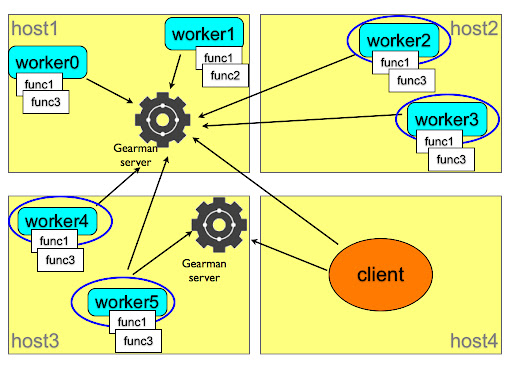
how gearman works
This picture explains the concept. You, as a client, need to have a job done. You ask the gearman server which somehow asks all the registered workers for their ability to perform such job. If any of the function names advertised by the workers matches the client request, the server assigns the job to the worker, together with the workload sent by the client, and then returns to the client the results that the worker has provided.
The system is flexible, because you can set as many servers and workers as needed, in several hosts. And it is fault tolerant, because the same worker can register its functions to several servers, and several workers can advertise the same functions to the same or a different server. Depending on the nature of the task, a client can ask several workers for a portion of the task, or it can just ask the first available one to perform the whole job. Since the workers can be located in several servers, you can distribute the load of a heavy job among many hosts. Your imagination is the limit.

Installing a replication system with Gearman

If you are familiar with MySQL Sandbox, you know that its main aim is to install servers quickly and efficiently, and to save valuable time by providing shortcut scripts for each sandbox. You can create a replication sandbox with one master and two slaves in the same server in a handful of seconds. However, they are all in the same server. This means that you can use this sandbox system to test the correctness of your application, but you can't test efficiency and scalability very well.
On one side, we have a flexible method to install single sandboxes. On the other side, we have a general purpose distributed system that can do jobs in remote servers. It is a logical choice to put these two frameworks together.

Requirements


Before you start, you need to install MySQL Sandbox and Gearman in all the servers that will host a database node.You also need to have downloaded the appropriate tarball in each host. If the boxes are compatible, you can download once and copy from box to box (I am playing with the idea of doing the copy through Gearman), but that is not always a safe assumption. If one of the boxes has a different operating system or architecture (as in my case: two Macs and one Tux), you need a different tarball.
Another task to perform before installing is opening the necessary ports. You will need to open the Gearman port (4730) and the port(s) used by MySQL master and slaves.

Gluing pieces together

Installing the Gearman framework is not trivial. For many users, it is not as difficult as setting up a MySQL replicated system, but it may have some pitfalls.
Unless you are comfortable programming in C, in addition to the Gearman server you may want to install the API for your favorite language. I used Gearman::XS, a Perl module wrapped around the C API. It installs easily on some operating systems, but it requires some manual help in some others.
Anyway, after one hour, I had it installed in six servers with five operating systems and I am confident that I can install it almost anywhere (if that anywhere looks like Unix).
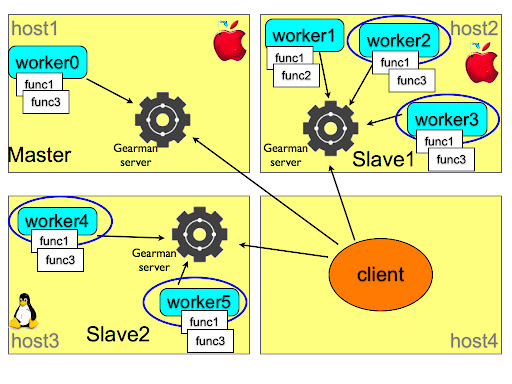
Sandbox replication with Gearman
Unlike the sample framework of the previous picture, I can't use a single Gearman server. Or, actually, I can, but it would require quite a lot of additional traffic and code complexity in the client, and therefore I used one server for each host where I had to install something.
Once that decision was taken, everything went smoothly. Each host has a server and one or two workers that registered the "make_sandbox" function with a remote installer script. The client knows which role is assigned to each host. Although it is not strictly necessary: the IPs could be shuffled around, and the final result would not change. Anyway, using the make_distributed_replication scripts, the client installs (or, rather, asks a worker to install) the master in the first host, and the slaves in the second and third host. At each step, there is a rudimentary error check, to make sure that the installation is being performed as expected. During the operation, the client produces a few scripts that make the administration easy.
At the end of the installation, you can connect to the master and the slaves using the familiar m, s1, and s2 scripts, and do mass operations with use_all and check_slaves.
To the user, the layout looks like the result of make_replication_sandbox in one machine, but you are dealing with a system spread among several hosts.

$ ./make_distributed_replication.pl
installing master
installing slave 0
initializing slave 0
installing slave 1
initializing slave 1

$ ./check_slaves
slave 1:
Slave_IO_Running: Yes
Slave_SQL_Running: Yes
slave 2:
Slave_IO_Running: Yes
Slave_SQL_Running: Yes

$ ./m
Welcome to the MySQL monitor. Commands end with ; or \g.
Your MySQL connection id is 4
Server version: 5.0.83-log MySQL Community Server (GPL)

Type 'help;' or '\h' for help. Type '\c' to clear the current input statement.

master> exit
Bye

My first test was to load some heavy data, using the employees test database, and I am happy to report that the execution is much faster than a replication in the same host.

TO DO list

This is just a proof of concept. It seems to work well, but there is still much work to do. The error checking must be improved a lot both in the client and in the worker. Before registering the function, the worker must check that the external applications are available. When receiving a request, the worker can check if the desired tarball exists and if there is no conflict with already installed servers.
The client should be able to accept IPs, ports, and tarball versions from the command line. Some functions to cleanup and diagnose the remote servers should be implemented as well.
But I am very pleased about this first step.
Comments are welcome. This is my first usage of Gearman, and any way of improving on the basic concepts of this framework will be welcome.

Sunday, June 21, 2009

Failing by choice. Another bug-vs-feature debate ends

A long standing bug

Among the many outstanding bugs for MySQL, there is one that has sparked a fierce discussion, not only in the bug report itself, but also in blogs, forums, mailing lists.
Bug #19027: MySQL 5.0 starts even with Fatal InnoDB errors was neglected for long time, until finally it got fixed, and it is available in MySQL 5.1.36.
First off, what is it about?
In short, if an engine doesn't initialize correctly, the MySQL server starts anyway, without the offending engine. Depending on how you use the failing engine, this could be either a minor annoyance or a complete disaster.
Annoyance: ARCHIVE fails to initialize, and you create tables with the default engine (usually MyISAM), and after a while you realize that the disk is filling up faster than you expected. You will find out eventually.
Disaster: ARCHIVE fails to initialize, and you copy 300 GB of data into a table that you believed was ARCHIVE and instead is MyISAM, filling the disk and halting your server completely.
Annoyance: InnoDB fails to initialize on your new slave, and you create MyISAM tables instead. After a while you realize that this slave is serving queries way more slowly than the others.
Disaster: InnoDB fails to initialize on your master, which was already using InnoDB tables. None of you application work anymore. You can't read or write from your tables. You are completely stuck.

The same old story: bug or feature?

While I admit that some cases could be classified as annoyances, I am convinced, by personal experience coupled with gut feeling, that disaster is a more frequent outcome of this situation. When the engine fails and the server happily starts without your valuable data you are in trouble. True, you can monitor the error log and have a cron job sending you an alert if this happens, but by then it may be already too late.
So, why did it take this long to fix it? The bug was filed in April 2006.
The reason is that this bug was labeled between low priority and feature request. The behavior was documented and consistent with other similar cases, and many developers felt that by satisfying the request of the bug reporter we were adding a new feature. If this were a philosophical discussion, yes, it would be so. But this is about real life usage of databases, and it's my strong opinion that it is a bug, because it can harm the user, and it feels wrong.
I wrote about this matter before. A bug is not justified by being documented. A documented wrong behavior is a bug nonetheless.

How it works

Let's have a look at the practicalities. In MySQL 5.1.35, you create a InnoDB table and then restart the server with a mistake in your my.cnf. You inadvertently changed the size of the InnoDB file. For example, you set innodb_data_file_path=ibdata1:2000M while the original size was 200 MB.

$ $HOME/sandboxes/msb_5_1_35/restart --innodb_data_file_path=ibdata1:2000M
. sandbox server started
# the server starts
$ $HOME/sandboxes/msb_5_1_35/use -e "show engines" | grep -i innodb
Your query for the InnoDB engine is met by Unix nothingness. InnoDB failed to initialize, but the server started, leaving your data crippled and the DBAs blissfully unaware, unless they were checking for this specific occurrence.
What happens with 5.1.36? By default, it does exactly the same. If you think that this kind of failure could be a minor annoyance, you leave things as they are, and the failure of an engine, from CSV to InnoDB, won't bother you more than usually.
However, if you want to force the server to abort when your engine fails, now you can say so. You need to specify the desired behavior in the options file.
commandmeaningexample
engine_name=OFFThe specified engine will not be included. The server will start without it.innodb=off
engine_name=ONThe specified engine will be included. If it fails, the server will start.innodb=on
engine_name=FORCEThe specified engine will be included. If it fails, the server will NOT start.innodb=force

Testing the above assumptions with the latest version shows a different result.
$ cd $HOME/sandboxes/msb_5_1_36
./restart --innodb=force --innodb_data_file_path=ibdata1:2000M
................... sandbox server not started yet
With the choice to fail now available, we can decide if an engine is so important that we can't live without, and instruct the server that it's better to fail than starting in crippled mode.
Another usability bug bites the dust.

Tuesday, June 16, 2009

Giving away one copy of MySQL Administration Bible in Madrid


Open Communities Forum

I will be in Madrid on June 18-19, to participate to the Sun Open Communities Forum. I will have two presentations on my own, and I will be a guest speaker during Victor Jimenez's session. There will be some ancillary activities, among which a lunch with the MySQL community and a MySQL workshop.

During one of these activities, I will give away one copy of the MySQL Administrator’s Bible. If you are a MySQL enthusiast and you are in Madrid, that's an extra reason to attend the forum. For the ones who still don't know how good this book is, you can have a look at this Review.
During the forum, there will be an announcement about the MySQL community in Spain.

Friday, June 12, 2009

A quick look at Google Fusion Tables

I was curious about Google Fusion Tables, and gave it a try.
I uploaded the employees table from the employees test database, 16 MB of data, about 300,000 rows. Since the maximum limit per table is 100 MB, I expected interesting results.
However, one of my first tests, with aggregation was quite disappointing.
A simple group by gender was executed in about 30 seconds.

InnoDB on my laptop did a much better job:

select gender , count(*) from employees group by gender;
+--------+----------+
| gender | count(*) |
+--------+----------+
| M | 179973 |
| F | 120051 |
+--------+----------+
2 rows in set (0.32 sec)

Here's the link to my test table, if you want to give it a try. You need to have a Google account to see it.

Thursday, June 11, 2009

MySQL Sandbox and laziness


MySQL Sandbox shortcut
Laziness strikes again.
MySQL Sandbox was created with the intent of avoiding repetitive work when creating and using several servers. Turns out that even the current framework, which many say that is really time saving and enhances productivity, was not enough. So my desire for laziness, which is, as everybody should know a chief virtue for a programmer has made me code a shortcut script, which can joggle sandboxes as never before.

Enter the sb script (available in version 3.0.03). Now I can shorten my typing experience with sandboxes quite a lot:

$ sb 5135
# same as calling
# $SANDBOX_HOME/msb_5_1_35/use

Nice, isn't it? It saves me quite a lot of keys. Not only that. If this sandbox is not active, the script will start it for me. That's yet a few keystrokes more that I am saving.
What if I want a replication sandbox? Easy:

$ sb r5135
# same as calling
# $SANDBOX_HOME/rsandbox_5_1_35/m

For a multiple sandbox instead of a replication one, use "m5135."
Now, for the really amazing stuff. Let's suppose that the sandbox doesn't exist yet.
No problem.

$ sb 5.1.35
# same as calling
# make_sandbox 5.1.35
# and
# $SANDBOX_HOME/msb_5_1_35/use

And if you don't have a pre-expanded directory for 5.1.35 under $SANDBOX_BINARY as I do? Also this is easily done:

$ sb mysql-5.1.35-YOUR_OS.tar.gz
# same as calling
# make_sandbox mysql-5.1.35-YOUR_OS.tar.gz
# and
# $SANDBOX_HOME/msb_5_1_35/use

Creating and using a replication sandbox is really easy as well:

$ sb r5.1.35
# same as calling
# make_replication_sandbox 5.1.35
# and
# $SANDBOX_HOME/rsandbox_5_1_35/m

The manual explains the above cases and some more (Yes: there is actually more).
Go on! get lazy!

Tuesday, June 09, 2009

Speaking at FrOSCon 2009 and getting ready to OpenSQLCamp-Europe

FrOSCon 2009
For the fourth time in a row, I will be speaking at FrOSCon, one of the most charming open source events in Europe.
Hosted in the bright environment of the Department of Computer Science of the University of Applied Sciences Bonn-Rhein-Sieg, this event will get you hooked from the beginning. The organization is done by volunteers, who have always done an amazing job, with even better results than more expensive and famous conferences.
This year, there will be some more action than ever before. In addition to the main event, the organizers have given away a few developers rooms, to let some projects build their own event within the main one. There will be a Java subconference, and, closer to my interests, the European edition of the OpenSQLCamp 2009, which applies to all open database related projects, such as MySQL, PostgreSQL, JavaDB, and many others that are listed in the announcements page. The principal organizer is Lenz Grimmer, who is looking for volunteers to share the burden.
The organizers have also launched a creative contest, which most geeks will find irresistible. Check it out!
FrOSCon started as one of the many LAMP events, and in its fourth year it has emerged as an example for others. I warmly recommend it to all people interested in open source.

Joining the PHP BBQ in Hamburg and Kiel


Australian barbecue and countryside

There must be something that gets coders and barbecue together. In Australia, I was invited to a hackers barbecue, while at FrOSCon, the Saturday evening meal is a grill fest.
It seems just right that the PHP coders in Germany are getting together with a BBQ Tour, starting on Monday, June 15, and touching seven German towns in one week.

I will join the happy campers on Saturday, June 20, in Hamburg, and finish off the tour in Kiel the next day.
The event is open. However, for logistic reasons, a registration is required in some of them. Check the schedule for more details.
Being informal events, we may or may not have presentations and demos, but being inter-geek meetings, there will be some fun and mutual learning for sure. I look forward for it. Most of my "aha" technical moments came during serendipitous social gatherings. Beer and food are great science conductors!
Follow FrOSCon on Twitter and OpenSQLCamp on Twitter for more updates.

Saturday, June 06, 2009

Unreliable androids

There is an article with a cute title that is gaining popularity:
Do Androids Count Electric Sheep with DB2 or MySQL?
Allegedly, DB2 is demonstrated as incredibly faster than MySQL, with a benchmark that repeats the same COUNT query 100 times.

This is a naive (at best) benchmark that doesn’t tell me nothing about the database potential. But anyway, if you enable the query cache in MySQL, the repetition of 100 queries is at least three times faster than DB2.

Try
set global query_cache_size=1024*1024;
and repeat that test.

Moreover: the table structure doesn’t correspond to the data from the freebase project.

CREATE TABLE `people` (
`id` int(11) DEFAULT NULL auto_increment PRIMARY KEY,
`name` varchar(255) NOT NULL,
`fbid` varchar(255) NOT NULL,
`gender` varchar(255),
`profession` varchar(255)
) ENGINE=InnoDB

Too bad there is no integer ID in that table, and there are 23 fields instead of 5.
These androids don’t strike me as extremely reliable.

A cross-system benchmark is reliable only if you either (a) know both systems very well or (b) you invite one expert of the systems involved to make sure you are using both of them in a fair way.
Oh, and if you can make a table that has smarter fields than VARCHAR(255), your benchmark may look more credible.

Wednesday, June 03, 2009

MySQL Sandbox has a dedicated home


MySQL Sandbox

MySQL Sandbox is a mature project (recently released version 3.0), and as such I thought that it deserved a dedicated home.
Thus, I went shopping, and I bought a few domains, all pointing to the same place:

Web design is not (to say it mildly) my strongest ability, and thus the result is nothing that would trouble Facebook or eBay's sleep. But I will work at it in my spare time to improve its features and possibly its looks.

This is my 300th post in this blog!

Open Communities in Madrid - June 18-19


I am going to Madrid, Spain, to participate in the Open Communities Forum on June 18-19.
As usual with Sun open events, the agenda includes several actors in the open source arena, such as MySQL, Java, Open Solaris, with topics ranging from web development to mobile integration.
It looks promising, and I look forward to this event, which is my first one in Spain.
On the first day, I will do an introductory talk about MySQL, and a more technical workshop for advanced users. The second day will be mainly dedicated to meeting users in the area, but I will also do a guest appearance in a talk about database testing.

Monday, June 01, 2009

MySQL University - Boosting performance with partitions


MySQL University

Mark your calendars: A MySQL University session about Boosting performance with MySQL 5.1 will take place on Thursday, June 4th at 13:00 UTC ( 8am CDT (Central) / 9am EDT (Eastern) / 14:00 BST / 15:00 CET / 17:00 MDT (Moscow) / 18:30 IST (India))
The session will be conducted through DimDim, a system that allows you to follow the audio and visuals of a presentation from your browser, without any additional settings.

Attendance is free. Please follow the instructions given in the MySQL University main page.

Sunday, May 24, 2009

The "Chemistry" of MySQL

Searching for MySQL with WolframAlpha, the latest entry in the search engines arena, I had a surprise:


Interpreting "mysql" as "mycil"
Input interpretation:
chlorphenesin
A further search for chlorphenesin, explains that it is a drug pertaining to the "central muscle relaxants" category.

Saturday, May 23, 2009

Wordcamp in Milan - slides on MySQL 5.x performance


Wordcamp

I am attending WordCamp 2009 in Milan.
I presented MySQL 5.1 and 5.4, with stress on performance.
People are interested. And many questions are flying around, some of which are answerable and some aren't. The questions about Oracle were swiftly avoided, and the ones about forks comparisons were answered with live examples.
The attendees have appreciated it.

Monday, May 18, 2009

Cleaning up Wordpress comment tables


cleaning wp

In Montreal with Dups and Kaj, we were looking at a number of technical problems, and each one of you got something valuable from the meeting.
One of Kaj's problems was a collection of Wordpress blogs infested by spam. Kaj has done something already but the situation was critical. Before applying Akismet to his comments, he needed to cleanup the majority of the spam in same easy way.

It is not rocket science, really, but it needs some care in the implementation.
The comment tables in a wordpress installation are called wp_X_comments, where X is a progressive integer. This makes it a bit problematic to run a single query against all comments. Additionally, the same problem exists in two different servers, with a different number of blogs. Thus, I needed to come up with a portable remedy.
There's the starting point.

SELECT
table_name, table_rows
from
information_schema.tables
where
table_schema=schema() and table_name like '%comments';
+----------------+------------+
| table_name | table_rows |
+----------------+------------+
| wp_10_comments | 385 |
| wp_11_comments | 1 |
| wp_12_comments | 7 |
| wp_13_comments | 0 |
| wp_14_comments | 80 |
| wp_15_comments | 0 |
| wp_16_comments | 24 |
| wp_17_comments | 1 |
| wp_18_comments | 2 |
| wp_19_comments | 3 |
| wp_1_comments | 6 |
| wp_2_comments | 34457 |
| wp_3_comments | 582 |
| wp_4_comments | 103 |
| wp_5_comments | 1 |
| wp_6_comments | 0 |
| wp_7_comments | 3 |
| wp_8_comments | 1 |
| wp_9_comments | 24 |
+----------------+------------+

DESC wp_1_comments;
+----------------------+---------------------+------+-----+
| Field | Type | Null | Key |
+----------------------+---------------------+------+-----+
| comment_ID | bigint(20) unsigned | NO | PRI |
| comment_post_ID | int(11) | NO | MUL |
| comment_author | tinytext | NO | |
| comment_author_email | varchar(100) | NO | |
| comment_author_url | varchar(200) | NO | |
| comment_author_IP | varchar(100) | NO | |
| comment_date | datetime | NO | |
| comment_date_gmt | datetime | NO | MUL |
| comment_content | text | NO | | <--
| comment_karma | int(11) | NO | |
| comment_approved | varchar(20) | NO | MUL | <--
| comment_agent | varchar(255) | NO | |
| comment_type | varchar(20) | NO | |
| comment_parent | bigint(20) | NO | |
| user_id | bigint(20) | NO | |
+----------------------+---------------------+------+-----+

To get rid of most of the probable spam, we can use a regular expression to search for unapproved comments that contain at least three links. There is a chance of legitimate comments like that, but this is the best shot.
First, let's see how big is the problem:
set group_concat_max_len = 65000;

set @sum=0;
set @q = (
select group_concat(
concat(
'SELECT "',
table_name,
'" as T, count(*), @sum := @sum + COUNT(*) C FROM ',
table_name,
' where comment_approved=0'
) SEPARATOR ' UNION '
)
from information_schema.tables
where table_schema = schema()
and table_name like 'wp_%_comments');

prepare q from @q;
execute q;
deallocate prepare q;
select @sum;

This code will tell us how many unapproved comments there are in each comment table.
The way if works is by creating a query using the list of comment table, taken from the information schema.

+----------------+----------+-------+
| T | count(*) | C |
+----------------+----------+-------+
| wp_10_comments | 339 | 339 |
| wp_11_comments | 0 | 339 |
| wp_12_comments | 2 | 341 |
| wp_13_comments | 0 | 341 |
| wp_14_comments | 73 | 414 |
| wp_15_comments | 0 | 414 |
| wp_16_comments | 3 | 417 |
| wp_17_comments | 0 | 417 |
| wp_18_comments | 0 | 417 |
| wp_19_comments | 0 | 417 |
| wp_1_comments | 0 | 417 |
| wp_2_comments | 33784 | 34201 |
| wp_3_comments | 579 | 34780 |
| wp_4_comments | 90 | 34870 |
| wp_5_comments | 0 | 34870 |
| wp_6_comments | 0 | 34870 |
| wp_7_comments | 1 | 34871 |
| wp_8_comments | 0 | 34871 |
| wp_9_comments | 24 | 34895 |
+----------------+----------+-------+
+-------+
| @sum |
+-------+
| 34895 |
+-------+

Cleaning up the comments manually is thus ruled out.
The next step is to see how many comments contain at least three links. To create the search pattern, we use the REPEAT function.

set @w = concat('%', repeat('http%',3));
set @sum1 =0;
set @q = (
select group_concat(
concat(
'SELECT "',
table_name,
'" as T, count(*), @sum1 := @sum1 + COUNT(*) C FROM ', table_name,
' where comment_content LIKE "', @w, '" and comment_approved = 0'
) SEPARATOR ' UNION '
)
from information_schema.tables
where table_schema = schema()
and table_name like 'wp_%_comments');

prepare q from @q;
execute q;
select @sum, @sum1, @sum1 / @sum * 100 ;

This second statement will show how many comments will be removed by simply looking at the links.

+----------------+----------+-------+
| T | count(*) | C |
+----------------+----------+-------+
| wp_10_comments | 51 | 51 |
| wp_11_comments | 0 | 51 |
| wp_12_comments | 0 | 51 |
| wp_13_comments | 0 | 51 |
| wp_14_comments | 0 | 51 |
| wp_15_comments | 0 | 51 |
| wp_16_comments | 0 | 51 |
| wp_17_comments | 0 | 51 |
| wp_18_comments | 0 | 51 |
| wp_19_comments | 0 | 51 |
| wp_1_comments | 0 | 51 |
| wp_2_comments | 26340 | 26391 |
| wp_3_comments | 402 | 26793 |
| wp_4_comments | 57 | 26850 |
| wp_5_comments | 0 | 26850 |
| wp_6_comments | 0 | 26850 |
| wp_7_comments | 0 | 26850 |
| wp_8_comments | 0 | 26850 |
| wp_9_comments | 9 | 26859 |
+----------------+----------+-------+

+-------+-------+--------------------+
| @sum | @sum1 | @sum1 / @sum * 100 |
+-------+-------+--------------------+
| 34895 | 26859 | 76.9709 |
+-------+-------+--------------------+

This filter will eliminate almost 77% of the comments.
The last step is now the production of the DELETE queries .

drop table if exists remove_queries;
create table remove_queries (q varchar(600));

insert into remove_queries
select
concat(
'DELETE FROM ', table_name,
' where comment_content LIKE "', @w, '" and comment_approved = 0;'
)
from information_schema.tables
where table_schema = schema()
and table_name like 'wp_%_comments';

select * from remove_queries;

This latest step creates the DELETE queries, the ones that will remnve the 77% of spam.
One they are created, you can either cut-and-paste them, or pipe them between client runs:

mysql wordpress -N -e 'select * from remove_queries' | mysql -v -v -v wordpress

The bigger bulk is gone. But we can do something more to clean up. The query to create is this one:

DELETE FROM wp_XXX_comments
where
comment_approved="spam"
or (
((comment_content regexp "casino|cialis|viagra|sex|loan")
or length(comment_content) < 10 )
and comment_approved = 0
);

It will remove another 20% of spam, leaving the situation so light that a few loops of the akismet plugin will remove the remaining spam.
In the other server, these two scripts removed 90% of the spam, leaving a few hundred comments to consider manually.

Wednesday, May 13, 2009

I am sponsoring the Boston MySQL User Group


Sheeri's MySQL Bible is here!

As many may probably know, Boston is one of my favorite towns. I have been in love with this town since my first visit in 1990, and in every subsequent trips I have always been enchanted by the town itself and by the kindness I was shown by its people.
I am also very fond of the Boston MySQL User Group, and its organizer, Sheeri K. "Super Hero" Cabral.

I want to show my personal appreciation for Boston by sponsoring the MySQL User Group for one year. I am doing that with my own money, without involving my company.
You can also donate for a MySQL user group, if you want, using the Technocation fund.
You can specify your funds go to a particular user group if you like, or any user group that needs your help.


Tuesday, May 12, 2009

MySQL 5.4 - performance at your fingertips


MySQL performance

The session at the Boston MySQL User Group was very enjoyable. There was a full room, and the presentation was followed with attention and curiosity.
The slides I used for this presentation include the deck used by Allan Packer and Mikael Ronström at the MySQL Conference 2009, followed by a testimony of my own experience with 5.4.
Here is the final deck: MySQL 5.4 theory and practice

While preparing the slides, I realized that, for the first time, we have a product that allows a painless performance gain. Unlike all the tuning and technological improvements that you can use to improve performance so far, upgrading to MySQL 5.4 is a simple and easy step to a performance gain. It deserves at least some testing, because of the huge difference that it can make.

On May 21, there will be an online presentation by Allan Packer on MySQL 5.4 Benchmarks In-Depth.

Saturday, May 09, 2009

MySQL Sandbox 3.0 is released - looking at the future


MySQL Sandbox 3.0

It's done. MySQL Sandbox 3.0 is now available.
New features include:
  • Installation as a Perl module;
  • Copying, moving, deleting, and preserving sandboxes;
  • Port checking before installing;
  • A test suite with 200 tests;
  • User defined modular tests;
  • A rich cookbook

If you get the source code through the Bazaar repository, you will see something new. There is now a directory script_templates, containing the re-engineered scripts that go inside the Sandbox. These scripts are not in version 3.0.0, but they are the first step to the changes that will go into version 3.1. The main new feature is modularity. These scripts are now easier to maintain and modify.
The new start script is also more powerful. You will be able to start a sandboxed server without the mysqld_safe container, sending the output to a user defined place, choosing between running it in background or foreground.
All in due time. The new features for now pass all the existing tests, but I didn't want to include them in the current release before designing some rigorous tests for them.
Looking forward to your comments!

Thursday, May 07, 2009

MySQL 5.4 at the MySQL Boston User group


MySQL 5.4

The MySQL Boston User group will meet on May 11 at 7pm.
I will speak about my experience using MySQL 5.4, with some general information on the release.
BTW, you know that there has been some trouble about MySQL meetup groups. We are looking into the matter, and we will release information as soon as possible. For now, I can tell you that the current agreement between MySQL and Meetup is valid at least until June 10, 2009.

Sunday, May 03, 2009

MySQL Sandbox 3.0 release candidate


MySQL Sandbox is now in release candidate status. If no bugs are reported on the latest version (2.0.99f), I will repackage it as 3.0.
In addition to the list of features previously announced, I managed to implement another feature that has been in the wish list for long time, i.e. creating a sandbox from existing binaries, such as the ones installed by a .rpm or .deb package.

The new script make_sandbox_from_installed meets the expectations by creating a fake BASEDIR with symbolic links.
Other important additions:
  • the test suite has now 200 tests, making it much more comprehensive than before.
  • The above feature was achieved also thanks to the improved test plugins, which allowed me to write tests much faster.
  • There is now another module, which only contains documentation. MySQL::Sandbox::Recipes is a cookbook that tells most of the cool things you can do with MySQL Sandbox. It is not completed, but for the unfinished recipes the stubs are enough to give you a clue.

MySQL Sandbox is a non trivial project.

partfileslinescharacters
scripts104,390141,585
libraries31,59551,304
documentation21,25050,248
tests1968619,951
total346,671239,048

If you have some recipes to contribute to the MySQL::Sandbox cookbook, please let me know.

Wednesday, April 29, 2009

Test driving the Spider storage engine - sharding for the masses


MySQL Conference and Expo 2009
At the MySQL Conference 2009 I attended a session about the Spider storage engine, an engine with built-in sharding features.
The talk was notable for the speaker wearing a spiderman costume, and for some language barrier that made the talk less enjoyable than it should be. That's a pity, because the engine is very intriguing, and deserves some exploration.

What is the Spider engine, then? In short, it's an extension to the partitioning engine with the ability of connecting to remote servers. Basically, partitions + federated, except that Federated is explicitly removed during the compilation. Additionally, the spider engine should remove current limitations, such as single thread for replication and single source replication, but due to lack of specific documentation, I will limit my current experiment to the sharding features.
The only documentation available is the slide deck from the presentation, and some very reference parameters that come with the source code. I show here what I found by practical inspection.

building the engine

To compile the engine, you need the source code for MySQL 5.1.31 (as required by the documentation, but it works fine with later versions as well).
Download the source code from the launchpad repository and expand it. You will get a ./spider directory, which you need to move under the ./storage directory in the source. Then you compile, with these instructions:
autoconf
automake
./configure \
--prefix=/usr/local/mysql \
--localstatedir=/usr/local/mysql/data \
--libexecdir=/usr/local/mysql/bin \
--enable-thread-safe-client \
--enable-local-infile --with-pic \
--with-fast-mutexes \
--with-client-ldflags=-static \
--with-mysqld-ldflags=-static \
--with-zlib-dir=bundled \
--with-big-tables --with-ssl \
--with-readline --with-embedded-server \
--with-partition --without-innodb \
--without-ndbcluster \
--without-archive-storage-engine \
--without-blackhole-storage-engine \
--with-csv-storage-engine \
--without-example-storage-engine \
--without-federated-storage-engine \
--with-extra-charsets=complex
make
./scripts/make_binary_distribution

Now we will use the MySQL Sandbox to create a testing environment. Let's start with a simple case: 1 main server and 4 remote ones.
make_sandbox $PWD/mysql-5.1.31-osx10.5-i386.tar.gz

This creates a sandbox under $HOME/sandboxes/msb_5_1_31, which is our main server. Before using it, we need to create some additional tables and load the plugin. (These queries are in the spider instructions, but they are hard to cut and paste. This is much easier for that purpose.)

create table if not exists mysql.spider_xa(
format_id int not null default 0,
gtrid_length int not null default 0,
bqual_length int not null default 0,
data char(128) not null default '',
status char(8) not null default '',
primary key (data, format_id, gtrid_length),
key idx1 (status)
) engine=MyISAM default charset=utf8 collate=utf8_bin;
create table if not exists mysql.spider_xa_member(
format_id int not null default 0,
gtrid_length int not null default 0,
bqual_length int not null default 0,
data char(128) not null default '',
scheme char(64) not null default '',
host char(64) not null default '',
port char(5) not null default '',
socket char(64) not null default '',
username char(64) not null default '',
password char(64) not null default '',
primary key (data, format_id, gtrid_length, host, port, socket)
) engine=MyISAM default charset=utf8 collate=utf8_bin;
create table if not exists mysql.spider_tables(
db_name char(64) not null default '',
table_name char(64) not null default '',
priority bigint not null default 0,
server char(64) default null,
scheme char(64) default null,
host char(64) default null,
port char(5) default null,
socket char(64) default null,
username char(64) default null,
password char(64) default null,
tgt_db_name char(64) default null,
tgt_table_name char(64) default null,
primary key (db_name, table_name),
key idx1 (priority)
) engine=MyISAM default charset=utf8 collate=utf8_bin;

install plugin spider soname 'ha_spider.so';
select engine,support,transactions,xa
from information_schema.engines;
+------------+---------+--------------+------+
| engine | support | transactions | xa |
+------------+---------+--------------+------+
| SPIDER | YES | YES | YES |
| MRG_MYISAM | YES | NO | NO |
| CSV | YES | NO | NO |
| MyISAM | DEFAULT | NO | NO |
| MEMORY | YES | NO | NO |
+------------+---------+--------------+------+

Spider is now enabled

preparing the remote servers


The servers used as remote shards can be conveniently replaced, for this experiment, by sandboxes. Let's create three of them, to illustrate the concept.
make_multiple_sandbox --group_directory=spider_dir \
--sandbox_base_port=6000 --check_base_port 5.1.31

Now we have three sandboxes under $HOME/sandboxes/spider_dir, with ports ranging from 6001 to 6003.
What we need to do is to create, in each server, a table with the same structure as the one that is being sharded in the main server.
$ cd $HOME/sandboxes/spider_dir
$ cat tablea.sql
drop schema if exists myspider;
create schema myspider;
use myspider;

Create table tbl_a(
col_a int,
col_b int,
primary key(col_a)
);

$ ./use_all "source tablea.sql"

The main server


Finally, we have all the components in place, we can create the table for the main server.
drop schema if exists   myspider;
create schema myspider;
use myspider;

Create table tbl_a(
col_a int,
col_b int,
primary key(col_a)
) engine = Spider
Connection ' table "tbl_a", user "msandbox", password "msandbox" '
partition by range( col_a )
(
partition pt1 values less than (1000)
comment 'host "127.0.0.1", port "6001"',
partition pt2 values less than (2000)
comment 'host "127.0.0.1", port "6002"',
partition pt3 values less than (MAXVALUE)
comment 'host "127.0.0.1", port "6003"'
);

Compared to classic partitions, there is some new ground to cover. The "CONNECTION" clause is used to define the table name in the remote server. The schema name is assumed to be the same as the one in the main server.
For each partition, we can add a "COMMENT" clause, with the connection parameters. Since we are using sandboxes in the same host, we connect to 127.0.0.1, and use the port corresponding to each sandbox.
From now on, we can use this table almost transparently.

Using the spider engine


# on the main server
./use myspider

insert into tbl_a values (1,1);
Query OK, 1 row affected (0.00 sec)

insert into tbl_a values (1001,2);
Query OK, 1 row affected (0.01 sec)

insert into tbl_a values (2001,3);
Query OK, 1 row affected (0.00 sec)

select * from tbl_a;
+-------+-------+
| col_a | col_b |
+-------+-------+
| 1 | 1 |
| 1001 | 2 |
| 2001 | 3 |
+-------+-------+
3 rows in set (0.01 sec)

So far, so good. No surprises, at least in the surface.
Now, where is the data? A close inspection to the files in the data directory shows that the data is not in the main server.
The data is stored in the "remote" servers, as we can check easily:

# in the spider_dir path
./use_all "select * from myspider.tbl_a"

# server: 1:
col_a col_b
1 1
# server: 2:
col_a col_b
1001 2
# server: 3:
col_a col_b
2001 3

Now, let's apply some curiosity. What happens in the remote server when I insert a row in the main server? Probably the general log can give me an answer.
# spider_dir
./use_all 'set global general_log=1'

# main server
insert into tbl_a values (2002,3);
Query OK, 1 row affected (0.00 sec)

# spider_dir
$ tail node3/data/mysql_sandbox6003.log
090429 17:27:28 299 Connect msandbox@localhost on
090429 17:27:42 299 Query set session sql_log_off = 1
Ah! No curious people allowed.
Well. This can stop a common user, but not a determined one.
MySQL Proxy to the rescue! There is a Lua script that handles logs.
./node2/proxy_start --proxy-lua-script=$PDW/logs.lua --log-level=warning

Let's change the main table definition:
...
partition pt3 values less than (MAXVALUE)
comment 'host "127.0.0.1", port "4040"'

And now we can see what happens.
# main server
insert into tbl_a values (2004,3);
Query OK, 1 row affected (0.00 sec)

#tail /tmp/mysql/log
2009-04-29 18:03:04 305 -- set session sql_log_off = 1 >{0}
2009-04-29 18:03:04 305 -- set session autocommit = 1 >{0}
2009-04-29 18:03:04 305 -- start transaction >{0}
2009-04-29 18:03:04 305 -- set session transaction isolation level repeatable read >{0}
2009-04-29 18:03:04 305 -- insert into `myspider`.`tbl_a`(`col_a`,`col_b`)values(2004,3) >{0}
2009-04-29 18:03:04 305 -- commit >{0}

Hmmm. I don't like the sight of it. autocommit=1 and then start transaction, set session transaction and commit. At the very least, it's wasting three queries. This needs some explanation from the author, I guess. Let's try some data retrieval.

# main server
select * from tbl_a;
+-------+-------+
| col_a | col_b |
+-------+-------+
| 1 | 1 |
| 1001 | 2 |
| 2003 | 3 |
| 2004 | 3 |
| 1001 | 2 |
| 2003 | 3 |
| 2004 | 3 |
+-------+-------+
7 rows in set (0.01 sec)

$tail /tmp/mysql.log
2009-04-29 18:01:07 303 -- set session sql_log_off = 1 >{0}
2009-04-29 18:01:07 303 -- set session autocommit = 1 >{0}
2009-04-29 18:01:07 303 -- start transaction >{0}
2009-04-29 18:01:07 303 -- set session transaction isolation level repeatable read >{0}
2009-04-29 18:01:07 303 -- show table status from `myspider` like 'tbl_a' >{0}
2009-04-29 18:01:07 303 -- select `col_a`,`col_b` from `myspider`.`tbl_a` limit 0,9223372036854775807 >{0}
2009-04-29 18:01:07 303 -- commit >{0}

Scarier than the previous one. The LIMIT clause spells trouble.
And this latest experiment made me try something more ambitious.
I installed a group of 20 sandboxes and loaded the employees test database (4.2 million records), spreading two partitioned tables across the backend servers.
Performance is better than using a single table, but slower than a normal partitioned table on a single server. And I think I know why.
# main server
select count(*) from salaries where from_date between '1995-01-01' and '1995-12-31';
+----------+
| count(*) |
+----------+
| 201637 |
+----------+
1 row in set (0.76 sec)

$ tail /tmp/mysql.log
2009-04-29 18:09:51 307 -- set session sql_log_off = 1 >{0}
2009-04-29 18:09:51 307 -- set session autocommit = 1 >{0}
2009-04-29 18:09:51 307 -- start transaction >{0}
2009-04-29 18:09:51 307 -- set session transaction isolation level repeatable read >{0}
2009-04-29 18:09:51 307 -- show table status from `employees` like 'salaries' >{0}
2009-04-29 18:09:51 307 -- select `emp_no`,`from_date` from `employees`.`salaries` order by `emp_no`,`from_date` limit 0,9223372036854775807 >{0}

This is definitely a waste. It's a problem that is similar to what is happening when using the Federated engine. But here, we get a "ORDER BY" clause that is unnecessary to say the least.

Bugs


During the tests, I spot at least two serious bugs.
When you drop a partition, the data in the remote server is not removed. If you recreate the partition and insert something, you get a "duplicate key" error.

When you drop a database, the table mysql.spider_tables does not get updated, with the result that you can't recreate the table. with the same name, unless you remove the corresponding entries manually.

That was a lot of information for one session. Please try it and comment. Don't expect me to provide answers to the reasons of the spider engine. I hope the author chimes in and clarifies the muddy matter.