Showing posts with label remote. Show all posts

Thursday, August 11, 2011

Usability improvements in Tungsten Replicator 2.0.4

If you love a software product, you should try to improve it, and not be afraid of criticizing it. This principle has guided me with MySQL (where I have submitted many usability bugs, and discussed interface with developers for years), and it proves true for Tungsten Replicator as well. When I started working at Continuent, while I was impressed by the technology, I found the installation procedure and the product logs quite discouraging. I would almost say disturbing. Fortunately, my colleagues have agreed on my usability focus, and we can enjoy some tangible improvements. I have already mentioned the new installation procedure, which requires just one command to install a full master/slave cluster. I would like to show how you can use the new installer to deploy a multiple source replication topology like the following: The first step is to install one master in each node. I can run the commands from node #4, which is the one that will eventually receive the updates from the remote masters, and where I need to install the slave services:
TUNGSTEN_BASE=$HOME/newinst
SERVICES=(alpha bravo charlie delta)
REPLICATOR=$TUNGSTEN_BASE/tungsten/tungsten-replicator/bin/replicator

for N in 1 2 3 4
do
    INDEX=$(($N-1))

  ./tools/tungsten-installer \
    --master-slave \
    --master-host=qa.r$N.continuent.com \
    --datasource-user=tungsten \
    --datasource-password=secret \
    --service-name=${SERVICES[$INDEX]} \
    --home-directory=$TUNGSTEN_BASE \
    --cluster-hosts=qa.r$N.continuent.com \
    --start-and-report
done
The above loop will install a master (remotely or locally) in the four servers. Then I need to create the slave services. To do it, I use the updated configure-service in the tools directory.
TUNGSTEN_TOOLS=$TUNGSTEN_BASE/tungsten/tools
COMMON_OPTIONS='-C -q 
    --local-service-name=delta 
    --role=slave 
    --service-type=remote 
    --allow-bidi-unsafe=true 
    --datasource=qa_r4_continuent_com' 

$TUNGSTEN_TOOLS/configure-service $COMMON_OPTIONS --master-host=qa.r1.continuent.com  alpha 
$TUNGSTEN_TOOLS/configure-service $COMMON_OPTIONS --master-host=qa.r2.continuent.com  bravo
$TUNGSTEN_TOOLS/configure-service $COMMON_OPTIONS --master-host=qa.r3.continuent.com  charlie 

$TUNGSTEN_BASE/tungsten/tungsten-replicator/bin/replicator restart
$TUNGSTEN_BASE/tungsten/tungsten-replicator/bin/trepctl services
These commands create the slave services locally in Delta. After restarting the replicator, a simple test will be creating something different in each master, and check that the data has replicated to the single slave. The latest improvement in matter of usability is the simplification of the replicator logs. Until a few days ago, if you had an error in the replicator, you would get a long list of not exactly helpful stuff. For example, if I create a table in a slave, and then create the same table in the master, I will break replication. The extended log would produce something like this:
INFO   | jvm 1    | 2011/08/11 18:10:52 | 2011-08-11 18:10:52,216 [tsandbox - q-to-dbms-0] ERROR pipeline.SingleThreadStageTask Event application failed: seqno=1 fragno=0 message=java.sql.SQLException: Statement failed on slave but succeeded on master
INFO   | jvm 1    | 2011/08/11 18:10:52 | 2011-08-11 18:10:52,217 [tsandbox - Event dispatcher thread] ERROR management.OpenReplicatorManager Received error notification, shutting down services: Event application failed: seqno=1 fragno=0 message=java.sql.SQLException: Statement failed on slave but succeeded on master
INFO   | jvm 1    | 2011/08/11 18:10:52 | com.continuent.tungsten.replicator.applier.ApplierException: java.sql.SQLException: Statement failed on slave but succeeded on master
INFO   | jvm 1    | 2011/08/11 18:10:52 |       at com.continuent.tungsten.replicator.applier.MySQLDrizzleApplier.applyStatementData(MySQLDrizzleApplier.java:183)
INFO   | jvm 1    | 2011/08/11 18:10:52 |       at com.continuent.tungsten.replicator.applier.JdbcApplier.apply(JdbcApplier.java:1233)
INFO   | jvm 1    | 2011/08/11 18:10:52 |       at com.continuent.tungsten.replicator.applier.ApplierWrapper.apply(ApplierWrapper.java:101)
INFO   | jvm 1    | 2011/08/11 18:10:52 |       at com.continuent.tungsten.replicator.pipeline.SingleThreadStageTask.runTask(SingleThreadStageTask.java:498)
INFO   | jvm 1    | 2011/08/11 18:10:52 |       at com.continuent.tungsten.replicator.pipeline.SingleThreadStageTask.run(SingleThreadStageTask.java:155)
INFO   | jvm 1    | 2011/08/11 18:10:52 |       at java.lang.Thread.run(Unknown Source)
INFO   | jvm 1    | 2011/08/11 18:10:52 | Caused by: java.sql.SQLException: Statement failed on slave but succeeded on master
INFO   | jvm 1    | 2011/08/11 18:10:52 |       at com.continuent.tungsten.replicator.applier.MySQLDrizzleApplier.applyStatementData(MySQLDrizzleApplier.java:139)
INFO   | jvm 1    | 2011/08/11 18:10:52 |       ... 5 more
INFO   | jvm 1    | 2011/08/11 18:10:52 | Caused by: java.sql.SQLSyntaxErrorException: Table 't1' already exists
INFO   | jvm 1    | 2011/08/11 18:10:52 |       at org.drizzle.jdbc.internal.SQLExceptionMapper.get(SQLExceptionMapper.java:78)
INFO   | jvm 1    | 2011/08/11 18:10:52 |       at org.drizzle.jdbc.DrizzleStatement.executeBatch(DrizzleStatement.java:930)
INFO   | jvm 1    | 2011/08/11 18:10:52 |       at com.continuent.tungsten.replicator.applier.MySQLDrizzleApplier.applyStatementData(MySQLDrizzleApplier.java:125)
INFO   | jvm 1    | 2011/08/11 18:10:52 |       ... 5 more
INFO   | jvm 1    | 2011/08/11 18:10:52 | Caused by: org.drizzle.jdbc.internal.common.QueryException: Table 't1' already exists
INFO   | jvm 1    | 2011/08/11 18:10:52 |       at org.drizzle.jdbc.internal.mysql.MySQLProtocol.executeQuery(MySQLProtocol.java:500)
INFO   | jvm 1    | 2011/08/11 18:10:52 |       at org.drizzle.jdbc.internal.mysql.MySQLProtocol.executeBatch(MySQLProtocol.java:546)
INFO   | jvm 1    | 2011/08/11 18:10:52 |       at org.drizzle.jdbc.DrizzleStatement.executeBatch(DrizzleStatement.java:917)
INFO   | jvm 1    | 2011/08/11 18:10:52 |       ... 6 more
INFO   | jvm 1    | 2011/08/11 18:10:52 | 2011-08-11 18:10:52,218 [tsandbox - Event dispatcher thread] WARN  management.OpenReplicatorManager Performing emergency service shutdown
INFO   | jvm 1    | 2011/08/11 18:10:52 | 2011-08-11 18:10:52,219 [tsandbox - Event dispatcher thread] INFO  pipeline.Pipeline Shutting down pipeline: slave
INFO   | jvm 1    | 2011/08/11 18:10:52 | 2011-08-11 18:10:52,219 [tsandbox - q-to-dbms-0] INFO  pipeline.SingleThreadStageTask Terminating processing for stage task thread
INFO   | jvm 1    | 2011/08/11 18:10:52 | 2011-08-11 18:10:52,219 [tsandbox - q-to-dbms-0] INFO  pipeline.SingleThreadStageTask Last successfully processed event prior to termination: seqno=0 eventid=mysql-bin.000002:0000000000000426;20
Did you see the reason for the error? No? Neither did I. I would need to open the THL, look for event #1, and determine what it was. Instead, the new user.log looks like this:
2011-08-11 18:10:52,216 ERROR Received error notification: Event application failed: seqno=1 fragno=0 message=java.sql.SQLException: Statement failed on slave but succeeded on master
Caused by : java.sql.SQLException: Statement failed on slave but succeeded on master
Caused by : Statement failed on slave but succeeded on master
Caused by : Table 't1' already exists
2011-08-11 18:10:54,721 INFO  State changed ONLINE -> OFFLINE:ERROR
2011-08-11 18:10:54,721 WARN  Received irrelevant event for current state: state=OFFLINE:ERROR event=OfflineNotification
That's much better. It is not perfect yet, but it will be soon. Right now, it tells me what is wrong without forcing me to go hunting for it amid hundreds of stack trace lines. Give it a try, using the latest replicator build.

Sunday, June 28, 2009

Remote replication setup with Gearman and MySQL Sandbox


replication via Gearman

A few months ago, Brian Aker invited me to have a look at Gearman, saying that I could find interesting combinations with MySQL Proxy. I did not forget, and I kept thinking about interesting ways of using it. The first idea that I managed to apply is not related to Proxy, but to a practical problem that I have been keeping in reserve for years, i.e. installing replication systems from remote, without effort.

After some fiddling around with the alternatives, I convinced myself that Gearman is the way to go. Before I proceed to show what I did, though, perhaps it's useful if I spend a few words about Gearman itself.

Gearman overview

It's a strange word. If you don't pay close attention, you read "German" and you may think "why should an administration tool be German? Doesn't Open Source apply across country boundaries?" And when you realize that there is an "a" after the "e", you are as baffled as before. What's this? Gearman is an anagram of manager. Because managers, so the explanation goes, don't do anything, but only direct workers towards their jobs. And this could be a good explanation of what Gearman is: it's a system to organize distributed jobs.
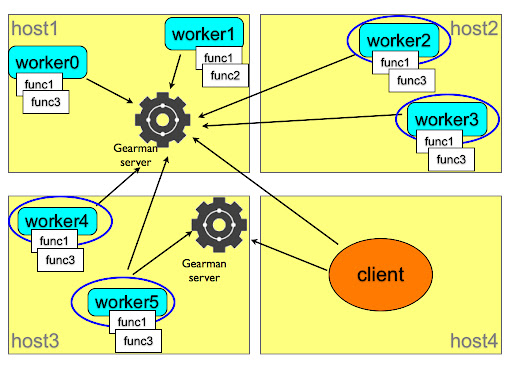
how gearman works
This picture explains the concept. You, as a client, need to have a job done. You ask the gearman server which somehow asks all the registered workers for their ability to perform such job. If any of the function names advertised by the workers matches the client request, the server assigns the job to the worker, together with the workload sent by the client, and then returns to the client the results that the worker has provided.
The system is flexible, because you can set as many servers and workers as needed, in several hosts. And it is fault tolerant, because the same worker can register its functions to several servers, and several workers can advertise the same functions to the same or a different server. Depending on the nature of the task, a client can ask several workers for a portion of the task, or it can just ask the first available one to perform the whole job. Since the workers can be located in several servers, you can distribute the load of a heavy job among many hosts. Your imagination is the limit.

Installing a replication system with Gearman

If you are familiar with MySQL Sandbox, you know that its main aim is to install servers quickly and efficiently, and to save valuable time by providing shortcut scripts for each sandbox. You can create a replication sandbox with one master and two slaves in the same server in a handful of seconds. However, they are all in the same server. This means that you can use this sandbox system to test the correctness of your application, but you can't test efficiency and scalability very well.
On one side, we have a flexible method to install single sandboxes. On the other side, we have a general purpose distributed system that can do jobs in remote servers. It is a logical choice to put these two frameworks together.

Requirements


Before you start, you need to install MySQL Sandbox and Gearman in all the servers that will host a database node.You also need to have downloaded the appropriate tarball in each host. If the boxes are compatible, you can download once and copy from box to box (I am playing with the idea of doing the copy through Gearman), but that is not always a safe assumption. If one of the boxes has a different operating system or architecture (as in my case: two Macs and one Tux), you need a different tarball.
Another task to perform before installing is opening the necessary ports. You will need to open the Gearman port (4730) and the port(s) used by MySQL master and slaves.

Gluing pieces together

Installing the Gearman framework is not trivial. For many users, it is not as difficult as setting up a MySQL replicated system, but it may have some pitfalls.
Unless you are comfortable programming in C, in addition to the Gearman server you may want to install the API for your favorite language. I used Gearman::XS, a Perl module wrapped around the C API. It installs easily on some operating systems, but it requires some manual help in some others.
Anyway, after one hour, I had it installed in six servers with five operating systems and I am confident that I can install it almost anywhere (if that anywhere looks like Unix).
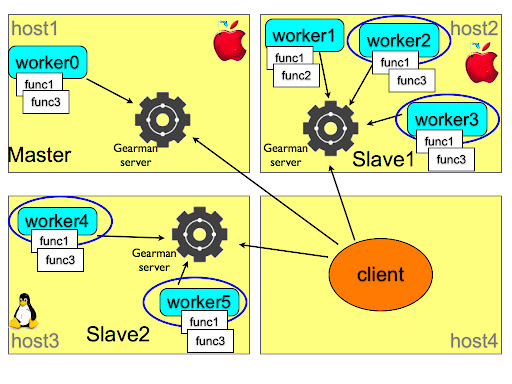
Sandbox replication with Gearman
Unlike the sample framework of the previous picture, I can't use a single Gearman server. Or, actually, I can, but it would require quite a lot of additional traffic and code complexity in the client, and therefore I used one server for each host where I had to install something.
Once that decision was taken, everything went smoothly. Each host has a server and one or two workers that registered the "make_sandbox" function with a remote installer script. The client knows which role is assigned to each host. Although it is not strictly necessary: the IPs could be shuffled around, and the final result would not change. Anyway, using the make_distributed_replication scripts, the client installs (or, rather, asks a worker to install) the master in the first host, and the slaves in the second and third host. At each step, there is a rudimentary error check, to make sure that the installation is being performed as expected. During the operation, the client produces a few scripts that make the administration easy.
At the end of the installation, you can connect to the master and the slaves using the familiar m, s1, and s2 scripts, and do mass operations with use_all and check_slaves.
To the user, the layout looks like the result of make_replication_sandbox in one machine, but you are dealing with a system spread among several hosts.

$ ./make_distributed_replication.pl
installing master
installing slave 0
initializing slave 0
installing slave 1
initializing slave 1

$ ./check_slaves
slave 1:
Slave_IO_Running: Yes
Slave_SQL_Running: Yes
slave 2:
Slave_IO_Running: Yes
Slave_SQL_Running: Yes

$ ./m
Welcome to the MySQL monitor. Commands end with ; or \g.
Your MySQL connection id is 4
Server version: 5.0.83-log MySQL Community Server (GPL)

Type 'help;' or '\h' for help. Type '\c' to clear the current input statement.

master> exit
Bye

My first test was to load some heavy data, using the employees test database, and I am happy to report that the execution is much faster than a replication in the same host.

TO DO list

This is just a proof of concept. It seems to work well, but there is still much work to do. The error checking must be improved a lot both in the client and in the worker. Before registering the function, the worker must check that the external applications are available. When receiving a request, the worker can check if the desired tarball exists and if there is no conflict with already installed servers.
The client should be able to accept IPs, ports, and tarball versions from the command line. Some functions to cleanup and diagnose the remote servers should be implemented as well.
But I am very pleased about this first step.
Comments are welcome. This is my first usage of Gearman, and any way of improving on the basic concepts of this framework will be welcome.