Wednesday, August 22, 2012

MySQL 5.6 replication gotchas (and bugs)

There has been a lot of talk about MySQL 5.6 replication improvements. With few exceptions, what I have seen was either marketing messages or hearsay. This means that few people have really tried out the new features to see whether they meet the users needs.

As usual, I did try the new version in my environment. I like to form my own opinion based on experiments, and so I have been trying out these features since they have appeared in early milestones.

What follows is a list of (potentially) surprising results that you may get when using MySQL 5.6.
All the examples are made using MySQL 5.6.6.

Gotcha #1 : too much noise

I have already mentioned that MySQL 5.6 is too verbose when creating data directory. This also means that your error log may have way more information than you'd like to get. You should check the contents of the error log when you start, and either clean it up before using it on a regular basis or take note of what's there after a successful installation, so you won't be surprised when something goes wrong.

Gotcha #2 : Innodb tables where you don't expect them

Until version 5.5, after you installed MySQL, you could safely drop the ib* files, change the configuration file, and restart MySQL with optimized parameters. Not anymore.

When you run mysqld with the --bootstrap option (which is what mysql_install_db does), the server creates 5 innodb tables:

 select table_schema, table_name 
from information_schema .tables 
where engine='innodb';
+--------------+----------------------+
| table_schema | table_name           |
+--------------+----------------------+
| mysql        | innodb_index_stats   |
| mysql        | innodb_table_stats   |
| mysql        | slave_master_info    |
| mysql        | slave_relay_log_info |
| mysql        | slave_worker_info    |
+--------------+----------------------+

The slave_* tables are needed for the safe crash slave feature, which we'll cover later. The innodb_*_stats tables are as documented at Innodb persistent stats, and they seem to contain almost the same info of the tables with the same name that you find in Percona Server INFORMATION_SCHEMA. I can only speculate why these tables are in mysql rather than in performance_schema.

Another side effect of this issue is that, whatever setting you want to apply to innodb (size of the data files, file-per-table, default file format, and so on) must be done when you run mysqld --bootstrap.

Gotcha #3 : Global transaction IDs and security

The information about Global transaction ID is not easy to locate. But eventually, searching the manual, you will get it. The important information that you take from this page is that this feature only works if you enable all these options in all the servers used for replication:

log-bin
server-id=xx
log-slave-updates 
gtid-mode=ON
disable-gtid-unsafe-statements

The first two options are not a surprise. You need them for replication anyway. Check.

The third one is puzzling. Why would you want this option in a master? But then you realize that this will allow any server to be promoted or demoted at will. Check.

gtid-mode is the main option that needs to be enabled for global transaction IDs. Check

The last option forces the server to be safe, by using only transactional tables, and by forbidding things like temporary tables inside transactions and create table ... select. Which means that if you try to update a MyISAM table in the master, the statement will fail. You won't be allowed to do it. Check?

The trouble is, if you enable gtid-mode=ON (with its mandatory ancillary options), you can't run mysql_secure_installation, because that utility needs to delete anonymous users and clean the 'db' table for anonymous usage of the 'test' database.

The workaround is to enable GTID after you secure the installation, which means one more server restart.

Gotcha #4 (bug): multi thread slave won't work without safe-crash slave tables

To enable parallel replication, you need to change the value of 'slave_parallel_workers" to a value between 1 and 1024.

show variables like '%worker%';
+------------------------+-------+
| Variable_name          | Value |
+------------------------+-------+
| slave_parallel_workers | 0     |
+------------------------+-------+
1 row in set (0.00 sec)

slave1 [localhost] {msandbox} ((none)) > stop slave;
Query OK, 0 rows affected (0.06 sec)

slave1 [localhost] {msandbox} ((none)) > set global slave_parallel_workers=5;
Query OK, 0 rows affected (0.00 sec)

slave1 [localhost] {msandbox} (mysql) > start slave;
Query OK, 0 rows affected, 1 warning (0.05 sec)

slave1 [localhost] {msandbox} ((none)) > select * from mysql.slave_worker_info\G
Empty set (0.00 sec)

What the hell? The workers table is empty.

I know the cause: the slave_worker_info table is not activated unless you also set relay_log_info_repository='table'. What I don't understand is WHY it is like that. If this is documented, I could not find where.

Anyway, once you are in this bizarre condition, you can't activate relay_log_info_repository='table', because of the following

Gotcha #5 (bug) : master and relay_log repository must be either set forever or they will fail

After we have activated parallel threads, without enabling table repositories, you can't easily get to a clean replication environment:
set global relay_log_info_repository='table';
start slave;
ERROR 1201 (HY000): Could not initialize master info structure; more error messages can be found in the MySQL error log
And the error log says:
120822 14:15:08 [ERROR] Error creating relay log info: Error transfering information.

What you need to do is

  • stop the slave
  • enable both master_info_repository and relay_log_info_repository as 'table'
  • set the number of parallel threads
  • restart the slave
slave1 [localhost] {msandbox} (mysql) > stop slave;
Query OK, 0 rows affected (0.02 sec)

slave1 [localhost] {msandbox} (mysql) > set global master_info_repository='table';
Query OK, 0 rows affected (0.00 sec)

slave1 [localhost] {msandbox} (mysql) > set global relay_log_info_repository='table';
Query OK, 0 rows affected (0.00 sec)

slave1 [localhost] {msandbox} (mysql) > set global slave_parallel_workers=5;
Query OK, 0 rows affected (0.00 sec)

slave1 [localhost] {msandbox} (mysql) > start slave;
Query OK, 0 rows affected, 1 warning (0.01 sec)

slave1 [localhost] {msandbox} (mysql) > select count(*) from slave_worker_info;
+----------+
| count(*) |
+----------+
|        5 |
+----------+
1 row in set (0.00 sec)

This sequence of commands will start parallel replication, although MySQL crashes when restarting the slave.

Gotcha #6 : Global transaction IDs not used in parallel threads

Global transaction IDs (GTIDs) are very useful when you need to switch roles from master to slave, and especially when you deal with unplanned failovers. They are also a great simplification in many cases where you need to identify a transaction without getting lost in the details of binary log file and position.

However, one of the cases where GTIDs would have been most useful, they are not there. The table mysql.slave_workers_info still identifies transactions by binary log and position. Similarly, CHANGE MASTER TO does not use GTIDs, other than allowing the automatic alignment (MASTER_AUTO_POSITION=1). If you need to perform any fine tuning operations, you need to revert to the old binary log + position.

Monday, August 20, 2012

Is Oracle really killing MySQL?

There are plenty of "Oracle-is-killing-MySQL" headlines in the tech world:

Is Oracle really consciously and willingly killing MySQL?

I don't think so.

Is Oracle damaging MySQL by taking the wrong steps? Probably so.

This is my personal opinion, and AFAIK there is no official statement from Oracle on this matter, but I think I can summarize the Oracle standpoint as follows:

  • There is a strong and reasonable concern about security. Oracle promise to its customers is that security breeches will be treated with discretion, and no information will be released that could help potential attackers;
  • There is also an equally strong but unreasonable concern that exposing any bugs and code commits to the public scrutiny will help MySQL competitors;
  • to address the security concern, Oracle wants to hide every aspect of the bug fixing that may reveal security-related information:
    • bug reports that mention how the breech happens;
    • comments to commits that explain what has been done to fix the issue;
    • test cases that show the problem being solved.
  • From the security standpoint, the above steps have been implemented, and they look effective. Unfortunately, they have the side effects that:

    • the bugs database is censored, and does not provide information to users about why they should upgrade;
    • the public trees under Revision Control System are mutilated. In fact, it looks like Oracle has just stopped updating them.
    • contributions to MySQL, which weren't easy before, are now made extremely harder;
    • trust in Oracle good faith as MySQL steward is declining.

    The inevitable side effect is that the moves that have reduced the security risk have also partially addressed Oracle's concern about exposing its innovation to the competition, thus making MySQL de-facto less open. Was it intentional? I don't know. What I know is that these actions, which make MySQL less friendly for MySQL direct competitors, rather than damaging such competitors, are in fact getting the opposite effect, because traditional open source users will have more reasons for looking at alternatives, and these competitors will look more appealing now that Oracle has stiffened its approach to open source.

    The main point with this whole incident is that Oracle values its current customers more than its potential ones. While MySQL AB was focusing its business to the customers that the open source model would attract to its services, Oracle wants first and foremost to make its current customers happy, and it doesn't consider the future ones coming from open source spread worth of its attention. In short, Oracle doesn't get the open source business model.

    OTOH, Oracle is doing a good job in the innovation front. A huge effort is going into new features and improvements in MySQL 5.6, showing that Oracle believes in the business behind MySQL and wants to make it grow. This is an undeniable benefit for MySQL and its users. However, there is less openness than before, because the source comes out less often and not in a shape that is suitable for contributions, but the code is open, and there is growth in both Oracle (which is taking ideas and code from MySQL forks) and MySQL forks, which merge Oracle changes into their releases. Even though the game is not played according to open source purists rules, Oracle is still a main player.

    What can we, the MySQL Community, do?

    We need to reinforce the idea that the open source model still works for MySQL. The business side is the only one that Oracle gets. Unfortunately, the classical Oracle sales model does not see favorably a system where you get customers by distributing a free product and try to please non-customers, with the hope that some of them will eventually buy your services.

    My point is that Oracle is unintentionally harming MySQL and its own image. If Oracle cares about MySQL, it should take action now to amend the fracture, before it becomes too deep.

    I don't have a solution to this issue, but I thought that spelling out the problem would perhaps help to find one.

Friday, June 22, 2012

The hidden mistake

There are mistakes that drive you crazy when you try to understand what went wrong.

One of the most annoying and hard to catch was this, apparently harmless line:

tungsten-sandbox -m 5.5.24 --topology all-masters -n 2 -p 7300 -l 12300 -r 10300 –t $HOME/mm -d tsb-mm

The person reporting the error told me that the installation directory (indicated by "-t") was not taken into account.

I usually debug by examples, so I copied the line, and pasted it into one of my servers. Sure enough, the application did not take trat option into account. The installation kept happening in the default directory.

I knew that I had done a good job at making the application configurable, but I checked the code nonetheless. The only place where the default directory is mentioned is when the related variable is initialized. Throughout the code, there are no literal values used for this purpose. And yet, the application was not recognizing the option.

I inspected the code while it was running, checking the value of the variable before and after the parsing of the command line. No clues. The option was simply ignored.

I did an experiment, I edited the command line, deleted the "t", and wrote the full name of the option (--tungsten-base) instead of the abbreviated one. I tried again. No changes.

Then I did what I often call IT Voodoo. I removed the option from the middle of the line, and I added it again at the beginning of the line.

tungsten-sandbox -m 5.5.24 -t $HOME/mm --topology all-masters -n 2 -p 7300 -l 12300 -r 10300 -d tsb-mm

And sure enough, the option was accepted!

W. T. F ?

I knew for sure that I did not introduce any logic in the application that would consider an option depending on its position. So I edited the line again, and put the option at the very end.

tungsten-sandbox -m 5.5.24 --topology all-masters -n 2 -p 7300 -l 12300 -r 10300 -d tsb-mm -t $HOME/mm 

And it was accepted again!

Then I edited the line again, putting the option back in the same point where it was initially reported to fail.

tungsten-sandbox -m 5.5.24 --topology all-masters -n 2 -p 7300 -l 12300 -r 10300 -t $HOME/mm -d tsb-mm 

And it succeeded again.

Actually, I didn't manage to make it fail anymore. I hate these cases of "It works for me." I want to find the reason why things fail.

So I got the initial failing line again, and I saved it to a file


$ cat > /tmp/one
tungsten-sandbox -m 5.5.24 --topology all-masters -n 2 -p 7300 -l 12300 -r 10300 –t $HOME/mm -d tsb-mm

$ cat > /tmp/two
tungsten-sandbox -m 5.5.24 --topology all-masters -n 2 -p 7300 -l 12300 -r 10300 -t $HOME/mm -d tsb-mm 

$ vimdiff /tmp/one /tmp/two
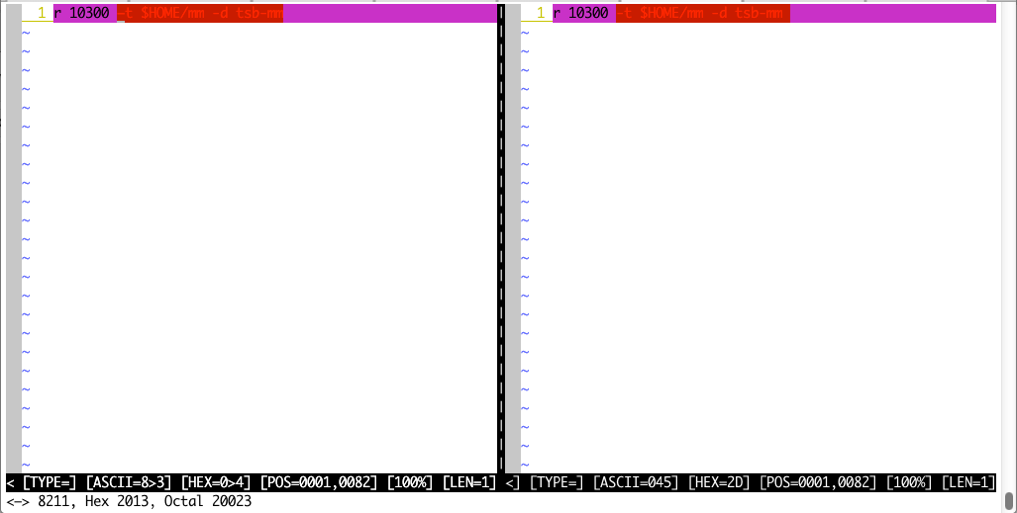
Vimdiff

Looking at the two strings side by side didn't tell me anything at the beginning, except that the difference starts at the dash. Suddenly, it hit me: it is not a dash, it is a minus sign! It is actually longer than a regular dash, but a cursory examination will miss it. Using the ":asc" feature in vim shows that this is not ASCII code 45, but a more complex character.

So the mystery error was a problem of copy-and-paste. I have seen this error other times, but when I paste the code inside my editor, the syntax highlighter catches it immediately. This time, it took longer to find the culprit, and in the end the story seemed worth sharing.

Sunday, May 13, 2012

How to run a flawless technical demo

Why demos?

For as long as I can remember in my public speaking activities, I have always planned my presentations with some sort of live demo in it. I am always surprised when a conference venue asks me to provide my slides in advance, to be loaded in an anonymous computer with no chance of demos. I always turn down such offers, as I always want to provide a demo.

There have been times when technical or time constraints prevented me from demoing something, and in these cases I felt that the presentation was lacking a vital part. But I always try. I have even given demos during lightning talks, and those were the ones that made me feel really good.

I have given hundreds of presentations, and hundreds of demos, and as in every human activity, I have made plenty of mistakes. I believe I have learned some valuable lesson from my mistakes, and this article is my attempt at sharing the joy with wannabe presenters and also with presenters who want to embrace this method.

So, why having a (risky) live demo in your presentation? Here are some of the reasons that may also appeal to you.

Show trust in your product

You want to talk about your product. The audience assumes that you have confidence in whichever product you want to talk about. However, if you limit your presentation to showing slides, no matter how beautiful and dynamic they are, the audience will be left with the dormant impression that you were talking about something not really trustworthy, or even (gasp!) unreal. If your audience start thinking that you are dealing with vaporware, nothing can dispel that thought faster and more convincingly than a demo. If you trust your product, then you should demo it. If you don't include a demo because you are afraid that the demo would fail, then don't present the topic. It's as simple as that.

Improve the entertainment level of your presentation

A demo makes a presentation more lively. The audience sees that you abandon the comfortable protection of your slide deck, where you are totally in control, and you risk your hide with a live demo of something that (as any technological artifact) can fail and blow up on your face, burning your reputation and your ego at the same time. Entertainment in a presentation is very important. As Guy Kawasaki said [1], if you make your presentation full of important things, chances are that people will forget all of them because your presentation will be boring, but if your make your presentation entertaining, then you can easily sneak in some important stuff, and the audience will remember that.

increase your reputation as a guru

Including live demos in your presentation will make the audience think of you as some sort of guru, and your reputation will grow. Now, I don't do demos for this reason. As I said before, I like presenting technical things with live examples. And then I realized that people attending my presentations had a high opinion of me, because of my demos. If not your reputation, live demos will increase your self confidence, and sometimes they amount to the same thing.

Demos DOs and DON’Ts

Down to business. A demo is not a casual happening. A successful demo has a long story behind it.

When you are on stage with a demo, you are not a boring presenter. You are a magician pulling rabbits from a top hat. You are a gymnast showing your dexterity. You are the center of attention, and success is within your grasp.

All this comes at a price, though. Read on.

DO: Master the topic

First and foremost. You must be really comfortable with the topic being presented. If you aren’t, it shows, and the audience will feel your fear. Therefore, the first requirement for a good demo is that you really understand what you are doing, and why. Not only because you are unlikely to demo successfully something that you don’t fully understand, but also because you will fall at the first question from the audience. (Incidentally, if a presenter maneuvers the presentation to prevent questions, it may be a sign of lack of self confidence, or even downright ignorance.)

DO: make a plan of what you want to show

Knowing your stuff doesn’t mean that you can convey your enthusiasm for the product to the audience just by showing some random commands. You must decide beforehand what you want to demo, and design a set of steps to follow during the demo. Think of the reasons why you believe your product is wonderful, and try to define these reasons as a set of examples that will make the audience share your feelings.

DO: include in the demo your product’s best features

When you plan, you have to give the audience the amazing stuff. If your slides claim that your product can make men walk on water, you will have to bring an inflatable pool on stage, fill it with water, bare your feet, and take a stroll in front of everyone. That’s a bit extreme, as we are dealing with software here, and your claims are, hopefully, less daring, but you get the gist. If you claim features that could be compared to walking on water, be prepared to show the miracle.

Whatever it is that your product has promised, you must show it live. The audience won’t be satisfied by your demo of secondary marvelous features if you don’t show evidence of your primary goods. There are exceptions, of course. If your goods require 30 minutes of processing to show their full potential, you can’t show all of it live. But you may try to give a reduced demo of whatever can be achieved in the time allotted for your presentation. One thing that I often do is start the presentation with a short demo where I get the process started, inform the audience that this process will take 30 minutes, and then get on with the slide show. 30 minutes later, I resume the demo, explain what has happened in the meantime, and finally I show the magic part. This is simple, honest, and very effective.

DO: Practice

Your experience with the product is not enough to guarantee a good demo. You must make sure that:

  • What you want to demo is actually feasible. If you promise something that your product can’t deliver, there is no amount of penance that can save your reputation;
  • You know how to perform the tasks that you have planned;
  • The tasks happen in a predictable way, so that you know that a given sequence of events will end up with the result that you want.
  • There are no side effects determined by other tasks running in your computer (or computers) that will prevent a positive result.

This means that you will repeat the demo several times, until you are satisfied that nothing can surprise you, and everything goes as planned. This phase is very important for you, and also for your product. You are likely to find important bugs when getting ready for a demo. Two birds with a stone!

DO: Time it!

Your time for a demo is short. No matter how much you want to show your product live, you can’t go beyond the time allotted for the whole presentation. More realistically, your demo will last from 1/4 to 2/3 of the presentation, with 1/3 being the more common duration. Thus, you need to make sure that your demo doesn’t run out of time. Especially if your punch line is at the end of your demo, you won’t be able to show it if the attendees are rushing from your room to attend the next presentation.

Have a plan B

Despite your preparation, there are things that may happen that will keep you longer than expected at your demo, and you may find yourself short of time. Then you need to have an alternative demo plan, i.e. a shorter demo that you can show from that moment on instead of the original one. What this means is that you need to practice two plans. And maybe three. Such is life!

DO: Practice some more - Make sure your demo is visible

When you practice, you are looking at your computer and you may think that what you see is the same thing that your audience will see. Don’t make this assumption! When you are on stage, things are much different from what you see at home.

In person, in a large ballroom

When you are using a projector, or an external screen, you may have a different experience from what you had at home or at the office, with your dedicated 24in screen, where you did prepare a beautiful demo. If the projector has a maximum resolution of 1024x768 (which is quite common nowadays) or even 800x600, you must review your demo, and be ready to scale down your ambitions. What you need to do:

  • find out in advance, days or weeks before the presentation, if possible, what kind of projector you will be dealing with, and try to test with the same resolution.
  • When you are at the venue, test with the projector before the presentation, and make sure that your demo is visible from every seat in the room. Adjust your demo if needed.
  • If there is no advance testing time allocated, grab an apple or a sandwich and do it at breakfast or lunch time. Skipping a meal is less important than risking your reputation.

Online, when giving a webinar

When you are presenting online, in addition to the resolution of the software delivering your webinar, there is also the possibility of more limitations or complex setups that will stand in the way of a successful demo. You will need to test the webinar software, possibly with two computers: one to deliver the demo, and one to check what another attendee would see. Don’t ever accept a denial along the lines of “we can’t do a dry run, but the software is a piece of cake, nothing can go wrong.” You know that everything can go wrong, so insist and make sure that you get testing time. Cancel the demo if you can’t get it.

DON’T: make mistakes

This seems an unnecessary recommendation. It goes together with Practice your demo. But we need to stress some points in the matter of mistakes. There are simple mistakes, like misspelling a command when you are typing (I do a lot of SEELCT instead of SELECT), but this kind of mistakes are not the ones that get you in trouble. They may even increase the audience awareness that they are witnessing a live event,

The mistakes you must avoid are the ones that make the demo fail; the ones that may show your lack of familiarity with the product (which won’t happen if you have been practicing). Therefore: focus on the task, and you will win.

There are, though, mistakes that you can include in your demo. If one of your product’s features is the ability to recover from mistakes, you can include such mistakes in your demo, provided that:

  • You tell the audience beforehand that you are going to make a deliberate mistake, just to show how your product can save your butt. (You may also try the theatrical trick of making the error and then emphatically announce that you did that on purpose. The result really depends on how good your theatrics are.)
  • You include this mistake in your demo plan, and you practice it as thoroughly as you did the rest.

DON’T: Run other applications in background during the demo

Depending on the product you are showing, there are many ways of spoiling the demo through applications that run when they should not. Let me give you a non-comprehensive list:

  • A Skype balloon saying I miss you honey bunny will not improve your credibility;
  • Twitter and Facebook notifications with more or less embarrassing remarks should be also avoided;
  • Your computer starts a file reindex when you are showing a resource intensive task using three virtual machines, and performance drops to a crawl;
  • The remote server that you are using for your demo goes down for maintenance;
  • A planned backup starts in youd database server right when you need it to be responsive at its best;
  • A daily test starts on your remote server, and removes your demo setup.

There are more, and more. If you can think of it, t may happen!

DON’T: Deviate from your well rehearsed script

Once you have defined a demo plan, stick to it. Make no exceptions. If you must make exceptions, you must plan for them as well. Therefore: make no exceptions. This recommendation closely resembles the next one.

DON’T: Make some brilliant improvements at the last minute

You are an expert in your field, and an expert of the product that you are presenting. You may also be one of the developers of that project. It is thus very natural and common that you think of improvements that will make your product behave much better. That’s good and commendable. But don’t make these changes on the build that you will use for the demo. NEVER. EVER.

I did it. A few times. And I regretted it. Every time.

If you make a change, then you must have time to test the whole demo from scratch, more than once, or else you must wait to apply your changes after the demo. Similarly, you may think of an improvement of the demo. If that implies deviating from the plan that you have tested, don’t do it, unless you have time to test the whole demo again with the change.

Summing up

Doing a live demo is a lot of work, and what you show on stage is only a tiny part of the work involved. But I can assure you that the thrill of having a flawless demo that amazes the audience is deeply fulfilling. I recommend it to all the public speakers.

Try it. And then you will be hooked. At my company, we all are.


  1. I don’t remember where I read it, as I have read many books and articles by Guy Kawasaki, but I think it was in Reality Check.  ↩

Thursday, April 19, 2012

A few hacks to simulate mysqldump --ignore-database

A few days ago, Ronald Bradford asked for a mysqldump –ignore-database option.

As a workaround, he proposes:
mysqldump --databases `mysql --skip-column-names \
   -e "SELECT GROUP_CONCAT(schema_name SEPARATOR ' ') \
   FROM information_schema.schemata WHERE schema_name \
   NOT IN ('mysql','performance_schema','information_schema');" \
   >` >/mysql/backup/rds2.sql

It's a clever solution, but unfortunately it only works if you have a handful of schemas. If your databases happens to have several dozens (or hundreds or thousands) of schemas (which is where you need this option more), then the output will be truncated to the length of group_concat_max_len (by default, 1024.)

There are two alternative methods.

The all-shell method

This method lets shell commands filter the wanted databases. In its simplest way, it goes
DATABASE_LIST=$(mysql -NBe 'show schemas' | grep -wv 'mysql\|personnel\|buildings')
mysqldump --all-databases $DATABASE_LIST

Notice that, when you use --all-databases, information_schema and performance_schema are filtered off by default.

This method works, because the default length of the command line in Unix is much longer than group_concat_max_len:

$ getconf ARG_MAX
131072  # Linux

$ getconf ARG_MAX
262144  # Mac OSX

(in Windows it's much shorter: 8191, but since I haven't used Windows for ages, I don't really care).

A more elaborate method would require a scripting wrapper around the above instructions, but I think that as it is, it's simple enough to be remembered.

The options file method

If the length of all your database names combined is more than the maximum allowed by the shell, and all you want is filtering a few databases off a huge list, there is still hope.

Let's assume that you want to ignore mysql, personnel, and buildings from your backup.

echo '[mysqldump]' > mydump.cnf
mysql -NBe "select concat('ignore-table=', table_schema, '.', table_name) \
  from information_schema.tables \
  where table_schema in ('mysql', 'personnel', 'buildings')" \
  >> mydump.cnf

Now the options file looks like this:

[mysqldump]
ignore-table=mysql.db
ignore-table=mysql.host
ignore-table=mysql.user
[...]
What we need to do is tell mysqldump to get its information from this options file, and it will duly skip all the tables that are listed in there.
mysqldump --defaults-file=./mydump.cnf  -u $DBUSER -p$DBPWD --all-databases
There are two drawbacks with this approach:
  • There will be a DROP DATABASE IF EXISTS and CREATE DATABASE for each of the excluded schemas, although no tables will be dumped.
  • This method only works with --default-options-file. Theoretically, it should also work with --default-extra-file, but it doesn't. Therefore, if you are relying on an options file for connection parameters, they should be added to this file or listed in the command line.
Summing up, there is no perfect solution, but there are enough hacks available that you probably would find what suits you.

Tuesday, April 17, 2012

Some lessons from MySQL Conference 2012

The Percona Live MySQL Conference and Expo 2012 is over. Together with the SkySQL solutions day, it has kept me occupied for 4 full days, from early morning to late at night.

I have to say that I am pleased. The quality of the organization was very high, with a very good lineup of speakers and an excellent technical support.

As usual, I have learned a lot during this week, either directly, by attending talks, or indirectly, by meeting people who told me what was juicy at the talks that I had missed. And I have met new interesting people, and caught up with the people that I know already.

This conference was particularly intense also because I got myself involved in 5 talks, which was probably more than I should have. How did I end up with such a task? It's a long story.

It all started when the CfP opened. In the review committee, we all knew that Oracle was not eager to participate, but we hoped that it would change its mind and send someone in the end. So we planned ahead, and some of us proposed talks aimed at beginner and intermediate users, with topics that are usually best covered by the people who work at the MySQL team. I proposed Replication 101 and What's new in MySQL 5.5 and 5.6 replication, with the idea that I would hand them over to a couple of Oracle engineers, or have them as co-speakers. That, however, didn't happen. So I had to prepare and present these two talks, in addition to the one that I wanted to do on my own (Testing MySQL creatively in a sandbox).

That makes 3 talks. Then I got tasked with organizing the lightning Talks, which is not a big deal per se, but it adds to the global effort. 4 talks.

And finally, SkySQL organized another beautiful conference on Friday, and I got to present a fifth talk. I enjoyed every bit of them, but boy! the conference was intense!.

I have learned not only from the talks that I have attended, but also from the preparation of my own talks. The biggest source of surprises was my talk about MySQL 5.6 replication. I was expecting a mature release, but I found a collection of features that don't play very well together, and can sometimes lead to an unstable server. Since I was trying to get my demos working, rather than isolating the bugs, I didn't submit any reports, but I will come back to that version and do a more thorough analysis as soon as I catch up with my day-by-day work.

Speaking about demos, it's quite common for me to include a demo in a technical talk. First, because getting a demo done will make me better acquainted with the features that I am presenting, and also because a presentation with a demo conveys the idea of a mature and reliable product (or the idea that I, as the speaker, know what I am talking about). Either way, I know prepare a demo for every talk where I have sufficient time to show one, and sometimes even for a lightning talk. So it was surprising to hear comments that praised my talks because they contain demos. Is this practice so unusual? I should start taking count of how often this is done.

My most satisfactory demo (and the one that almost got me in trouble) happened at the last talk, on Friday, when I had to show features from three different Tungsten topologies, using three separate remote clusters. For these demos to be successful, I needed good internet connection, a solid confidence in the product and the strength of its tests, and to remember the sequence of operations for each demo. To my surprise, everything went so smoothly, that someone in the audience thought that I was running a simulation in my laptop, instead of interacting with servers that were 10,000 Km away. So much for my rehearsals! I must remember to add at least a tiny mistake in an otherwise perfect sequence of tasks, to make the audience aware that I am playing live.

The slides for my presentations are available at Slideshare.

Saturday, March 31, 2012

21st century presentation technology at Percona Live

After 15 years of slide show technology, I thought that we need to change the way we do presentations. And since I am advocating radical changes, I will eat my own dog food and be the first to present a MySQL session using 3D technology.

Since watching Avatar a few years ago, I thought that using this technology would make my presentations truly amazing. However, two years ago a 3d projector was prohibitively expensive. Now, instead, it is affordable, and fits in my briefcase!

What I needed, though, was a compelling reason for using 3d vs. traditional presentations. And I found it. As I have mentioned recently, I am working with the coolest replication technology on earth. Explaining this technology is often challenging. While regular replication is easy to represent in slides, star and fan-in topologies are hard to grasp for the average attendees. But with the help of 3d technology, the concept looks easy and reachable.

For this reason, I have convinced my company to invest a few thousand dollars in this technology and I am now ready to replace the regular projector in ballroom "C" with the new machine. Sure I will need to drill a few holes in the floor (BTW, thanks to the San Francisco MySQL User Group for lending me the tools), but the result will be fantastic!

I don't want to spoil the surprise, so no more details will be available until you see the result on Tutorial Day.

Now, let's talk about the logistics. In order to follow a 3d presentation, you need special glasses. Since this is a talk about open source stuff, it seems just right that I tell you How to Make Your Own 3D Glasses, so you won't have to buy them. If you are in a hurry, you can get the quick model (Make Your Own 3D Glasses in 10 Seconds).

For those of you who want the enterprise edition, you can buy very fancy 3D glasses at a friendly price (just $14), following the QR link below.

3d glasses

Friday, March 23, 2012

April talks at Percona and SkySQL events

The second week of April will be quite a busy one

Tuesday, April 10

April 10th is Tutorial day at the Percona Live MySQL Conference and Expo.

On that day, I will present a classic: MySQL Replication 101. This is a topic traditionally presented by a MySQL engineer. However, since Oracle seems not to be eager to send anyone to the conference, I volunteered to the task, and I have let everyone know that, if Oracle change its mind and sends some engineers at the conference, I will happily have one of my former colleagues from the replication team as co-speaker.

Wednesday, April 11

The conference will be in full swing when the regular sessions (and the keynotes!) start. From my side, it is noteworthy the talk about Continuent crown jewels, which I have mentioned recently.

Next on the same day, two of my colleagues will take the podium before it's my turn again.

Unfortunately, at the same time, there will be a talk that I will miss, but I would love to see:

After my own talk, I will instead go to see It is not over yet. After the regular schedule, there will be Lightning Talks during the Community Networking Reception.

Thursday, April 12

We will start with two interesting keynotes:

The sessions will start with Another tough choice in the afternoon. I will be on stage while my colleagues will present on yet another cool technology that I have tested extensively in the past months. I will then try to learn something new with

Friday, April 13th

This day brings us the MySQL Solutions day sponsored and organized by SkySQL. I will be on stage with Robert Hodges to talk and demo some of the solutions offered by Continuent.

Thursday, March 22, 2012

Lightning Talks at Percona Live MySQL Conference and Expo 2012

Several months ago I suggested having lightning talks at Percona Live MySQL Conference and Expo 2012, and I also offered to help.

Then I forgot about that for a while, until I saw the announcement that there was a call for Lightning Talks. Great! I submitted two proposals, and asked my colleagues to do the same, and also encouraged many good speakers I know to submit something.

The deadline for lightning talks submission passed, and I was told that my offer to help had been accepted, and I was in charge of lightning talks! OK. I would have preferred being told before the CfP, but an offer to help is an offer to help, and thus I went through the motions of evaluating the talks, sending notices to the winners, consoling the losers, and giving hope to the few brave ones who will replace the winners if they don't show up.

The talks that you will see at the conference are in the Lightning Talks page.

Lightning talks are fun and instructional micro events. Their official purpose is to give the audience a chance to learn something in a very limited amount of time. The real purpose is for the speaker to be as entertaining and memorable as possible within the allocated time.

Here are the official rules:

  1. All slides will be loaded into a single computer, to minimize delays between talks
  2. All speakers will meet 15 minutes before the start, and be given the presentation order. Missing speakers will be replaced by reserve speakers
  3. The speaker will have 5 minutes to deliver the talk.
  4. When one minute is left, there will be a light sound to remind of the remaining time.
  5. When 10 seconds are left, most likely the audience will start chanting the countdown.
  6. when the time is finished, the speaker must leave the place to the next one.

For this to be real fun, there must be some cooperation from the audience. Rule #5 is often a spontaneous behavior from the crowd. It's very effective to make the speaker hurry up and close.

If rule #6 were to be enforced in style, there would be a tele-transporter that is triggered at the last second, and the too-slow speaker is instantly moved to the parking lot. My contact at the Star Trek labs tells me that the appliance is not available yet. We'll see if there is an app for that …

Sunday, March 18, 2012

MySQL 5.6 too verbose when creating data directory

When I install a MySQL package using MySQL Sandbox, if everything goes smoothly, I get an informative message on standard output, and I keep working.

This is OK

$HOME/opt/mysql/5.5.15/scripts/mysql_install_db --no-defaults \
  --user=$USER --basedir=$HOME/opt/mysql/5.5.15 \
  --datadir=$HOME/sandboxes/msb_5_5_15/data \
  --lower_case_table_names=2
Installing MySQL system tables...
OK
Filling help tables...
OK

To start mysqld at boot time you have to copy
support-files/mysql.server to the right place for your system

PLEASE REMEMBER TO SET A PASSWORD FOR THE MySQL root USER !
To do so, start the server, then issue the following commands:

/Users/gmax/opt/mysql/5.5.15/bin/mysqladmin -u root password 'new-password'
/Users/gmax/opt/mysql/5.5.15/bin/mysqladmin -u root -h gmac4.local password 'new-password'

Alternatively you can run:
/Users/gmax/opt/mysql/5.5.15/bin/mysql_secure_installation

which will also give you the option of removing the test
databases and anonymous user created by default.  This is
strongly recommended for production servers.

See the manual for more instructions.

You can start the MySQL daemon with:
cd /Users/gmax/opt/mysql/5.5.15 ; /Users/gmax/opt/mysql/5.5.15/bin/mysqld_safe &

You can test the MySQL daemon with mysql-test-run.pl
cd /Users/gmax/opt/mysql/5.5.15/mysql-test ; perl mysql-test-run.pl

Please report any problems with the /Users/gmax/opt/mysql/5.5.15/scripts/mysqlbug script!
I can actually suppress this output, confident that, if something goes wrong, the error comes to my screen loud and clear. For example, if I try to install to a data directory that is write protected, I get this:
chmod 444 $HOME/sandboxes/msb_5_5_15/data
$HOME/opt/mysql/5.5.15/scripts/mysql_install_db --no-defaults \
  --user=$USER --basedir=$HOME/opt/mysql/5.5.15 \
  --datadir=$HOME/sandboxes/msb_5_5_15/data \
  --lower_case_table_names=2  > /dev/null

mkdir: /Users/gmax/sandboxes/msb_5_5_15/data: Permission denied
chmod: /Users/gmax/sandboxes/msb_5_5_15/data: Permission denied
chown: /Users/gmax/sandboxes/msb_5_5_15/data: Permission denied
This, way, I know that there was an error, it is very clear and readable. I don't need to hunt it down within the regular messages. The standard error is a separate file descriptor, which can be read independently from the standard input.

After fixing permissions:

chmod 755 ~/sandboxes/msb_5_5_15/
$HOME/opt/mysql/5.5.15/scripts/mysql_install_db --no-defaults \
  --user=$USER --basedir=$HOME/opt/mysql/5.5.15 \
  --datadir=$HOME/sandboxes/msb_5_5_15/data \
  --lower_case_table_names=2  > /dev/null
# empty line: means all OK

This is very convenient, and it is the Unix way.

This is not OK

Now, let's try the same with MySQL 5.6

$BASEDIR/scripts/mysql_install_db --no-defaults --user=tungsten \
  --basedir=$BASEDIR --datadir=/home/tungsten/sandboxes/msb_5_6_4/data \
  --tmpdir=/home/tungsten/sandboxes/msb_5_6_4/tmp  > /dev/null
120318 10:10:44 InnoDB: The InnoDB memory heap is disabled
120318 10:10:44 InnoDB: Mutexes and rw_locks use GCC atomic builtins
120318 10:10:44 InnoDB: Compressed tables use zlib 1.2.3
120318 10:10:44 InnoDB: Using Linux native AIO
120318 10:10:44 InnoDB: CPU supports crc32 instructions
120318 10:10:44 InnoDB: Initializing buffer pool, size = 128.0M
120318 10:10:44 InnoDB: Completed initialization of buffer pool
InnoDB: The first specified data file ./ibdata1 did not exist:
InnoDB: a new database to be created!
120318 10:10:44 InnoDB: Setting file ./ibdata1 size to 10 MB
InnoDB: Database physically writes the file full: wait...
120318 10:10:44 InnoDB: Log file ./ib_logfile0 did not exist: new to be created
InnoDB: Setting log file ./ib_logfile0 size to 5 MB
InnoDB: Database physically writes the file full: wait...
120318 10:10:44 InnoDB: Log file ./ib_logfile1 did not exist: new to be created
InnoDB: Setting log file ./ib_logfile1 size to 5 MB
InnoDB: Database physically writes the file full: wait...
InnoDB: Doublewrite buffer not found: creating new
InnoDB: Doublewrite buffer created
120318 10:10:44 InnoDB: 128 rollback segment(s) are active.
InnoDB: Creating foreign key constraint system tables
InnoDB: Foreign key constraint system tables created
120318 10:10:44 InnoDB: 1.2.4 started; log sequence number 0
120318 10:10:44 [Warning] Info table is not ready to be used. Table 'mysql.slave_master_info' cannot be opened.
120318 10:10:44 [Warning] Error while checking replication metadata. Setting the requested repository in order to give users the chance to fix the problem and restart the server. If this is a live upgrade please consider using mysql_upgrade to fix the problem.
120318 10:10:44 [Warning] Info table is not ready to be used. Table 'mysql.slave_relay_log_info' cannot be opened.
120318 10:10:44 [Warning] Error while checking replication metadata. Setting the requested repository in order to give users the chance to fix the problem and restart the server. If this is a live upgrade please consider using mysql_upgrade to fix the problem.
120318 10:10:44 [Note] Binlog end
120318 10:10:44 [Note] Shutting down plugin 'partition'
120318 10:10:44 [Note] Shutting down plugin 'ARCHIVE'
120318 10:10:44 [Note] Shutting down plugin 'BLACKHOLE'
120318 10:10:44 [Note] Shutting down plugin 'PERFORMANCE_SCHEMA'
120318 10:10:44 [Note] Shutting down plugin 'INNODB_SYS_FOREIGN_COLS'
120318 10:10:44 [Note] Shutting down plugin 'INNODB_SYS_FOREIGN'
120318 10:10:44 [Note] Shutting down plugin 'INNODB_SYS_FIELDS'
120318 10:10:44 [Note] Shutting down plugin 'INNODB_SYS_COLUMNS'
120318 10:10:44 [Note] Shutting down plugin 'INNODB_SYS_INDEXES'
120318 10:10:44 [Note] Shutting down plugin 'INNODB_SYS_TABLESTATS'
120318 10:10:44 [Note] Shutting down plugin 'INNODB_SYS_TABLES'
120318 10:10:44 [Note] Shutting down plugin 'INNODB_FT_INDEX_TABLE'
120318 10:10:44 [Note] Shutting down plugin 'INNODB_FT_INDEX_CACHE'
120318 10:10:44 [Note] Shutting down plugin 'INNODB_FT_CONFIG'
120318 10:10:44 [Note] Shutting down plugin 'INNODB_FT_BEING_DELETED'
120318 10:10:44 [Note] Shutting down plugin 'INNODB_FT_DELETED'
120318 10:10:44 [Note] Shutting down plugin 'INNODB_FT_INSERTED'
120318 10:10:44 [Note] Shutting down plugin 'INNODB_FT_DEFAULT_STOPWORD'
120318 10:10:44 [Note] Shutting down plugin 'INNODB_METRICS'
120318 10:10:44 [Note] Shutting down plugin 'INNODB_BUFFER_POOL_STATS'
120318 10:10:44 [Note] Shutting down plugin 'INNODB_BUFFER_PAGE_LRU'
120318 10:10:44 [Note] Shutting down plugin 'INNODB_BUFFER_PAGE'
120318 10:10:44 [Note] Shutting down plugin 'INNODB_CMPMEM_RESET'
120318 10:10:44 [Note] Shutting down plugin 'INNODB_CMPMEM'
120318 10:10:44 [Note] Shutting down plugin 'INNODB_CMP_RESET'
120318 10:10:44 [Note] Shutting down plugin 'INNODB_CMP'
120318 10:10:44 [Note] Shutting down plugin 'INNODB_LOCK_WAITS'
120318 10:10:44 [Note] Shutting down plugin 'INNODB_LOCKS'
120318 10:10:44 [Note] Shutting down plugin 'INNODB_TRX'
120318 10:10:44 [Note] Shutting down plugin 'InnoDB'
120318 10:10:44  InnoDB: FTS optimize thread exiting.
120318 10:10:44  InnoDB: Starting shutdown...
120318 10:10:46 InnoDB: Shutdown completed; log sequence number 1602841
120318 10:10:46 [Note] Shutting down plugin 'CSV'
120318 10:10:46 [Note] Shutting down plugin 'MEMORY'
120318 10:10:46 [Note] Shutting down plugin 'MyISAM'
120318 10:10:46 [Note] Shutting down plugin 'MRG_MYISAM'
120318 10:10:46 [Note] Shutting down plugin 'mysql_old_password'
120318 10:10:46 [Note] Shutting down plugin 'mysql_native_password'
120318 10:10:46 [Note] Shutting down plugin 'binlog'
120318 10:10:46 InnoDB: The InnoDB memory heap is disabled
120318 10:10:46 InnoDB: Mutexes and rw_locks use GCC atomic builtins
120318 10:10:46 InnoDB: Compressed tables use zlib 1.2.3
120318 10:10:46 InnoDB: Using Linux native AIO
120318 10:10:46 InnoDB: CPU supports crc32 instructions
120318 10:10:46 InnoDB: Initializing buffer pool, size = 128.0M
120318 10:10:46 InnoDB: Completed initialization of buffer pool
120318 10:10:46 InnoDB: highest supported file format is Barracuda.
120318 10:10:46 InnoDB: 128 rollback segment(s) are active.
120318 10:10:46 InnoDB: Waiting for the background threads to start
120318 10:10:47 InnoDB: 1.2.4 started; log sequence number 1602841
120318 10:10:47 [Note] Binlog end
120318 10:10:47 [Note] Shutting down plugin 'partition'
120318 10:10:47 [Note] Shutting down plugin 'ARCHIVE'
120318 10:10:47 [Note] Shutting down plugin 'BLACKHOLE'
120318 10:10:47 [Note] Shutting down plugin 'PERFORMANCE_SCHEMA'
120318 10:10:47 [Note] Shutting down plugin 'INNODB_SYS_FOREIGN_COLS'
120318 10:10:47 [Note] Shutting down plugin 'INNODB_SYS_FOREIGN'
120318 10:10:47 [Note] Shutting down plugin 'INNODB_SYS_FIELDS'
120318 10:10:47 [Note] Shutting down plugin 'INNODB_SYS_COLUMNS'
120318 10:10:47 [Note] Shutting down plugin 'INNODB_SYS_INDEXES'
120318 10:10:47 [Note] Shutting down plugin 'INNODB_SYS_TABLESTATS'
120318 10:10:47 [Note] Shutting down plugin 'INNODB_SYS_TABLES'
120318 10:10:47 [Note] Shutting down plugin 'INNODB_FT_INDEX_TABLE'
120318 10:10:47 [Note] Shutting down plugin 'INNODB_FT_INDEX_CACHE'
120318 10:10:47 [Note] Shutting down plugin 'INNODB_FT_CONFIG'
120318 10:10:47 [Note] Shutting down plugin 'INNODB_FT_BEING_DELETED'
120318 10:10:47 [Note] Shutting down plugin 'INNODB_FT_DELETED'
120318 10:10:47 [Note] Shutting down plugin 'INNODB_FT_INSERTED'
120318 10:10:47 [Note] Shutting down plugin 'INNODB_FT_DEFAULT_STOPWORD'
120318 10:10:47 [Note] Shutting down plugin 'INNODB_METRICS'
120318 10:10:47 [Note] Shutting down plugin 'INNODB_BUFFER_POOL_STATS'
120318 10:10:47 [Note] Shutting down plugin 'INNODB_BUFFER_PAGE_LRU'
120318 10:10:47 [Note] Shutting down plugin 'INNODB_BUFFER_PAGE'
120318 10:10:47 [Note] Shutting down plugin 'INNODB_CMPMEM_RESET'
120318 10:10:47 [Note] Shutting down plugin 'INNODB_CMPMEM'
120318 10:10:47 [Note] Shutting down plugin 'INNODB_CMP_RESET'
120318 10:10:47 [Note] Shutting down plugin 'INNODB_CMP'
120318 10:10:47 [Note] Shutting down plugin 'INNODB_LOCK_WAITS'
120318 10:10:47 [Note] Shutting down plugin 'INNODB_LOCKS'
120318 10:10:47 [Note] Shutting down plugin 'INNODB_TRX'
120318 10:10:47 [Note] Shutting down plugin 'InnoDB'
120318 10:10:47  InnoDB: FTS optimize thread exiting.
120318 10:10:47  InnoDB: Starting shutdown...
120318 10:10:49 InnoDB: Shutdown completed; log sequence number 1602851
120318 10:10:49 [Note] Shutting down plugin 'CSV'
120318 10:10:49 [Note] Shutting down plugin 'MEMORY'
120318 10:10:49 [Note] Shutting down plugin 'MyISAM'
120318 10:10:49 [Note] Shutting down plugin 'MRG_MYISAM'
120318 10:10:49 [Note] Shutting down plugin 'mysql_old_password'
120318 10:10:49 [Note] Shutting down plugin 'mysql_native_password'
120318 10:10:49 [Note] Shutting down plugin 'binlog'
Why is this bad? Because you don't see at a glance what is right and what is wrong. All the above messages are printed to the standard error, the kind of output that should be reserved for, well, errors! If the standard error is used for regular messages, you may miss the important error messages that are instead mixed with the "all is OK" messages.

There is Bug#60934 filed about this issue, but it has been considered a feature request, and as such unlikely to be fixed.

In the above text there is something more. There are warnings, mixed with the standard text, telling me of errors that the bootstrap operation is not in a position to fix, like replication metadata and slave_master_info.

MySQL developers, please fix this issue. Users need error messages when there is something wrong, and warning or error messages about something that can actually be fixed. When MySQL 5.6 goes GA, this issue will hit most everybody.

Tuesday, March 13, 2012

MySQL Sandbox at the OTN MySQL Developers day in Paris, March 21st

On March 21st I will be in Paris, to attend the OTN MySQL Developers Day. Oracle is organizing these events all over the world, and although the majority are in the US, some of them are touching the good old European continent. Previous events were an all-Oracle show. Recently, the MySQL Community team has been asking for cooperation from the community, and in such capacity I am also presenting at the event, on the topic of testing early releases of MySQL in a sandbox. Of course, this is one of my favorite topics, but it is quite appropriate in this period, when Oracle has released a whole lot of preview features in its MySQL Labs. Which is another favorite topic of mine, since I was the one who insisted for having the Labs when I was working in the community team. It's nice to see that the labs are still in place, and being put to good use.

MySQL Sandbox

Speaking of sandboxes, I was making some quick tests yesterday, and I installed 15 sandboxes at once (all different versions, from 5.0.91 to 5.6.5). Installing a single sandbox, depending on the version, takes from 5 to 19 seconds. Do you know how long it takes to install 15 sandboxes, completely, from tarball to working conditions? It takes 19 seconds. How's so? It's because I have been working at a large project where we are dealing with many replicated clusters spread across three continents. Administering these clusters is a problem in itself, and so we are using tools to do our work in parallel. At the same time, using a host with a fast 16 core CPU I can install many sandboxes at once. It's a real joy to see software behaving efficiently the way it should! It works so fast, in fact, that I found a race condition bug. If you install more than one sandbox at once, the MySQL bootstrap process may try to open the same temporary file from two different servers. That's because I did not indicate a dedicated temporary directory for the bootstrap (I was using one only for the installed sandbox). When this happens, you may find that instead of 15 sandboxes you have installed only 9 or 11. So I fixed the bug, by adding --tmpdir to mysql_install_db, and now you can install more than one sandbox in parallel.

Thursday, March 08, 2012

Bringing fresh blood to the MySQL Council

The MySQL Council has been operational for more than one year, with mixed fortunes. As an early member, I am glad to be a member, and I feel that I have done something useful by participating in this organism. The council is young, and the MySQL community is variegated and sparse. The enthusiasm of the first volunteers must be reinforced by the injection of new members, who can contribute fresh views and keep the council on their toes. I am glad to see more names coming up, and, as some of my fellow council members, I volunteered to serve for another year. But this doesn't need to be my decision. I will stay unless we get feedback on the contrary, and the same will be for the other people in the list below. (1) Please use the feedback form to voice your ideas and suggestions about the new council. Anything goes: who should be or not be there, what you would like the council to do, and how the next council should be created.

Mysql village

First Name
Last Name
Title
Company
Country
Alexandre
Almeida
CTO
HTI Tecnologia
Brazil
Sheeri
Cabral
DBA/Architect
Mozilla
United States
Laine
Campbell
Principal and CEO
PalominoDB
United States
Patrick
Galbraith
Senior Engineer Cloud Data Services
Hewlett Packard
United States
Bradley
Kuszmaul
Chief Architect
Tokutek
United States
Giuseppe
Maxia
Director of Quality Assurance
Continuent
Italy
Sarah
Novotny
CIO
Meteor Entertainment
United States
Marco
Tusa
Cluster Technical Leader
Pythian
Canada
Daniel
van Eeden
Consultant
Snow B.V.
Netherlands
The deadline for feedback is March 23, 2012. Let your voice be heard!

(1) Just for the record: all the people in this list have volunteered, in answer to a public call for candidates.

Tuesday, March 06, 2012

Cool technology and usability in Tungsten Enterprise

When I joined Continuent, at the end of 2010, I was fascinated by the technology of its core products. Readers of this blog know that I have had my hands full with Tungsten Replicator, but what really turned me on was the flagship management suite, Tungsten Enterprise. After hammering at it for several months, and always marveling at the beauty of its technology, let me give a tour of the suite, so that you'll understand what's so exciting about it. First off, Tungsten Enterprise is not simply a replication tool. It is based on replication, but it is mostly a data management suite. Its aim is to reduce complexity for the user and to show a database cluster to the user as if it were a single server, always on, no matter what happens. The most amazing things that you will see in Tungsten Enterprise are
  • Automatic failover
  • Cluster console, and One-Command-Operations
  • transparent connections
  • No VIPs !!!
  • Multi site switch and failover

Automatic failover

This is probably the most amazing feature of all. It is a combination of the same efficient replication technology seen in Tungsten Replicator, which uses a global transaction ID to allow a seamless failover, and a management system, made of components that communicate to each other and can replace a failed master within seconds, even under heavy load. All this, without the application having more trouble than a few seconds delay (see transparent connections below). This feature is customizable. If the manager is in "automatic" mode, it will replace a failed master without manual intervention, and it will try to put online every element that goes offline. In "manual" mode, however, it will let the user take control of operations as needed.

Cluster Console, and One-Command-Operations

Tungsten Enterprise comes with a text-based console that gives immediate access to the cluster information, and lets the users perform maintenance without troubling them with the inner knowledge necessary to perform the tasks. Promoting a slave to master (a planned "switch", as opposed to an unplanned "failover") is just one command, even though behind the scenes the Tungsten Manager runs a dozen commands to complete the task safely. Backup and restore are also one command. And so are all the dozens of administrative tasks that the Tungsten Manager allows the user. The console comes with a comprehensive help that explains all commands in detail. The console allows the DBA to perform operations in any text terminal, without additional components such as a desktop application or a web interface.

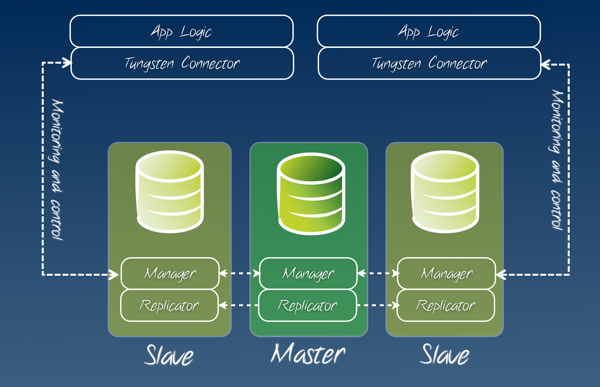
Tungsten enterprise overview

Transparent connections

The suite includes a component called Tungsten Connector, which is a sort of high performance proxy between the application and the database. Instead of connecting your applications to the DBMS, you connect it to a Tungsten Connector, which looks and feels as a MySQl (or PostgreSQL) database. The difference is that, when the master changes, the connector will get notified by the Tungsten Manager and immediately re-routes the underlying connections to the appropriate server. Depending on how smart is your application, you can use the Tungsten Connector in two ways:
  • Static routing mode: You create one (or more) connector that will always bring you to the master, and use that connection whenever your application needs to write. And you also create one or more connectors that will always give you access to a slave, and use this one whenever your application needs to read.
  • Smart mode: you ask the connector to detect what you are doing and direct your queries to the appropriate server. This mode sends all transactions and updates to the master, and every read query that is not inside a transaction to the slaves. This mode can also guarantee data consistency, by directing the reading of a just saved record to a slave that has already received that record.
The connector can also do more interesting and even amazing things, such as showing you its status as a SQL query (what fun in being a proxy if you don't take advantage of it?) and allowing on-the-fly changes of policy for an existing connector using command line or SQL parameters. The connector plays well with well designed applications, such as the ones that retry a failed transaction rather than failing, and the ones that are replication-aware and can split reads and writes between connections. But it also plays well with applications that have been designed for a single server, without scalability in mind. In most cases, you replace a single server with a cluster of Tungsten Enterprise, and you are in business.

No VIPs !!!

The failover and switch features are not new in the replication arena. There are tools that do something similar and keep an application connected to the same IP using virtual IPs. I don't like virtual IPs, as they are dumb stateless components between two stateful elements, and I am not the only one who dislikes them (See Virtual IP Addresses and Their Discontents for Database Availability). Using Tungsten Connector instead of a dumb virtual IP makes life so much easier. When you do a failover with a VIP, quite often the application hangs, as the client doesn't detect that the server on the other side has gone away, and thus your failover technology has to somehow identify the hanging connections and cut them: a very painful experience. Instead, the Tungsten Connector will either kill the connection immediately or reroute your query, depending on the needs, and your application doesn't get more than a hiccup.

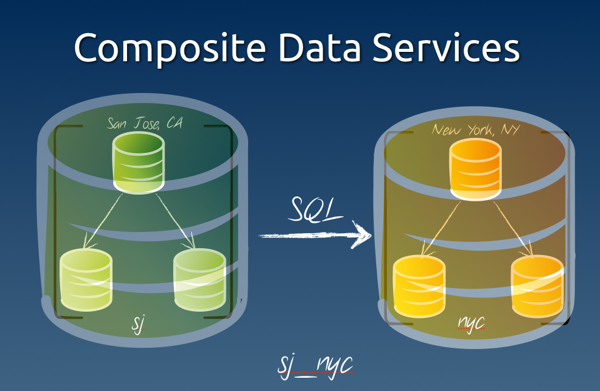
Composite data services

Multi site switch and failover

A recent addition to the suite is the ability of handling whole sites as single servers. The suite can create and maintain a so called composite data service, which is a cluster that is seen and treated as a single server. in a disaster recovery scenario, you want to have a functioning site in one location and a relay site in another location, ready to take over when sudden disaster strikes. Here's an example of what you can get:
cctrl -multi -expert 
Tungsten Enterprise 1.5.0 build 426
sjc: session established
[LOGICAL:EXPERT] / > ls
+----------------------------------------------------------------------------+
|DATA SERVICES:                                                              |
+----------------------------------------------------------------------------+
great_company
nyc
sjc

[LOGICAL:EXPERT] / > use great_company
[LOGICAL:EXPERT] /great_company > ls

COORDINATOR[qa.tx6.continuent.com:AUTOMATIC:ONLINE]

DATASOURCES:
+----------------------------------------------------------------------------+
|nyc(composite master:ONLINE)                                                |
|STATUS [OK] [2012/03/05 10:59:28 PM CET]                                    |
+----------------------------------------------------------------------------+

+----------------------------------------------------------------------------+
|sjc(composite slave:ONLINE)                                                 |
|STATUS [OK] [2012/03/05 10:59:30 PM CET]                                    |
+----------------------------------------------------------------------------+
In this scenario, there is a data service called "great_company", which contains two sites that loom like regular servers. Inside each site, there is a cluster, which we can examine at will:
[LOGICAL:EXPERT] /great_company > use nyc
nyc: session established
[LOGICAL:EXPERT] /nyc > ls

COORDINATOR[qa.tx2.continuent.com:AUTOMATIC:ONLINE]

DATASOURCES:
+----------------------------------------------------------------------------+
|qa.tx1.continuent.com(master:ONLINE, progress=1397, THL latency=0.857)      |
|STATUS [OK] [2012/03/05 10:58:42 PM CET]                                    |
+----------------------------------------------------------------------------+
|  MANAGER(state=ONLINE)                                                     |
|  REPLICATOR(role=master, state=ONLINE)                                     |
|  DATASERVER(state=ONLINE)                                                  |
|  CONNECTIONS(created=54, active=0)                                         |
+----------------------------------------------------------------------------+

+----------------------------------------------------------------------------+
|qa.tx2.continuent.com(slave:ONLINE, progress=1397, latency=0.000)           |
|STATUS [OK] [2012/03/05 11:02:19 PM CET]                                    |
+----------------------------------------------------------------------------+
|  MANAGER(state=ONLINE)                                                     |
|  REPLICATOR(role=slave, master=qa.tx1.continuent.com, state=ONLINE)        |
|  DATASERVER(state=ONLINE)                                                  |
|  CONNECTIONS(created=0, active=0)                                          |
+----------------------------------------------------------------------------+

+----------------------------------------------------------------------------+
|qa.tx3.continuent.com(slave:ONLINE, progress=1397, latency=0.000)           |
|STATUS [OK] [2012/03/05 10:58:31 PM CET]                                    |
+----------------------------------------------------------------------------+
|  MANAGER(state=ONLINE)                                                     |
|  REPLICATOR(role=slave, master=qa.tx1.continuent.com, state=ONLINE)        |
|  DATASERVER(state=ONLINE)                                                  |
|  CONNECTIONS(created=0, active=0)                                          |
+----------------------------------------------------------------------------+
There is a master and two slaves. For each server, we can see the vitals at a glance. The relay site offers a similar view, with the distinction that, instead of a master, there is a relay server. All changes coming from the master in the main site will also go to the relay server, and from that to the slaves in the second site.
[LOGICAL:EXPERT] /nyc > use sjc 
[LOGICAL:EXPERT] /sjc > ls

COORDINATOR[qa.tx6.continuent.com:AUTOMATIC:ONLINE]

DATASOURCES:
+----------------------------------------------------------------------------+
|qa.tx6.continuent.com(relay:ONLINE, progress=1397, THL latency=4.456)       |
|STATUS [OK] [2012/03/05 10:58:32 PM CET]                                    |
+----------------------------------------------------------------------------+
|  MANAGER(state=ONLINE)                                                     |
|  REPLICATOR(role=relay, master=qa.tx1.continuent.com, state=ONLINE)        |
|  DATASERVER(state=ONLINE)                                                  |
|  CONNECTIONS(created=0, active=0)                                          |
+----------------------------------------------------------------------------+

+----------------------------------------------------------------------------+
|qa.tx7.continuent.com(slave:ONLINE, progress=1397, latency=0.000)           |
|STATUS [OK] [2012/03/05 10:59:03 PM CET]                                    |
+----------------------------------------------------------------------------+
|  MANAGER(state=ONLINE)                                                     |
|  REPLICATOR(role=slave, master=qa.tx6.continuent.com, state=ONLINE)        |
|  DATASERVER(state=ONLINE)                                                  |
|  CONNECTIONS(created=0, active=0)                                          |
+----------------------------------------------------------------------------+

+----------------------------------------------------------------------------+
|qa.tx8.continuent.com(slave:ONLINE, progress=1397, latency=0.000)           |
|STATUS [OK] [2012/03/05 10:58:30 PM CET]                                    |
+----------------------------------------------------------------------------+
|  MANAGER(state=ONLINE)                                                     |
|  REPLICATOR(role=slave, master=qa.tx6.continuent.com, state=ONLINE)        |
|  DATASERVER(state=ONLINE)                                                  |
|  CONNECTIONS(created=0, active=0)                                          |
+----------------------------------------------------------------------------+
If you need to bring the relay site as the main one, all you need to do is to run a switch command:
[LOGICAL:EXPERT] /sjc > use great_company 
[LOGICAL:EXPERT] /great_company > switch
SELECTED SLAVE: 'sjc@great_company'
FLUSHING TRANSACTIONS THROUGH 'qa.tx1.continuent.com@nyc'
PUT THE NEW MASTER 'sjc@great_company' ONLINE
PUT THE PRIOR MASTER 'nyc@great_company' ONLINE AS A SLAVE
SWITCH TO 'sjc@great_company' WAS SUCCESSFUL
[LOGICAL:EXPERT] /great_company > ls

COORDINATOR[qa.tx6.continuent.com:AUTOMATIC:ONLINE]

DATASOURCES:
+----------------------------------------------------------------------------+
|nyc(composite slave:ONLINE)                                                 |
|STATUS [OK] [2012/03/06 09:44:48 AM CET]                                    |
+----------------------------------------------------------------------------+

+----------------------------------------------------------------------------+
|sjc(composite master:ONLINE)                                                |
|STATUS [OK] [2012/03/06 09:44:47 AM CET]                                    |
+----------------------------------------------------------------------------+
If disaster strikes, instead of "switch" you say failover, and then use the relay site transparently. Did I mention that Tungsten Connector can be configured to use a composite data service transparently? It can, and if you switch your operations from one Coast to another, the applications will follow suit without any manual intervention. It's so cool! I am sure any geek must love it! BTW: this is not a toy application. This suite is handling data centers that are huge by any standard you care to use, with 100+ terabyte moved through this technology.

Usability

The experience gained with the installer for Tungsten Replicator has been very useful for the whole team. Using the same technology, we have now created a more advanced and simpler installation tool, which is summarized in the Tungsten Enterprise Cookbook. Installing a complex cluster has never been easier!

Tungsten 2.0.5 with more power and ease of use

Tungsten Replicator 2.0.5 was released this week-end. The release notes have quite a long list of bug fixes. Thanks to all the ones who have submitted bug reports, and fixes! There are a couple of new features as well. The replicator includes now a slave prefetch service. Unlike parallel replication, this feature works fine with a single database, and provides performance improvements that in many cases solve the slave lagging problems. This was a bitch of a feature to get right. Many have tried it, many have experienced various degrees of success, and several failures. We started with the bold assertiveness of the brave after an exciting talk at Percona Live in October, and I was sorry to report one bad performance result after the other for a few months, until finally the tide turned, and the good results started showing up, and improving! The key to success was the realization that the prefetch is hard to set up and tune right, but also the need for multiple threads that do the pre-fetching efficiently. Since we had already an efficient engine that we use for parallel replication, the final design started bearing fruits at the end of January, and became definitely good and reliable in February. The other noteworthy improvements were made in the installer. Thanks to the many users who have tried it and reported usability issues, we have made the Tungsten Replicator installation a much better experience, and a powerful tool. The best proof of the installer maturity is that the prefetch installation required little work to be implemented and it worked flawlessly at the first attempt! Other improvements in the tools include trepctl and thl better understanding of their environment. They no longer require a service name if there is only one installed in a given host, and they provide more instrumentation for parallel replication, pre-fetching, and for the processing of huge transactions (quite common when dealing with RBR). This version was also the first with Oracle to MySQL support. This is not open source, however. As this feature requires substantial investments, it is not possible to release it as the rest of the replicator. But the list of goodies is not over yet. The feature that probably more than anything else has been used in the past months has been the star schema topology, which is something that was probably possible in 2.0.4, but nobody had tried it before.
Tungsten topologies
We are not stopping here, however. The investment in the installer has given us the know-how necessary to improve and simplify the installation of our flagship product (Tungsten Enterprise) which is about to ship with similar usability enhancements. We have plans to enhance multiple master replication and management, we are developing powerful parallel processing administration tools, and we are also trying to simplify the powerful filters that Tungsten provides. There are more open source releases to discuss, but these will require more than one article to be described conveniently. We have released more tools in the Tungsten Toolbox project. A better Tungsten Sandbox, capable of installing every technology, and some more ancillary tools for Tungsten. I will come back to those in the near future. Much as I like coding, I also like talking about the cool things that we have made. And, another thing that kept me busy and happy: Continuent and SkySQl are now partners. This has given me quite a lot of work, since we had deliver training to SkySQL field operatives. It was a beautiful experience (teaching to a class of advanced users always is) also because most of the attendees were my former colleagues at MySQL AB. The future looks good. More to come.

Friday, January 27, 2012

More Oracle ACEs for MySQL

Oracle ACEs for MySQL

As Keith announced today, there are two more Oracle ACE Directors for MySQL expertise. In case you are wondering how an ACE Director compares to a regular ACE, here is an overview and some FAQ.

Wednesday, January 18, 2012

MySQL and Friends schedule at FOSDEM 2012

FOSDEM, the Free and Open Source Software Developers' European Meeting The MySQL DevRoom at FOSDEM is ready. The schedule has been voted. Thanks to all who have participated. Now, let's make sure that the event is successful. The schedule is juicy, and not only because I have three talks in it!
Sunday 2012-02-05
Event Speaker Room When
All you need to know about migrations and you never dared to ask Ralf Gebhardt H.1309 09:05-09:30
Sphinx User stories Stéphane Varoqui H.1309 09:35-10:00
MySQL HA reloaded - old tricks and cool new tools to guarantee high availability to your MySQL Servers Ivan Zoratti H.1309 10:00-10:25
MariaDB 5.3's query optimizer: taking the dolphin to where he's never been before Sergey Petrunya H.1309 10:30-10:55
How to offload MySQL server with Sphinx Vladimir Fedorkov H.1309 11:00-11:25
** Build simple and complex replication clusters with Tungsten Replicator Giuseppe Maxia H.1309 11:30-11:55
Cluster internals Ralf Gebhardt H.1309 12:00-12:25
Optimising SQL applications by using client side tools Mark Riddoch H.1309 12:30-12:55
** MySQL Replication 101 Giuseppe Maxia H.1309 13:00-13:25
Choosing Hardware for MySQL Kenny Gryp H.1309 13:30-13:55
Replication features of 2011: what they were, how to get and how to use them Sergey Petrunya H.1309 14:00-14:25
** MySQL creatively in a sandbox Giuseppe Maxia H.1309 14:30-14:55
Case Study: La Poste - Real Time, High Volume Data Warehousing Using MySQL & InfiniDB Stéphane Varoqui H.1309 15:00-15:25
Sphinx performance top secret Vladimir Fedorkov H.1309 15:30-15:55
Managing MySQL with Percona Toolkit Frédéric Descamps H.1309 16:00-16:25
Data Warehousing with MySQL Ivan Zoratti H.1309 16:30-16:55

UPDATE The schedule has changed. Speakers with more than one talk have been asked to give up one. Now I have two talks instead of three.

Monday, January 02, 2012

Time to vote for MySQL sessions at FOSDEM

Fosdem 2012 info There is a room dedicated to MySQL at FOSDEM 2012. (Thanks to @lefred for organizing). The CfP has received 37 submissions, but there will be time slots only for 12 to 15 talks. So now it's up to the community. If you want to attend a particular talk, you should vote for it. Like in previous years, the selection of the talks is public. You can see the list of the proposals, with the instructions, which I repeat here. You can vote either publicly, using Twitter, or privately, by sending an email. Each talk proposal will be referred by the number immediately after the title in this page. This number indicates the order in which the proposals were received. In public, you should send a tweet to @opensqlcamp, indicating a maximum of 12 talks that you would like to see, in the order you like them. e.g. "@opensqlcamp #FOSDEM2012 1,2,3,4,5,6,7,8,9,10,11,12 http://bit.ly/mysql_fosdem_2012" (adding the link will help others to find the page. In private, by email at mysqlfriends AT gmail DOT com, using the same method used for Twitter. Maximum 12 talks, in the order of your preference. In both cases, votes for your preferences will result in 1 point for each talk. In case of equal voting, we will assign 12 points to the first in the list, 11 to the second, and so on. We'll do the tally, and choose the most popular ones. Anonymous votes either by Twitter or email won't be counted. If you want your vote to count, make sure your twitter account has a recognized name (or known nick) on it. If your email address doesn't spell your name, please sign the message with your real one. DEADLINE: Your votes must be entered by January 8th, 2011.

Monday, December 19, 2011

Testing new builds with MySQL-Sandbox 3.0.24

MySQL::Sandbox 3.0.24 was released yesterday, with many new features.

More than vanilla MySQL

If you have missed my previous announcement, here's the gist of it. MySQL Sandbox can now deal with tarballs from either Percona Server or MariaDB. The main difference after this change is that you can now create a directory called <PREFIX>5.5.16 and make_sandbox will recognize it as well as the plain 5.5.16.
$ make_sandbox --export_binaries --add_prefix=ps \
   Percona-Server-5.5.11-rel20.2-114.Darwin.i386.tar.gz  \
   -- --sandbox_directory=msb_ps5_5_11
unpacking Percona-Server-5.5.11-rel20.2-114.Darwin.i386.tar.gz
[…]
installing with the following parameters:
upper_directory                = /Users/gmax/sandboxes
sandbox_directory              = msb_ps5_5_11
[…]
basedir                        = $HOME/opt/mysql/ps5.5.11
tmpdir                         = 
[…]
Your sandbox server was installed in $HOME/sandboxes/msb_ps5_5_11
After the binary export, subsequent installations will be easier:
$ make_sandbox ps5.5.11
The same commands can be used for MariaDB. At the moment, make_sandbox does not recognize other packages, but adding them should not be a big deal, provided that such packages look like MySQL. It wouldn't work with Drizzle, because it lacks the main ingredients for MySQL installation.

High Performance sandboxes

While testing parallel replication and prefetch slaves with Tungsten Replicator, I realized that I was doing too much manual fiddling with my scripts. Since I need more performant servers, I added the basic items that I need to modify to enable a faster server. Now, using the '--high_performance' option with make_sandbox, you get a server that is much better than out-of-the-box MySQL. To avoid problems with too much RAM, I am using a default of 512 MB for InnoDB, which is not enough for really demanding tests, but at least it is a good placeholder in the sandbox configuration file, should you need to modify it.
$ make_sandbox 5.1.60 -- --high_performance
[…]
innodb-flush-method=O_DIRECT ; \
innodb-log-file-size=50M ; \
innodb_buffer_pool_size=512M ; \
max_allowed_packet=48M ; \
max-connections=350 ; \
innodb-additional-mem-pool-size=50M ; \
innodb-log-buffer-size=50M ; sync_binlog=0 ; \
innodb-thread-concurrency=0 ; log-error=msandbox.err
[…]

Standalone masters and slaves

MySQL Sandbox has had the ability of creating replicated systems for years. Yet, sometimes you need a stand-alone master server that you want to use for some odd experiment. Similarly, you may want to create a slave of a specific master without having a full replication system. One case where you would like this ability is when you want to try replicating between servers of different versions.
$ make_sandbox 5.1.57 -- --master
[…]
my_clause                      = server-id=5157 ; log-bin=mysql-bin ; log-error=msandbox.err
[…]
Your sandbox server was installed in $HOME/sandboxes/msb_5_1_57

$ make_sandbox 5.5.10 -- --slaveof='master_port=5157' 
[…]
my_clause                      = server-id=5510 ; log-bin=mysql-bin ; log-error=msandbox.err
[…]
Your sandbox server was installed in $HOME/sandboxes/msb_5_5_10


$ ~/sandboxes/msb_5_1_57/use -e 'show master status'
+------------------+----------+--------------+------------------+
| File             | Position | Binlog_Do_DB | Binlog_Ignore_DB |
+------------------+----------+--------------+------------------+
| mysql-bin.000001 |      106 |              |                  |
+------------------+----------+--------------+------------------+

$ ~/sandboxes/msb_5_5_10/use -e 'show slave status\G'
*************************** 1. row ***************************
               Slave_IO_State: Waiting for master to send event
                  Master_Host: 127.0.0.1
                  Master_User: rsandbox
                  Master_Port: 5157
                Connect_Retry: 60
              Master_Log_File: mysql-bin.000001
          Read_Master_Log_Pos: 106
               Relay_Log_File: mysql_sandbox5510-relay-bin.000002
                Relay_Log_Pos: 252
        Relay_Master_Log_File: mysql-bin.000001
             Slave_IO_Running: Yes
            Slave_SQL_Running: Yes
              Replicate_Do_DB: 
          Replicate_Ignore_DB: 
           Replicate_Do_Table: 
       Replicate_Ignore_Table: 
      Replicate_Wild_Do_Table: 
  Replicate_Wild_Ignore_Table: 
                   Last_Errno: 0
                   Last_Error: 
                 Skip_Counter: 0
          Exec_Master_Log_Pos: 106
              Relay_Log_Space: 420
              Until_Condition: None
               Until_Log_File: 
                Until_Log_Pos: 0
           Master_SSL_Allowed: No
           Master_SSL_CA_File: 
           Master_SSL_CA_Path: 
              Master_SSL_Cert: 
            Master_SSL_Cipher: 
               Master_SSL_Key: 
        Seconds_Behind_Master: 0
Master_SSL_Verify_Server_Cert: No
                Last_IO_Errno: 0
                Last_IO_Error: 
               Last_SQL_Errno: 0
               Last_SQL_Error: 
  Replicate_Ignore_Server_Ids: 
             Master_Server_Id: 5157
You can download MySQL::Sandbox from either launchpad or CPAN.