Friday, January 27, 2006

MySQL 5 general purpose routine library - VII: Testing and best practices

(Seventh part of the MySQL 5 general purpose routine library presentation.)

Test units

Testing is often considered a boring activity, something that is not cool enough for a developer to take into consideration.
Sometimes, it's true. Testing is almost as exciting as having a haircut or trimming your nails.
It needs to be done, but you hardly welcome the task.
However, that happens when you don't test with method. Because testing can be fun and it can be as rewarding as any other programming activity.

What you need to do, is to move your testing schedule up to the development schedule and put it in front of the code.That way, you don't have just "some testing", which is usually fumbling with a few examples to ensure that your routine does what you thought it should do.
That's not testing. That's sampling.
And if that fails, you will test even less after you fix the bug (or you think you did),
because that sort of testing is really boring and tiresome.

What you should do instead is to create testing units.
The practice of unit testing (http://en.wikipedia.org/wiki/Unit_testing) calls for the creation of a set of tests to probe all facets of the code you are about to check.
This practice is well known to Perl programmers, since almost all modules from Perl itself and from CPAN come with a standard set of tests. Some modules have even thousands of them.
The clever addition of recent practice, though, is not just writing the testing units,
but writing them before the actual code.
The idea is this: write your specifications as testing units, i.e. put down a stream of cases to prove that the code being produced meets your expectations. If your specifications are detailed and complex, so will be the testing units, which will include as many detail as your specification requires.
Using this approach, you will know that your routine works when it passes all the tests.

Unit testing in MySQL

Testing in Perl is a powerful experience. There are so many tools available, that testing it's becoming an art in itself. There are modules to help you test just about everything. Writing your tests in Perl becomes a very easy task, even pleasant sometimes.
Coming from such experience, the testing environment for MySQL stored routines looks just, well, lacking.
Therefore my first thought when I was facing the task was "let's do it in Perl", and so I did it.
My first test unit (for the arrays module) was in Perl. It did not take long to write, but I found myself writing quite a lot to describe how the tests work in Perl.
And then I realized that, for a non Perl programmer, installing the Perl DBI and DBD::mysql modules is not an easy task, and it can be actually a frightening experience.
The same goes for another well established testing environment for C and C++. Who is not used to compiling and linking a C program will find even a simple task very demanding.
Thus I came to the logical conclusion that testing for stored routines has to be done with MySQL resources alone. It is not very advanced, and it pales compared to Perl, but it can be enhanced with some well thought structures and routines.
So, here goes.
Let's see how unit testing can be performed with MySQL and the general purpose stored routines.

Testing support in mysql-sr-lib

To ease the task of testing, there are a few routines. The most important one, and perhaps the only one that you may need in setting a test, is log_test, which expects four parameters

procedure log_test(
p_description varchar(200),
p_result text,
p_expected text,
p_outcome boolean)
The first one is a description of what we are testing, perhaps the routine name, with some additional short comment. The second one is the result we are inspecting. The third one is a description of what we are expecting. The last one is a boolean, and it should receive an expression, the evaluation of which will tell us whether the test succeeded or not. I know that it sounds obscure, but it will become clearer with the examples below.
Furthermore, we have some generalized tests for something that is quite common during our testing tasks. It is very likely that, testing stored routines, we want to test if such routine exists. And it is equally common to test if a given table exists. So, there are procedures to perform these simple repetitive tasks: check_routine and check_table do the job for you, and if you look at the source code for them, you will see just a clear example of how a test should be carried out. If you have several routines to check at once (as it is the case of this collection, for instance) you can benefit from check_routine_simple and check_for_routines_existence. The first one will let you set a user variable @database and use it to check your routines, so you will set the database parameter only once. The second one gets the routine names form a table (_routine_list) and calls check_routine for each of them. This latest case will raise a question: "how do I know how the table structure?" Don't worry. Before starting your testing work, call initialize_tests, and that, among other hidden tasks, will be done for you. To see different uses of these routines, inspect the source code of test_*.mysql in the "tests" directory. for now, it's enough to say that these three uses are equivalent:
 call initialize_tests();

connect;
call check_routine(database(), 'myp1', 'procedure');
call check_routine(database(), 'myf2', 'function');

connect;
set @database = database();
call check_routine_simple('myp1', 'procedure');
call check_routine_simple('myf2', 'function');

connect;
insert into _routine_list (routine_name, routine_type) values
('myp1', 'procedure'),
('myf2', 'function');
call check_for_routines_existence(database());
Last, there is show_test_results, which gives you an account of what you have tested, listing the result of each test, a summary of passed and failed ones, and a further list of failed test for your easy review. And now it's time for some hands on.

Short tutorial: Writing a testing unit

For this brief exercise, we want to create two stored routines. A procedure that creates a table with a character column and two numeric columns, and a function that will return the sum of the two numbers given the string.
Some facts: The name of the table is 'my_data'. The procedure, 'make_table,' won't have any parameters, the function, 'get_result,' will have one. These facts are enough to set our tests.
   -- test_tutorial.mysql
call initialize_tests();

call check_routine(database(), 'make_table', 'procedure');
call check_routine(database(), 'get_result', 'function');

connect;
call make_table();
call check_table(database(), 'my_data');

connect;
insert into my_data values('first', 1, 2), ('second',10,20),('third', 100, 200);
set @my_res = get_result('first');
call log_test('get_result first', @my_res, '@my_res = 3', @my_res = 3 );

set @my_res = get_result('second');
call log_test('get_result second', @my_res, '@my_res = 30', @my_res = 30 );

set @my_res = get_result('third');
call log_test('get_result third', @my_res, '@my_res = 300', @my_res = 300 );

set @my_res = get_result('fourth');
call log_test('get_result non-existent', @my_res, '@my_res is null',
@my_res is null );

call show_test_results();
This test is what we expect the actual routines to do. It can be part of the user's requirements to signify what you want to achieve. That done, it's time to write the actual code:
   -- test_t1.mysql

delimiter //

drop procedure if exists make_table //
create procedure make_table ()
deterministic
begin
create table my_data
(
name char(10) not null primary key,
val1 int,
val2 int
);
end//

drop function if exists get_result //
create function get_result ( p_name char(10))
returns int
reads sql data
begin
declare mysum int;
select val1*val2 into mysum -- intentional bug
from my_data
where name = p_name;
return mysum;
end//

delimiter ;
Now we have all the components. To perform the tests, we need to install the test utilities and the globals module.


$ mysql databasename < globals.mysql
$ mysql databasename < test_utilities.mysql


and then we can install the two routines:

   $ mysql databasename < test_t1.mysql


Finally, we run the test. Don't forget to add the '-t' option to mysql.


$ mysql -t databasename < test_tutorial.mysql
+---------+-------------------------+--------+-----------------------+------------+
| test no | description | result | expected | outcome |
+---------+-------------------------+--------+-----------------------+------------+
| 1 | make_table p exists | 1 | routine_exists = true | pass |
| 2 | get_result f exists | 1 | routine_exists = true | pass |
| 3 | table my_data exists | 1 | table_exists = true | pass |
| 4 | get_result first | 2 | @my_result = 3 | ** fail ** |
| 5 | get_result second | 200 | @my_result = 30 | ** fail ** |
| 6 | get_result third | 20000 | @my_result = 300 | ** fail ** |
| 7 | get_result non-existent | NULL | @my_result is null | pass |
+---------+-------------------------+--------+-----------------------+------------+
7 rows in set (0.00 sec)

+-------------+--------+--------+-------------------------+
| total tests | passed | failed | passed tests percentage |
+-------------+--------+--------+-------------------------+
| 7 | 4 | 3 | 57.14 |
+-------------+--------+--------+-------------------------+
1 row in set (0.00 sec)

+---------+-------------------+--------+------------------+------------+
| test no | description | result | expected | outcome |
+---------+-------------------+--------+------------------+------------+
| 4 | get_result first | 2 | @my_result = 3 | ** fail ** |
| 5 | get_result second | 200 | @my_result = 30 | ** fail ** |
| 6 | get_result third | 20000 | @my_result = 300 | ** fail ** |
+---------+-------------------+--------+------------------+------------+


The tests worked, but something surely went wrong, because three tests were unsuccessful. We expected the result to be 3, 30,300, and instead we got 2,200,20000. Time to inspect the source, and we find quickly that get_result has val1*val1 where it should have been val1+val2. Let's correct the mistake, and run the test again

   $ mysql databasename < test_t1.mysql
$ mysql -t databasename < test_tutorial.mysql
+---------+-------------------------+--------+-----------------------+---------+
| test no | description | result | expected | outcome |
+---------+-------------------------+--------+-----------------------+---------+
| 1 | make_table p exists | 1 | routine_exists = true | pass |
| 2 | get_result f exists | 1 | routine_exists = true | pass |
| 3 | table my_data exists | 1 | table_exists = true | pass |
| 4 | get_result first | 3 | @my_result = 3 | pass |
| 5 | get_result second | 30 | @my_result = 30 | pass |
| 6 | get_result third | 300 | @my_result = 300 | pass |
| 7 | get_result non-existent | NULL | @my_result is null | pass |
+---------+-------------------------+--------+-----------------------+---------+
7 rows in set (0.00 sec)

+-------------+--------+--------+-------------------------+
| total tests | passed | failed | passed tests percentage |
+-------------+--------+--------+-------------------------+
| 7 | 7 | 0 | 100.00 |
+-------------+--------+--------+-------------------------+


Now we got what we wanted. The routine works reasonably well. Notice that we also included a test for failure, when we asked for a value 'fourth', which does not exist in the table.

best practices


Enlightened by the testing example, we can draw some guidelines for developing stored routines. Actually, this advice can be successfully applied to any programming language, and I owe this great advice to Damian Conway (Ten essential development practices). Follow these simple rules, and you'll see the quality of your routines improving soon.


Write the interface

Before writing any code, write down the interface, i.e. how you would like to call the routine, with the necessary parameters. Possibly, write down the documentation for such a routine, describing how to invoke it and what it should do. Write down every detail of the implementation such as environment variables, dependencies, side effects, and so on.

Write a test unit for your routine

Before writing the code, there is yet another step. Write some tests for your routine. You already know the interface, so you can create the tests for your routine. For every feature described in the documentation, you should prepare at least one test. Make tests for success and for failure. For example, if your routine has some pre-requisites, test that it fails when such requisites aren't met.


As soon as you implement one feature of the routine, test it

When finally writing the code, run the tests on your routine, to see if that feature works as expected. If the test for that feature fails, don't go on developing further features until the failing one is fixed.

When your routine passes all tests, you're done

Your work is finished as soon as your routine passes all the tests. You'll be amazed at the low number of bugs that this approach leaves behind. Most of them are caught during the test.

MySQL 5 general purpose routine library - VI : Globals

(Sixth part of the MySQL 5 general purpose routine library presentation.)
Among the General Puropose Routines there are some that are more general than others. I refer to those small utility routines that don't belong to any specific module, or that are useful and required by any module. I call this group globals because it applies to all the modules, and also because one of its objectives is to create global variables that are available across sessions.

Finding existing objects

This category has some functions to report on the existence of a specific database object, mainly tables, views and routines.
Although this is a task mainly related to testing, I didn't put it among the test utilities, because they are really general, and I believe that they should be useful to many developers in several different tasks.
The list starts with three simple functions table_exists, table_or_view_exists, view_exists, which can tell you in one call if a given table or view exists.
Similar ones are routine_exists, function_exists and procedure_exists. The first one tells you if a given routine exists, providing the database name, the routine name and the routine type (procedure or function). The other two functions are just shortcuts toward calling routine_exists.

Using global variables

The main course in globals, and the reason why this module holds this name is due to the implementation of global variables, i.e. variables that keep their value across sessions. Unlike user variables, that lose their value after a disconnection, global variables can stay stored for as long as you need them.
To set a global variable, you can use either a procedure global_var_set or the homonymous function.
  set @myvar = global_var_set('varname','an important value');
call global_var_set('varname', 'an important value');
Both these calls will create a global variable named 'varname'. The first usage has the side effect of actually returning the variable's value, which is immediately assigned to a user variable. The second form will just create a global variable, assigning its value to a @global_var_set user variable.
To retrieve the value, you use global_var_get.
  set @othervar = global_var_get('varname');
Global variables are created on a user basis. With the default implementation, several users can define variables with the same name, and they will be kept separated, each one being available to their respective creator. It is possible to set the global variables to be truly global, each one available to all users, by changing the return value of library_user, which is used, incidentally, by the arrays module as well.
You can drop global variables with global_var_drop, and inquire about the existence of a global variables using global_var_exists.

Sunday, January 08, 2006

Checking MySQL weak passwords

Do you have a policy of strong passwords?
Do you want to enforce it? If yes, then you may want a quick way of checking if your users are abiding to the rules.
You can either force the users to change passwords through a smart application, to prevent them from using weak passwords, or, if you are assessing an existing environment, you can check the existing passwords against a dictionary, to see if there are some imeediately exploitable passwords among your server accounts.

The mechanics of passwords checking

Checking passwords against a dictionary is a costly business. It can be made more affordable if we manage to put all the items to check in the database itself, so that we can use the DBMS force to do our job.
What we have to do is to collect a large list of words that we would not like our users to set as their password. Immediate candidates are user names, both from the operating system and the database, user full names, and of course words from as many dictionaries we believe our users could make advantage of.


WARNING Password checking is a breech of privacy. If you need to use the techniques explained in this post, be sure to:
  • Inform the users about a policy of strict passwords;
  • Inform them that you will run sanity checks from time to time;
  • Make them sign a form to acknowledge that they know and understand the policy;
  • If you are not the boss, get the management approval (in written!);
  • Have the company lawyer review and approve the policy wording and the forms.
Failure to do so may result in unpleasant situations, ranging from slight embarrassment to criminal charges, depending on the company you work with, your country regulation, and your ill luck.
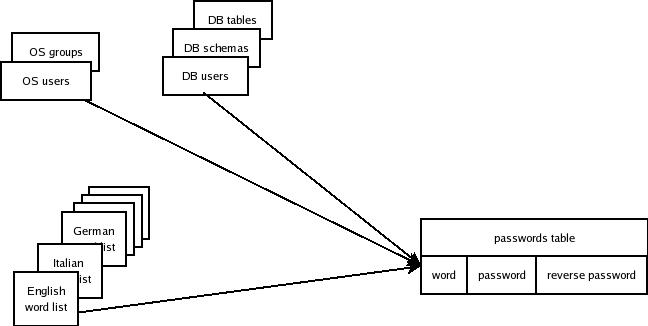
The table we need to create will have a word, which is what we would not want to be used as a password. A password, which is the word encoded with MySQL password function, and a reversed_password, which is the word spelled backwards encoded with password. If you have time and patience, you may add more variations (such as all lowercase, all uppercase).
Using such table, finding the weak passwords is quite easy. To have something to find, let's create some dumb users:
GRANT all on test.* to test1 identified by "test";        # name of a database
GRANT all on test.* to test2 identified by "test2"; # name of a user
GRANT all on test.* to test3 identified by "master"; # a common word
GRANT all on test.* to test4 identified by "retsam"; # a reversed common word
GRANT all on test.* to test5 identified by "marshmallow"; # an uncommon word
Now let's get them:
select
user, word as 'chosen password', word as 'original word', 'direct' as 'password type'
from
passwords
inner join mysql.user on password=pwd
union
select
user, reverse(word),word,'reverse' as 'password type'
from
passwords
inner join mysql.user on password=reverse_pwd
;
+-----------+-----------------+---------------+---------------+
| user | chosen password | original word | password type |
+-----------+-----------------+---------------+---------------+
| test5 | marshmallow | marshmallow | direct |
| test3 | master | master | direct |
| test4 | retsam | master | reverse |
| test1 | test | test | direct |
| test2 | test2 | test2 | direct |
+-----------+-----------------+---------------+---------------+

Here we are. All the offending users came to light, with a simple (and very efficient) query.

Creating the passwords table


The following perl script will create the passwords table and populate it, using a dictionary of English words and the other above mentioned elements.

#!/usr/bin/perl 
use strict;
use warnings;
use Data::Dumper;
use DBI;

my $words_file = '/usr/share/dict/words';
my $groups_file = '/etc/group';
my $users_file = '/etc/passwd';
my $DEBUG = $ENV{DEBUG};
my $deferred_keys = $ENV{DEFERRED_KEYS} || 1;
my $max_records = $ENV{MAX_RECORDS} || 30_000;
my $base_query = qq{INSERT IGNORE INTO passwords VALUES };
my $query = $base_query;
my $record_count = 0;
my $total_recs = 0;
my $database = 'test';
my $host = 'localhost';
my $conf_file = "$ENV{HOME}/.my.cnf";
my $table_struct = qq{
create table passwords (
word char(50) collate utf8_bin NOT NULL,
pwd char(41) collate utf8_bin NOT NULL,
reverse_pwd char(41) collate utf8_bin NOT NULL,
PRIMARY KEY (word),
KEY (pwd),
KEY (reverse_pwd)
) ENGINE=MyISAM DEFAULT CHARSET=utf8
};

my $dbh=DBI->connect("dbi:mysql:$database;host=$host"
. ";mysql_read_default_file=$conf_file",
undef,
undef,
{RaiseError => 1})
or die "Can't connect: $DBI::errstr\n";

$dbh->do(qq{drop table if exists passwords});
$dbh->do($table_struct);
$dbh->do(qq{ALTER TABLE passwords DISABLE KEYS}) if $deferred_keys;

# get the database users
my $users = $dbh->selectall_arrayref(qq{select user from mysql.user});

# get the database names
my $databases = $dbh->selectall_arrayref(qq{show databases});

# get the table names
my $tables = $dbh->selectall_arrayref(qq{
select distinct table_name from information_schema.tables});

# add all table, users, database names to the word list
for ((@{$users}, @{$databases}, @{$tables})) {
process_query( $_->[0] );
}

# get the OS group names
open my $IN, q{<}, $groups_file
or die "unable to open $groups_file\n";
process_query((split(q{:}, $_))[0]) while <$IN>;
close $IN;

# get the OS user names
open $IN, q{<}, $users_file
or die "unable to open $users_file\n";
while (<$IN>) {
my ($user_id, $full_name) = (split(q{:}, $_))[0,4];
process_query($user_id);
process_query($full_name) if $full_name;
}
close $IN;

# get the words from a dictionary
# repeat this step for every other
# dictionary file you may want to include
open $IN, q{<}, $words_file
or die "unable to open $words_file\n";
process_query( $_ ) while <$IN>;
close $IN;

# finish off leftovers
if ($record_count) {
$dbh->do($query);
$total_recs += $record_count;
print "$record_count ($total_recs)\n" if $DEBUG;
}

$dbh->do(qq{ALTER TABLE passwords ENABLE KEYS}) if $deferred_keys;

sub process_query {
my ($word) = @_;
chomp $word;
if ($record_count) {
$query .= q{,};
}
my $quoted_word = $dbh->quote($word);
$query .= q{(}
. $quoted_word
. q{, password(}
. $quoted_word
. q{), password(reverse(}
. $quoted_word
. q{)))};
if (++$record_count >= $max_records) {
$dbh->do($query);
$total_recs += $record_count;
print "$record_count ($total_recs)\n" if $DEBUG;
$record_count = 0;
$query = $base_query;
}
}

Some efficiency issues

Why do we need a Perl script to achieve such goal? Everything could be done with a few one-liners, and this is actually what I tried in the beginning.
Of course you can use some one-liners, but you will end up inserting one record at the time, which becomes unbearably slow when you pass the fifty thousand record mark.
As an example, to insert five hundred thousand records, this script takes about one minute, because it makes multiple insert statements of 30,000 records each, while inserting records one by one took about 17 minutes.
One more problem may arise if you are not careful about the column types. Your "password" and "reversed_password" columns must have exactly the same type, character set and collation of the "password" column in mysql.user table. If you don't make them match exactly, MySQL will refuse to use any index from that table when joining them. The query I showed before the script runs in less than one second. If you use a different character set, it will require a table scan, and it can take as much as one minute for a table of one million words.

Saturday, December 31, 2005

New Year quiz

A few days ago I was asked to analyze some data related to a particular service usage in a large communications provider. The (simplified) table looks like this:
CREATE TABLE `xusage` (
`item_id` int(11) NOT NULL,
`begin_date` date NOT NULL,
`xusage` int(11) default NULL,
PRIMARY KEY (`item_id`,`begin_date`)
) ;
And here is some sample data:
select * from xusage order by begin_date,item_id;
+---------+------------+--------+
| item_id | begin_date | xusage |
+---------+------------+--------+
| 1 | 2005-09-01 | 93 |
| 1 | 2005-09-02 | 90 |
| 2 | 2005-09-02 | 54 |
| 1 | 2005-09-03 | 66 |
| 2 | 2005-09-03 | 74 |
| 3 | 2005-09-03 | 90 |
| 1 | 2005-09-04 | 38 |
| 2 | 2005-09-04 | 49 |
| 3 | 2005-09-04 | 91 |
| 4 | 2005-09-04 | 91 |
| 2 | 2005-09-05 | 47 |
| 3 | 2005-09-05 | 49 |
| 4 | 2005-09-05 | 33 |
| 5 | 2005-09-05 | 83 |
| 3 | 2005-09-06 | 23 |
| 4 | 2005-09-06 | 99 |
| 5 | 2005-09-06 | 93 |
| 4 | 2005-09-07 | 75 |
| 5 | 2005-09-07 | 47 |
| 5 | 2005-09-08 | 3 |
+---------+------------+--------+
The task at hand was to produce another table (for charting purposes), having the same columns as xusage, with some additional pieces of information: the total usage for that day and the following day, the usage for item_id on day +1, the percentage of such usage from the total of all usage in day + 1;
For example, in the given data, the total usage on September 1st was 93, and on September 2nd was 144. The wanted columns for the first two days would be
+---------+------------+--------+-----------+-------------+-------------+------------------+
| item_id | begin_date | xusage | total day | total day+1 | usage day+1 | percentage day+1 |
+---------+------------+--------+-----------+-------------+-------------+------------------+
| 1 | 2005-09-01 | 93 | 93 | 93 | 90 | 62.5000 |
| 1 | 2005-09-02 | 90 | 144 | 144 | 66 | 28.6957 |
| 2 | 2005-09-02 | 54 | 144 | 144 | 74 | 32.1739 |
+---------+------------+--------+-----------+-------------+-------------+------------------+
The original table had 50 million records. Therefore I had to find an efficient way of fulfilling the task.
It can be done with a single query, although performance would suffer. I chose to create a supporting table to ease the task.

My solution is here.
How would you have solved it? (BTW, there is no prize, unless Arjen wants to provide some.
Happy New Year!

Friday, December 30, 2005

function WELL_KNOWN_FUNC does not exist

That came today in a newsgroup. A user was complaining that he was able to encrypt and decrypt some data with an early release of MySQL 5.0 and not being able to decrypt it with the latest one.
The message he received was, allegedly
function AES_DECRYPT does not exist
That puzzled me, of course. I have the latest MySQL version installed in one of my servers, and I tried it straight away:

select version(), AES_DECRYPT(AES_ENCRYPT('abc','y'),'y');
+----------------+-----------------------------------------+
| version() | AES_DECRYPT(AES_ENCRYPT('abc','y'),'y') |
+----------------+-----------------------------------------+
| 5.0.17-max-log | abc |
+----------------+-----------------------------------------+

So the function does exist. But what was the poster complaining about? Perhaps he did not report the error message correctly.
Let's try to put a space between the function name and the parenthesis.

select version(), AES_DECRYPT (AES_ENCRYPT('abc','y'),'y');
ERROR 1305 (42000): FUNCTION test.AES_DECRYPT does not exist

Aha! That was the problem. The message was missing one piece that would have given away the answer immediately.
The problem was that he was calling the function with a space between name and parenthesis and the manual tells you how it will accepted by the interpteter.
If you are used to spaces in front of parentheses and you'd like the interpreter to make some additional effort before reporting failure, you can always use the sql mode to inform the server of your preferences. Either start the server with the option --sql-mode=IGNORE_SPACE, or change it run-time:

set sql_mode='IGNORE_SPACE';

# or if you have the SUPER privilege:
set global sql_mode='IGNORE_SPACE';

select version(), AES_DECRYPT (AES_ENCRYPT('abc','y'),'y');
+----------------+------------------------------------------+
| version() | AES_DECRYPT (AES_ENCRYPT('abc','y'),'y') |
+----------------+------------------------------------------+
| 5.0.17-max-log | abc |
+----------------+------------------------------------------+

Tuesday, December 20, 2005

MySQL 5 general purpose routine library - V : more on arrays

Hi.
It's me again.
That one who is crazy for data structures and believes they are at all useful.
I know you've seen an article about arrays just a few days ago, and it was mine as well, but I have something new to share and here goes.
I told you that arrays were useful.
So useful, in fact, that improving the library itself became quite an easy task.
And so I made some more addition, such as operations on whole arrays, rather than on single items.
(Fifth part of the MySQL 5 general purpose routine library presentation.)

multiple users

It occurred to me that having arrays in a multi-user environment could be either a blessing or a disaster, depending on which side you are.
If you are likely to see the benefits, having a way of sharing data among users could be a pro.
If you are more focused on the drawbacks, then you'll see that having a user modify an array while you are doing something highly sensitive on it would not be desirable.
So I said, let's have it both ways.
And I made a few adjustments to the library, so that arrays can be restricted or shareable depending on one single function that will influence all the routines.
  create function array_user()
returns varchar(50)
reads sql data
begin
-- To have separate arrays for each user
-- uncomment the following line.
return substring_index(user(),'@',1);
--
-- To have arrays shared among users
-- use the statement below.
-- return 'all users';
end//
This is the "multi-user" implementation. Installing the library this way, each user will see only the arrays (s)he has created. Using the library with this function, different users can use an array with the same name, and they will stay separated and independent. Changing the return statement so that it gives 'all users', all arrays are unique among multiple users, i.e. if user A creates an array 'X', that array can be accessed, modified and erased by user B as well.

copying

Before you had arrays, you didn't care much. But now that they exist and are usable, you start wondering if you can make a copy of an array without being forced to insert items one by one. Of course you could do that using a for_each like function, but why bother, since there is a low-level array_copy function that will do it for you?
(Yes, I know that a few days ago it was not there. I just made it yesterday, it passed the tests today, and now it's ready for general usage. )
Back to the issue. To copy an array, just call array_copy, supplying the source and destination name.
    select array_copy('A', 'B');
# now array 'B' contains the same items as array 'A'
While copying, you can also do some additional actions, such as filtering, appending and more. As you suspect, there is a array_copy_complete that allows a wide degree of control on your copy.

sorting

Sorting is a special case of copying, since it will create a new array, with the elements sorted. By default, array_sort will create a new array with the elements sorted by value. If this is not enough for you, there is array_sort_complete that lets you choose among different ways of sorting (by value, by key/value, by value as numeric) and the sorting direction (ascending, descending).
    call array_show('A');
+-------------+-----------+------------+
| array_index | array_key | "A" values |
+-------------+-----------+------------+
| 0 | g | sheep |
| 1 | b | cow |
| 2 | c | ox |
| 3 | d | donkey |
| 4 | a | dog |
+-------------+-----------+------------+

select array_sort('A','B');

call array_show('B');
+-------------+-----------+------------+
| array_index | array_key | "B" values |
+-------------+-----------+------------+
| 0 | b | cow |
| 1 | a | dog |
| 2 | d | donkey |
| 3 | c | ox |
| 4 | g | sheep |
+-------------+-----------+------------+

# sorted by value

select array_sort_complete('A','B','K','asc');

call array_show('B');
+-------------+-----------+------------+
| array_index | array_key | "B" values |
+-------------+-----------+------------+
| 0 | a | dog |
| 1 | b | cow |
| 2 | c | ox |
| 3 | d | donkey |
| 4 | g | sheep |
+-------------+-----------+------------+
# sorted by key
Notice that the original array is not changed.

merging

If you want to create an array from the contents of two existing arrays, array_merge is your function. One complication that arises when merging arrays is the 'keys', which must be unique in each array. Thus, if both arrays have one or more key in common, only one value can be taken. By default, array_merge uses the key from the first array. As usual, if you want to control such detail, there is array_merge_complete.
    call array_show('A');
+-------------+-----------+------------+
| array_index | array_key | "A" values |
+-------------+-----------+------------+
| 0 | b | cow |
| 1 | c | ox |
| 2 | d | donkey |
| 3 | a | dog |
+-------------+-----------+------------+

call array_show('B');
+-------------+-----------+------------+
| array_index | array_key | "B" values |
+-------------+-----------+------------+
| 0 | z | hare |
| 1 | y | rabbit |
| 2 | w | mole |
| 3 | a | beaver |
+-------------+-----------+------------+

select array_merge('A','B','C');
+--------------------------+
| array_merge('A','B','C') |
+--------------------------+
| C |
+--------------------------+

call array_show('C');
+-------------+-----------+------------+
| array_index | array_key | "C" values |
+-------------+-----------+------------+
| 0 | b | cow |
| 1 | c | ox |
| 2 | d | donkey |
| 3 | a | dog |
| 4 | z | hare |
| 5 | y | rabbit |
| 6 | w | mole |
+-------------+-----------+------------+
Notice that 'C' does not have 8 elements, but just 7. That's because key 'a' was present in both 'A' and 'B' source arrays. The conflict was resolved taking the value from the first array ('dog' from array 'A'). To change this behaviour, you could have done this:
    select array_merge_complete('A','B','C','use_second');
+------------------------------------------------+
| array_merge_complete('A','B','C','use_second') |
+------------------------------------------------+
| C |
+------------------------------------------------+

call array_show('C');
+-------------+-----------+------------+
| array_index | array_key | "C" values |
+-------------+-----------+------------+
| 0 | b | cow |
| 1 | c | ox |
| 2 | d | donkey |
| 3 | a | beaver |
| 4 | z | hare |
| 5 | y | rabbit |
| 6 | w | mole |
+-------------+-----------+------------+

appending

Appending is a variation of merging. Instead of creating a new array, an existing one gets the contents of another. Conflicting keys are resolved in favour of the second array.
    select array_append('A','B');
+-----------------------+
| array_append('A','B') |
+-----------------------+
| A |
+-----------------------+

call array_show('A');
+-------------+-----------+------------+
| array_index | array_key | "A" values |
+-------------+-----------+------------+
| 0 | b | cow |
| 1 | c | ox |
| 2 | d | donkey |
| 3 | a | beaver |
| 4 | z | hare |
| 5 | y | rabbit |
| 6 | w | mole |
+-------------+-----------+------------+

filtering

Perl programmers know what grep is. It's a filter applied to an array with a regular expression, so that the resulting array is made of all elements matching such expression. array_grep does the same thing. Given an array and a regular expression, it will create an array containing all the elements from the source array where the elements match the pattern.
    call array_show('A');
+-------------+-----------+------------+
| array_index | array_key | "A" values |
+-------------+-----------+------------+
| 0 | b | cow |
| 1 | c | ox |
| 2 | d | donkey |
| 3 | a | dog |
+-------------+-----------+------------+

select array_grep('A','B','^d');
+--------------------------+
| array_grep('A','B','^d') |
+--------------------------+
| B |
+--------------------------+

call array_show('B');
+-------------+-----------+------------+
| array_index | array_key | "B" values |
+-------------+-----------+------------+
| 0 | d | donkey |
| 1 | a | dog |
+-------------+-----------+------------+
The regular expression is anything that MySQL built-in REGEXP operator recognizes as valid. In this example, only the elements starting by 'd' are selected.

piping

The astute reader must have noticed that all the functions mentioned in this section return the array name, and that all array routine require an array name as their first argument. This fact leads to the pleasant result that array functions can be piped together. Wherever you need an array name, you can use an array function returning an array name instead. The above operation about grep could have been done with just one query:
    call array_show( array_grep('A','B','^d'));
+-------------+-----------+------------+
| array_index | array_key | "B" values |
+-------------+-----------+------------+
| 0 | d | donkey |
| 1 | a | dog |
+-------------+-----------+------------+
Here the result of array_grep (which is 'B') is given as first argument to array_show. You can take one step further, and sort the elements in the same step:
    call array_show( array_sort(array_grep('A','B','^d'),'C'));
+-------------+-----------+------------+
| array_index | array_key | "C" values |
+-------------+-----------+------------+
| 0 | a | dog |
| 1 | d | donkey |
+-------------+-----------+------------+
Array 'B' (as result of array_grep) is passed to array_sort, and its result, 'C', is used by array_show. If you think that this looks very much like Perl array syntax, where you can pipe grep, sort and so on, you are right. Since MYSQL SP syntax is so primitive, I wanted to add some perlish power to it. I hope I succeeded.

Monday, December 19, 2005

Dumping GIS data

Today I needed to dump a table containing GIS data and I could not find a quick way of exporting such data into a WKT format. Since I had also some more small problem with my data, I called MySQL technical support (I have a MySQL Network account) and I got the small problem solved, but the dump seems to be still a pending issue.
If you are used to dump data often, you may know that mysqldump has two useful options: --hex-blob, which will dump binary data in hexadecimal format, and --compatible=target, which will adjust the dump format to the requested target. However, none of these options has any effect on GIS data. It is always dumped in binary format, hardly compatible with any other DBMS.

So I cooked up an alternative way of dumping such data.
First, I created a stored function to create the query I needed

delimiter //

drop function if exists gis_dump_query //

create function gis_dump_query
(
p_db_name varchar(50),
p_table_name varchar(50),
p_file_name varchar(100)
)
returns text
reads sql data
begin
declare done boolean default false;
declare is_first boolean default true;
declare col_list text;
declare cname varchar(50);
declare ctype varchar(50);
declare column_descr varchar(100);
declare get_cols cursor for
select column_name, data_type
from
information_schema.columns
where
table_schema= p_db_name
and
table_name = p_table_name;
declare continue handler for not found
set done = true;

set col_list = '';
open get_cols;
GET_COLUMNS:
loop
fetch get_cols into cname,ctype;
if (done) then
leave GET_COLUMNS;
end if;
if (is_first) then
set is_first = false;
else
set col_list = concat(col_list, ',');
end if;
set column_descr = cname;
if is_geometry(ctype) then
set column_descr = concat('astext(',cname, ')');
end if;
set col_list = concat(col_list, column_descr);
end loop;
return concat('SELECT ', col_list, ' INTO OUTFILE ', "'",
p_file_name, "'",
' FIELDS TERMINATED BY ";" OPTIONALLY ENCLOSED BY "''" ESCAPED BY ''\\\\'' ',
' FROM ', p_db_name, '.', p_table_name);
end //

drop function if exists is_geometry //
create function is_geometry (ctype varchar(50))
returns boolean
deterministic
begin
return ctype in (
'geometry', 'polygon', 'linestring',
'point', 'curve' , 'surface',
'geometrycollection', 'multipoint', 'multicurve',
'multilinestring', 'multisurface', 'multipolygon');
end//

delimiter ;
After that, I had a quick way of exporting data. All I have to do is a select:
desc test_gis;
+------------+--------------+------+-----+---------+-------+
| Field | Type | Null | Key | Default | Extra |
+------------+--------------+------+-----+---------+-------+
| id | int(11) | NO | PRI | | |
| sometext | varchar(100) | YES | | NULL | |
| somemore | varchar(100) | YES | | NULL | |
| gis1 | polygon | NO | MUL | | |
| gis2 | linestring | NO | MUL | | |
+------------+--------------+------+-----+---------+-------+

SELECT gis_dump_query(database(),'test_gis','/path/dumpfile.csv') as q\G
*************************** 1. row ***************************
q: SELECT id,sometext,somemore,astext(gis1),astext(gis2) INTO OUTFILE '/path/dumpfile.csv' FIELDS TERMINATED BY ";" OPTIONALLY ENCLOSED BY "'" ESCAPED BY '\\' FROM mydb.test_gis
and I get a ready to use query to export my data. But of course, instead of cutting and pasting, I could go the whole nine yards, with another simple stored procedure.
drop procedure if exists dump_gis_table //

create procedure dump_gis_table (
p_db_name varchar(50),
p_table_name varchar(50),
p_file_name varchar(100)
)
reads sql data
begin
set @_dump_query = gis_dump_query(p_db_name, p_table_name, p_file_name);
prepare dump_query from @_dump_query;
execute dump_query;
deallocate prepare dump_query;
set @_dump_query = null;
end //
Now, the task is even simpler:
call dump_gis_table(database,'test_gis','/path/dumpfile.csv');

Monday, December 12, 2005

MySQL 5 general purpose routine library - IV: Syntax helpers and named parameters

(Fourth part of the MySQL 5 general purpose routine library presentation.)

SYNTAX HELPERS

No matter how skilled you are as a programmer, when dealing with a rich language (or a rich library),
there is little chance that you will remember the syntax of all the routines, especially if such routines need more than two parameters each.
This is even truer for MySQL stored routines, where the language does not allow niceties like routines with variable number of parameters or default values for parameters that are not included in the call list.
I solved the problem storing the syntax in a couple of tables, and having a few functions returning such syntax for each routine and some procedures to list routines by a regular expression.
Let's start with these last ones.
The most general procedure is my_routines(pattern)
Here are all routines having "array_get" in their names:
    call my_routines('array_get');
+----------------+--------------------------+--------------+
| routine_schema | routine_name | routine_type |
+----------------+--------------------------+--------------+
| my_db | array_get | function |
| my_db | array_get_key_by_index | function |
| my_db | array_get_value_by_index | function |
| my_db | array_get_value_by_key | function |
+----------------+--------------------------+--------------+
And here are all the routines outside the "arrays" section that use arrays.
    call my_routines('^[^a].*array');
+----------------+------------------------------+--------------+
| routine_schema | routine_name | routine_type |
+----------------+------------------------------+--------------+
| my_db | for_each_array_item | procedure |
| my_db | for_each_array_item_complete | procedure |
| my_db | for_each_array_item_simple | procedure |
+----------------+------------------------------+--------------+
To get the list of all routines, then
    call my_routines('.');
If I want only functions, then I use my_functions, instead of my_routines, and if I want the list of procedures, there is my_procedures.
You can see the detailed syntax for a routine with fsyntax (= function syntax) and psyntax (= procedure syntax). Why two separate routines for what seems to be a unique job? Because a function and a routine can have the same name (I said some reasoning about this in the user guide for arrays). Anyway, here are some examples:
    select fsyntax('array_get')\G
*************************** 1. row ***************************
fsyntax('array_get'):
** function my_db.array_get

function array_get
p_array_name varchar(30),
p_array_ndx_key varchar(30)
--
retrieves a value from array p_array_name.
If p_array_ndx_key is a number, then array_get_value_by_index is used,
otherwise it is treated as a key, and array_get_value_by_key is used.
(simulates Perl hashes or PHP arrays)
--
returns the array value
--
see also: array_get_value_by_index, array_get_value_by_key

select psyntax('array_clear')\G
*************************** 1. row ***************************
psyntax('array_clear'):
** procedure my_db.array_clear

procedure array_clear
p_array_name varchar(30),
--
removes all items from a given array
--
returns 1 on success, 0 on failure (if p_array_name does not exist)
--
see also: array_drop

--
sets variable @array_clear.
The latter case is an example of what I was saying. You can have array_clear as a function and array_clear as a procedure, with separate (albeit similar) syntax pages.

USING NAMED PARAMETERS

So far, it was the easy part. It may seem a long job writing all these reference pages, but it is not hard. The difficult part is putting the command together, making sure that you are using the right number of parameters in the correct order.
This is something that makes me love Perl, for instance, where I can write routines that accept named parameters. For example, the for_each_counter routine could be called in Perl as
    for_each_counter(
counter_start => 1,
counter_delta => 1,
counter_end => 10,
sql_command => 'SELECT $N * $N ');
Notice that the order of parameters does not matter, since they are recognized by name, rather than by position. My main goal was to emulate this calling syntax as much as I could, and I came up with simple_sp(routine_to_call, array_parameters). With this, I need to enter the parameters into an array, and then call the routine through simple_sp.
    select array_set('test', 'sql_command',   'SELECT $N * $N '),
array_set('test', 'counter_start', 1),
array_set('test', 'counter_end', 10),
array_set('test', 'counter_delta' 1)\G

call simple_sp('for_each_counter', 'test');
The result is very much like the one I was looking for. I can set the parameters, in the order that I remember them, and simple_sp will put them in the right order. Stop for a moment, now. I know you are asking "how does it do that?"
There was an additional part in the syntax stuff that I haven't mentioned yet. So far, we know that we have a list of all routines with their syntax. However, there is also a table containing, for each routine, a list of all parameters in the appropriate order. This list was a bit painful, because MySQL information_schema still lacks a PARAMETERS table, so I had to provide one of my own, and to avoid populating that table manually I had to use an external program (in Perl, if you must ask) that will read the SHOW CREATE {PROCEDURE|FUNCTION} statement and extract the parameters.
After that, I have a table where the parameters for each routine are stored in calling order. When I call simple_sp with my array of parameters, the routine creates another array with the parameters in the correct order, and fills its values from the corresponding keys in the first array. Then, it transforms the array into a string, the string is used to create a dynamic query, which is executed and everybody is happy.

Even easier named parameters

But I kept thinking about this problem, until I came up with the idea of exploiting the DBMS a bit more, and making it able to parse a list of named parameters similar to the one that Perl accepts. When I created array_from_pair_list, I knew that the solution was there:
    call simple_spl(
'for_each_counter';
'counter_start => 1;
counter_delta => 1;
counter_end => 10;
sql_command => SELECT $N * $N ');
This simple_spl (=simple stored procedure list) actually works! The only drawback is that I need to set the default list separator to a semicolon (";") instead of a comma, because commas are quite common inside a SQL statement. In case you feel that the default list separator and pair separator are clashing with something in your statements, you can set them with the user variables @list_separator (default ";") and @pair_separator (default "=>").
Parting thought for the MySQL developers: wouldn't be good if this feature were included in MySQL language itself?

Friday, December 09, 2005

Creating triggers in MSQL 5.0 without SUPER privilege

Trigger grants blues

Triggers are a great feature, and used with care they can prove very useful.
Unfortunately, since they arrived quite late in the schedule, there is no specific privilege designed to grant users the power to create a trigger. Instead, as of 5.0.17, users require the SUPER privilege to create triggers. Which is kind of unconvenient, because the SUPER privilege also allows users to do more things than creating triggers, such as killing threads and setting global variables.
This it is understandable why a system administrator would be quite reluctant to give the SUPER privilege to (possibly) unknown users who have otherwise full control of one database. Think, for example, to a ISP, or to the great database provider db4free, for which this page is dedicated. In these services, you can get an account, which leads to full grants to one database. Within that database you can do almost anything, except creating triggers.
Now, if triggers are really needed and important, your only resort would be asking the system administrator to create it, and then to modify it if it turns out to be wrong, and to drop it when you no longer need it. That's probably a task that the system administrator is not willing to burden himself with.

What then?

I remember that a few years ago I had a similar need. I was the administrator of a large human resources and finance database for a international organization. I was the only one who could physically create new users, but only the Chief of Personnel (CPO) or her deputies could authorize such creation. I did not want to give root privileges to the CPO, because, as much as I trusted her judgement, she had no technical computer skills, and besides, I did not feel confortable sharing my root password with anyone or creating a user with root prvileges.
For a few weeks I was creating users, and it was a tedious work, because there were about twenty different profiles, depending on the read/write accesses on personnel and financial matters. Then I worked out a solution that made everybody's life easier.
I created a table of user creation requests, with a front end for the CPO and her deputies, where they could fill in the request for a new user or for modifying/removing existing ones. The table contained the user name and department, and the profile to which (s)he was to be allowed.
A cron job every 30 minutes checked such table, and it fulfilled the request using a template for each profile, generatng a password for the user, who was then informed by e-mail about the new account, with the CPO in CC.
The system worked very well, and it had the side effect that my vacations could be planned with more freedom than before.
Remembering this experience, I thought that the same device could be applied to triggers, and here it is how it works.

Bending the rules

Assuming an organization like db4free, we have several databases, each one assigned to one user, who does not have powers on any other DB. Currently, these users can't create triggers. Each user who wants to use triggers should create a table named trigger_request with three mandatory fields: trigger_name, which is the name of the trigger, trigger_body, containing the query to create the trigger, and done, a numeric field with default to zero.
CREATE TABLE `trigger_request` (
`trigger_name` varchar(50) NOT NULL,
`trigger_body` text,
`ts` timestamp NOT NULL default CURRENT_TIMESTAMP on update CURRENT_TIMESTAMP,
`done` int(11) default '0',
PRIMARY KEY (`trigger_name`)
) ENGINE=MyISAM DEFAULT CHARSET=latin1
There is a cron job every N minutes (the interval depending on how many users want to use this feature). My personal choice to implement this feature is Perl, but it can be easily done in any language. When the addtriggers program runs, it checks every database with a trigger_request table (the INFORMATION_SCHEMA helps here), and reads the table to see if there is a record where done is set to zero. For each record, it attempts to create the trigger, and reports the result to the user, by means of another table, which is created if needed, called trigger_answer
CREATE TABLE `trigger_answer` (
`trigger_name` varchar(50) NOT NULL,
`TS` timestamp NOT NULL default CURRENT_TIMESTAMP on update CURRENT_TIMESTAMP,
`result` text,
PRIMARY KEY (`trigger_name`)
) ENGINE=MyISAM DEFAULT CHARSET=latin1

Safety checks

Of course, the program I made does not execute blindly any query that is passed to it. Some sanitizing checks are performed before the query is given to the DBMS. First of all, it checks that it is a CREATE TRIGGER query, and it is created within the same database. Then, it checks that there are no references to tables in a different database.
If the query does not pass these checks, the user is informed that something unacceptable was passed. When the program is satisfied that nothing fishy was tried, it executes the query, reporting the result in trigger_answer.
Let's see a practical example. Assume that I have a database called "charmer" and I put the following in my trigger_request table.
select * from trigger_request\G
*************************** 1. row ***************************
trigger_name: city_bi
trigger_body: create trigger city_bi /*THIS SHOULD RETURN AN ERROR*/
ts: 2005-12-09 12:58:01
done: 0
*************************** 2. row ***************************
trigger_name: city_ai
trigger_body: create trigger city_ai after insert on City for each row set @XY = 1
/*this should be OK*/
ts: 2005-12-09 12:58:01
done: 0
*************************** 3. row ***************************
trigger_name: city_bu
trigger_body: grant all on *.* to TheWiz identified by "gotcha" with grant option
/*THIS SHOULD BE REJECTED*/
ts: 2005-12-09 12:58:01
done: 0
*************************** 4. row ***************************
trigger_name: city_au
trigger_body: create trigger city_au after update on world.City for each row set @city_au = 1
/*THIS SHOULD BE REJECTED*/
ts: 2005-12-09 12:58:01
done: 0
*************************** 5. row ***************************
trigger_name: city_bd
trigger_body: create trigger city_bd before delete on charmer.City for each row set @city_bd = 1
/*THIS SHOULD BE OK*/
ts: 2005-12-09 12:58:01
done: 0
5 rows in set (0.00 sec)
Running addtriggers against this dataset will produce two triggers and tree errors. The first record is accepted, because starts with "CREATE TRIGGER trigger_name", but will prduce an error because the SQL is incomplete. The second record is OK, and will execute without fuss. The third record is rejected because it is not a "CREATE TRIGGER" statement. The fourth one is rejected because it references a table in a different database, and the fifth one is accepted because, even though it references a table with the "database.table" syntax, it is using the authorized database name.
Thus, the user will see the following in trigger_answer
select * from trigger_answer\G
*************************** 1. row ***************************
trigger_name: city_bi
TS: 2005-12-09 13:03:05
result: You have an error in your SQL syntax; check the manual that corresponds to your
MySQL server version for the right syntax to use near ''
*************************** 2. row ***************************
trigger_name: city_ai
TS: 2005-12-09 13:03:05
result: OK
*************************** 3. row ***************************
trigger_name: city_bu
TS: 2005-12-09 13:03:05
result: SQL command not recognized as a CREATE TRIGGER
*************************** 4. row ***************************
trigger_name: city_au
TS: 2005-12-09 13:03:05
result: REJECTED: Attempt at using database world from database charmer
*************************** 5. row ***************************
trigger_name: city_bd
TS: 2005-12-09 13:03:05
result: OK
5 rows in set (0.00 sec)
The source code for addtriggers is quite long. You can see it online at MySQL General Purpose Stored Routines Library CVS tree.

(Update) Modifying triggers


To drop a trigger, set the trigger's body in trigger_request to NULL or to an empty string. To modify an existing trigger, change the trigger's body, and set the done column to zero. The program will first drop the trigger (because it sees that it exists, from the INFORMATION SCHEMA tables) and will execute the trigger creation query.

A final plea

Does anybody see any security risks in this paradigm? Any suggestion to strenghten the checking mechanism in the cron job program would be welcome.

Sunday, December 04, 2005

MySQL 5 general purpose routine library - III : Using "FOR EACH" loops

(Third part of the MySQL 5 general purpose routine library presentation.)
How many times, while using a MySQL client, you were facing a problem that seemed quite simple to solve, if only you could perform a loop of some sort without creating an external script?
I often found myself doing things like
  $ for $X in `mysql -B -N -e 'show tables'` ; \
do perl -pe "something with $X" | \
mysql -e "something else with $X" ; done
Or perhaps I write a quick Perl script to achieve the result I need. But how much better it would be if I could use a FOR EACH loop from mysql command line! Hence, when stored procedures became available, I started planning this kind of features, and now I can say that I have made my life simpler with these powerful language extensions.

complete, normal, simple.

Each group of routines has one "complete" method, i.e. a routine with as many details as it is humanly bearable. This routine is called for_each_SOMETHING_complete. Then there is another routine that does the same thing, but without so many arguments, and it is called for_each_SOMETHING. In some cases, it is possible to reduce the number of parameters even more, an then you'll find a routine called for_each_SOMETHING_simple. The reference guide has the details of what you can do with each one of them.

placeholders

Within the loop, there are elements that you may want to use in your SQL statements. For this reason, in almost each routine of this class you are provided with placeholders that refer to such elements. For example, when using a counter, there is a placeholder for the counter itself, when looping through a table list, you have placeholders for the table name, the database name, the engine type, and so on. Again, the reference guide tells you which placeholders are available for each routine.

user variables

Sometimes, there are too many details that you should take care of, but there are already so many parameters in your routine, that adding more would make its convenience fade away. Instead of adding parameters for every small detail of your routine, we prefer passing these less important arguments as user variables. For example, one routine allows up to 6 different placeholders, and every one of them can be customized. Rather than adding 6 more parameters, you can change one or more of those placeholders by setting the appropriate user variable, as explained in the reference guide.

For each table

The idea of this routine is to provide a database name, and to execute an SQL command for each table of the database, possibly with a filter to choose for which tables the task should be carried out. This option is easier if we take into account the tables available in MySQL 5 INFORMATION_SCHEMA database. Using the information listed in INFORMATION_SCHEMA.TABLES, it is easy to filter tables by name, type, engine, number of rows.
The easiest call is for_each_table(database_name, condition_text, sql_command). The first parameter is self explanatory. The second one is a condition that applies to INFORMATION_SCHEMA.TABLES. For example, if you want to limit the command applicability to the tables with a name starting by 'emp', then set condition_text to 'table_name like "emp%"'. Notice my usage of single and double quotes. Since you are passing a string, every quote inside the string must be escaped, or you should use different quote types. The last parameter, sql_command, is the query you need to execute for each table. This query, to be really effective, needs to use some table attributes, and this feat can be achieved by using placeholders.
A simple example:
    call for_each_table(
'myoffice',
'table_name like "tmp%"',
'drop table $D.$T');

WARNING! You can really do this kind of commands, and you can drop all tables in your database in a second. Use this function with extreme care!

Another example
    call for_each_table(
'myoffice',
'table_name like "emp%"',
'create table another_db.$T like $D.$T' );

This one will create a copy of all tables with name starting by 'emp' in another_db.
If your requirements are more complex, then you may want to try for_each_table_complete, which works like [RP]for_each_table, but has three additional parameters: a query to execute before the main command, another to execute after the main command, and a modifier telling if such queries should be executed before and after the loop ('once') or for each command in the loop ('many'). Let's see an example first:

    call for_each_table_complete(
'world',
'table_name !="mycounts"',
'insert into world.mycounts select "$T", count(*) from $D.$T ',
'create table if not exists world.mycounts(t varchar(50), nrows int)',
'select sum(nrows) from world.mycounts',
'once' );
The first three parameters work just like for_each_table. The fourth parameter is a query to be executed before the main command. As you see, it creates a table used by the main command to insert some values from each table. The fifth parameter is a query to get the summary of the operation. The last parameter says that these two queries should be executed just once, not within the loop.
Let's see an example of these two different behaviours:
    call for_each_table_complete(
'world', -- database
'', -- no filter
'select @SUM := @SUM + ( select count(*) from $D.$T )', -- main command
'select @SUM := 0', -- before
'select @SUM', -- after
'once' ); -- modifier
First, let's call the routine with a 'once' modifier, and see what happens:
+-----------+
| @SUM := 0 |
+-----------+
| 0 |
+-----------+

+----------------------------------------------------+
| @SUM := @SUM + ( select count(*) from world.City ) |
+----------------------------------------------------+
| 4079 |
+----------------------------------------------------+

+-------------------------------------------------------+
| @SUM := @SUM + ( select count(*) from world.Country ) |
+-------------------------------------------------------+
| 4318 |
+-------------------------------------------------------+

+---------------------------------------------------------------+
| @SUM := @SUM + ( select count(*) from world.CountryLanguage ) |
+---------------------------------------------------------------+
| 5302 |
+---------------------------------------------------------------+

+------+
| @SUM |
+------+
| 5302 |
+------+
What happened was that the variable @SUM was set before the loop, and it got increased by the number of rows in each table. The final query gave us the total. Let's see what happens if we call the same routine with a 'many' modifier:
    call for_each_table_complete(
'world', -- database
'', -- no filter
'select @SUM := @SUM + ( select count(*) from $D.$T )', -- main command
'select @SUM := 0', -- before
'select @SUM', -- after
'many' ); -- modifier

+-----------+
| @SUM := 0 |
+-----------+
| 0 |
+-----------+

+----------------------------------------------------+
| @SUM := @SUM + ( select count(*) from world.City ) |
+----------------------------------------------------+
| 4079 |
+----------------------------------------------------+

+------+
| @SUM |
+------+
| 4079 |
+------+

+-----------+
| @SUM := 0 |
+-----------+
| 0 |
+-----------+

+-------------------------------------------------------+
| @SUM := @SUM + ( select count(*) from world.Country ) |
+-------------------------------------------------------+
| 239 |
+-------------------------------------------------------+

+------+
| @SUM |
+------+
| 239 |
+------+

+-----------+
| @SUM := 0 |
+-----------+
| 0 |
+-----------+

+---------------------------------------------------------------+
| @SUM := @SUM + ( select count(*) from world.CountryLanguage ) |
+---------------------------------------------------------------+
| 984 |
+---------------------------------------------------------------+

+------+
| @SUM |
+------+
| 984 |
+------+
Now the variable gets set to 0 for each loop, and thus the final value we get is not the total, but just the number of rows of the last table processed.
If you look at the reference guide for for_each_table_complete, you'll see that there are many more things you can do. Do some experiment and you'll realize that this routine, coupled with some imagination, can do really wonderful things.

For each counter

This is the classic "for loop" that you can find in programming language such as C, Perl, Java. You have a counter with a starting and ending value and a delta value to increment the counter. As in the for_each_table routine, you have a for_each_counter and a [RP]for_each_counter_complete to play with. The principle is the same: the normal routine gets just the minimum parameters to get the job done (counter_start, counter_end, counter_delta, sql_command) and the "complete" version has the same additional parameters seen for for_each_table_complete (sql_before, sql_after, {'once', 'many'} ).
Here is some simple usage of this routine:
 call for_each_counter(1,4,1, 'create table test.test_$N(i int)');
Query OK, 0 rows affected (0.06 sec)

show tables from test like 'test%';
+------------------------+
| Tables_in_test (test%) |
+------------------------+
| test_1 |
| test_2 |
| test_3 |
| test_4 |
+------------------------+

call for_each_counter(1,400,1, 'insert into test.test_1 values ($N)');
Query OK, 0 rows affected (0.08 sec)

select count(*) from test_1;
+----------+
| count(*) |
+----------+
| 400 |
+----------+
Here's another common example from real life experience. One of the most frustrating problems is when you have a table with date values, and you are supposed to have values for every date in a given period. To check that this is correct, you should either use an external program, or, if you have a for_each_counter routine, you can get a quick solution:
 create table test.mydates(d date);

call for_each_counter(1,365,1,
'insert into test.mydates values ("2005-01-01" + interval $N day)');

select d from mydates limit 10;
+------------+
| d |
+------------+
| 2005-01-02 |
| 2005-01-03 |
| 2005-01-04 |
| 2005-01-05 |
| 2005-01-06 |
| 2005-01-07 |
| 2005-01-08 |
| 2005-01-09 |
| 2005-01-10 |
| 2005-01-11 |
+------------+
10 rows in set (0.01 sec)
Now all you need to do to check that your original table is complete, is a RIGHT OUTER JOIN with mydates and you get a list of the missing dates very quick.
   SELECT
d
FROM
mydates
LEFT OUTER JOIN my_real_table on (d=date_column)
WHERE
my_real_table.PK_column is null;

For each dataset row

This is possibly the most complicated routine in this collection. It allows you to walk through a dataset and execute a query for each row, referencing in your query up to three values per row. Does it sound complicated? It is. But it is also powerful, and it works. The syntax for for_each_table_value is
  call for_each_table_value(
database_name,
table_name,
wanted_column1,
wanted_column2,
wanted_column3,
search_condition,
sql_command);
database_name and table_name are just the identifiers of the place from where we get the values. wanted_column1, wanted_column2, and wanted_column3 are the columns you want to get from the table to use in your query. search_condition is the WHERE clause to select which rows we should get from the table. And sql_command is the query where you can use placeholders to reference database and table ($D, $T), each of the three columns ($I1, $I2, $I3) and a counter ($N).
Here's an example. It may seem silly, but this is not something you can easily do in normal SQL.
  call for_each_table_value(
'world', -- database
'City', -- table
'District', -- first column
'Name', -- second column
NULL, -- third (not needed) column
'CountryCode="ITA" limit 10', -- filter
'create table world.$I2(`$I1` varchar(50))');
This query will create a table named after a city, having a column named after the city's district.
 show tables;
+-----------------+
| Tables_in_world |
+-----------------+
| Bari |
| Bologna |
| Catania |
| City |
| Country |
| CountryLanguage |
| Firenze |
| Genova |
| Milano |
| Napoli |
| Palermo |
| Roma |
| Torino |
+-----------------+

desc Firenze;
+---------+-------------+------+-----+---------+-------+
| Field | Type | Null | Key | Default | Extra |
+---------+-------------+------+-----+---------+-------+
| Toscana | varchar(50) | YES | | NULL | |
+---------+-------------+------+-----+---------+-------+

desc Genova;
+---------+-------------+------+-----+---------+-------+
| Field | Type | Null | Key | Default | Extra |
+---------+-------------+------+-----+---------+-------+
| Liguria | varchar(50) | YES | | NULL | |
+---------+-------------+------+-----+---------+-------+
Using the same method, you can drop those tables at once:
  call for_each_table_value(
'world',
'City',
'Name',NULL,NULL,
'CountryCode="ITA" limit 10', 'drop table world.$I1');

show tables;
+-----------------+
| Tables_in_world |
+-----------------+
| City |
| Country |
| CountryLanguage |
+-----------------+

For each array item

If you have seen the documentation about the array routines, you knew that this one was coming. Executing a loop for each element of an array is a common programming need, and this was in my mind since I started planning the array routines.
The simplest case is for_each_array_item_simple, which requires an array name and a sql command. Then the routine walks through the array items, executing the SQL command for each one of them, allowing the SQL to reference the item and the counter using placeholders.
So, for instance, if your array 'colors' contains three values: 'red', 'blue', and 'white', calling
    for_each_array_item_simple('colors','select "$N","$I"')
will execute three times, printing each array item to the screen.
A more advanced routine, for_each_array_item, will take two more parameters to mark the minimum and maximum array index to use in the loop.
As you may guess, having seen the previous routines, for_each_array_item_complete will also take parameters for queries to be executed before and after the main command.

For each list item

Last, but not least, routines for treating lists are the most dynamic of them all. You know that you can execute a query for each item of an array, and you know (if you don't, see array_from_list) that you can create an array from a comma separated list. Therefore, you can execute an SQL command from a list converted into an array. Rather than forcing the user to write
    call for_each_array_item(
array_from_list('red,blue,white','colors'),'select "$N","$I"' );
there is a routine for_each_list_item that does just that behind the scenes.
    call for_each_list_item('red,blue,white', 'select "$N","$I"' );
which does the same thing, with less effort.
As usual, there is also a for_each_list_item_complete to do additional wonders, as the reference guide will tell you.