
The MySQL Proxy presentation at Linux Conf Australia 2008 was done just before lunch.
As announced, here are the presentation slides
The penguin on the above image is actually painted on my room's window glass.


DROP TABLE IF EXISTS t1, t1_f1a, t1_f1b, t1_f1c, t1_f2a, t1_f2b, t1_f2c;
DROP SERVER IF EXISts s1;

CREATE TABLE t1 (id int, c char(100)) engine=MyISAM;

CREATE SERVER s1
FOREIGN DATA WRAPPER mysql
OPTIONS (
   host '127.0.0.1',
   port 5123,
   database 'test',
   user 'msandbox',
   password 'msandbox'
);

CREATE TABLE t1_f1c (id int, c char(100))
   ENGINE=FEDERATED CONNECTION='s1/t1';
CREATE TABLE t1_f1b (id int, c char(100))
   ENGINE=FEDERATED CONNECTION='s1/t1_f1c';
CREATE TABLE t1_f1a (id int, c char(100))
   ENGINE=FEDERATED CONNECTION='s1/t1_f1b';

CREATE TABLE t1_f2c (id int, c char(100))
   ENGINE=FEDERATED CONNECTION='s1/t1';
CREATE TABLE t1_f2b (id int, c char(100))
   ENGINE=FEDERATED CONNECTION='s1/t1_f2c';
CREATE TABLE t1_f2a (id int, c char(100))
   ENGINE=FEDERATED CONNECTION='s1/t1_f2b';

CREATE TRIGGER bi_t1_fed_1 BEFORE INSERT ON t1_f1a
FOR EACH ROW
SET NEW.c = 'something';

CREATE TRIGGER bi_t1_fed_1b BEFORE INSERT ON t1_f1b
FOR EACH ROW
SET NEW.c = CONCAT(NEW.c, ' more');

CREATE TRIGGER bi_t1_fed_1c BEFORE INSERT ON t1_f1c
FOR EACH ROW
SET NEW.c = CONCAT(NEW.c, ' !!');

CREATE TRIGGER bi_t2_fed_1 BEFORE INSERT ON t1_f2a
FOR EACH ROW
SET NEW.id = NEW.id + 10;

CREATE TRIGGER bi_t2_fed_1b BEFORE INSERT ON t1_f2b
FOR EACH ROW
SET NEW.id = NEW.id + 100;

CREATE TRIGGER bi_t2_fed_1c BEFORE INSERT ON t1_f2c
FOR EACH ROW
SET NEW.id = NEW.id + 1000;

INSERT INTO t1_f1a VALUES (1, 'nothing');
INSERT INTO t1_f2a VALUES (1, 'nothing');

SELECT * FROM t1;
CREATE TABLE t1 (id int, c char(100)) engine=MyISAM;
 Thus, when I saw a skilled craftsman creating customized hats and scarfs, I couldn't resist.
 . We are going to have MySQL company meeting in this beautiful place. For now, I am just nursing my jet lag and preparing to meet a few hundred colleagues.


create table t1 (
id tinyint not null
);
insert into t1 values (1),(1),(1),(1),(1),(1),(1),(1);
insert into t1 select * from t1;
insert into t1 select * from t1; # and so on
CREATE VIEW `v4` AS
select NULL
union all select NULL
union all select NULL
union all select NULL;

CREATE VIEW v1024 AS
select null from v4 a, v4 b, v4 c, v4 d, v4 e;

INSERT INTO t1 select 1 from v1024 a, v1024 b, v1024 c, v4 ;
create table t1 (
dt datetime not null,
primary key (dt)
);
create view v3 as select null union all select null union all select null;
create view v10 as select null from v3 a, v3 b union all select null;
create view v1000 as select null from v10 a, v10 b, v10 c;
set @n = 0;
insert into t1 select now()-interval @n:=@n+1 second from v1000 a,v1000 b;
create view v3 as select 1 n union all select 1 union all select 1;
create view v as select 1 n from v3 a, v3 b union all select 1;
set @n = 0;
insert t1 select now()-interval @n:=@n+1 second from v a,v b,v c,v d,v e,v;
set @a:=1167602400,@b:=1168602400;
create view v as select 1 union select 2 union select 3 union select 4;
create view x as select 1 from v,v a,v b,v c,v d;
insert t1 select(from_unixtime(@a:=@a+1))from x,x a where @a<@b; create view v as select a.dt from t1,t1 a,t1 b,t1 c,t1 d,t1 e,t1 f,t1 g;
replace t1 values('990101'),('980101'),('970101'),(@a:=1);
replace t1 select (adddate(a.dt,@a:=@a+1)) from v,v a limit 999996;
  INSERT t1 VALUES(@a:=72620211),(101),(102),(103),(104),(105),(106),(107);
 replace t1 select@a:=adddate(@a,1)from t1,t1 a,t1 b,t1 c,t1 d,t1 e,t1 f;
# WARNING! DON'T RUN IF YOUR SERVER DOES NOT HAVE AT LEAST 4 GB RAM !!!
set max_allowed_packet := 1073741824;
set @s=concat('insert into t1 values(@d:=10000101+@i:=1)');
set @s=concat(@s,repeat(',(date_add(@d,interval @i:=@i+1 day))',999999));
prepare s from @s;
execute s;
set @a=concat(repeat(concat(@s:="select 1 ","union all "),99),@s),@x:=0;
set @c=concat(@s,"from (",@a,")a join(",@a,")b join(",@a,")c"),@i="inser";
set @d=concat(@i,"t into t1 select from_unixtime(@x:=@x+1) from(",@c,")c");
prepare s from @d;
execute s;
insert into t1 values (now()-2),(now()-1),(now()),(now()+(@a:=1));
insert into t1 select adddate(now(),@a:=@a+1) from t1 a,t1 b,t1 c,t1 d,t1;
insert into t1 select adddate(now(),@a:=@a+1) from t1,t1 b limit 998972;
create table t1 (Task: insert exactly 1 million records in table t1, with the following constraints:
dt datetime not null,
primary key (dt)
);
fc6d32faf19b5ac1064093a6d7969f7c solution.txtIf you are paranoid and believe that I can create an arbitrary file and make its contents match with the above MD5 signature, you have until Friday to get the solution from that. :)
 | Mark your calendars! On Thursday, December 13th at 15:00 CET (14:00 UTC, 09:00 EDT, 06:00 PST) I will host a session of MySQL University, on the topic of Introducing Lua for MySQL Proxy scripting. |
PLOAD script_name;The script you indicate will then be available to all the clients.
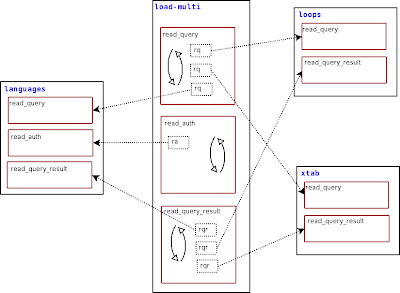
-- show_handlers.luaLoad this script with
function read_query (packet)
if packet:byte() ~= proxy.COM_QUERY then
return
end
local query = packet:sub(2)
if query:match('select pload status') then
local header = { 'module', 'handler' }
local rows = {}
for id, lmodule in pairs(proxy.global.handler_status) do
for i,h in pairs(lmodule) do
table.insert(rows, { id, h.func } )
end
end
return proxy.global.make_dataset(header,rows)
end
end
PLOAD show_handlers, and any client will be able to get a list of modules, with the function that each one introduced.pload show_handlers;
+-------------------------------+
| info |
+-------------------------------+
| module "show_handlers" loaded |
+-------------------------------+
1 row in set (0.01 sec)
pload auth1;
+-----------------------+
| info |
+-----------------------+
| module "auth1" loaded |
+-----------------------+
1 row in set (0.03 sec)
select pload status;
+---------------+-------------------+
| module | handler |
+---------------+-------------------+
| show_handlers | read_query |
| auth1 | read_auth |
| auth1 | disconnect_client |
| auth1 | read_handshake |
| auth1 | connect_server |
| auth1 | read_auth_result |
+---------------+-------------------+
6 rows in set (0.01 sec)
But of the table of the knowledge of good and evil, thou shalt not select of it
local SHOW_REGEXP       = make_regexp_from_command('show')

queries_to_filter = {
  {
      prefix = SHOW_REGEXP,
      keywords = { 'SHOW', 'TABLES'} ,
  },
}
SHOW_REGEXP is a variable containing a regular expression built from the command you want to consider. For performance reasons, before tokenizing every query, a quick search is pergormed, and only if that search is positive the query is analyzed further. In this case, the script will first check if there is a 'SHOW' at the start of the query. Then it will tokenize the query, and check if all the elements (SHOW and TABLES) are present. The tokenizer can separate literal values from strings. Therefore, if your query contains something like SELECT "SHOW TABLES" as X, it won't block the query.mysql> show tables;
ERROR 7777 (X7777): command <SHOW TABLES> is not allowed
mysql> show table status;
ERROR 7777 (X7777): command <SHOW TABLE STATUS> is not allowed
mysql> select * from information_schema.tables;
ERROR 7777 (X7777): command <SELECT FROM INFORMATION_SCHEMA TABLES> is not allowed
mysql> select schema_name from information_schema.schemata;
+--------------------+
| schema_name |
+--------------------+
| information_schema |
| test |
+--------------------+
2 rows in set (0.00 sec)
local SELECT_REGEXP       = make_regexp_from_command('select')

queries_to_filter = {
  {
      prefix = SELECT_REGEXP,
      keywords = { 'SELECT', 'FROM', 'GOOD_AND_EVIL'} ,
  },
}



$ time ./express_install.pl ~/downloads/mysql-5.0.45-osx10.4-i686.tar.gz --no_confirm
unpacking /Users/gmax/downloads/mysql-5.0.45-osx10.4-i686.tar.gz
Executing ./install.pl --basedir=/Users/gmax/downloads/5.0.45 \
[...]
Installing MySQL system tables...
OK
Filling help tables...
OK
[...]
loading grants
sandbox server started
installation options saved to current_options.conf.
To repeat this installation with the same options,
use ./install.pl --conf_file=current_options.conf
----------------------------------------
Your sandbox server was installed in /Users/gmax/msb_5_0_45

real    0m6.773s
user    0m0.245s
sys 0m0.235s
So we worked hard to make the installation and first use as easy as possible. We came up with the 15 minutes rule: we wanted a user to be able to have MySQL up and running 15 minutes after he finished downloading it.With advanced installers like apt and rpm, the installation time can go down to seconds.
./express_install.pl $HOME/downloads/tarball_filename.tar.gz
$ ~/msb_5_0_45/use.sh
Welcome to the MySQL monitor.  Commands end with ; or \g.
Your MySQL connection id is 1
Server version: 5.0.45 MySQL Community Server (GPL)

Type 'help;' or '\h' for help. Type '\c' to clear the buffer.

mysql [localhost] {msandbox} ((none)) > show schemas;
+--------------------+
| Database           |
+--------------------+
| information_schema |
| mysql              |
| test               |
+--------------------+
3 rows in set (0.02 sec)

mysql [localhost] {msandbox} ((none)) >
$ ~/msb_5_0_45/stop.sh
/Users/gmax/downloads/5.0.45/bin/mysqladmin --defaults-file=/Users/gmax/msb_5_0_45/my.sandbox.cnf shutdown
$ time ./set_replication.pl ~/downloads/mysql-5.0.45-osx10.4-i686.tar.gzThat's slightly less than fifteen seconds. And you must consider that each "start" step contains a sleep 3 instruction, to let the server boot properly.
installing and starting master
installing slave 1
installing slave 2
starting slave 1
sandbox server started
initializing slave 1
starting slave 2
sandbox server started
initializing slave 2
replication directory installed on /Users/gmax/rsandbox
real 0m14.820s
user 0m0.789s
sys 0m0.745s
Now it's up to you. Try it!
$ ~/rsandbox/m.sh -e 'create table test.t1(i int)'
$ ~/rsandbox/s1.sh -e 'show tables from test'
+----------------+
| Tables_in_test |
+----------------+
| t1             |
+----------------+
$ ~/rsandbox/s1.sh -e 'show slave status \G' |grep Running
         Slave_IO_Running: Yes
        Slave_SQL_Running: Yes

mysql> select 1 + 1;As an exercise for the reader, you can figure out the Lua script that made the above exchange possible.
+-------------------------------+
| ERROR |
+-------------------------------+
| Don't understand these digits |
+-------------------------------+
1 row in set (0.00 sec)
# Hmmm!
# Let's try to make it understand ...
mysql> set sql_mode='english_digits'; # You did not know we could do that. Did you?
Query OK, 42 rows affected (0.01 sec)
mysql> select 1 + 1;
+--------+
| result |
+--------+
| two |
+--------+
1 row in set (0.00 sec)
# Clever!
# perhaps it understands something more
mysql> select 1 + two;
+--------+
| result |
+--------+
| three |
+--------+
1 row in set (0.00 sec)
# Ok. What about two numbers?
mysql> select seven + two;
+--------+
| result |
+--------+
| nine |
+--------+
1 row in set (0.00 sec)
# Very good. Now how about something other than adding numbers?
mysql> select seven * two;
+----------+
| result |
+----------+
| fourteen |
+----------+
1 row in set (0.00 sec)
# Pushing it a bit ?
mysql> select seven * three;
+-----------------------------------------------+
| result |
+-----------------------------------------------+
| Can't count beyond my fingers and toes. (21?) |
+-----------------------------------------------+
1 row in set (0.00 sec)
# Well, it has some limitations!

mysql> start;
+------------------------+
| TEST CREATOR           |
+------------------------+
| Testing has started... |
+------------------------+
1 row in set (0.00 sec)

mysql> create table t1 (id int);
Query OK, 0 rows affected (0.01 sec)

mysql> set @counter = 0;
Query OK, 0 rows affected (0.00 sec)

mysql> start_loop myvar 100;
+-------------------------+
| TEST CREATOR            |
+-------------------------+
| Beginning loop creation |
+-------------------------+
1 row in set (0.00 sec)

mysql> set @counter = @counter + 1;
Query OK, 0 rows affected (0.00 sec)

mysql> insert into t1 values (@counter);
Query OK, 1 row affected (0.00 sec)

mysql> stop_loop;
+--------------------------------+
| TEST CREATOR                   |
+--------------------------------+
| Executed 2 queries X 100 times |
+--------------------------------+
1 row in set (0.02 sec)

mysql> select count(*) from t1;
+----------+
| count(*) |
+----------+
|      100 |
+----------+
1 row in set (0.00 sec)

mysql> stop;
+---------------------+
| TEST CREATOR        |
+---------------------+
| Testing has stopped |
+---------------------+
1 row in set (0.00 sec)

mysql> view test;
+-----------------------------------+
| Test File                         |
+-----------------------------------+
| --disable_warnings                |
| DROP TABLE if exists t1;          |
| --enable_warnings                 |
| create table t1 (id int);         |
| set @counter = 0;                 |
| let $myvar = 100;                 |
| while ($myvar)                    |
| {                                 |
| set @counter = @counter + 1;      |
| insert into t1 values (@counter); |
| dec $myvar;                       |
| }                                 |
| select count(*) from t1;          |
+-----------------------------------+
13 rows in set (0.00 sec)
There are still a few glitches to take care of, but the results so far are really great!
mysql> start;
+------------------------+
| TEST CREATOR           |
+------------------------+
| Testing has started... |
+------------------------+
1 row in set (0.00 sec)

mysql> select 1 as info;
+------+
| info |
+------+
|    1 |
+------+
1 row in set (0.00 sec)

mysql> select 2 as info;
+------+
| info |
+------+
|    2 |
+------+
1 row in set (0.00 sec)

mysql> select this is wrong;
ERROR 1064 (42000): You have an error in your SQL syntax; check the manual that corresponds to your MySQL server version for the right syntax to use near 'wrong' at line 1
mysql> view test;
+-----------------------+
| Test File             |
+-----------------------+
| connection con55;     |
| select 1 as info;     |
| select 2 as info;     |
| --error 1064          |
| select this is wrong; |
+-----------------------+
5 rows in set (0.00 sec)

mysql> discard_last;
+-------------------------------+
| TEST CREATOR                  |
+-------------------------------+
| Last query has been discarded |
+-------------------------------+
1 row in set (0.00 sec)

mysql> view test;
+-------------------+
| Test File         |
+-------------------+
| connection con55; |
| select 1 as info; |
| select 2 as info; |
+-------------------+
3 rows in set (0.00 sec)

mysql> select 3 as info;
+------+
| info |
+------+
|    3 |
+------+
1 row in set (0.00 sec)

mysql> wrong;
ERROR 1064 (42000): You have an error in your SQL syntax; check the manual that corresponds to your MySQL server version for the right syntax to use near 'wrong' at line 1
mysql> discard_last;
+-------------------------------+
| TEST CREATOR                  |
+-------------------------------+
| Last query has been discarded |
+-------------------------------+
1 row in set (0.00 sec)

mysql> view test;
+-------------------+
| Test File         |
+-------------------+
| connection con55; |
| select 1 as info; |
| select 2 as info; |
| select 3 as info; |
+-------------------+
4 rows in set (0.00 sec)

mysql> stop;
+---------------------+
| TEST CREATOR        |
+---------------------+
| Testing has stopped |
+---------------------+
1 row in set (0.00 sec)


