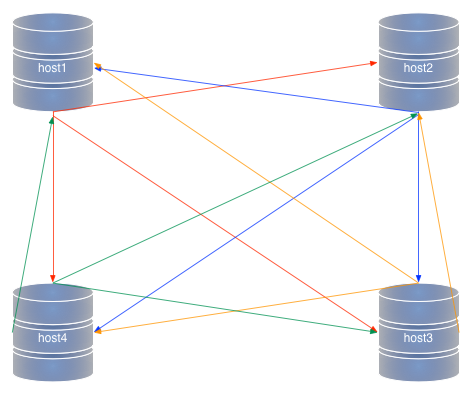
In my previous post, we saw the usage of MySQL Group Replication (MGR) in single-primary mode. We know that Oracle does not recommends using MGR in multi-primary mode, but there is so much in the documentation and in presentations about MGR behavior in multi-primary, that I feel I should really give it a try, and especially compare this technology with the already existing multiple master solution introduced in 5.7: multi-source replication.
Installation
To this extent, I will set up two clusters using MySQL-Sandbox. The instructions for MGR in the manual use three nodes in the same host without using MySQL Sandbox. Here we can see that using MySQL-Sandbox simplifies operations considerably (the scripts are available in GitHub):
Group replication
# ----------------------------------------------------------------------------
#!/bin/bash
# mm_gr.sh : installs MySQL Group Replication
MYSQL_VERSION=$1
[ -z "$MYSQL_VERSION" ] && MYSQL_VERSION=5.7.17

make_multiple_sandbox --gtid --group_directory=GR $MYSQL_VERSION

if [ "$?" != "0" ] ; then exit 1 ; fi
multi_sb=$HOME/sandboxes/GR
baseport=$($multi_sb/n1 -BN -e 'select @@port')
baseport=$(($baseport+99))

port1=$(($baseport+1))
port2=$(($baseport+2))
port3=$(($baseport+3))
for N in 1 2 3
do
    myport=$(($baseport+N))
    options=(
        binlog_checksum=NONE
        log_slave_updates=ON
        plugin-load=group_replication.so
        group_replication=FORCE_PLUS_PERMANENT
        group_replication_start_on_boot=OFF
        group_replication_bootstrap_group=OFF
        transaction_write_set_extraction=XXHASH64
        report-host=127.0.0.1
        loose-group_replication_group_name="aaaaaaaa-bbbb-cccc-dddd-eeeeeeeeeeee"
        loose-group_replication_local_address="127.0.0.1:$myport"
        loose-group_replication_group_seeds="127.0.0.1:$port1,127.0.0.1:$port2,127.0.0.1:$port3"
        loose-group-replication-single-primary-mode=off
    )
    $multi_sb/node$N/add_option ${options[*]}

    user_cmd='reset master;'
    user_cmd="$user_cmd CHANGE MASTER TO MASTER_USER='rsandbox', MASTER_PASSWORD='rsandbox' FOR CHANNEL 'group_replication_recovery';"
    $multi_sb/node$N/use -v -u root -e "$user_cmd"
done

START_CMD="SET GLOBAL group_replication_bootstrap_group=ON;"
START_CMD="$START_CMD START GROUP_REPLICATION;"
START_CMD="$START_CMD SET GLOBAL group_replication_bootstrap_group=OFF;"
$multi_sb/n1 -v -e "$START_CMD"
sleep 1
$multi_sb/n2 -v -e 'START GROUP_REPLICATION;'
sleep 1
$multi_sb/n3 -v -e 'START GROUP_REPLICATION;'
sleep 1
$multi_sb/use_all 'select * from performance_schema.replication_group_members'
# ----------------------------------------------------------------------------
Using this script, we get a cluster with MGR up and running. Here's a trimmed-out sample of its output:
$ ./mm_gr.sh
installing node 1
installing node 2
installing node 3
group directory installed in $HOME/sandboxes/GR
# option 'binlog_checksum=NONE' added to configuration file
# option 'log_slave_updates=ON' added to configuration file
# option 'plugin-load=group_replication.so' added to configuration file
# option 'group_replication=FORCE_PLUS_PERMANENT' added to configuration file
# option 'group_replication_start_on_boot=OFF' added to configuration file
# option 'group_replication_bootstrap_group=OFF' added to configuration file
# option 'transaction_write_set_extraction=XXHASH64' added to configuration file
# option 'loose-group_replication_group_name=aaaaaaaa-bbbb-cccc-dddd-eeeeeeeeeeee' added to configuration file
# option 'loose-group_replication_local_address=127.0.0.1:14518' added to configuration file
# option 'loose-group_replication_group_seeds=127.0.0.1:14518,127.0.0.1:14519,127.0.0.1:14520' added to configuration file
# option 'loose-group-replication-single-primary-mode=off' added to configuration file
.. sandbox server started
reset master
CHANGE MASTER TO MASTER_USER='rsandbox', MASTER_PASSWORD='rsandbox' FOR CHANNEL 'group_replication_recovery'

# [ ...]
.. sandbox server started
reset master
CHANGE MASTER TO MASTER_USER='rsandbox', MASTER_PASSWORD='rsandbox' FOR CHANNEL 'group_replication_recovery'

# [...]
.. sandbox server started
reset master
CHANGE MASTER TO MASTER_USER='rsandbox', MASTER_PASSWORD='rsandbox' FOR CHANNEL 'group_replication_recovery'

SET GLOBAL group_replication_bootstrap_group=ON
START GROUP_REPLICATION
SET GLOBAL group_replication_bootstrap_group=OFF
--------------

--------------
START GROUP_REPLICATION
--------------
START GROUP_REPLICATION
--------------
Multi-source replication
We have a similar (but much shorter) script to run multi-source replication in sandboxes.
# ----------------------------------------------------------------------------
#!/bin/bash
# mm_ms.sh : installs MySQL multi-source replication
MYSQL_VERSION=$1
[ -z "$MYSQL_VERSION" ] && MYSQL_VERSION=5.7.16

make_multiple_sandbox --gtid --group_directory=MS $MYSQL_VERSION

if [ "$?" != "0" ] ; then exit 1 ; fi
multi_sb=$HOME/sandboxes/MS

$multi_sb/use_all 'reset master'

for N in 1 2 3
do
    user_cmd=''
    for node in 1 2 3
    do
        if [ "$node" != "$N" ]
        then
            master_port=$($multi_sb/n$node -BN -e 'select @@port')
            user_cmd="$user_cmd CHANGE MASTER TO MASTER_USER='rsandbox', "
            user_cmd="$user_cmd MASTER_PASSWORD='rsandbox', master_host='127.0.0.1', "
            user_cmd="$user_cmd master_port=$master_port FOR CHANNEL 'node$node';"
            user_cmd="$user_cmd START SLAVE FOR CHANNEL 'node$node';"
        fi
    done
    $multi_sb/node$N/use -v -u root -e "$user_cmd"
done
# ----------------------------------------------------------------------------

Sample run:

$ ./mm_ms.sh
installing node 1
installing node 2
installing node 3
group directory installed in $HOME/sandboxes/MS
# server: 1:
# server: 2:
# server: 3:
--------------
CHANGE MASTER TO MASTER_USER='rsandbox',  MASTER_PASSWORD='rsandbox', master_host='127.0.0.1',  master_port=14318 FOR CHANNEL 'node2'
START SLAVE FOR CHANNEL 'node2'
CHANGE MASTER TO MASTER_USER='rsandbox',  MASTER_PASSWORD='rsandbox', master_host='127.0.0.1',  master_port=14319 FOR CHANNEL 'node3'
START SLAVE FOR CHANNEL 'node3'

--------------
CHANGE MASTER TO MASTER_USER='rsandbox',  MASTER_PASSWORD='rsandbox', master_host='127.0.0.1',  master_port=14317 FOR CHANNEL 'node1'
START SLAVE FOR CHANNEL 'node1'
CHANGE MASTER TO MASTER_USER='rsandbox',  MASTER_PASSWORD='rsandbox', master_host='127.0.0.1',  master_port=14319 FOR CHANNEL 'node3'
START SLAVE FOR CHANNEL 'node3'

--------------
CHANGE MASTER TO MASTER_USER='rsandbox',  MASTER_PASSWORD='rsandbox', master_host='127.0.0.1',  master_port=14317 FOR CHANNEL 'node1'
START SLAVE FOR CHANNEL 'node1'
CHANGE MASTER TO MASTER_USER='rsandbox',  MASTER_PASSWORD='rsandbox', master_host='127.0.0.1',  master_port=14318 FOR CHANNEL 'node2'
START SLAVE FOR CHANNEL 'node2'
--------------
Simple test data
Finally, we have a script that will create one table for each node and insert one record.
# ----------------------------------------------------------------------------
#!/bin/bash
multi_sb=$1
if [ -z "$multi_sb" ]
then
    echo multiple sandbox path needed
    exit 1
fi
if [ ! -d $multi_sb ]
then
    echo directory $multi_sb not found
    exit 1
fi
if [ ! -d "$multi_sb/node3" ]
then
    echo directory $multi_sb/node3 not found
    exit 1
fi
cd $multi_sb

for N in  1 2 3 ; do
    ./n$N -e "create schema if not exists test"
    ./n$N -e "drop table if exists test.t$N"
    ./n$N -e "create table test.t$N(id int not null primary key, sid int)"
    ./n$N -e "insert into  test.t$N values ($N, @@server_id)"
done

./use_all 'select * from test.t1 union select * from test.t2 union select * from test.t3'
# ----------------------------------------------------------------------------
We run the script in both clusters, and at the end we'll have the test database with three tables, each one created and filled by a different node.
Checking replication status
The old topology: multi-source
Let's start with the the old technology, so we can easily compare it with the new one.
node1 [localhost] {msandbox} (performance_schema) > select * from replication_connection_status\G
*************************** 1. row ***************************
             CHANNEL_NAME: node2
               GROUP_NAME:
              SOURCE_UUID: 00014318-2222-2222-2222-222222222222   # ----
                THREAD_ID: 32
            SERVICE_STATE: ON
COUNT_RECEIVED_HEARTBEATS: 244
 LAST_HEARTBEAT_TIMESTAMP: 2017-01-22 13:31:54
 RECEIVED_TRANSACTION_SET: 00014318-2222-2222-2222-222222222222:1-4
        LAST_ERROR_NUMBER: 0
       LAST_ERROR_MESSAGE:
     LAST_ERROR_TIMESTAMP: 0000-00-00 00:00:00
*************************** 2. row ***************************
             CHANNEL_NAME: node3
               GROUP_NAME:
              SOURCE_UUID: 00014319-3333-3333-3333-333333333333   # ----
                THREAD_ID: 34
            SERVICE_STATE: ON
COUNT_RECEIVED_HEARTBEATS: 244
 LAST_HEARTBEAT_TIMESTAMP: 2017-01-22 13:31:55
 RECEIVED_TRANSACTION_SET: 00014319-3333-3333-3333-333333333333:1-4
        LAST_ERROR_NUMBER: 0
       LAST_ERROR_MESSAGE:
     LAST_ERROR_TIMESTAMP: 0000-00-00 00:00:00
2 rows in set (0.00 sec)
Notice that we are benefitting from a feature of MySQL-Sandbox that creates a more readable version of the server UUID. This way we can easily identify the nodes. Here we see that each transaction set has a clearly defined origin. We can see similar information in the replication tables from the mysql database:
node1 [localhost] {msandbox} (mysql) > select * from slave_master_info\G
*************************** 1. row ***************************
       Number_of_lines: 25
       Master_log_name: mysql-bin.000001
        Master_log_pos: 154
                  Host: 127.0.0.1       # ----
             User_name: rsandbox
         User_password: rsandbox
                  Port: 14318           # ----
         Connect_retry: 60
           Enabled_ssl: 0
Ssl_verify_server_cert: 0
             Heartbeat: 30
                  Bind:
    Ignored_server_ids: 0
                  Uuid: 00014318-2222-2222-2222-222222222222  # ----
           Retry_count: 86400
           Ssl_crlpath:
 Enabled_auto_position: 0
          Channel_name: node2
           Tls_version:
*************************** 2. row ***************************
       Number_of_lines: 25
       Master_log_name: mysql-bin.000001
        Master_log_pos: 154
                  Host: 127.0.0.1    # ----
             User_name: rsandbox
         User_password: rsandbox
                  Port: 14319        # ----
         Connect_retry: 60
           Enabled_ssl: 0
Ssl_verify_server_cert: 0
             Heartbeat: 30
                  Bind:
    Ignored_server_ids: 0
                  Uuid: 00014319-3333-3333-3333-333333333333  # ----
           Retry_count: 86400
           Ssl_crlpath:
 Enabled_auto_position: 0
          Channel_name: node3
           Tls_version:
2 rows in set (0.00 sec)
Additionally, we have SHOW SLAVE STATUS, which, although not the ideal monitoring tool, is still the only place where we can see at once both the received and executed transactions, and the corresponding binary log and relay log records.
Here's an abridged version:
node1 [localhost] {msandbox} (performance_schema) > SHOW SLAVE STATUS\G
*************************** 1. row ***************************
               Slave_IO_State: Waiting for master to send event
                  Master_Host: 127.0.0.1
                  Master_User: rsandbox
                  Master_Port: 14318
                Connect_Retry: 60
              Master_Log_File: mysql-bin.000001
          Read_Master_Log_Pos: 965
               Relay_Log_File: mysql-relay-node2.000002
                Relay_Log_Pos: 1178
        Relay_Master_Log_File: mysql-bin.000001
             Slave_IO_Running: Yes
            Slave_SQL_Running: Yes
          Exec_Master_Log_Pos: 965
              Relay_Log_Space: 1387
             Master_Server_Id: 102
                  Master_UUID: 00014318-2222-2222-2222-222222222222
             Master_Info_File: mysql.slave_master_info
      Slave_SQL_Running_State: Slave has read all relay log; waiting for more updates
           Master_Retry_Count: 86400
           Retrieved_Gtid_Set: 00014318-2222-2222-2222-222222222222:1-4
            Executed_Gtid_Set: 00014317-1111-1111-1111-111111111111:1-4,
00014318-2222-2222-2222-222222222222:1-4,
00014319-3333-3333-3333-333333333333:1-4
                 Channel_Name: node2
*************************** 2. row ***************************
               Slave_IO_State: Waiting for master to send event
                  Master_Host: 127.0.0.1
                  Master_User: rsandbox
                  Master_Port: 14319
                Connect_Retry: 60
              Master_Log_File: mysql-bin.000001
          Read_Master_Log_Pos: 965
               Relay_Log_File: mysql-relay-node3.000002
                Relay_Log_Pos: 1178
        Relay_Master_Log_File: mysql-bin.000001
             Slave_IO_Running: Yes
            Slave_SQL_Running: Yes
          Exec_Master_Log_Pos: 965
              Relay_Log_Space: 1387
              Until_Condition: None
             Master_Server_Id: 103
                  Master_UUID: 00014319-3333-3333-3333-333333333333
             Master_Info_File: mysql.slave_master_info
      Slave_SQL_Running_State: Slave has read all relay log; waiting for more updates
           Master_Retry_Count: 86400
           Retrieved_Gtid_Set: 00014319-3333-3333-3333-333333333333:1-4
            Executed_Gtid_Set: 00014317-1111-1111-1111-111111111111:1-4,
00014318-2222-2222-2222-222222222222:1-4,
00014319-3333-3333-3333-333333333333:1-4
                 Channel_Name: node3
2 rows in set (0.00 sec)
Finally, we'll have a look at the data itself:
node1 [localhost] {msandbox} (mysql) > show binlog events;
+------------------+-----+----------------+-----------+-------------+-------------------------------------------------------------------+
| Log_name         | Pos | Event_type     | Server_id | End_log_pos | Info                                                              |
+------------------+-----+----------------+-----------+-------------+-------------------------------------------------------------------+
| mysql-bin.000001 |   4 | Format_desc    |       101 |         123 | Server ver: 5.7.16-log, Binlog ver: 4                             |
| mysql-bin.000001 | 123 | Previous_gtids |       101 |         154 |                                                                   |
| mysql-bin.000001 | 154 | Gtid           |       101 |         219 | SET @@SESSION.GTID_NEXT= '00014317-1111-1111-1111-111111111111:1' |
| mysql-bin.000001 | 219 | Query          |       101 |         325 | create schema if not exists test                                  |
| mysql-bin.000001 | 325 | Gtid           |       101 |         390 | SET @@SESSION.GTID_NEXT= '00014317-1111-1111-1111-111111111111:2' |
| mysql-bin.000001 | 390 | Query          |       101 |         518 | DROP TABLE IF EXISTS `test`.`t1` /* generated by server */        |
| mysql-bin.000001 | 518 | Gtid           |       101 |         583 | SET @@SESSION.GTID_NEXT= '00014317-1111-1111-1111-111111111111:3' |
| mysql-bin.000001 | 583 | Query          |       101 |         711 | create table test.t1(id int not null primary key, sid int)        |
| mysql-bin.000001 | 711 | Gtid           |       101 |         776 | SET @@SESSION.GTID_NEXT= '00014317-1111-1111-1111-111111111111:4' |
| mysql-bin.000001 | 776 | Query          |       101 |         844 | BEGIN                                                             |
| mysql-bin.000001 | 844 | Table_map      |       101 |         890 | table_id: 108 (test.t1)                                           |
| mysql-bin.000001 | 890 | Write_rows     |       101 |         934 | table_id: 108 flags: STMT_END_F                                   |
| mysql-bin.000001 | 934 | Xid            |       101 |         965 | COMMIT /* xid=72 */                                               |
+------------------+-----+----------------+-----------+-------------+-------------------------------------------------------------------+
13 rows in set (0.00 sec)
The binary log contains only the data produced in this node.
The new topology: MGR
Turning to the new software, let's first check whether replication is working. An important note here: SHOW SLAVE STATUS is not available in MGR. That's not entirely true. The channel architecture used for multi-master has been hijacked to convey information about group problems. If something goes wrong during the setup, you will find the information in the groupreplicationrecovery channel.
node1 [localhost] {msandbox} (performance_schema) > SHOW SLAVE STATUS for channel 'group_replication_recovery';
Empty set (0.00 sec)
When things are fine, the tables in performance_schema report a satisfactory status:
node1 [localhost] {msandbox} (performance_schema) > select * from replication_group_members;
+---------------------------+--------------------------------------+-------------+-------------+--------------+
| CHANNEL_NAME              | MEMBER_ID                            | MEMBER_HOST | MEMBER_PORT | MEMBER_STATE |
+---------------------------+--------------------------------------+-------------+-------------+--------------+
| group_replication_applier | 00014418-1111-1111-1111-111111111111 | gmini       |       14418 | ONLINE       |
| group_replication_applier | 00014419-2222-2222-2222-222222222222 | gmini       |       14419 | ONLINE       |
| group_replication_applier | 00014420-3333-3333-3333-333333333333 | gmini       |       14420 | ONLINE       |
+---------------------------+--------------------------------------+-------------+-------------+--------------+
The above command tells us that all nodes are online.
Next, we ask what are the stats of the current member.
node1 [localhost] {msandbox} (performance_schema) > select * from replication_group_member_stats\G
*************************** 1. row ***************************
                      CHANNEL_NAME: group_replication_applier
                           VIEW_ID: 14850806532423012:3
                         MEMBER_ID: 00014418-1111-1111-1111-111111111111
       COUNT_TRANSACTIONS_IN_QUEUE: 0
        COUNT_TRANSACTIONS_CHECKED: 12
          COUNT_CONFLICTS_DETECTED: 0
COUNT_TRANSACTIONS_ROWS_VALIDATING: 0
TRANSACTIONS_COMMITTED_ALL_MEMBERS: aaaaaaaa-bbbb-cccc-dddd-eeeeeeeeeeee:1-7:1000003-1000006:2000003-2000006
    LAST_CONFLICT_FREE_TRANSACTION: aaaaaaaa-bbbb-cccc-dddd-eeeeeeeeeeee:2000006
1 row in set (0.00 sec)
The same operation from a different member will give a very similar result.
node2 [localhost] {msandbox} (performance_schema) > select * from replication_group_member_stats\G
*************************** 1. row ***************************
                      CHANNEL_NAME: group_replication_applier
                           VIEW_ID: 14850806532423012:3
                         MEMBER_ID: 00014419-2222-2222-2222-222222222222
       COUNT_TRANSACTIONS_IN_QUEUE: 0
        COUNT_TRANSACTIONS_CHECKED: 12
          COUNT_CONFLICTS_DETECTED: 0
COUNT_TRANSACTIONS_ROWS_VALIDATING: 0
TRANSACTIONS_COMMITTED_ALL_MEMBERS: aaaaaaaa-bbbb-cccc-dddd-eeeeeeeeeeee:1-7:1000003-1000006:2000003-2000006
    LAST_CONFLICT_FREE_TRANSACTION: aaaaaaaa-bbbb-cccc-dddd-eeeeeeeeeeee:2000006
1 row in set (0.00 sec)
Then, we check the more classical replication status:
node1 [localhost] {msandbox} (performance_schema) > select * from replication_connection_status\G
*************************** 1. row ***************************
             CHANNEL_NAME: group_replication_applier
               GROUP_NAME: aaaaaaaa-bbbb-cccc-dddd-eeeeeeeeeeee
              SOURCE_UUID: aaaaaaaa-bbbb-cccc-dddd-eeeeeeeeeeee    # ----
                THREAD_ID: NULL
            SERVICE_STATE: ON
COUNT_RECEIVED_HEARTBEATS: 0
 LAST_HEARTBEAT_TIMESTAMP: 0000-00-00 00:00:00
 RECEIVED_TRANSACTION_SET: aaaaaaaa-bbbb-cccc-dddd-eeeeeeeeeeee:1-7:1000003-1000006:2000003-2000006
        LAST_ERROR_NUMBER: 0
       LAST_ERROR_MESSAGE:
     LAST_ERROR_TIMESTAMP: 0000-00-00 00:00:00
1 row in set (0.00 sec)
There are a few things that strike the observer immediately:
- As we saw in the single-primary topology, all transactions bear the UUID of the group, not of the server that generated them. While in single-primary mode this could be considered an asset, as it simplifies a failover procedure, in multi-primary mode I consider it to be a loss. We lose the knowledge of the transaction provenience. As you can see, the SOURCE_UUID field shows the group ID instead of the node.
- The GTID numbers look odd. There is a set that stars at 1, another set that starts at 1 million, and a third one that starts at 2 million. What's going on? The answer is in the value of group_replication_gtid_assignment_block_size, which determines the block of values for each node. When the values in the block are exhausted, the node allocates another block. Someone could naively think that we could use this block to identify which node the data comes from, but this would be ultimately wrong for two reasons:
- The blocks are assigned on a first-come-first-served basis. If we start operations in node 2, its transactions will bear the lowest numbers.
- When the blocks are exhausted, the node starts a new block, meaning that with a busy cluster we will have hard time identifying which nodes uses which block.
If someone thought that we could get some more information from the replication tables in mysql, they are in for a disappointment:
node2 [localhost] {msandbox} (mysql) > select * from slave_master_info\G
*************************** 1. row ***************************
       Number_of_lines: 25
       Master_log_name:
        Master_log_pos: 4
                  Host: <NULL>            # ----
             User_name:
         User_password:
                  Port: 0                 # ----
         Connect_retry: 60
           Enabled_ssl: 0
Ssl_verify_server_cert: 0
             Heartbeat: 30
                  Bind:
    Ignored_server_ids: 0
                  Uuid:                   # ----
           Retry_count: 86400
 Enabled_auto_position: 1
          Channel_name: group_replication_applier
           Tls_version:
*************************** 2. row ***************************
       Number_of_lines: 25
       Master_log_name:
        Master_log_pos: 4
                  Host: <NULL>
             User_name: rsandbox
         User_password: rsandbox
                  Port: 0
         Connect_retry: 60
           Enabled_ssl: 0
Ssl_verify_server_cert: 0
             Heartbeat: 30
                  Bind:
    Ignored_server_ids: 0
                  Uuid:
           Retry_count: 1
 Enabled_auto_position: 1
          Channel_name: group_replication_recovery
           Tls_version:
2 rows in set (0.00 sec)
The table shows group operations rather than individual hosts connections. There is no origin information here.
Looking at the events, we will notice immediately some more differences.
node2 [localhost] {msandbox} (mysql) > show binlog events;
+------------------+------+----------------+-----------+-------------+-------------------------------------------------------------------------+
| Log_name         | Pos  | Event_type     | Server_id | End_log_pos | Info                                                                    |
+------------------+------+----------------+-----------+-------------+-------------------------------------------------------------------------+
| mysql-bin.000001 |    4 | Format_desc    |       102 |         123 | Server ver: 5.7.17-log, Binlog ver: 4                                   |
| mysql-bin.000001 |  123 | Previous_gtids |       102 |         150 |                                                                         |
| mysql-bin.000001 |  150 | Gtid           |       101 |         211 | SET @@SESSION.GTID_NEXT= 'aaaaaaaa-bbbb-cccc-dddd-eeeeeeeeeeee:1'       |
| mysql-bin.000001 |  211 | Query          |       101 |         270 | BEGIN                                                                   |
| mysql-bin.000001 |  270 | View_change    |       101 |         369 | view_id=14850806532423012:1                                             |
| mysql-bin.000001 |  369 | Query          |       101 |         434 | COMMIT                                                                  |
| mysql-bin.000001 |  434 | Gtid           |       101 |         495 | SET @@SESSION.GTID_NEXT= 'aaaaaaaa-bbbb-cccc-dddd-eeeeeeeeeeee:2'       |
| mysql-bin.000001 |  495 | Query          |       101 |         554 | BEGIN                                                                   |
| mysql-bin.000001 |  554 | View_change    |       101 |         693 | view_id=14850806532423012:2                                             |
| mysql-bin.000001 |  693 | Query          |       101 |         758 | COMMIT                                                                  |
| mysql-bin.000001 |  758 | Gtid           |       102 |         819 | SET @@SESSION.GTID_NEXT= 'aaaaaaaa-bbbb-cccc-dddd-eeeeeeeeeeee:3'       |
| mysql-bin.000001 |  819 | Query          |       102 |         878 | BEGIN                                                                   |
| mysql-bin.000001 |  878 | View_change    |       102 |        1017 | view_id=14850806532423012:3                                             |
| mysql-bin.000001 | 1017 | Query          |       102 |        1082 | COMMIT                                                                  |
| mysql-bin.000001 | 1082 | Gtid           |       101 |        1143 | SET @@SESSION.GTID_NEXT= 'aaaaaaaa-bbbb-cccc-dddd-eeeeeeeeeeee:4'       |
| mysql-bin.000001 | 1143 | Query          |       101 |        1250 | create schema if not exists test                                        |
| mysql-bin.000001 | 1250 | Gtid           |       101 |        1311 | SET @@SESSION.GTID_NEXT= 'aaaaaaaa-bbbb-cccc-dddd-eeeeeeeeeeee:5'       |
| mysql-bin.000001 | 1311 | Query          |       101 |        1440 | DROP TABLE IF EXISTS `test`.`t1` /* generated by server */              |
| mysql-bin.000001 | 1440 | Gtid           |       101 |        1501 | SET @@SESSION.GTID_NEXT= 'aaaaaaaa-bbbb-cccc-dddd-eeeeeeeeeeee:6'       |
| mysql-bin.000001 | 1501 | Query          |       101 |        1630 | create table test.t1(id int not null primary key, sid int)              |
| mysql-bin.000001 | 1630 | Gtid           |       101 |        1691 | SET @@SESSION.GTID_NEXT= 'aaaaaaaa-bbbb-cccc-dddd-eeeeeeeeeeee:7'       |
| mysql-bin.000001 | 1691 | Query          |       101 |        1755 | BEGIN                                                                   |
| mysql-bin.000001 | 1755 | Table_map      |       101 |        1797 | table_id: 219 (test.t1)                                                 |
| mysql-bin.000001 | 1797 | Write_rows     |       101 |        1837 | table_id: 219 flags: STMT_END_F                                         |
| mysql-bin.000001 | 1837 | Xid            |       101 |        1864 | COMMIT /* xid=51 */                                                     |
| mysql-bin.000001 | 1864 | Gtid           |       102 |        1925 | SET @@SESSION.GTID_NEXT= 'aaaaaaaa-bbbb-cccc-dddd-eeeeeeeeeeee:1000003' |
| mysql-bin.000001 | 1925 | Query          |       102 |        2032 | create schema if not exists test                                        |
| mysql-bin.000001 | 2032 | Gtid           |       102 |        2093 | SET @@SESSION.GTID_NEXT= 'aaaaaaaa-bbbb-cccc-dddd-eeeeeeeeeeee:1000004' |
| mysql-bin.000001 | 2093 | Query          |       102 |        2222 | DROP TABLE IF EXISTS `test`.`t2` /* generated by server */              |
| mysql-bin.000001 | 2222 | Gtid           |       102 |        2283 | SET @@SESSION.GTID_NEXT= 'aaaaaaaa-bbbb-cccc-dddd-eeeeeeeeeeee:1000005' |
| mysql-bin.000001 | 2283 | Query          |       102 |        2412 | create table test.t2(id int not null primary key, sid int)              |
| mysql-bin.000001 | 2412 | Gtid           |       102 |        2473 | SET @@SESSION.GTID_NEXT= 'aaaaaaaa-bbbb-cccc-dddd-eeeeeeeeeeee:1000006' |
| mysql-bin.000001 | 2473 | Query          |       102 |        2542 | BEGIN                                                                   |
| mysql-bin.000001 | 2542 | Table_map      |       102 |        2584 | table_id: 220 (test.t2)                                                 |
| mysql-bin.000001 | 2584 | Write_rows     |       102 |        2624 | table_id: 220 flags: STMT_END_F                                         |
| mysql-bin.000001 | 2624 | Xid            |       102 |        2651 | COMMIT /* xid=62 */                                                     |
| mysql-bin.000001 | 2651 | Gtid           |       103 |        2712 | SET @@SESSION.GTID_NEXT= 'aaaaaaaa-bbbb-cccc-dddd-eeeeeeeeeeee:2000003' |
| mysql-bin.000001 | 2712 | Query          |       103 |        2819 | create schema if not exists test                                        |
| mysql-bin.000001 | 2819 | Gtid           |       103 |        2880 | SET @@SESSION.GTID_NEXT= 'aaaaaaaa-bbbb-cccc-dddd-eeeeeeeeeeee:2000004' |
| mysql-bin.000001 | 2880 | Query          |       103 |        3009 | DROP TABLE IF EXISTS `test`.`t3` /* generated by server */              |
| mysql-bin.000001 | 3009 | Gtid           |       103 |        3070 | SET @@SESSION.GTID_NEXT= 'aaaaaaaa-bbbb-cccc-dddd-eeeeeeeeeeee:2000005' |
| mysql-bin.000001 | 3070 | Query          |       103 |        3199 | create table test.t3(id int not null primary key, sid int)              |
| mysql-bin.000001 | 3199 | Gtid           |       103 |        3260 | SET @@SESSION.GTID_NEXT= 'aaaaaaaa-bbbb-cccc-dddd-eeeeeeeeeeee:2000006' |
| mysql-bin.000001 | 3260 | Query          |       103 |        3324 | BEGIN                                                                   |
| mysql-bin.000001 | 3324 | Table_map      |       103 |        3366 | table_id: 221 (test.t3)                                                 |
| mysql-bin.000001 | 3366 | Write_rows     |       103 |        3406 | table_id: 221 flags: STMT_END_F                                         |
| mysql-bin.000001 | 3406 | Xid            |       103 |        3433 | COMMIT /* xid=68 */                                                     |
+------------------+------+----------------+-----------+-------------+-------------------------------------------------------------------------+
47 rows in set (0.00 sec)
Two important points:
- All transaction IDs are assigned to the group, not to the node. The only way to see where the data is coming from is to look at the binary log itself and check the good old server-id. One wonders why we have come all this way with the ugly UUIDs in the global transaction identifier only to maim their usefulness by removing one of the most important feature, which is tracking the data origin.
For example:
# at 434
#170122 11:24:11 server id 101  end_log_pos 495         GTID    last_committed=1        sequence_number=2
SET @@SESSION.GTID_NEXT= 'aaaaaaaa-bbbb-cccc-dddd-eeeeeeeeeeee:2'/*!*/;
# at 495
#170122 11:24:11 server id 101  end_log_pos 554         Query   thread_id=7     exec_time=6     error_code=0
SET TIMESTAMP=1485080651/*!*/;
BEGIN
/*!*/;
- Because log-slave-updates is mandatory, the binary log in every node will have all the transactions of every other node. This can have disagreeable side effects when dealing with large data. Here is an example when we load the sample employee database from node #1:
With Group Replication, the load takes 2 minutes and 16 seconds, and the binary logs have the same size in every node.
[GR]$ ls -lh node?/data/*bin*
-rw-r-----  1 gmax  staff   8.2K Jan 22 10:22 node1/data/mysql-bin.000001
-rw-r-----  1 gmax  staff    63M Jan 22 10:24 node1/data/mysql-bin.000002
-rw-r-----  1 gmax  staff    38B Jan 22 10:22 node1/data/mysql-bin.index

-rw-r-----  1 gmax  staff    63M Jan 22 10:24 node2/data/mysql-bin.000001
-rw-r-----  1 gmax  staff    19B Jan 22 10:12 node2/data/mysql-bin.index

-rw-r-----  1 gmax  staff    63M Jan 22 10:24 node3/data/mysql-bin.000001
-rw-r-----  1 gmax  staff    19B Jan 22 10:12 node3/data/mysql-bin.index
The same operation in multi-source replication takes 1 minute and 30 seconds. The binary logs are kept only in the origin.
[MS]$ ls -lh node?/data/*bin*
-rw-r-----  1 gmax  staff   4.9K Jan 22 10:26 node1/data/mysql-bin.000001
-rw-r-----  1 gmax  staff    63M Jan 22 10:27 node1/data/mysql-bin.000002
-rw-r-----  1 gmax  staff    38B Jan 22 10:26 node1/data/mysql-bin.index

-rw-r-----  1 gmax  staff   1.4K Jan 22 10:14 node2/data/mysql-bin.000001
-rw-r-----  1 gmax  staff    19B Jan 22 10:14 node2/data/mysql-bin.index

-rw-r-----  1 gmax  staff   1.4K Jan 22 10:14 node3/data/mysql-bin.000001
-rw-r-----  1 gmax  staff    19B Jan 22 10:14 node3/data/mysql-bin.index
Conflict resolution
One of the strong points of MGR is conflict resolution.
We can try a conflicting operations in two nodes, inserting the same data at the same time:
use test;
set autocommit=0;
insert into t2 values (3, @@server_id);
commit;
In multi source, we get a replication error, on both nodes. It's an ugly result, but it tells the user immediately that something went wrong in a given node, and doesn't let the error propagate to other nodes.
In MGR, the situation varies. This is a possible outcome:
node1 [localhost] {msandbox} (test) > set autocommit=0;                        |   node2 [localhost] {msandbox} (test) > set autocommit=0;
Query OK, 0 rows affected (0.00 sec)                                           |   Query OK, 0 rows affected (0.00 sec)
                                                                               |
node1 [localhost] {msandbox} (test) > insert into t2 values (3, @@server_id);  |   node2 [localhost] {msandbox} (test) > insert into t2 values (3, @@server_id);
Query OK, 1 row affected (0.00 sec)                                            |   Query OK, 1 row affected (0.00 sec)
                                                                               |
node1 [localhost] {msandbox} (test) > select * from t2;                        |   node2 [localhost] {msandbox} (test) > select * from t2;
+----+------+                                                                  |   +----+------+
| id | sid  |                                                                  |   | id | sid  |
+----+------+                                                                  |   +----+------+
|  2 |  102 |                                                                  |   |  2 |  102 |
|  3 |  101 |                                                                  |   |  3 |  102 |
+----+------+                                                                  |   +----+------+
2 rows in set (0.00 sec)                                                       |   2 rows in set (0.00 sec)
                                                                               |
node1 [localhost] {msandbox} (test) > commit;                                  |   node2 [localhost] {msandbox} (test) > commit;
Query OK, 0 rows affected (0.01 sec)                                           |   ERROR 3101 (HY000): Plugin instructed the server to rollback the current transaction.
                                                                               |   node2 [localhost] {msandbox} (test) > select * from t2;
 node1 [localhost] {msandbox} (test) > select * from t2;                       |   +----+------+
 +----+------+                                                                 |   | id | sid  |
 | id | sid  |                                                                 |   +----+------+
 +----+------+                                                                 |   |  2 |  102 |
 |  2 |  102 |                                                                 |   |  3 |  101 |
 |  3 |  101 |                                                                 |   +----+------+
 +----+------+                                                                 |   2 rows in set (0.00 sec)
 2 rows in set (0.00 sec)                                                      |
Here node # 2 got the transaction a fraction of second later, and its transaction was rolled back. Thus the transaction that was ultimately kept in the database was the one from node1 (server-id 101.) However, this behavior is not predictable. If we try the same operation again, we get a different outcome:
node1 [localhost] {msandbox} (test) > insert into t2 values (4, @@server_id);  |   node2 [localhost] {msandbox} (test) > insert into t2 values (4, @@server_id);
Query OK, 1 row affected (0.00 sec)                                            |   Query OK, 1 row affected (0.00 sec)
                                                                               |
node1 [localhost] {msandbox} (test) > select * from t2;                        |   node2 [localhost] {msandbox} (test) > select * from t2;
+----+------+                                                                  |   +----+------+
| id | sid  |                                                                  |   | id | sid  |
+----+------+                                                                  |   +----+------+
|  2 |  102 |                                                                  |   |  2 |  102 |
|  3 |  101 |                                                                  |   |  3 |  101 |
|  4 |  101 |                                                                  |   |  4 |  102 |
+----+------+                                                                  |   +----+------+
3 rows in set (0.00 sec)                                                       |   3 rows in set (0.00 sec)
                                                                               |
node1 [localhost] {msandbox} (test) > commit;                                  |   node2 [localhost] {msandbox} (test) > commit;
Query OK, 0 rows affected (0.01 sec)                                           |
ERROR 3101 (HY000): Plugin instructed the server to rollback                   |
the current transaction.                                                       |
node1 [localhost] {msandbox} (test) > select * from t2;                        |   node2 [localhost] {msandbox} (test) > select * from t2;
+----+------+                                                                  |   +----+------+
| id | sid  |                                                                  |   | id | sid  |
+----+------+                                                                  |   +----+------+
|  2 |  102 |                                                                  |   |  2 |  102 |
|  3 |  101 |                                                                  |   |  3 |  101 |
|  4 |  102 |                                                                  |   |  4 |  102 |
+----+------+                                                                  |   +----+------+
4 rows in set (0.00 sec)                                                       |   3 rows in set (0.00 sec)
In the second attempt, the transaction was rolled back by node 1, and the surviving one is the one that was inserted from node 2. This means that conflict resolution works, but it may not be what the user wants, as the resolved conflict if aleatory.
Summing up
On the plus side, MGR keeps what it promises. We can set up a cluster of peer nodes and replicate data between nodes with some advantages compared to older multi-source topologies.
On the minus side, the documentation could be vastly improved, especially for multi-primary setup. Moreover, users need to be aware of the limitations, such as serializable isolation level and foreign keys with constraints not being supported.
Most important from my standpoint is the reduction of monitoring information for this technology, namely the loss of information about the data origin.